1. 页面结构初始化
<body>
<h1>点名系统</h1>
<h2 id="selectTitle">被选中的小伙伴:</h2>
<button>开始</button>
<div id="content">
<div class="cell">姓名</div>
</div>
<script src="./index.js"></script>
</body>

- 写好必要的页面结构方便效果的呈现
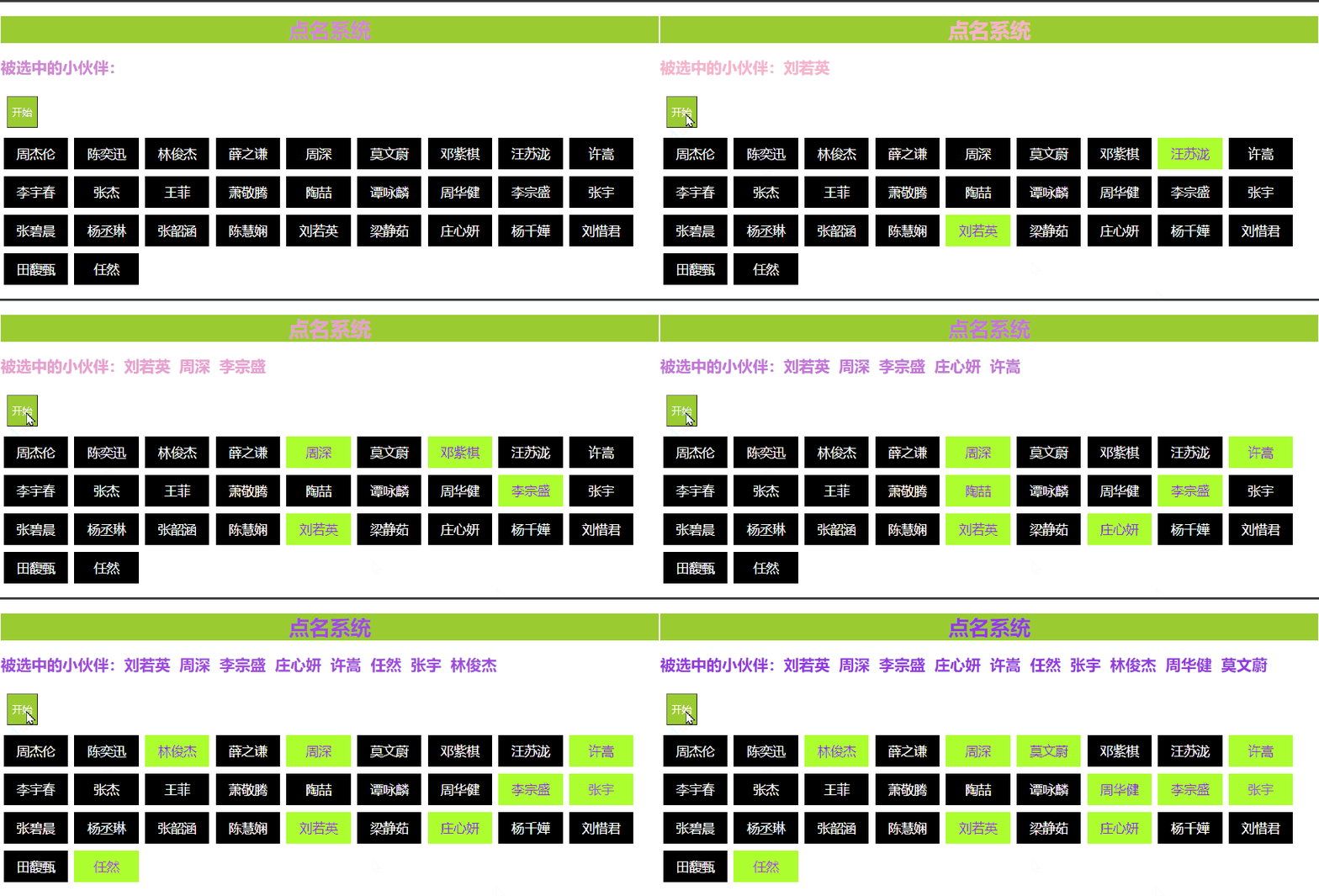
- "被选中的小伙伴" 这里在js添加的时候使用的是字符串拼接的方式来修改内容
- "姓名" 这里留一个div方便遍历数据数组时的时候直接拼接结构,通过
元素.innerHTML= ''拼接
2. 样式:
<style type="text/css">
* {
font-family: '微软雅黑';
}
h1,
h2 {
animation: changeColor 2s linear infinite;
animation-direction: alternate;
}
h1 {
background-color: yellowgreen;
color: white;
text-align: center;
}
#content>div {
float: left;
width: 100px;
height: 50px;
margin: 5px;
font-size: 20px;
line-height: 50px;
text-align: center;
}
.cell {
background-color: black;
color: white;
}
.current,
.a {
background-color: greenyellow;
color: blueviolet;
}
button {
display: inline-block;
height: 50px;
background-color: yellowgreen;
color: white;
font-size: 16px;
margin: 10px;
}
select {
display: inline-block;
height: 30px;
width: 100px;
border: 1px solid yellowgreen;
background-color: blanchedalmond;
color: black;
font-size: 14px;
margin: 10px;
}
@keyframes changeColor {
from {
color: pink;
}
to {
color: blueviolet;
}
}
</style>

- 使用动画给文字加了点变色, 可以忽略
- 是不是比没加样式之前好看多了?
3. 原生js代码
let data = ['周杰伦', '陈奕迅', '林俊杰', '薛之谦', '周深', '莫文蔚', '邓紫棋', '汪苏泷', '许嵩', '李宇春', '张杰', '王菲', '萧敬腾', '陶喆', '谭咏麟', '周华健', '李宗盛', '张宇', '张碧晨', '杨丞琳', '张韶涵', '陈慧娴', '刘若英', '梁静茹', '庄心妍', '杨千嬅', '刘惜君', '田馥甄', '任然',
]
let content = document.querySelector('#content')
let button = document.querySelector('button')
let selectTitle = document.querySelector('#selectTitle')
function init() {
let strHtml = ``
data.forEach(function (value) {
strHtml += `<div class="cell">${value}</div>`
content.innerHTML = strHtml
})
}
init()
let temp = []
data.forEach(function (value, index) {
temp.push(index)
})
let strTemp = ``
button.addEventListener('click', function () {
let cells = document.querySelectorAll('.cell')
if (temp.length == 1) {
button.disabled = 'true'
}
let count = 12
let timeId = setInterval(function () {
let random = parseInt(Math.random() * temp.length)
let index = temp[random]
temp.forEach(function (value) {
if (index == value) {
cells[value].classList.add('current')
} else {
cells[value].classList.remove('current')
}
})
count--
if (count == 0) {
clearInterval(timeId)
temp.splice(random, 1)
strTemp += `${data[index]} `
selectTitle.innerHTML = `被选中的小伙伴:${strTemp}`
}
}, 80)
})
-
- 模拟数据, 放在一个数组里面
-
- 遍历数组, 将数据体现在页面(姓名那里), 在这里我封装了, 可以不用封装, 我调试的时候用的
-
- 给获取页面元素 : 开始按钮, "被选中的小伙伴" 对应位置
-
- 给开始按钮绑定点击事件
-
- 点击完之后获取"姓名"所在的div, 不能在全局获取,因为是渲染上去的
-
- 定义一个数组
temp保存数据的索引号, 刚开始和数据的数组的一样
-
- 点击按钮事件里定义定时器,用来点名是闪烁
-
- 定时器里搞一个随机数, 随机点名嘛
-
- 保留定时器的最后一个随机数, 把它从
temp里删掉, 之后再点就不会再出现它了
-
- 把姓名渲染到 "被选中的小伙伴: " 这里
-
- 闪烁的时候用的是添加类名和一次类名, 因为之前写好了相关样式
-
- 想办法看明白 索引 的传来传去 (定时器里的), 不然很容易出bug
-
- 还有一些细节看代码, 说多了可能更乱
-
- 不懂就要问 ! ! !