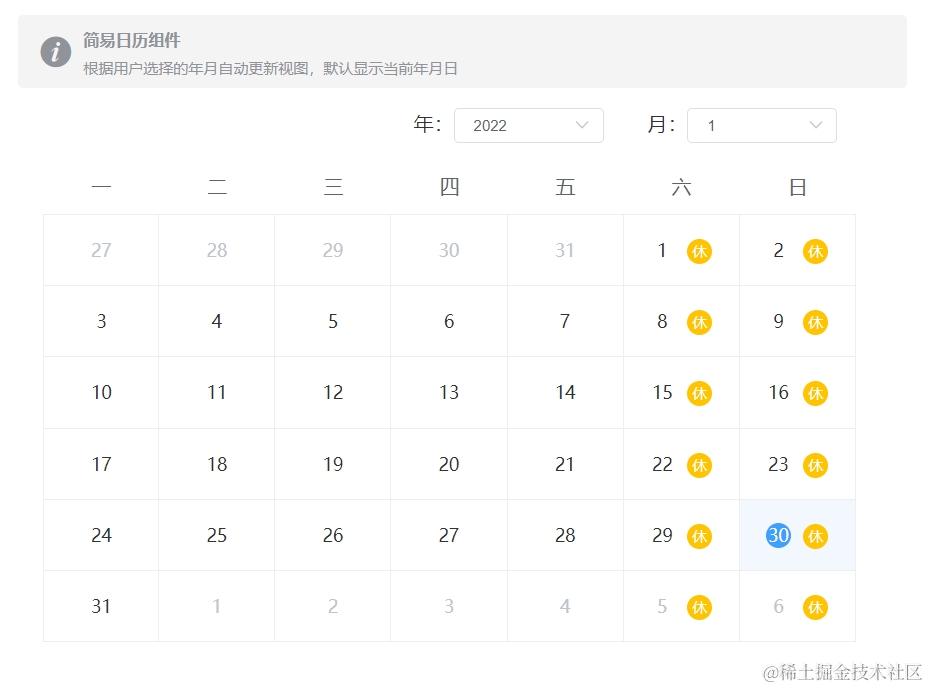
基于Element UI,封装一个简易日历组件。日历默认显示当前年月日,用户指定不同的年、月时,日历自动更新
核心思路
根据用户指定的年月,自动更新视图
第一步:移除Calendar组件中不需要的部分
- 移除Calendar组件自带的头部,给父级盒子添加样式穿透,并给日历盒子的头部设定:
.el-calendar__header { display: none; }
第二步:引入Select组件
- 添加年、月的下拉选择组件。年份以当前年为中心,分别向前、向后推5年,2017-2026作为年的可选择区间;月份写死。
- 将年份和月份与
el-calendar的依赖数据关联,利用v-model实现自动更新视图 核心代码:
    // 年选择框
    <span>年:</span>
    <el-select
        v-model="chosenYear"
        size="mini"
        style="width: 120px"
        @change="changeHandler"
     >
         <el-option
             v-for="item in yearOptions"
             :key="item"
             :label="item"
             :value="item"
          />
     </el-select>

     // 月选择框
     <span>月:</span>
     <el-select
         v-model="chosenMonth"
         size="mini"
         style="width: 120px"
         @change="changeHandler"
      >
          <el-option
              v-for="item in 12"
              :key="item"
              :label="item"
              :value="item" />
      </el-select>
第三步:使用插槽和业务实现
- 自定义日历单元格的内容。必须使用组件指定的具名插槽
dateCell;函数调用getDay提取日期中的多少号 - 为周末添加 “ 休 ” 标识。isWeek函数调用的结果,结合v-if实现动态添加 “ 休 ” 标识
- 12个月可写死,年份采用动态的。计算属性
yearOptions实现前后5年的年份区间选择 - 年份选择和月份选择公用一个事件处理函数
changeHandler,两种共同作用于el-calendar的依赖数据
结构
<el-calendar v-model="currentDate">
 <template v-slot:dateCell="scope">
     <div class="date-content">
         <!-- 1. 将每个单元格中的时间转换为当月的几“ 号 ” -->
         <span class="text"> {{ getDay(scope.date) }}</span>
         <!-- 2. 添加休息日的文字“ 休 ” ,要根据插槽的时间决定是否显示 “ 休 ”-->
         <span v-if="isWeek(scope.date)" class="rest">休</span>
     </div>
  </template>
</el-calendar>
行为
<script>
export default {
  name: 'Calender',
  data() {
    return {
      currentDate: new Date(),
      // 1. 当前下拉选择框所选中的年份, 默认是当前年份
      chosenYear: new Date().getFullYear(),
      // 2. 年份下拉选择框的选项依赖数组,迁移到计算属性中
      // 3.下拉选择框所选中的月份, 默认是当前月份
      chosenMonth: new Date().getMonth() + 1
      // getMonth返回一个0 到 11的整数值: 0 代表一月份,1 代表二月份, 2 代表三月份,依次类推
    }
  },

  computed: {
    // 年份下拉选择框的选项依赖数组,在小范围区间内动态变化
    yearOptions() {
      // 1. 获取当前年份
      const currentYear = this.currentDate.getFullYear()
      // new一个能容纳10个成员的数组(相当于是个类数组),并以undefined充当占位标识填充这10个空位,方便后续遍历数组时对成员重新赋值
      // 2. 准备数组
      const arr = Array.from(new Array(10))
      // 3. 遍历替换每个成员
      arr.forEach((item, index) => {
        // 以当前年为中心,向前5年,向后5年,再结合索引号,则数组成员的值为:数组成员 = 当前年 -5 + 索引号
        // 替换空数组中替换成员
        arr[index] = currentYear - 5 + index
      })
      return arr
    }
  },

  methods: {
    // 粗略的日期转换,简单转为当月的几号
        getDay(origin) {
          const date = new Date(origin)
          // getDate()方法返回一个指定的日期对象为一个月中的哪一日(从1--31)
          const num = date.getDate()
          return num
        },

    // 根据是否为周六周日,来决定是否显示文字“ 休 ”
        isWeek(origin) {
          const date = new Date(origin)
          // getDay()方法根据指定的日期对象,返回一个具体日期中一周的第几天(number型),0 表示星期天
          const day = date.getDay()
          if (day === 0 || day === 6) {
            return true
          } else {
            return false
          }
        },

        changeHandler() {
          // 将当前的年份 或 月份作为实际参数传给Date()函数,然后覆盖currentDate变量中的日期,就能实现日历组件根据指定年份 或 月份更新页面
          this.currentDate = new Date(`${this.chosenYear}-${this.chosenMonth}`)
          // currentDate 作为el-calendar的依赖数据,值可以是时间对象/字符串/数字
        }
      }
}
</script>