form(表单)的作用:
表格用来展示信息,form表单则是用来收集信息的。
表单的标签:
| 标签 | 描述 |
|---|---|
| form | 定义供用户输入的表单 |
| input | 定义输入域 |
| textarea | 定义文本域 (一个多行的输入控件) |
| label | 定义了 元素的标签,一般为输入标题 |
| fieldset | 定义了一组相关的表单元素,并使用外框包含起来 |
| legend | 定义了 元素的标题 |
| select | 定义了下拉选项列表 |
| optgroup | 定义选项组 |
| option | 定义下拉列表中的选项 |
| button | 定义一个点击按钮 |
| datalist | 指定一个预先定义的输入控件选项列表 |
| keygen | 定义了表单的密钥对生成器字段 |
| output | 定义一个计算结果 |
form标签
<form> 标签用于创建供用户输入的 HTML 表单。
<form> 元素包含一个或多个如下的表单元素:
<input>
<textarea>
<button>
<select>
<iption>
<optgroup>
<fieldset>
<lable>
form标签的属性
accept
HTML5 不支持。规定服务器接收到的文件的类型。(文件是通过文件上传提交的)
accept-charset
规定服务器可处理的表单数据字符集。
action="demo_form.php"
规定当提交表单时向何处发送表单数据。
<form action="demo_form.php">"
<input type="submit" value="提交">
上面这句话的意思是发送到服务器的“demo_form.php”页面
autocomplete
规定是否启用表单的自动完成功能。
enctype规定编码方式
规定在向服务器发送表单数据之前如何对其进行编码。(适用于 method="post" 的情况)
method="get"
规定用于发送表单数据的 HTTP 方法。
name
规定表单名称。
novalidate
提交表单时不进行验证。
target
规定在何处打开 action URL enum(枚举值)
- _blank\
- _self\
- _parent\
- _top
input标签的属性
accept文件上传的类型
作用:规定通过文件上传来提交的文件的类型。 (只针对type="file")\
语法:<input type="file" accept="audio/*|video/*|image/*|*MIME_type*">\
当要接收多个文件类型时:<input type="file" accept="audio/*,video/*,image/*" />
枚举值如下:
| 值 | 描述 |
|---|---|
| video/* | 接受所有的视频文件。 |
| image/* | 接受所有的图像文件。 |
| audio/* | 接受所有的声音文件。 |
| MIME_type | 一个有效的 MIME 类型,不带参数。请参阅 IANA MIME 类型,获得标准 MIME 类型的完整列表。 |
accept="video/*"
接受所有的视频文件,只收集(接收)视频类文件,效果如下案例
<!DOCTYPE html>
<html>

<head>
  <meta charset="utf-8">
  <title>菜鸟教程(runoob.com)</title>
</head>

<body>

  <form action="demo_form.php">
    <input type="file" name="pic" accept="video/*">
    <input type="submit">
  </form>
</body>

</html>
在一个文件夹中同时放有两个文件,一个.mp4视频文件,一个.jpg图片文件,如下:
当我跑上面示例时:
然后当我打开选择文件的窗口,只能看到video类型的文件,自然只能选这类:
选中之后的效果:
accept="image/*"
接受所有的图片文件
只收集(接收)图片类文件,效果同上video 语法:<input type="file" accept="audio/*|video/*|image/*|*MIME_type*">
accept="audio/*"
接受所有的声音文件
只收集(接收)视频类文件,效果同上video 语法:<input type="file" accept="audio/*|video/*|image/*|*MIME_type*">
accept="*MIME_type*"
一个有效的 MIME 类型,不带参数,请参阅 IANA MIME 类型,获得标准 MIME 类型的完整列表。 语法:
<input type="file" accept="audio/*|video/*|image/*|*MIME_type*">
accept 上传文件类型限制格式 ,例如:
<input type="file" accept="application/vnd.openxmlformats-officedocument.spreadsheetml.sheet" (change)="change($event)" multiple="false" class="ml-sm" />
MIME 类型列表
| 文件扩展名 | 文件类型 | MIME 类型 |
|---|---|---|
| .docx | Microsoft Office Word 2007 document | application/vnd.openxmlformats-officedocument.wordprocessingml.document |
| .docm | Office Word 2007 macro-enabled document | application/vnd.ms-word.document.macroEnabled.12 |
| .dotx | Office Word 2007 template | application/application/vnd.openxmlformats-officedocument.wordprocessingml.template |
| .dotm | Office Word 2007 macro-enabled document template | application/vnd.ms-word.template.macroEnabled.12 |
| .xlsx | Microsoft Office Excel 2007 workbook | application/vnd.openxmlformats-officedocument.spreadsheetml.sheet |
| .xlsm | Office Excel 2007 macro-enabled workbook | application/vnd.ms-excel.sheet.macroEnabled.12 |
| .xltx | Office Excel 2007 template | application/vnd.openxmlformats-officedocument.spreadsheetml.template |
| .xltm | Office Excel 2007 macro-enabled workbook template | application/vnd.ms-excel.template.macroEnabled.12 |
| .xlsb | Office Excel 2007 binary workbook | application/vnd.ms-excel.sheet.binary.macroEnabled.12 |
| .xlam | Office Excel 2007 add-in | application/vnd.ms-excel.addin.macroEnabled.12 |
| .pptx | Microsoft Office PowerPoint 2007 presentation | application/vnd.openxmlformats-officedocument.presentationml.presentation |
| .pptm | Office PowerPoint 2007 macro-enabled presentation | application/vnd.ms-powerpoint.presentation.macroEnabled.12 |
| .ppsx | Office PowerPoint 2007 slide show | application/vnd.openxmlformats-officedocument.presentationml.slideshow |
| .ppsm | Office PowerPoint 2007 macro-enabled slide show | application/vnd.ms-powerpoint.slideshow.macroEnabled.12 |
| .potx | Office PowerPoint 2007 template | application/vnd.openxmlformats-officedocument.presentationml.template |
| .potm | Office PowerPoint 2007 macro-enabled presentation template | application/vnd.ms-powerpoint.template.macroEnabled.12 |
| .ppam | Office PowerPoint 2007 add-in | application/vnd.ms-powerpoint.addin.macroEnabled.12 |
| .sldx | Office PowerPoint 2007 slide | application/vnd.openxmlformats-officedocument.presentationml.slide |
| .sldm | Office PowerPoint 2007 macro-enabled slide | application/vnd.ms-powerpoint.slide.macroEnabled.12 |
| .one | Microsoft Office OneNote 2007 section | application/msonenote |
| .onetoc2 | Office OneNote 2007 TOC | application/msonenote |
| .onetmp | Office OneNote 2007 temporary file | application/msonenote |
| .onepkg | Office OneNote 2007 package | application/msonenote |
| .thmx | 2007 Office system release theme | application/vnd.ms-officetheme |
| *.3gpp | audio/3gpp, video/3gpp | 3GPP Audio/Video |
| *.ac3 | audio/ac3 | AC3 Audio |
| *.asf | allpication/vnd.ms-asf | Advanced Streaming Format |
| *.au | audio/basic | AU Audio |
| *.css | text/css | Cascading Style Sheets |
| *.csv | text/csv | Comma Separated Values |
| *.doc | application/msword | MS Word Document |
| *.dot | application/msword | MS Word Template |
| *.dtd | application/xml-dtd | Document Type Definition |
| *.dwg | image/vnd.dwg | AutoCAD Drawing Database |
| *.dxf | image/vnd.dxf | AutoCAD Drawing Interchange Format |
| *.gif | image/gif | Graphic Interchange Format |
| *.htm | text/html | HyperText Markup Language |
| *.html | text/html | HyperText Markup Language |
| *.jp2 | image/jp2 | JPEG-2000 |
| *.jpe | image/jpeg | JPEG |
| *.jpeg | image/jpeg | JPEG |
| *.jpg | image/jpeg | JPEG |
| *.js | text/javascript, application/javascript | JavaScript |
| *.json | application/json | JavaScript Object Notation |
| *.mp2 | audio/mpeg, video/mpeg | MPEG Audio/Video Stream, Layer II |
| *.mp3 | audio/mpeg | MPEG Audio Stream, Layer III |
| *.mp4 | audio/mp4, video/mp4 | MPEG-4 Audio/Video |
| *.mpeg | video/mpeg | MPEG Video Stream, Layer II |
| *.mpg | video/mpeg | MPEG Video Stream, Layer II |
| *.mpp | application/vnd.ms-project | MS Project Project |
| *.ogg | application/ogg, audio/ogg | Ogg Vorbis |
| application/pdf | Portable Document Format | |
| *.png | image/png | Portable Network Graphics |
| *.pot | application/vnd.ms-powerpoint | MS PowerPoint Template |
| *.pps | application/vnd.ms-powerpoint | MS PowerPoint Slideshow |
| *.ppt | application/vnd.ms-powerpoint | MS PowerPoint Presentation |
| *.rtf | application/rtf, text/rtf | Rich Text Format |
| *.svf | image/vnd.svf | Simple Vector Format |
| *.tif | image/tiff | Tagged Image Format File |
| *.tiff | image/tiff | Tagged Image Format File |
| *.txt | text/plain | Plain Text |
| *.wdb | application/vnd.ms-works | MS Works Database |
| *.wps | application/vnd.ms-works | Works Text Document |
| *.xhtml | application/xhtml+xml | Extensible HyperText Markup Language |
| *.xlc | application/vnd.ms-excel | MS Excel Chart |
| *.xlm | application/vnd.ms-excel | MS Excel Macro |
| *.xls | application/vnd.ms-excel | MS Excel Spreadsheet |
| *.xlt | application/vnd.ms-excel | MS Excel Template |
| *.xlw | application/vnd.ms-excel | MS Excel Workspace |
| *.xml | text/xml, application/xml | Extensible Markup Language |
| *.zip | aplication/zip | Compressed Archive |
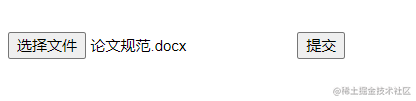
MiME_type类型的使用案例 需要去上面表格寻找拓展名.docx对应的MIME类型写入accept参数
<!DOCTYPE html>
<html>
<head>
<meta charset="utf-8">
<title>菜鸟教程(runoob.com)</title>
</head>
<body>
<form action="demo_form.php">
<input type="file" name="pic" accept="application/vnd.openxmlformats-officedocument.wordprocessingml.document">
<input type="submit">
</form>
</body>
</html>
打开选择框如下:
选中效果如下:
align对齐属性(已废弃)
在 HTML 4.01 中,
<input>的 align 属性已废弃。请使用 CSS 代替。
语法:CSS 语法:<input type="image" style="float:right">
<!DOCTYPE html>
<html>
<head>
<meta charset="utf-8">
<title>菜鸟教程(runoob.com)</title>
</head>
<body>

<form action="demo_form.php">
  First name: <input type="text" name="fname"><br>
  <input type="image" src="https://www.runoob.com/try/demo_source/submit.gif" alt="Submit" align="center" width="48" height="48">
</form>

</body>
</html>
使用style="float:right"替代效果同下
type类型,input的类型
语法:<input type="value">
type="submit"
<!DOCTYPE html>
<html>
<head>
<meta charset="utf-8">
<title>菜鸟教程(runoob.com)</title>
</head>
<body>

<form action="demo-form.php">
  First name: <input type="text" name="fname"><br>
  Last name: <input type="text" name="lname"><br>
  <input type="submit">
</form>

</body>
</html>
当type值submit时,点击提交会将表单提交到action属性值的地方去,就是demo_form.php网页去,如果这样写,这个网页地址会根据当前服务器自动补齐。
点击按钮之后效果如下:
type="button"
<!DOCTYPE html>
<html>
<head>
<meta charset="utf-8">
<title>菜鸟教程(runoob.com)</title>
<script>
    function msg()
    {
            alert("Hello world!");
    }
</script>
</head>
<body>

<form>
    <input type="button" value="点我" onclick="msg()">
</form>
<p>按钮点击时会触发 javascript 代码。</p>
</body>
</html>
type="checkbox"
<!DOCTYPE html>
<html>
<head>
<meta charset="utf-8">
<title>菜鸟教程(runoob.com)</title>
</head>
<body>

<form action="demo-form.php">
  <input type="checkbox" name="vehicle[]" value="Bike"> 我有一辆自行车<br>
  <input type="checkbox" name="vehicle[]" value="Car"> 我有一辆小轿车<br>
  <input type="checkbox" name="vehicle[]" value="Boat"> 我有一艘船<br>
  <input type="submit" value="提交">
</form>

</body>
</html>
type="color"
<!DOCTYPE html>
<html>
<head>
<meta charset="utf-8">
<title>菜鸟教程(runoob.com)</title>
</head>
<body>

<form action="demo-form.php">
  选择你喜欢的颜色: <input type="color" name="favcolor"><br>
  <input type="submit">
</form>

</body>
</html>
type="date"
<!DOCTYPE html>
<html>
<head>
<meta charset="utf-8">
<title>菜鸟教程(runoob.com)</title>
</head>
<body>

<form action="demo-form.php">
  生日: <input type="date" name="bday">
  <input type="submit">
</form>

</body>
</html>
type="datetime"
<!DOCTYPE html>
<html>
<head>
<meta charset="utf-8">
<title>菜鸟教程(runoob.com)</title>
</head>
<body>

<form action="demo-form.php">
  生日 (日期和时间): <input type="datetime" name="bdaytime">
  <input type="submit">
</form>

</body>
</html>
type="datetime-local"
<!DOCTYPE html>
<html>
<head>
<meta charset="utf-8">
<title>菜鸟教程(runoob.com)</title>
</head>
<body>

<form action="demo-form.php">
  生日 (日期和时间): <input type="datetime-local" name="bdaytime">
  <input type="submit">
</form>

</body>
</html>
type="email"
<!DOCTYPE html>
<html>
<head>
<meta charset="utf-8">
<title>菜鸟教程(runoob.com)</title>
</head>
<body>

<form action="demo-form.php">
  E-mail: <input type="email" name="usremail">
  <input type="submit">
</form>

<p><b>注意:</b> Internet Explorer 9  及更早 IE 版本不支持 type="email" 。</p>

</body>
</html>
type="file"
<!DOCTYPE html>
<html>
<head>
<meta charset="utf-8">
<title>菜鸟教程(runoob.com)</title>
</head>
<body>

<form action="demo-form.php">
  选择一个文件: <input type="file" name="img">
  <input type="submit">
</form>

</body>
</html>
type="hidden"
<!DOCTYPE html>
<html>
<head>
<meta charset="utf-8">
<title>菜鸟教程(runoob.com)</title>
</head>
<body>

<form action="demo-form.php">
  First name: <input type="text" name="fname"><br>
  <input type="hidden" name="country" value="Norway">
  <input type="submit" value="提交">
</form>

<p>注意隐藏字段用户是看不到的。</p>

</body>
</html>
type="image"
作用:定义图像作为提交按钮
<!DOCTYPE html>
<html>
<head>
<meta charset="utf-8">
<title>菜鸟教程(runoob.com)</title>
</head>
<body>

<form action="demo-form.php">
  First name: <input type="text" name="fname"><br>
  Last name: <input type="text" name="lname"><br>
  <input type="image" src="img_submit.gif" alt="Submit" width="48" height="48">
</form>

</body>
</html>
type="month"
<!DOCTYPE html>
<html>
<head>
<meta charset="utf-8">
<title>菜鸟教程(runoob.com)</title>
</head>
<body>

<form action="demo-form.php">
  生日 ( 月和年 ): <input type="month" name="bdaymonth">
  <input type="submit">
</form>

</body>
</html>
type="number"
<!DOCTYPE html>
<html>
<head>
<meta charset="utf-8">
<title>菜鸟教程(runoob.com)</title>
</head>
<body>

<form action="demo-form.php">
  数量 ( 1 到 5 之间): <input type="number" name="quantity" min="1" max="5">
  <input type="submit">
</form>

<p><b>注意:</b>Internet Explorer 9 及更早 IE 版本不支持 type="number" 。</p>

</body>
</html>
type="password"
<!DOCTYPE html>
<html>
<head>
<meta charset="utf-8">
<title>菜鸟教程(runoob.com)</title>
</head>
<body>

<form action="demo-form.php">
  Email: <input type="text" name="email"><br>
  Password: <input type="password" name="pwd" maxlength="8"><br>
  <input type="submit">
</form>

</body>
</html>
type="radio"
<!DOCTYPE html>
<html>
<head>
<meta charset="utf-8">
<title>菜鸟教程(runoob.com)</title>
</head>
<body>

<form action="demo-form.php">
  <input type="radio" name="gender" value="女"> 女<br>
  <input type="submit" value="提交">
</form>

</body>
</html>
type="range"
<!DOCTYPE html>
<html>
<head>
<meta charset="utf-8">
<title>菜鸟教程(runoob.com)</title>
</head>
<body>

<form action="demo-form.php" method="get">
Points: <input type="range" name="points" min="1" max="10">
<input type="submit">
</form>

<p><b>注意:</b> Internet Explorer 9 及更早 IE 版本不支持 type="range"。</p>

</body>
</html>
type="reset"
<!DOCTYPE html>
<html>
<head>
<meta charset="utf-8">
<title>菜鸟教程(runoob.com)</title>
</head>
<body>

<form action="demo-form.php">
  Email: <input type="text" name="email"><br>
  Pin: <input type="text" name="pin" maxlength="4"><br>
  <input type="reset" value="重置">
  <input type="submit" value="提交">
</form>

<p>点击重置按钮重新设置表单。</p>

</body>
</html>
type="search"
定义搜索字段(比如站内搜索或谷歌搜索等):
<!DOCTYPE html>
<html>
<head>
<meta charset="utf-8">
<title>菜鸟教程(runoob.com)</title>
</head>
<body>

<form action="demo-form.php">
  Search Google: <input type="search" name="googlesearch"><br>
  <input type="submit">
</form>

</body>
</html>
type="tel"
<!DOCTYPE html>
<html>
<head>
<meta charset="utf-8">
<title>菜鸟教程(runoob.com)</title>
</head>
<body>

<form action="demo-form.php">
  电话号码: <input type="tel" name="usrtel"><br>
  <input type="submit">
</form>

</body>
</html>
type="text"
<!DOCTYPE html>
<html>
<head>
<meta charset="utf-8">
<title>菜鸟教程(runoob.com)</title>
</head>
<body>

<form action="demo-form.php">
  First name: <input type="text" name="fname"><br>
  Last name: <input type="text" name="lname"><br>
  <input type="submit">
</form>

<p>点击提交按钮提交表单。</p>

</body>
</html>
type="time"
<!DOCTYPE html>
<html>
<head>
<meta charset="utf-8">
<title>菜鸟教程(runoob.com)</title>
</head>
<body>

<form action="demo-form.php">
  选择时间: <input type="time" name="usr_time">
  <input type="submit">
</form>

</body>
</html>
type="url"
<!DOCTYPE html>
<html>
<head>
<meta charset="utf-8">
<title>菜鸟教程(runoob.com)</title>
</head>
<body>

<form action="demo-form.php">
  添加你的主页: <input type="url" name="homepage"><br>
  <input type="submit">
</form>

<p><b>注意:</b> Internet Explorer 9及更早 IE 版本不支持 type="url" 。</p>

</body>
</html>
type="week"
<!DOCTYPE html>
<html>
<head>
<meta charset="utf-8">
<title>菜鸟教程(runoob.com)</title>
</head>

<body>

<form action="demo-form.php">
  选择周: <input type="week" name="year_week">
  <input type="submit">
</form>

</body>
</html>
value,input的值
定义和用法
value 属性规定 <input> 元素的值。
value 属性对于不同 input 类型,用法也不同:
- 对于 "button"、"reset"、"submit" 类型 - 定义按钮上的文本
- 对于 "text"、"password"、"hidden" 类型 - 定义输入字段的初始(默认)值
- 对于 "checkbox"、"radio"、"image" 类型 - 定义与 input 元素相关的值,当提交表单时该值会发送到表单的 action URL。
注意: value 属性对于 <input type="checkbox"> 和 <input type="radio"> 是必需的。
注意: value 属性不适用于 <input type="file">。
<!DOCTYPE html>
<html>
<head>
<meta charset="utf-8">
<title>菜鸟教程(runoob.com)</title>
</head>
<body>

<form action="demo_form.php">
  First name: <input type="text" name="fname" value="John"><br>
  Last name: <input type="text" name="lname" value="Doe"><br>
  <input type="submit" value="提交表单">
</form>

</body>
</html>
width,规定input的宽度
width 属性规定 <input> 元素的宽度。
注意: width 属性只适用于
<input type="image">。
<!DOCTYPE html>
<html>
<head>
<meta charset="utf-8">
<title>菜鸟教程(runoob.com)</title>
</head>
<body>

<form action="demo-form.php">
  First name: <input type="text" name="fname"><br>
  Last name: <input type="text" name="lname"><br>
  <input type="image" src="img_submit.gif"  alt="Submit" width="48" height="48">
</form>


</body>
</html>
step属性规定 元素的合法数字间隔。
src 属性规定显示为提交按钮的图像的 URL
注意: src 属性对于<input type="image">是必需的属性,且只能与 <input type="image"> 配合使用。
size属性规定以字符数计的 <input> 元素的可见宽度
<!DOCTYPE html>
<html>
<head>
<meta charset="utf-8">
<title>菜鸟教程(runoob.com)</title>
</head>

<body>

<form action="demo_form.php">
  Email: <input type="text" name="email" size="35"><br>
  PIN: <input type="text" name="pin" maxlength="4" size="4"><br>
  <input type="submit" value="提交">
</form>
</body>
</html>
required属性规定必需在提交表单之前填写输入字段。
<!DOCTYPE html>
<html>
<head>
<meta charset="utf-8">
<title>菜鸟教程(runoob.com)</title>
</head>
<body>

<form action="demo-form.php">
  Username: <input type="text" name="usrname" required>
  <input type="submit">
</form>

<p><strong>注意:</strong> Internet Explorer 9及更早 IE 版本,或 Safari 不支持 input 标签的 required 属性。</p>

</body>
</html>
readonly,input标签只读
<!DOCTYPE html>
<html>
<head>
<meta charset="utf-8">
<title>菜鸟教程(runoob.com)</title>
</head>
<body>

<form action="demo_form.php">
  Email: <input type="text" name="email"><br>
  Country: <input type="text" name="country" value="Norway" readonly><br>
  <input type="submit" value="提交">
</form>

</body>
</html>
placeholder提示语
placeholder 属性规定可描述输入 字段预期值的简短的提示信息 。
<!DOCTYPE html>
<html>
<head>
<meta charset="utf-8">
<title>菜鸟教程(runoob.com)</title>
</head>
<body>

<form action="demo-form.php">
  <input type="text" name="fname" placeholder="First name"><br>
  <input type="text" name="lname" placeholder="Last name"><br>
  <input type="submit" value="提交">
</form>

<p><strong>注意:</strong> Internet Explorer 9及更早 IE 版本不支持 input 标签的 placeholder 属性。</p>

</body>
</html>
pattern 属性规定用于验证 元素的值的正则表达式。
<!DOCTYPE html>
<html>
<head>
<meta charset="utf-8">
<title>菜鸟教程(runoob.com)</title>
</head>
<body>

<form action="demo-form.php">
  Country code: <input type="text" name="country_code" pattern="[A-Za-z]{3}" title="Three letter country code">
  <input type="submit">
</form>

<p><strong>注意:</strong>  Internet Explorer 9及更早 IE 版本,或 Safari 不支持 input 标签的 pattern 属性。</p>

</body>
</html>
name 属性规定 元素的名称。
注意: 只有设置了 name 属性的表单元素才能在提交表单时传递它们的值。
<!DOCTYPE html>
<html>
<head>
<meta charset="utf-8">
<title>菜鸟教程(runoob.com)</title>
</head>
<body>

<form action="demo_form.php">
  Name: <input type="text" name="fullname"><br>
  Email: <input type="text" name="email"><br>
  <input type="submit" value="提交">
</form>

</body>
</html>
multiple属性规定允许用户输入到 <input> 元素的多个值。
<!DOCTYPE html>
<html>
<head>
<meta charset="utf-8">
<title>菜鸟教程(runoob.com)</title>
</head>
<body>

<form action="demo-form.php">
  选择图片: <input type="file" name="img" multiple>
  <input type="submit">
</form>

<p>尝试选取一张或者多种图片。</p>

<p><strong>注意:</strong>  Internet Explorer 9及更早 IE 版本不支持 input 标签的 multiple 属性。</p>

</body>
</html>
min属性规定 <input>元素的最小值。
<!DOCTYPE html>
<html>
<head>
<meta charset="utf-8">
<title>菜鸟教程(runoob.com)</title>
</head>
<body>

<form action="demo-form.php">

 输入 1980-01-01 之前的日期:
  <input type="date" name="bday" max="1979-12-31"><br>

 输入 2000-01-01 之后的日期:
  <input type="date" name="bday" min="2000-01-02"><br>

  数量 (在1和5之间):
  <input type="number" name="quantity" min="1" max="5"><br>

  <input type="submit">
</form>

<p><strong>注意:</strong> Internet Explorer 9及更早 IE 版本,Firefox 不支持 input 标签的  max 和 min 属性。</p>
<p><strong>注意:</strong>
在 Internet Explorer 10中 max 和 min 属性不支持输入日期和时间,IE 10 不支持这些输入类型。</p>

</body>
</html>
maxlength属性规定 元素中允许的最大字符数。
<!DOCTYPE html>
<html>
<head>
<meta charset="utf-8">
<title>菜鸟教程(runoob.com)</title>
</head>
<body>

<form action="demo_form.php">
  Username: <input type="text" name="usrname" maxlength="10"><br>
  <input type="submit" value="提交">
</form>

</body>
</html>
max属性规定 <input> 元素的最大值。
同min
list属性引用 <datalist> 元素,其中包含 <input> 元素的预定义选项。
<!DOCTYPE html>
<html>
<head>
<meta charset="utf-8">
<title>菜鸟教程(runoob.com)</title>
</head>
<body>

<form action="demo-form.php" method="get">
<input list="browsers" name="browser">
<datalist id="browsers">
  <option value="Internet Explorer">
  <option value="Firefox">
  <option value="Chrome">
  <option value="Opera">
  <option value="Safari">
</datalist>
<input type="submit">
</form>

<p><strong>注意:</strong> Internet Explorer 9(更早 IE 版本),Safari 不支持 datalist 标签。</p>

</body>
</html>
hight规定 元素的高度。(只针对type="image")
同width
formtarget
规定表示提交表单后在哪里显示接收到响应的名称或关键词。(只适合
type="submit"和type="image")
<!DOCTYPE html>
<html>
<head>
<meta charset="utf-8">
<title>菜鸟教程(runoob.com)</title>
</head>
<body>

<form action="demo-form.php">
  First name: <input type="text" name="fname"><br>
  Last name: <input type="text" name="lname"><br>
  <input type="submit" value="正常提交">
  <input type="submit" formtarget="_blank" value="提交到一个新的页面上">
</form>

<p><strong>注意:</strong> Internet Explorer 9及更早 IE 版本不支持 input 标签的 formtarget 属性。</p>

</body>
</html>
formnovalidate不验证提交
formnovalidate 属性覆盖
<form>元素的 novalidate 属性。
<!DOCTYPE html>
<html>
<head>
<meta charset="utf-8">
<title>菜鸟教程(runoob.com)</title>
</head>
<body>

<form action="demo-form.php">
  E-mail: <input type="email" name="userid"><br>
  <input type="submit" value="提交"><br>
  <input type="submit" formnovalidate="formnovalidate" value="不验证提交">
</form>

<p><strong>注意:</strong> Internet Explorer 9及更早 IE 版本,或 Safari 不支持 input 标签的 formnovalidate 属性。</p>

</body>
</html>
formmethod定义action URL 的 HTTP 方法
定义发送表单数据到 action URL 的 HTTP 方法。 (只适合 type="submit" 和 type="image")
<!DOCTYPE html>
<html>
<head>
<meta charset="utf-8">
<title>菜鸟教程(runoob.com)</title>
</head>
<body>

<form action="demo-form.php" method="get">
  First name: <input type="text" name="fname"><br>
  Last name: <input type="text" name="lname"><br>
  <input type="submit" value="提交">
  <input type="submit" formmethod="post" formaction="demo-post.php" value="使用 POST 提交">
</form>

<p><strong>注意:</strong> Internet Explorer 9及更早 IE 版本不支持 input 标签的 formmethod 属性。</p>

</body>
</html>
form属性规定 <input> 元素所属的一个或多个表单
<!DOCTYPE html>
<html>
<head>
<meta charset="utf-8">
<title>菜鸟教程(runoob.com)</title>
</head>
<body>

<form action="demo-form.php" id="form1">
First name: <input type="text" name="fname"><br>
<input type="submit" value="提交">
</form>

<p> "Last name" 字段没有在 form 表单之内,但它也是 form 表单的一部分。</p>

Last name: <input type="text" name="lname" form="form1">

<p><b>注意:</b> IE 不支持 form 属性</p>

</body>
</html>
disabled 禁用
<!DOCTYPE html>
<html>
<head>
<meta charset="utf-8">
<title>菜鸟教程(runoob.com)</title>
</head>
<body>

<form action="demo_form.php">
  First name: <input type="text" name="fname"><br>
  Last name: <input type="text" name="lname" disabled><br>
  <input type="submit" value="提交">
</form>

</body>
</html>
checked预先选定的 <input> 元素
checked 属性规定在页面加载时应该被预先选定的
<input>元素。 (只针对type="checkbox"或者type="radio")
<!DOCTYPE html>
<html>
<head>
<meta charset="utf-8">
<title>菜鸟教程(runoob.com)</title>
</head>
<body>

<form action="demo_form.php" method="get">
  <input type="checkbox" name="vehicle" value="Bike"> I have a bike<br>
  <input type="checkbox" name="vehicle" value="Car" checked> I have a car<br>
  <input type="submit" value="提交">
</form>

</body>
</html>
autofocus属性规定当页面加载时 <input> 元素应该自动获得焦点。
<!DOCTYPE html>
<html>
<head>
<meta charset="utf-8">
<title>菜鸟教程(runoob.com)</title>
</head>
<body>

<form action="demo-form.php">
  First name: <input type="text" name="fname" autofocus><br>
  Last name: <input type="text" name="lname"><br>
  <input type="submit">
</form>
<p><strong>注意:</strong> Internet Explorer 9及更早 IE 版本不支持 input 标签的 autofocus 属性。</p>

</body>
</html>
autocomplete是否应该启用自动完成功能
autocomplete 属性规定
<input>元素输入字段是否应该启用自动完成功能。
<!DOCTYPE html>
<html>
<head>
<meta charset="utf-8">
<title>菜鸟教程(runoob.com)</title>
</head>
<body>

<form action="demo-form.php" autocomplete="on">
  First name:<input type="text" name="fname"><br>
  Last name: <input type="text" name="lname"><br>
  E-mail: <input type="email" name="email" autocomplete="off"><br>
  <input type="submit">
</form>

<p>填写并提交表单,然后重新刷新页面查看如何自动填充内容。</p>
<p>注意 form 的 autocomplete 属性为  "on"(开),但是 e-mail 自动为“off”(关)。</p>

</body>
</html>
alt定义图像输入的替代文本。 (只针对type="image")
alt 属性为用户由于某些原因(比如网速太慢、src 属性中的错误、浏览器禁用图像、用户使用的是屏幕阅读器)无法查看图像时提供了替代文本。
注意: alt 属性只能与 <input type="image"> 配合使用。
<!DOCTYPE html>
<html>
<head>
<meta charset="utf-8">
<title>菜鸟教程(runoob.com)</title>
</head>
<body>

<form action="demo_form.php">
  First name: <input type="text" name="fname"><br>
  <input type="image" src="submit.gif" alt="Submit" width="48" height="48">
</form>

<p>点击图片,输入框将被发送到服务器的“demo_form.php”页面。</p>
<p><b>注意:</b> 如果 type 属性设置为 image,当用户单击图像时,浏览器将以像素为单位,将鼠标相对于图像边界的偏移量发送到服务器,其中包括从图像左边界开始的水平偏移量,以及从图像上边界开始的垂直偏移量。</p>

</body>
</html>