<html lang="en">

<head>
  <meta charset="UTF-8" />
  <meta name="viewport" content="width=device-width, initial-scale=1.0" />
  <meta http-equiv="X-UA-Compatible" content="ie=edge" />
  <title>微博发布</title>
  <style>
    * {
      margin: 0;
      padding: 0;
    }

    ul {
      list-style: none;
    }

    .w {
      width: 900px;
      margin: 0 auto;
    }

    .controls textarea {
      width: 878px;
      height: 100px;
      resize: none;
      border-radius: 10px;
      outline: none;
      padding-left: 20px;
      padding-top: 10px;
      font-size: 18px;
    }

    .controls {
      overflow: hidden;
    }

    .controls div {
      float: right;
    }

    .controls div span {
      color: #666;
    }

    .controls div .useCount {
      color: red;
    }

    .controls div button {
      width: 100px;
      outline: none;
      border: none;
      background: rgb(0, 132, 255);
      height: 30px;
      cursor: pointer;
      color: #fff;
      font: bold 14px '宋体';
      transition: all 0.5s;
    }

    .controls div button:hover {
      background: rgb(0, 225, 255);
    }

    .controls div button:disabled {
      background: rgba(0, 225, 255, 0.5);
    }

    .contentList {
      margin-top: 50px;
    }

    .contentList li {
      padding: 20px 0;
      border-bottom: 1px dashed #ccc;
      position: relative;
    }

    .contentList li .info {
      position: relative;
    }

    .contentList li .info span {
      position: absolute;
      top: 15px;
      left: 100px;
      font: bold 16px '宋体';
    }

    .contentList li .info p {
      position: absolute;
      top: 40px;
      left: 100px;
      color: #aaa;
      font-size: 12px;
    }

    .contentList img {
      width: 80px;
      border-radius: 50%;
    }

    .contentList li .content {
      padding-left: 100px;
      color: #666;
      word-break: break-all;
    }

    .contentList li .the_del {
      position: absolute;
      right: 0;
      top: 0;
      font-size: 28px;
      cursor: pointer;
    }
  </style>
  <script src="js/random.js"></script>
</head>

<body>
  <div class="w">
    <!-- 操作的界面 -->
    <div class="controls">
      <img src="./images/9.6/tip.png" alt="" /><br />
      <!-- maxlength 可以用来限制表单输入的内容长度 -->
      <textarea placeholder="说点什么吧..." id="area" cols="30" rows="10" maxlength="200"></textarea>
      <div>
        <span class="useCount" id="useCount">0</span>
        <span>/</span>
        <span>200</span>
        <button id="send">发布</button>
      </div>
    </div>
    <!-- 微博内容列表 -->
    <div class="contentList">
      <ul id="list">
        <!-- <li>
            <div class="info">
              <img class="userpic" src="./images/9.5/01.jpg" />
              <span class="username">名字</span>
              <p class="send-time">发布于 时间</p>
            </div>
            <div class="content">内容</div>
            <span class="the_del">X</span>
          </li> -->
      </ul>
    </div>
  </div>

  <script>
    //模板字符串
    // 可以写:变量,运算符,调用api,调用自定义函数,三元表达式
    // 不可以写判断语句

    // 模拟数据,后期我们需要从这个数组中随机获取一个数据对象,做为发布微博的用户信息进行渲染,但是这个不是关键业务,我也可以固定写死
    let dataArr = [{
        uname: '司马懿',
        imgSrc: './images/9.5/01.jpg'
      },
      {
        uname: '女娲',
        imgSrc: './images/9.5/02.jpg'
      },
      {
        uname: '百里守约',
        imgSrc: './images/9.5/03.jpg'
      },
      {
        uname: '亚瑟',
        imgSrc: './images/9.5/04.jpg'
      },
      {
        uname: '虞姬',
        imgSrc: './images/9.5/05.jpg'
      },
      {
        uname: '张良',
        imgSrc: './images/9.5/06.jpg'
      },
      {
        uname: '安其拉',
        imgSrc: './images/9.5/07.jpg'
      },
      {
        uname: '李白',
        imgSrc: './images/9.5/08.jpg'
      },
      {
        uname: '阿珂',
        imgSrc: './images/9.5/09.jpg'
      },
      {
        uname: '墨子',
        imgSrc: './images/9.5/10.jpg'
      },
      {
        uname: '鲁班',
        imgSrc: './images/9.5/11.jpg'
      },
      {
        uname: '嬴政',
        imgSrc: './images/9.5/12.jpg'
      },
      {
        uname: '孙膑',
        imgSrc: './images/9.5/13.jpg'
      },
      {
        uname: '周瑜',
        imgSrc: './images/9.5/14.jpg'
      },
      {
        uname: '老夫子',
        imgSrc: './images/9.5/15.jpg'
      },
      {
        uname: '狄仁杰',
        imgSrc: './images/9.5/16.jpg'
      },
      {
        uname: '扁鹊',
        imgSrc: './images/9.5/17.jpg'
      },
      {
        uname: '马可波罗',
        imgSrc: './images/9.5/18.jpg'
      },
      {
        uname: '露娜',
        imgSrc: './images/9.5/19.jpg'
      },
      {
        uname: '孙悟空',
        imgSrc: './images/9.5/20.jpg'
      },
      {
        uname: '黄忠',
        imgSrc: './images/9.5/21.jpg'
      },
      {
        uname: '百里玄策',
        imgSrc: './images/9.5/22.jpg'
      }
    ]

    let area = document.querySelector('#area')
    let send = document.querySelector('#send')
    let list = document.querySelector('#list')
    let useCount = document.querySelector('#useCount')

    //加载聚焦
    area.focus()

    // 单击按钮
    send.addEventListener('click', function () {
      if (area.value.trim()) {
        let content = area.value
        let li = document.createElement('li')
        let num = parseInt(Math.random() * dataArr.length)
        li.innerHTML = `
      <div class="info">
              <img class="userpic" src="${dataArr[num].imgSrc}" />
              <span class="username">${dataArr[num].uname}</span>
              <p class="send-time">发布于 ${time()}</p>
            </div>
            <div class="content">${content}</div>
            <span class="the_del">X</span>
      `
        list.insertBefore(li, list[0])
        area.value = ''
        if (area.value.trim()) {
          console.log(area.value.trim());
          useCount.innerHTML = this.value.length
        } else {
          useCount.innerHTML = '0'
        }

        // let the_dels = document.querySelectorAll('.the_del')
        // del(the_dels)

        // 事件委托
        list.addEventListener('click', function (e) {
          if (e.target.className === 'the_del') e.target.parentNode.remove()
        })
      } else {
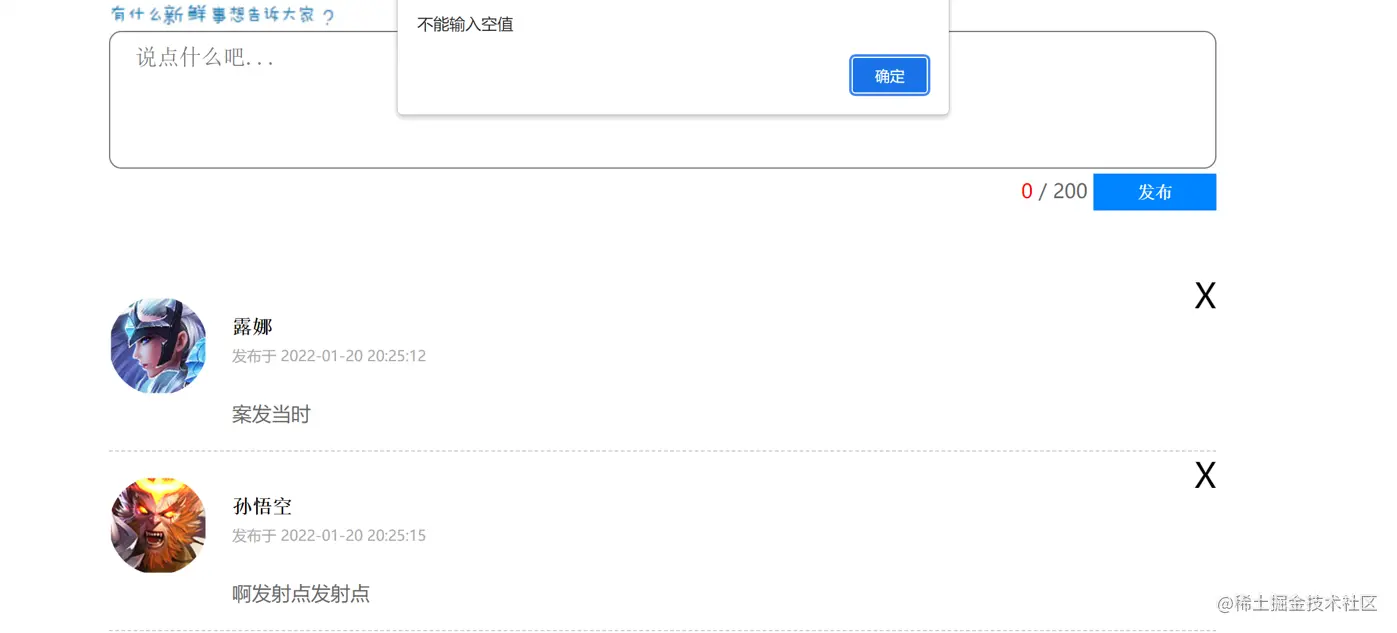
        alert('不能输入空值')
      }
    })

    // 获取时间
    function time() {
      let date = new Date()
      let year = date.getFullYear()
      let month = date.getMonth() + 1
      month = month < 10 ? '0' + month : month
      let day = date.getDate()
      let h = date.getHours()
      h = h < 10 ? '0' + h : h
      let m = date.getMinutes()
      m = m < 10 ? '0' + m : m
      let s = date.getSeconds()
      s = s < 10 ? '0' + s : s
      return `${year}-${month}-${day} ${h}:${m}:${s}`
    }

    // 删除事件
    // function del(btns) {
    //   btns.forEach(function (ele) {
    //     ele.addEventListener('click', function () {
    //       this.parentNode.remove()
    //     })
    //   })
    // }


    // 字数改变
    area.addEventListener('input', function () {
      if (this.value.trim()) {
        console.log(this.value.trim());
        useCount.innerHTML = this.value.length
      } else {
        useCount.innerHTML = '0'
      }
    })

    // 开始输入空格  回车提交事件
    area.addEventListener('keydown', function (e) {
      // 开头输入空格
      if (e.which === 32 && this.value.length === 0) {
        e.preventDefault()
        this.value = ''
      }
      // 回车提交事件
      if (e.which === 13) {
        e.preventDefault()
        send.click()
      }
    })
  </script>
</body>

</html>