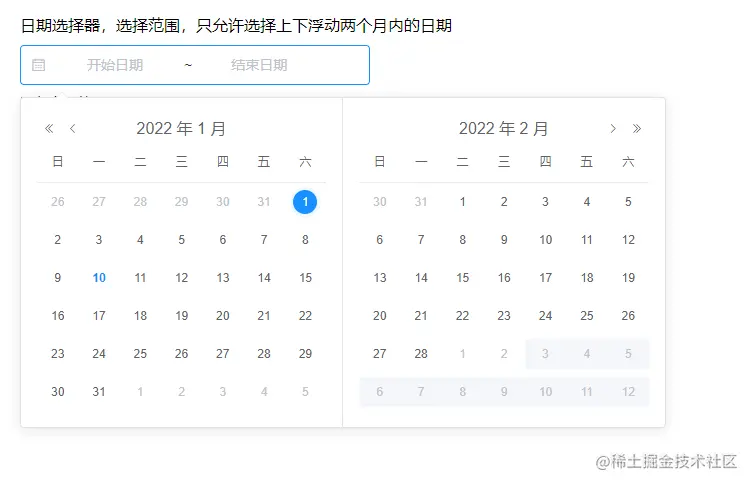
效果图
方法
<template>
  <div>
    <div class="text">日期选择器,选择范围,只允许选择上下浮动两个月内的日期</div>
    <el-date-picker
      v-model="createTime"
      end-placeholder="结束日期"
      range-separator="~"
      start-placeholder="开始日期"
      type="daterange"
      value-format="yyyy-MM-dd"
      :picker-options="pickerOptions"
    ></el-date-picker>
    <div class="txt-display">选择的时间:{{ createTime }}</div>
  </div>
</template>

<script>
export default {
  name: 'DatePicker',
  data () {
    return {
      createTime: null,
      pickerStartDate: '',
      pickerOptions: {
        onPick: ({ maxDate, minDate }) => {
          if (minDate && !maxDate) {
            this.pickerStartDate = minDate
          }
          if (maxDate) {
            this.pickerStartDate = ''
          }
        },
        disabledDate: (time) => {
          const timeOptionRange = this.pickerStartDate
          const two = 2 * 30 * 24 * 60 * 60 * 1000
          if (timeOptionRange) {
            return time.getTime() - two > timeOptionRange.getTime() || time.getTime() + two < timeOptionRange.getTime()
          }
        }
      }
    }
  }
}
</script>

<style scoped lang="scss">
.text {
  margin-bottom: 10px;
}
.txt-display {
  margin-top: 10px;
}
</style>