滚动页面显示侧边栏点击回到顶部
用到的知识点
window.pageYOffset()
window.pageXOffset()
scrollBy(x,y)
scrollTo(x,y)
window.onresize 或 window.addEventListener('resize',function(){})
window.onscroll 或 window.addEventListener('scroll',function(){})
xxx.offsetTop
xxx.offsetLeft
setInterval(function(){},1000)
clearInterval(定时器的变量名)
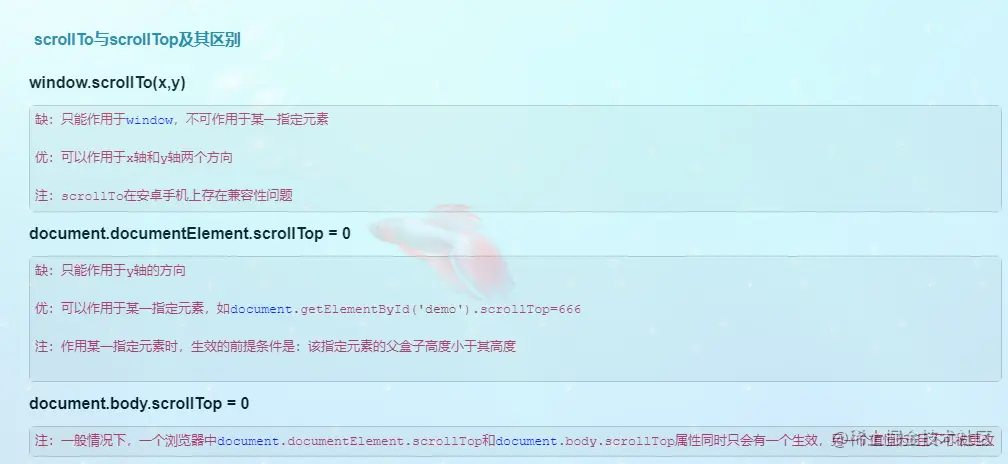
js的代码
let banner = document.querySelector('.banner')
let float_box = document.querySelector('.float_box')
let back_hd = document.querySelector('.back_header')
let float_top = float_box.offsetTop
window.addEventListener('scroll', function () {
console.log(window.pageYOffset)
if (window.pageYOffset > banner.offsetTop) {
flxed()
} else {
absolute()
}
})
window.addEventListener('resize', function () {
if (window.pageYOffset > banner.offsetTop) {
flxed()
} else {
absolute()
}
})
back_hd.addEventListener('click', function () {
let y = window.pageYOffset
let a = setInterval(function () {
y -= 50
scrollTo(0, y)
console.log(y)
if (y <= 0) {
clearInterval(a)
}
}, 10)
})
function flxed() {
float_box.style.position = "fixed"
float_box.style.top = float_top + 'px'
float_box.style.left = banner.offsetLeft + 1200 + "px"
back_hd.style.display = "block"
}
function absolute() {
float_box.style.position = "absolute"
float_box.style.top = float_top + 'px'
float_box.style.left = banner.offsetWidth + "px"
back_hd.style.display = "none"
}
HTML代码
let banner = document.querySelector('.banner')
let float_box = document.querySelector('.float_box')
let back_hd = document.querySelector('.back_header')
let float_top = float_box.offsetTop
window.addEventListener('scroll', function () {
console.log(window.pageYOffset)
if (window.pageYOffset > banner.offsetTop) {
flxed()
} else {
absolute()
}
})
window.addEventListener('resize', function () {
if (window.pageYOffset > banner.offsetTop) {
flxed()
} else {
absolute()
}
})
back_hd.addEventListener('click', function () {
let y = window.pageYOffset
let a = setInterval(function () {
y -= 50
scrollTo(0, y)
console.log(y)
if (y <= 0) {
clearInterval(a)
}
}, 10)
})
function flxed() {
float_box.style.position = "fixed"
float_box.style.top = float_top + 'px'
float_box.style.left = banner.offsetLeft + 1200 + "px"
back_hd.style.display = "block"
}
function absolute() {
float_box.style.position = "absolute"
float_box.style.top = float_top + 'px'
float_box.style.left = banner.offsetWidth + "px"
back_hd.style.display = "none"
}
less代码
// out: ../css/,sourceMap:true
* {
    padding: 0;
    margin: 0;
    box-sizing: border-box;
}

.w {
    margin: 0 auto;
    width: 1200px;
    margin-bottom: 20px;
}

header {
    height: 150px;
    background-color: pink;
}

.banner {
    position: relative;
    display: flex;
    justify-content: space-between;
    height: 600px;
    background-color: plum;

    aside {
        width: 300px;
        background-color: rosybrown;
    }

    article {
        width: 850px;
        background-color: sandybrown;
    }
}

.main {
    height: 900px;
    background-color: rgb(40,
            194,
            173);
}

section {
    height: 100px;
    background-color: springgreen;
}

.footer {
    margin: 0 auto;
    height: 200px;
    background-color: seagreen;
}

.float_box {
    position: absolute;
    top: 300px;
    right: -100px;
    width: 100px;
    height: 300px;
    background-color: steelblue;

    .back_header {
        width: 100px;
        height: 100px;
        line-height: 100px;
        text-align: center;
        background-color: tomato;
        cursor: pointer;
        display: none;
    }
}
思路:
1. window.pageYOffset > banner.offsetTop时切换成固定定位。
2.先将原来漂浮窗到它父盒子banner顶部的距离利用变量储存起来float_box.offsetTop。然后到变成浏览器固定定位时将float_box.offsetTop赋值给float_box.style.top就是可以实现下拉漂浮盒子固定不变了。
3.banner.offsetLeft当浏览器大小发生改变时的距离是不断变化的,我们应该利用banner盒子的宽度+banner.offsetLeft = 悬浮盒子左侧固定的位置
4.利用定时器实现动态返回顶部