Android API 11 源码查看
Zygote进程创建?
总结一下ZygoteInit的main方法都做了哪些事情:
1.创建了一个Server端的Socket
2.预加载类和资源
3.启动了SystemServer进程
4.等待AMS请求创建新的应用程序进程
最后再总结一下Zygote进程启动公做了几件事:
1.创建AndroidRuntime并调用其start方法,启动Zygote进程。
2.创建Java虚拟机并为Java虚拟机注册JNI方法。
3.通过JNI调用ZygoteInit的main函数进入Zygote的java框架层。
4.通过registerZygoteSocket方法创建服务端Socket,并通过runSelectLoop方法等待AMS的请求来创建新的应用程序进程。
5.启动SystemServer。
SystemServer进程创建过程?
1.runSelectLoop函数处理AMS 发送的请求进程
SystemServer进程:
1.启动Binder线程池
2.创建了SystemServiceManager(用于对系统服务进行创建、启动和生命周期管理)
3.启动了各种服务
SystemServer 怎么关联 AMS的(AMS什么时候创建的)?
AMS怎么关联了ATMS的?
ActivityManager是什么?
根据类的介绍来看:ActivityManager 就是一个管理类,是对Activity管理、运行时功能管理和运行时数据结构的封装,进程(Process)、应用程序/包、服务(Service)、任务(Task)信息等:
ActivityManager mActivityManager = (ActivityManager)getSystemService(Context.ACTIVITY_SERVICE);
获取实例,从而获取ActivityManager管理的 进程,包名,服务等内容。
public List<RunningAppProcessInfo> getRunningAppProcesses() {
}
@Deprecated
public List<RunningServiceInfo> getRunningServices(int maxNum)
        throws SecurityException {
}
@Deprecated
public List<RunningTaskInfo> getRunningTasks(int maxNum)
        throws SecurityException {
}
AMS作用?
AMS 和 ATMS 区别?看出来 ATMS 初始化也是在AMS 里面进行,而且包含了对他的管理
Android 桌面(Launcher)启动流程?
**AMS怎么管理得四大组件?**
**Activity启动流程?**
**Activity先创建还是Application先创建?** [流程启动代码说明参考这个](https://www.freesion.com/article/83351017344/) **OnCreate调用方法** 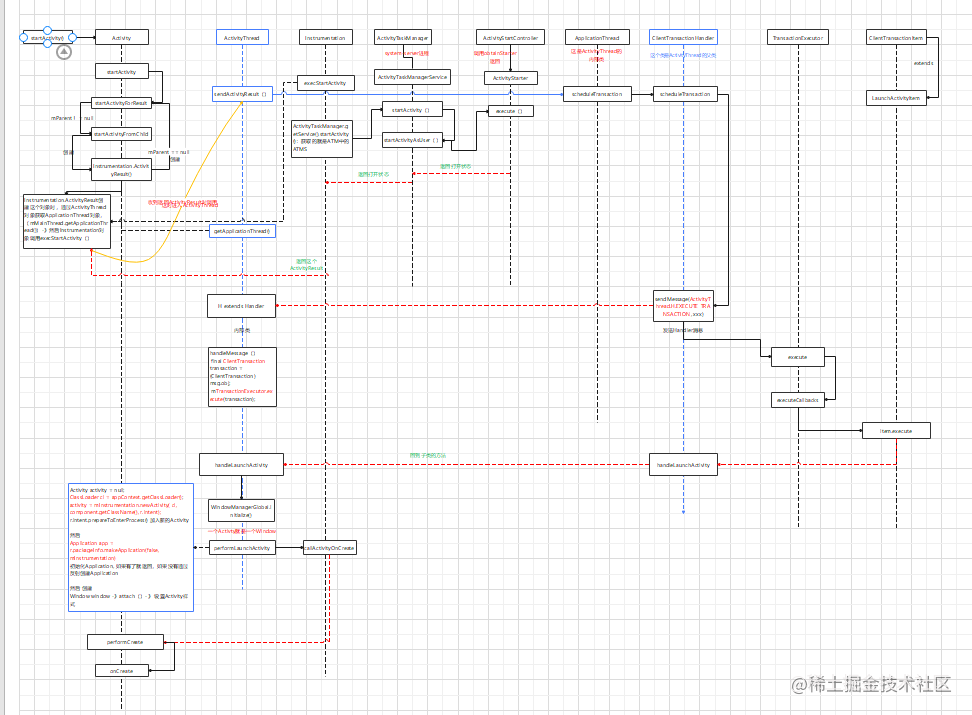 **OnResume调用方法**
Activity启动完成 查看启动流程全面
Activity 先创建 那么 Application 的onCreate方法在哪里运行?
从栈顶Activity的onPause到启动activityon的Resume过程
ActivityStack.startPausingLocked()
IApplicationThread.schedulePauseActivity()
ActivityThread.sendMessage()
ActivityThread.H.sendMessage();
ActivityThread.H.handleMessage()
ActivityThread.handlePauseActivity()
ActivityThread.performPauseActivity()
Activity.performPause()
Activity.onPause()
ActivityManagerNative.getDefault().activityPaused(token)
ActivityManagerService.activityPaused()
ActivityStack.activityPausedLocked()
ActivityStack.completePauseLocked()
ActivityStack.resumeTopActivitiesLocked()
ActivityStack.resumeTopActivityLocked()
ActivityStack.resumeTopActivityInnerLocked()
ActivityStack.startSpecificActivityLocked
Application 的创建流程?
startActivity到怎么创建进程
这表文章写了关于启动的整个流程包含了怎么创建的应用进程
AMS就是ActivityManagerService,是由zygote进程孵化出第一个java进程system_server,在com.android.internal.os.ZygoteInit类的main 方法中:
//ZygoteInit main方法 6件事:1.registerZygoteSocket,
//2.调用preload加载资源,3.利用gcAndFinalize初始化gc,4.启动SystemServer,
//5.调用runSelectLoop运行Zygote进程选择的looper,6.关闭和清理zygote sockets
public static void main(String argv[]) {
    ZygoteServer zygoteServer = null;

    Runnable caller;
    try {

        RuntimeInit.preForkInit();

        boolean startSystemServer = false;
        String zygoteSocketName = "zygote";
        String abiList = null;
        boolean enableLazyPreload = false;
        for (int i = 1; i < argv.length; i++) {
            if ("start-system-server".equals(argv[i])) {
                //开始system-server
                startSystemServer = true;
            } else if ("--enable-lazy-preload".equals(argv[i])) {
                //加载资源
                enableLazyPreload = true;
            } else if (argv[i].startsWith(ABI_LIST_ARG)) {
                abiList = argv[i].substring(ABI_LIST_ARG.length());
            } else if (argv[i].startsWith(SOCKET_NAME_ARG)) {
                zygoteSocketName = argv[i].substring(SOCKET_NAME_ARG.length());
            } else {
                throw new RuntimeException("Unknown command line argument: " + argv[i]);
            }
        }

        //初始化GC
        // Do an initial gc to clean up after startup
        bootTimingsTraceLog.traceBegin("PostZygoteInitGC");
        gcAndFinalize();
        bootTimingsTraceLog.traceEnd(); // PostZygoteInitGC

        final boolean isPrimaryZygote = zygoteSocketName.equals(Zygote.PRIMARY_SOCKET_NAME);
        if (!isRuntimeRestarted) {
            if (isPrimaryZygote) {
                FrameworkStatsLog.write(FrameworkStatsLog.BOOT_TIME_EVENT_ELAPSED_TIME_REPORTED,
                        BOOT_TIME_EVENT_ELAPSED_TIME__EVENT__ZYGOTE_INIT_START,
                        startTime);
            } else if (zygoteSocketName.equals(Zygote.SECONDARY_SOCKET_NAME)) {
                FrameworkStatsLog.write(FrameworkStatsLog.BOOT_TIME_EVENT_ELAPSED_TIME_REPORTED,
                        BOOT_TIME_EVENT_ELAPSED_TIME__EVENT__SECONDARY_ZYGOTE_INIT_START,
                        startTime);
            }
        }

        Zygote.initNativeState(isPrimaryZygote);

        //创建一个 Socket
        zygoteServer = new ZygoteServer(isPrimaryZygote);

        if (startSystemServer) {
            //创建system-server 进程
            Runnable r = forkSystemServer(abiList, zygoteSocketName, zygoteServer);

            // {@code r == null} in the parent (zygote) process, and {@code r != null} in the
            // child (system_server) process.
            if (r != null) {
                r.run();
                return;
            }
        }

        Log.i(TAG, "Accepting command socket connections");

        // The select loop returns early in the child process after a fork and
        // loops forever in the zygote.
        caller = zygoteServer.runSelectLoop(abiList);
    } catch (Throwable ex) {
        Log.e(TAG, "System zygote died with exception", ex);
        throw ex;
    } finally {
        if (zygoteServer != null) {
            zygoteServer.closeServerSocket();
        }
    }
}
private static Runnable forkSystemServer(String abiList, String socketName,
        ZygoteServer zygoteServer) {


    /* Hardcoded command line to start the system server */
    //fork 进程
    String args[] = {
            "--setuid=1000",
            "--setgid=1000",
            "--setgroups=1001,1002,1003,1004,1005,1006,1007,1008,1009,1010,1018,1021,1023,"
                    + "1024,1032,1065,3001,3002,3003,3006,3007,3009,3010,3011",
            "--capabilities=" + capabilities + "," + capabilities,
            "--nice-name=system_server",
            "--runtime-args",
            "--target-sdk-version=" + VMRuntime.SDK_VERSION_CUR_DEVELOPMENT,
            "com.android.server.SystemServer",
    };
    ZygoteArguments parsedArgs = null;

    int pid;

    try {
        //解析args指令
        parsedArgs = new ZygoteArguments(args);
        Zygote.applyDebuggerSystemProperty(parsedArgs);
        Zygote.applyInvokeWithSystemProperty(parsedArgs);

        if (Zygote.nativeSupportsTaggedPointers()) {
            /* Enable pointer tagging in the system server. Hardware support for this is present
             * in all ARMv8 CPUs. */
            parsedArgs.mRuntimeFlags |= Zygote.MEMORY_TAG_LEVEL_TBI;
        }

        /* Enable gwp-asan on the system server with a small probability. This is the same
         * policy as applied to native processes and system apps. */
        parsedArgs.mRuntimeFlags |= Zygote.GWP_ASAN_LEVEL_LOTTERY;

        if (shouldProfileSystemServer()) {
            parsedArgs.mRuntimeFlags |= Zygote.PROFILE_SYSTEM_SERVER;
        }

        /* Request to fork the system server process */
        //去fork 一个进程
        pid = Zygote.forkSystemServer(
                parsedArgs.mUid, parsedArgs.mGid,
                parsedArgs.mGids,
                parsedArgs.mRuntimeFlags,
                null,
                parsedArgs.mPermittedCapabilities,
                parsedArgs.mEffectiveCapabilities);
    } catch (IllegalArgumentException ex) {
        throw new RuntimeException(ex);
    }

    /* For child process */
    //当创建子进程的时候 pid 进程Id 为0
    if (pid == 0) {
        if (hasSecondZygote(abiList)) {
            waitForSecondaryZygote(socketName);
        }

        zygoteServer.closeServerSocket();
        //通知创建进程完成
        return handleSystemServerProcess(parsedArgs);
    }

    return null;
}
static int forkSystemServer(int uid, int gid, int[] gids, int runtimeFlags,
        int[][] rlimits, long permittedCapabilities, long effectiveCapabilities) {
    ZygoteHooks.preFork();

    int pid = nativeForkSystemServer(
            uid, gid, gids, runtimeFlags, rlimits,
            permittedCapabilities, effectiveCapabilities);

    // Set the Java Language thread priority to the default value for new apps.
    Thread.currentThread().setPriority(Thread.NORM_PRIORITY);

    ZygoteHooks.postForkCommon();
    return pid;
}

private static native int nativeForkSystemServer(int uid, int gid, int[] gids, int runtimeFlags,
        int[][] rlimits, long permittedCapabilities, long effectiveCapabilities);
nativeForkSystemServer创建system_server进程,创建成功后 调用 handleSystemServerProcess
private static Runnable handleSystemServerProcess(ZygoteArguments parsedArgs) {

    final String systemServerClasspath = Os.getenv("SYSTEMSERVERCLASSPATH");
    if (systemServerClasspath != null) {
        performSystemServerDexOpt(systemServerClasspath);
        // Capturing profiles is only supported for debug or eng builds since selinux normally
        // prevents it.
        if (shouldProfileSystemServer() && (Build.IS_USERDEBUG || Build.IS_ENG)) {
            try {
                Log.d(TAG, "Preparing system server profile");
                prepareSystemServerProfile(systemServerClasspath);
            } catch (Exception e) {
                Log.wtf(TAG, "Failed to set up system server profile", e);
            }
        }
    }

    if (parsedArgs.mInvokeWith != null) {
        String[] args = parsedArgs.mRemainingArgs;
        // If we have a non-null system server class path, we'll have to duplicate the
        // existing arguments and append the classpath to it. ART will handle the classpath
        // correctly when we exec a new process.
        if (systemServerClasspath != null) {
            String[] amendedArgs = new String[args.length + 2];
            amendedArgs[0] = "-cp";
            amendedArgs[1] = systemServerClasspath;
            System.arraycopy(args, 0, amendedArgs, 2, args.length);
            args = amendedArgs;
        }

        WrapperInit.execApplication(parsedArgs.mInvokeWith,
                parsedArgs.mNiceName, parsedArgs.mTargetSdkVersion,
                VMRuntime.getCurrentInstructionSet(), null, args);

        throw new IllegalStateException("Unexpected return from WrapperInit.execApplication");
    } else {
        ClassLoader cl = null;
        if (systemServerClasspath != null) {
            //通过反射会调用到SystemServer 的 main 函数
            cl = createPathClassLoader(systemServerClasspath, parsedArgs.mTargetSdkVersion);

            Thread.currentThread().setContextClassLoader(cl);
        }

        /*
         * Pass the remaining arguments to SystemServer.
         */
        return ZygoteInit.zygoteInit(parsedArgs.mTargetSdkVersion,
                parsedArgs.mDisabledCompatChanges,
                parsedArgs.mRemainingArgs, cl);
    }

    /* should never reach here */
}
这时 从 Zygote 进入 system-server进程, SystemServer 的 main:
public static void main(String[] args) {
    new SystemServer().run();
}
//5件事:1、初始化设置一些系统属性;2、准备MainLooper;
//3、初始化system context对象;4、创建system service manager;
//5、调用startBootstrapServices(),startCoreServices(),startOtherServices()启动各种service
private void run() {
        // 初始化一些系统属性
        // If the system has "persist.sys.language" and friends set, replace them with
        // "persist.sys.locale". Note that the default locale at this point is calculated
        // using the "-Duser.locale" command line flag. That flag is usually populated by
        // AndroidRuntime using the same set of system properties, but only the system_server
        // and system apps are allowed to set them.
        //
        // NOTE: Most changes made here will need an equivalent change to
        // core/jni/AndroidRuntime.cpp
        if (!SystemProperties.get("persist.sys.language").isEmpty()) {
            final String languageTag = Locale.getDefault().toLanguageTag();

            SystemProperties.set("persist.sys.locale", languageTag);
            SystemProperties.set("persist.sys.language", "");
            SystemProperties.set("persist.sys.country", "");
            SystemProperties.set("persist.sys.localevar", "");
        }

        // The system server should never make non-oneway calls
        Binder.setWarnOnBlocking(true);
        // The system server should always load safe labels
        PackageItemInfo.forceSafeLabels();

        // Default to FULL within the system server.
        SQLiteGlobal.sDefaultSyncMode = SQLiteGlobal.SYNC_MODE_FULL;

        // Deactivate SQLiteCompatibilityWalFlags until settings provider is initialized
        SQLiteCompatibilityWalFlags.init(null);


        // In case the runtime switched since last boot (such as when
        // the old runtime was removed in an OTA), set the system
        // property so that it is in sync. We can't do this in
        // libnativehelper's JniInvocation::Init code where we already
        // had to fallback to a different runtime because it is
        // running as root and we need to be the system user to set
        // the property. http://b/11463182
        SystemProperties.set("persist.sys.dalvik.vm.lib.2", VMRuntime.getRuntime().vmLibrary());

        // Mmmmmm... more memory!
        VMRuntime.getRuntime().clearGrowthLimit();

        // Some devices rely on runtime fingerprint generation, so make sure
        // we've defined it before booting further.
        Build.ensureFingerprintProperty();

        // Within the system server, it is an error to access Environment paths without
        // explicitly specifying a user.
        Environment.setUserRequired(true);

        // Within the system server, any incoming Bundles should be defused
        // to avoid throwing BadParcelableException.
        BaseBundle.setShouldDefuse(true);

        // Within the system server, when parceling exceptions, include the stack trace
        Parcel.setStackTraceParceling(true);

        // Ensure binder calls into the system always run at foreground priority.
        BinderInternal.disableBackgroundScheduling(true);

        // Increase the number of binder threads in system_server
        BinderInternal.setMaxThreads(sMaxBinderThreads);

        // Prepare the main looper thread (this thread).
        android.os.Process.setThreadPriority(
                android.os.Process.THREAD_PRIORITY_FOREGROUND);
        android.os.Process.setCanSelfBackground(false);
        //准备Looper
        Looper.prepareMainLooper();
        Looper.getMainLooper().setSlowLogThresholdMs(
                SLOW_DISPATCH_THRESHOLD_MS, SLOW_DELIVERY_THRESHOLD_MS);

        SystemServiceRegistry.sEnableServiceNotFoundWtf = true;

        // Initialize native services.
        System.loadLibrary("android_servers");
        //创建SystemServer的上下文SystemContext 并且ActivityThread 在这里面进行初始化
        // Initialize the system context.
        createSystemContext();

        // Call per-process mainline module initialization.
        ActivityThread.initializeMainlineModules();
        //实例化一个SystemServiceManager对象
        // Create the system service manager.
        mSystemServiceManager = new SystemServiceManager(mSystemContext);
        mSystemServiceManager.setStartInfo(mRuntimeRestart,
                mRuntimeStartElapsedTime, mRuntimeStartUptime);
        LocalServices.addService(SystemServiceManager.class, mSystemServiceManager);
        // Prepare the thread pool for init tasks that can be parallelized
        SystemServerInitThreadPool.start();

    } finally {
        t.traceEnd();  // InitBeforeStartServices
    }


    // Start services.
    try {
        t.traceBegin("StartServices");
        //开启一些系统服务
        startBootstrapServices(t);
        startCoreServices(t);
        startOtherServices(t);
    } catch (Throwable ex) {

        throw ex;
    } finally {
        t.traceEnd(); // StartServices
    }
    // Loop forever.
    Looper.loop();
    throw new RuntimeException("Main thread loop unexpectedly exited");
}
在SystemServer的run方法里面 需要关注的时
startBootstrapServices(t); 和 startOtherServices(t);
这个时候才进入到android.app.ActivityThread 的main 方法里面