DialogFragment代码主体
package com.zpp.imagelook;
import android.content.Context;
import android.content.DialogInterface;
import android.os.Bundle;
import android.text.TextUtils;
import android.view.KeyEvent;
import android.view.LayoutInflater;
import android.view.View;
import android.view.ViewGroup;
import android.view.WindowManager;
import android.widget.Button;
import android.widget.TextView;
import androidx.annotation.NonNull;
import androidx.annotation.Nullable;
import androidx.fragment.app.DialogFragment;
public class IMTipDialog extends DialogFragment {
TextView title;
TextView content;
Button sure;
protected static final float FLIP_DISTANCE = 50;
Context context;
private static IMTipDialog fragment;
public IMTipDialog() {
}
public static IMTipDialog newInstance(String tip) {
fragment = new IMTipDialog();
Bundle bundle = new Bundle();
bundle.putString("tip", tip);
fragment.setArguments(bundle);
return fragment;
}
@Nullable
@Override
public View onCreateView(@NonNull LayoutInflater inflater, @Nullable ViewGroup container,
@Nullable Bundle savedInstanceState) {
View view = inflater.inflate(R.layout.im_tip_layout, container, false);
return view;
}
@Override
public void onViewCreated(@NonNull View view, @Nullable Bundle savedInstanceState) {
String tip = getArguments().getString("tip");
getDialog().setOnKeyListener((dialog, keyCode, event) -> {
if (keyCode == KeyEvent.KEYCODE_BACK) {
return true;
}
return false;
});
setTipView(view, tip);
super.onViewCreated(view, savedInstanceState);
}
private void setTipView(View videoView, String tip) {
title = videoView.findViewById(R.id.title);
content = videoView.findViewById(R.id.content);
if (TextUtils.isEmpty(tip)) {
tip = "内容";
}
sure = videoView.findViewById(R.id.sure);
sure.setOnClickListener(v -> {
dismiss();
});
}
public IMTipDialog setContext(Context context) {
this.context = context;
return this;
}
public void show() {
setStyle(DialogFragment.STYLE_NORMAL, R.style.Dialog_FullScreen);
show(((MainActivity) (context)).getSupportFragmentManager(), "ssss");
}
@Override
public void onResume() {
ViewGroup.LayoutParams params = getDialog().getWindow().getAttributes();
params.width = WindowManager.LayoutParams.MATCH_PARENT;
params.height = WindowManager.LayoutParams.MATCH_PARENT;
getDialog().getWindow().setAttributes((WindowManager.LayoutParams) params);
super.onResume();
}
@Override
public void onDismiss(DialogInterface dialog) {
super.onDismiss(dialog);
}
}
布局
<?xml version="1.0" encoding="utf-8"?>
<RelativeLayout xmlns:android="http://schemas.android.com/apk/res/android"
    xmlns:app="http://schemas.android.com/apk/res-auto"
    android:layout_width="match_parent"
    android:layout_height="match_parent">

    <androidx.cardview.widget.CardView
        app:cardBackgroundColor="@color/white"
        android:layout_width="match_parent"
        android:layout_height="300dp"
        android:layout_centerInParent="true"
        android:layout_marginLeft="50dp"
        android:layout_marginRight="50dp"
        android:clipToPadding="false"
        app:cardCornerRadius="15dp">

        <RelativeLayout
            android:layout_width="match_parent"
            android:layout_height="match_parent"
            android:orientation="vertical"
            android:padding="15dp">

            <TextView
                android:id="@+id/title"
                android:layout_width="match_parent"
                android:layout_height="wrap_content"
                android:gravity="center"
                android:maxLines="1"
                android:text="重要提示"
                android:textColor="@color/black"
                android:textSize="17dp"
                android:textStyle="bold" />

            <TextView
                android:id="@+id/content"
                android:layout_width="match_parent"
                android:layout_height="wrap_content"
                android:layout_below="@id/title"
                android:layout_marginTop="10dp"
                android:lineHeight="20dp"
                android:text="内容"
                android:textColor="@color/black" />

            <Button
                android:id="@+id/sure"
                android:layout_width="match_parent"
                android:layout_height="35dp"
                android:layout_alignParentBottom="true"
                android:layout_marginLeft="20dp"
                android:layout_marginRight="20dp"
                android:background="@drawable/bule_15_btn"
                android:text="我已了解"
                android:textColor="@color/white" />

        </RelativeLayout>

    </androidx.cardview.widget.CardView>

</RelativeLayout>
sytle 防止全屏时状态栏变黑
<?xml version="1.0" encoding="utf-8"?>
<resources>
    <style name="Dialog.FullScreen" parent="Theme.AppCompat.Dialog">
        <item name="android:padding">0dp</item>
        <item name="android:windowBackground">@android:color/transparent</item>
        <item name="android:windowIsFloating">false</item>
        <item name="android:windowTranslucentStatus">true</item>
    </style>
</resources>
使用
IMTipDialog.newInstance("").setContext(MainActivity.this).show();
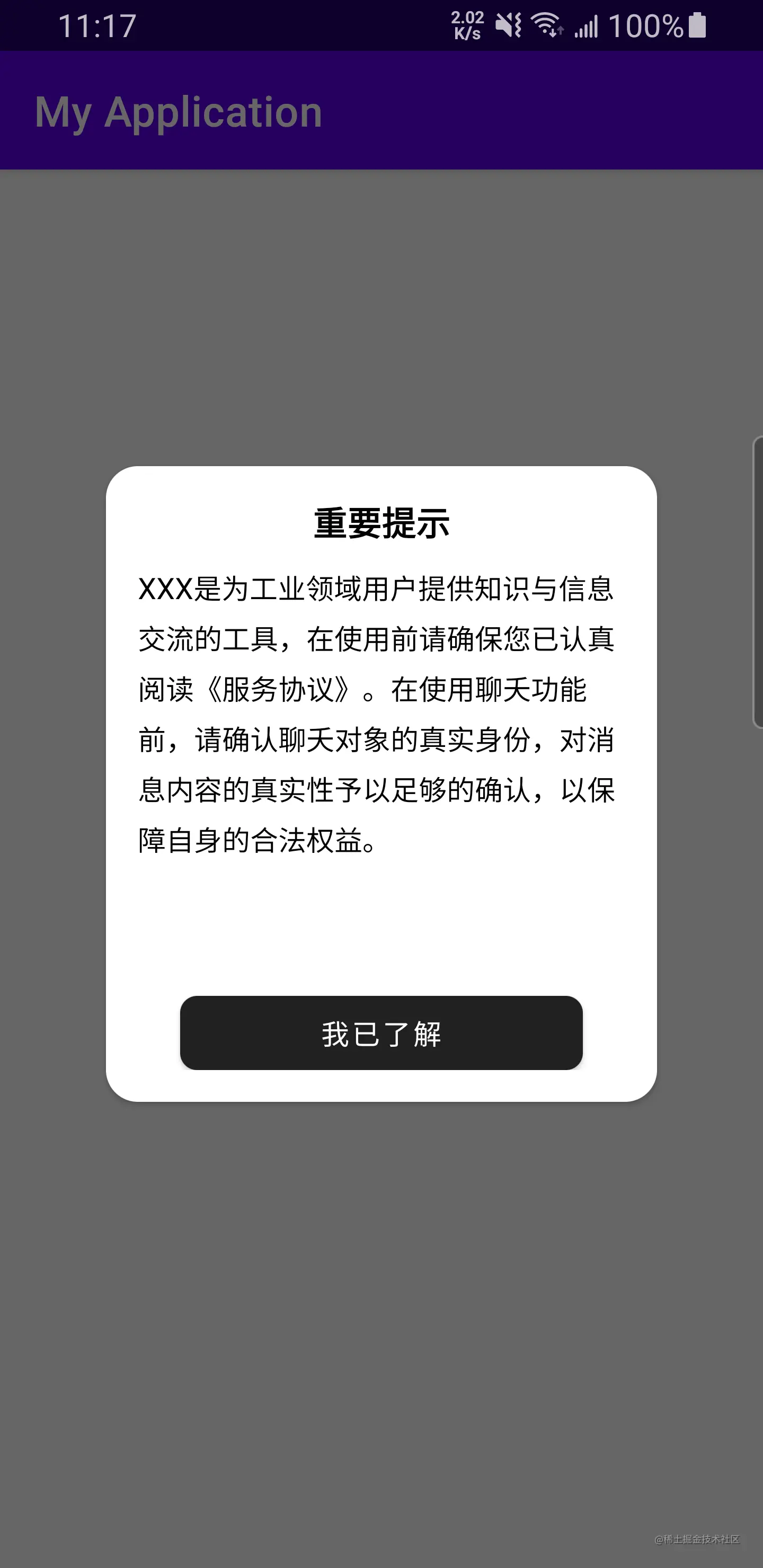
效果