欢迎关注微信公众号:FSA全栈行动 👋
Mach-O 是 iOS/macOS 系统上应用程序的文件格式,了解 Mach-O 文件的格式,有利于我们后续对应用进行静态分析和动态调试。
分析 Mach-O 文件的工具
otool
此为命令行的方式,具体参数可以使用 man 进行查看
man otool
...
-h     Display the Mach header.
-l     Display the load commands.
...
其中 -h 可查看 Header
otool -h Mach-O文件

-l 可查看 load commands,打印的内容太多就不展示了,有兴趣的可以自己打印看看
MachOView
免费开源的 Mach-O 文件分析工具
- GitHub链接:gdbinit/MachOView
- 蓝奏云链接:MachOView.dmg
010 Editor
- 官网链接: 010 Editor
- MachO模板:MachOTemplate.bt
010 Editor 的模板功能很强大,收费产品,不过要分析 ARM64 架构的 Mach-O 程序,需要借助第三方模板。
菜单依次选择:Templates -> View Installed Templates
点击 Add 按钮,选择下载好的 MachOTemplate.bt,可以配置 Name 和 Category 等,然后点击 OK
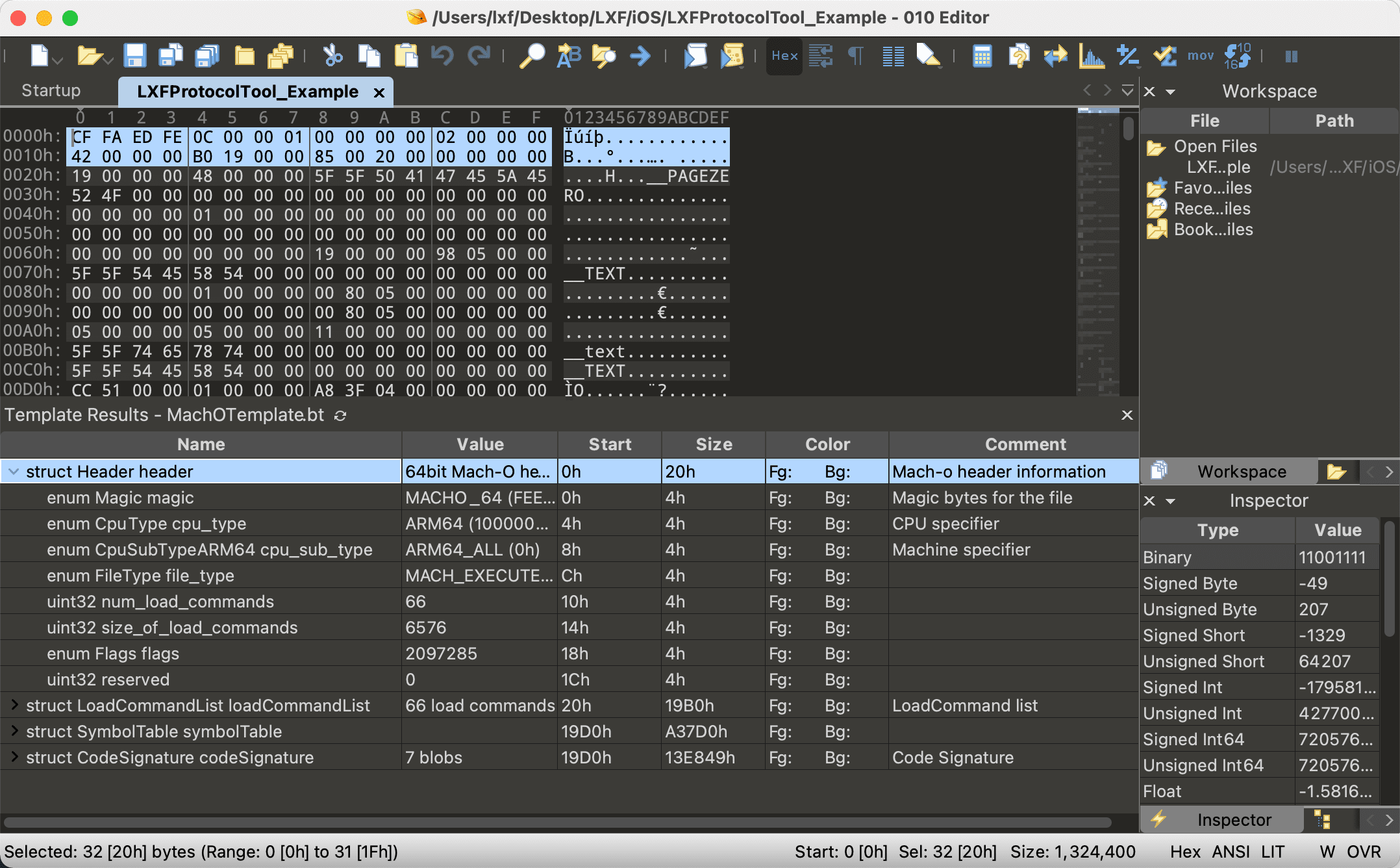
回到程序,将 Mach-O 插入到 010 Editor中,接着在 Templates 菜单中选择刚才点击的模板
分析结果如图所示
Mach-O 的结构
如上图所示,Mach-O 文件由三部分组成
| 部分 | 作用 |
|---|---|
Mach-O头部(Header) | 保存了 CPU 架构、大小端序、文件类型、加载命令数量等一些基本信息 |
加载命令(Load Commands) | 指定了文件的逻辑结构与文件在虚拟内存中的布局 |
数据块(Data) | Load Commands 中定义的 Segment 的原始数据 |
Header
Mach-o头部(Header)保存了CPU架构、大小端序、文件类型、加载命令数量等一些基本信息,用于校验Mach-O文件的合法性和确定文件的运行环境。
在 Xcode 中按快捷键 ⌘ + Shift + o ,输入 mach-o/loader.h,即可找到头部的定义
32 位和 64 位架构的 CPU 分别使用 mach_header 与 mach_header_64 结构体来描述 Mach-O 头部,本文所述内容均以 64 位为主,定义如下:
/*
 * The 64-bit mach header appears at the very beginning of object files for
 * 64-bit architectures.
 */
struct mach_header_64 {
    uint32_t    magic;      /* mach magic number identifier */
    cpu_type_t  cputype;    /* cpu specifier */
    cpu_subtype_t  cpusubtype; /* machine specifier */
    uint32_t    filetype;   /* type of file */
    uint32_t    ncmds;      /* number of load commands */
    uint32_t    sizeofcmds; /* the size of all the load commands */
    uint32_t    flags;      /* flags */
    uint32_t    reserved;   /* reserved */
};

/* Constant for the magic field of the mach_header_64 (64-bit architectures) */
#define MH_MAGIC_64 0xfeedfacf /* the 64-bit mach magic number */
#define MH_CIGAM_64 0xcffaedfe /* NXSwapInt(MH_MAGIC_64) */
| 字段 | 作用 |
|---|---|
magic | 魔数(特征字段),用于标识当前设备是大端序还是小端序。 由于 iOS 是小端序,所以其被定义常量 MH_MAGIC_64,即固定取值为 0xfeedfacf |
cputype | 标识 CPU 架构,类型为 cpu_type_t,其定义于 mach/machine.h |
cpusubtype | 标具体的 CPU 架构,区分不同版本的处理器,类型为 cpusubtype,其定义于 mach/machine.h |
filetype | Mach-O 文件类型(如:可执行文件、库文件等),可在 mach-o/loader.h 中找到具体定义和取值。常见的有 MH_OBJECT(中间目标文件)、MH_EXECUTE(可执行文件)、MH_DYLIB(动态链接库)、MH_DYLINKER(动态链接器) |
ncmds | Load Commands 的数量 |
sizeofcmds | Load Commands 所占的总字节大小 |
flags | 一些标识信息,可在 mach-o/loader.h 中找到具体定义和取值。其中 #define MH_PIE 0x200000 值得注意,只会在文件类型为 MH_EXECUTE 时使用,表明开启 ASLR,用来增加程序安全性。 |
reserved | 系统保留字段 |
注: ASLR ,全称 Address Space Layout Randomization,地址空间布局随机化,顾名思义,每次启动程序,加载的地址都会随机变化,需要对代码地址进行计算修正才可正常访问。
Load Commands
加载命令(
Load Commands)紧跟Header之后,指定了文件的逻辑结构与文件在虚拟内存中的布局,明确地告诉加载器如何处理二进制数据。有些命令由内核处理,有些由动态链接器(dyld)处理。
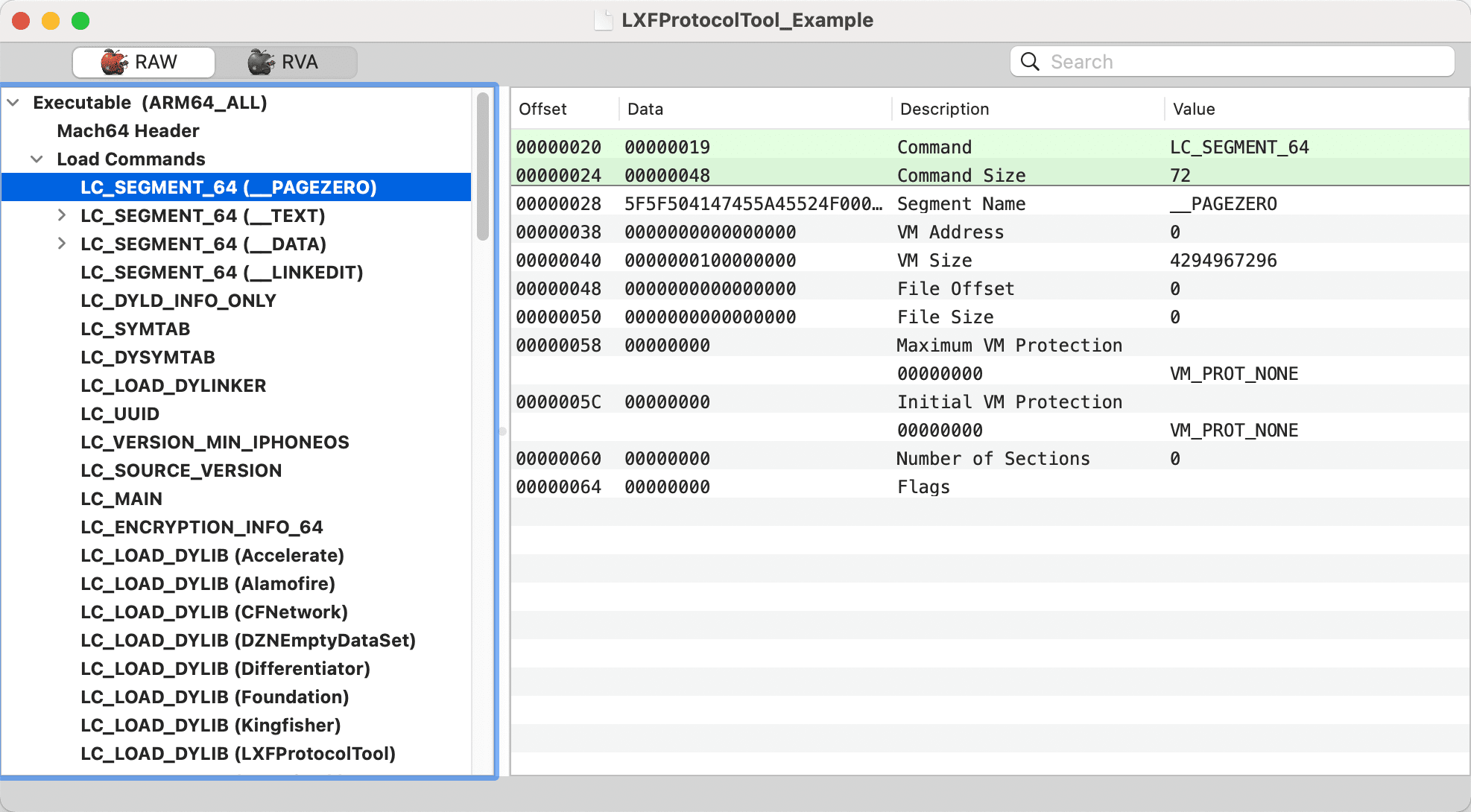
Load Commands 可以当作是多个 command 的集合,每一个 command 的类型 cmd 都是以 LC_ 为前缀的常量,如 LC_SEGMENT。
在头文件 mach-o/loader.h 中可以查看每个 command 的定义,每个 command 都拥有自己的独立结构,但是其结构的前两个字段固定为 cmd 和 cmdsize
struct load_command {
    uint32_t cmd;        /* type of load command */
    uint32_t cmdsize;    /* total size of command in bytes */
};
| 字段 | 作用 |
|---|---|
cmd | 当前 Load Commands 的类型,如 LC_SEGMENT |
cmdsize | 当前 Load Commands 的大小,保证其可被正确解析 |
根据不同的命令类型(cmd),内核会使用不同的函数进行解析。
下面对几个重要的命令类型进行详解。
LC_SEGMENT
LC_SEGMENT 和 LC_SEGMENT_64 为段加载命令,每个段都定义了一个虚拟内存区域,动态链接器负责把这个区域映射到进程地址空间。其结构定义如下所示:
struct segment_command_64 { /* for 64-bit architectures */
    uint32_t	cmd;		/* LC_SEGMENT_64 */
    uint32_t	cmdsize;	/* includes sizeof section_64 structs */
    char	segname[16];	/* segment name */
    uint64_t	vmaddr;		/* memory address of this segment */
    uint64_t	vmsize;		/* memory size of this segment */
    uint64_t	fileoff;	/* file offset of this segment */
    uint64_t	filesize;	/* amount to map from the file */
    vm_prot_t	maxprot;	/* maximum VM protection */
    vm_prot_t	initprot;	/* initial VM protection */
    uint32_t	nsects;		/* number of sections in segment */
    uint32_t	flags;		/* flags */
};
| 字段 | 描述 |
|---|---|
cmd | 当前 command 的类型 |
cmdsize | 当前 command 的大小 |
segname | 段名称,占16个字节 |
vmaddr | 段的虚拟内存地址 |
vmsize | 段的虚拟内存大小 |
fileoff | 段在文件中的偏移量 |
filesize | 段在文件中的大小 |
maxprot | 段页面的最高内存保护级别 |
initprot | 段页面的初始内存保护级别 |
nsects | 段中包含节的数量。一个段可以包含0个或多个节 |
flags | 段的标志信息(SG_HIGHVM、SG_FVMLIB等) |
系统从 fileoff 处加载大小为 filesize 的内容到虚拟内存 vmaddr 处,大小为 vmsize, 段页面的权限由 initprot 进行初始化,权限可被修改,但不可超过 maxprot 的值。
上图中的四个段作用如下:
| 段 | 描述 |
|---|---|
__PAGEZERO | 静态链接器创建了 __PAGEZERO 作为可执行文件的第一个段,该段在虚拟内存中的位置和大小皆为 0,不能读写、不能执行,用来处理空指针。 |
__TEXT | 包含了可执行的代码和其他一些只读数据。静态链接器设置该段的虚拟内存权限为可读、可执行,进程被允许执行这些代码,但不能修改。 |
__DATA | 包含了将会被更改的数据。静态链接器设置该段的虚拟内存权限为可读写。 |
__LINKEDIT | 包含了动态链接库的原始数据,如符号、字符串和重定位表条目等。 |
64 位的节(section)结构定义:
struct section_64 { /* for 64-bit architectures */
    char	sectname[16];	/* name of this section */
    char	segname[16];	/* segment this section goes in */
    uint64_t	addr;		/* memory address of this section */
    uint64_t	size;		/* size in bytes of this section */
    uint32_t	offset;		/* file offset of this section */
    uint32_t	align;		/* section alignment (power of 2) */
    uint32_t	reloff;		/* file offset of relocation entries */
    uint32_t	nreloc;		/* number of relocation entries */
    uint32_t	flags;		/* flags (section type and attributes)*/
    uint32_t	reserved1;	/* reserved (for offset or index) */
    uint32_t	reserved2;	/* reserved (for count or sizeof) */
    uint32_t	reserved3;	/* reserved */
};
| 段 | 描述 |
|---|---|
sectname | 节的名称,占 16 个字节 |
segname | 节指导的段名称,占 16 个字节 |
addr | 节在内存中的起始位置 |
size | 节占用的内存大小 |
offset | 节的文件偏移地址 |
align | 节的字节对齐大小 |
reloff | 重定位入口的文件偏移 |
nreloc | 需要重定位的入口数量 |
flags | 节的类型和属性 |
reserved1/2/3 | 系统保留字段 |
LC_LOAD_DYLIB
LC_LOAD_DYLIB 指向程序依赖库的加载信息,可以使用 MachOView 进行查看
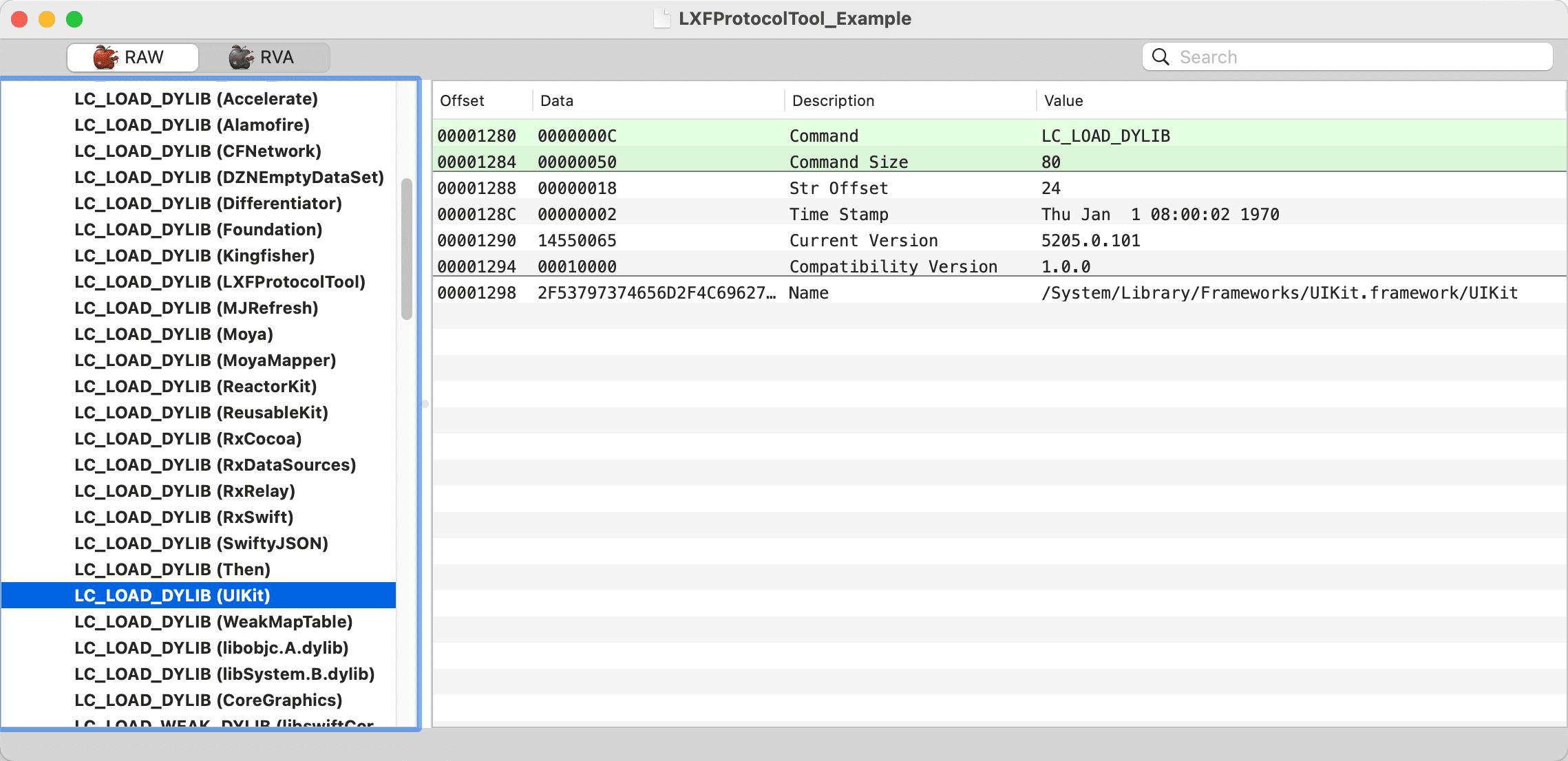
LC_LOAD_DYLIB 的结构定义为 dylib_command
struct dylib {
    union lc_str  name;			/* library's path name */
    uint32_t timestamp;			/* library's build time stamp */
    uint32_t current_version;		/* library's current version number */
    uint32_t compatibility_version;	/* library's compatibility vers number*/
};

struct dylib_command {
    uint32_t		cmd;		/* LC_ID_DYLIB, LC_LOAD_{,WEAK_}DYLIB, LC_REEXPORT_DYLIB */
    uint32_t		cmdsize;	/* includes pathname string */
    struct dylib	dylib;		/* the library identification */
};
| 字段 | 描述 |
|---|---|
name | 依赖库的完整路径。动态链接器会使用此路径进行动态库加载 |
timestamp | 依赖库构建时的时间戳 |
current_version | 当前版本号 |
compatibility_version | 兼容版本号 |
LC_LOAD_WEAK_DYLIB 的结构也是 dylib_command,不同的是其声明的依赖库是可选的,即缺少声明的依赖库不会影响主程序的运行,而 LC_LOAD_DYLIB 声明的依赖库如果找不到,加载器会放弃并结束进程。
可以使用 otool 来查看有哪些依赖库
otool -arch arm64 -L LXFProtocolTool_Example

LXFProtocolTool_Example:
    /System/Library/Frameworks/Accelerate.framework/Accelerate (compatibility version 1.0.0, current version 4.0.0)
    @rpath/Alamofire.framework/Alamofire (compatibility version 1.0.0, current version 1.0.0)
    /usr/lib/libobjc.A.dylib (compatibility version 1.0.0, current version 228.0.0)
    /usr/lib/swift/libswiftCoreMIDI.dylib (compatibility version 1.0.0, current version 5.0.0, weak)
    ...
除了 /System/Library/ 和 /usr/lib 这些系统路径外,还可能会遇到 @rpath、@executable_path 之类的路径
| 路径 | 描述 |
|---|---|
@executable_path | 指可执行文件的目录 |
@rpath | 由 LC_RPATH 加载指定指定,iOS 上通常为应用自身 framework 文件,默认为:@executable_path/Framework |
这些路径可使用 MacOS 上提供的 install_name_tool 工具进行修改,注意:此操作对于未越狱平台注入动态库是必须掌握的!
# 修改依赖库路径
install_name_tool -change @rpath/Alamofire.framework/Alamofire @executable_path/Alamofire.framework/Alamofire LXFProtocolTool_Example
通用二进制
Universal Binary格式文件(通用二进制,也称胖二进制),实际上只是将不同架构的的 Mach-O 文件打包到一起,再在文件起始位置处加上 fat_header 结构来说明所支持的架构和偏移地址信息,其结构如下图所示:
头文件 mach-o/fat.h 中可查看通用二进制文件的定义:
#define FAT_MAGIC    0xcafebabe
#define FAT_CIGAM    0xbebafeca /* NXSwapLong(FAT_MAGIC) */

struct fat_header {
    uint32_t magic;     /* FAT_MAGIC or FAT_MAGIC_64 */
    uint32_t nfat_arch; /* number of structs that follow */
};
| 字段 | 作用 |
|---|---|
magic | 魔数(特征字段),其被定义常量 FAT_MAGIC,即固定取值为 0xcafebabe |
nfat_arch | 标识 Mach-O 文件包含的架构个数 |
fat_header 后紧跟 fat_arch 结构,有多少架构就会有多少 fat_arch,用于描述对应的 Mach-O文件的具体信息
struct fat_arch {
    cpu_type_t  cputype; /* cpu specifier (int) */
    cpu_subtype_t    cpusubtype; /* machine specifier (int) */
    uint32_t    offset;  /* file offset to this object file */
    uint32_t    size;    /* size of this object file */
    uint32_t    align;   /* alignment as a power of 2 */
};
| 字段 | 作用 |
|---|---|
offset | 指定对应架构相对于文件开头的偏移量 |
size | 指定对应架构数据的大小 |
align | 指定数据的内存对齐边界,取舍为 2 的 N 次方 |
cputype 和 cpusubtype 在前面已经提及过,这里就不赘述了