一、js逻辑处理
1. 对象获取属性的深层
let obj = {a:{b:1}}
console.log(obj.a)     // {b:1}
console.log(obj['a'])  // {b:1}

console.log(obj.a.b)   // 1
console.log(obj['a']['b']) // 1
console.log(obj['a.b']) // undefined
深层获取 obj['a.b'] 是undefined,不可取的;当然可以用 obj['a']['b'] 来获取值。
在开发过程中,会遇到写一个函数,把值传入函数中,得到该值去做后续的逻辑处理(如图)。
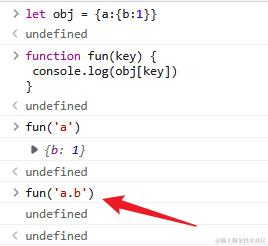
解决办法一:用eval() 函数会将传入的字符串当做 JavaScript 代码进行执行。
eval("obj['a']['b']") // 1
但最好不要用 eval,很有可能会出现很大的问题,至于啥问题我不知道,因为我没实际体验过,哈哈哈,具体可翻看文档[。](eval() - JavaScript | MDN (mozilla.org))
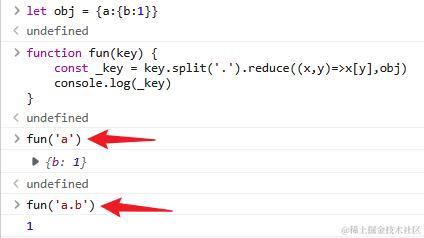
解决办法二:用 reduce
'a.b'.split('.').reduce((x,y)=>x[y],obj) // 1
2. 提取数组,返回对应的数据
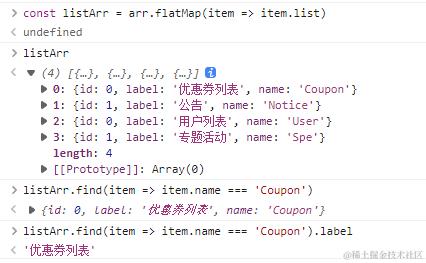
需求:返回 infoName 在数组 arr 里 list 数组里的 相对应的 label值
例如:let infoName = 'Coupon',则返回 '优惠券列表';
infoName = 'Notice',则返回 '公告'
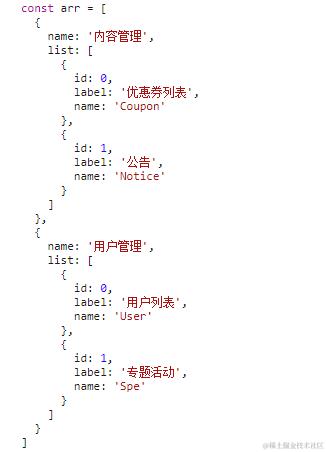
先: 第一条数据里的数组用 find 找到对应数据的label

然后: 用 flatMap 把 数组 arr 里的 list 数组全部提取出来,整合到一个新数组
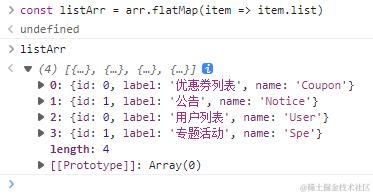
最后: 把两步整合。
3.返回相对应的数字字符串
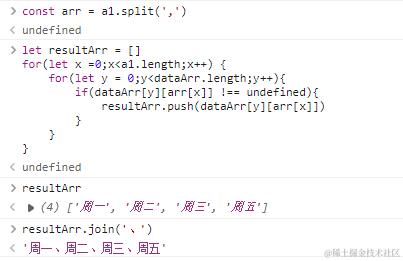
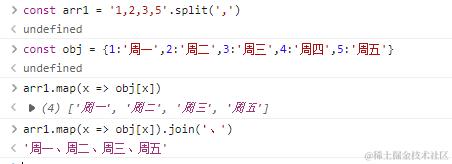
从这串字符串 a1 在 数组dataArr 中返回对应的字符串,即:周一、周二、周三、周五

第一种解法:
第二种解法:

第三种解法:
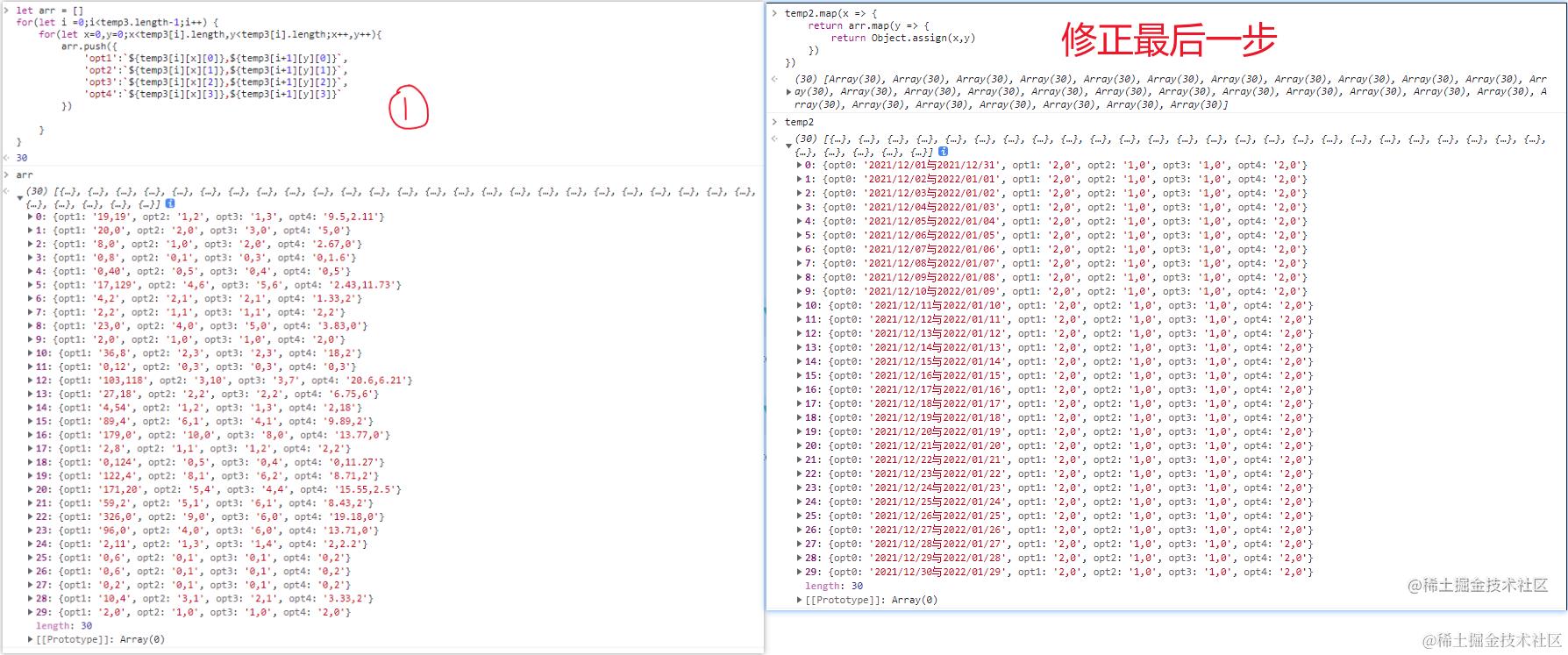
4.
5.原生 js 写折叠
<!DOCTYPE html>
<html lang="en">
<head>
    <meta charset="UTF-8">
    <meta http-equiv="X-UA-Compatible" content="IE=edge">
    <meta name="viewport" content="width=device-width, initial-scale=1.0">
    <title>Document</title>
    <style>
        body,div,p,h1,h2,h3,h4,h5,h6,ul,li,dl,dt,a,input,button,textarea,select {
            margin: 0;
            padding: 0;
            outline: none;
        }
        html,body {
            color: #333;
            font-size: 14px;
            min-width: 1200px;
        }
        a {
            text-decoration: none;
        }
        ul li {
            list-style: none;
        }
        .a-list {
            width: 900px;
            margin: 20px auto 20px;
        }
        .a-list li{
            border: 1px solid #ddd;
            margin-bottom: 10px;
        }
        .a-header {
            display: flex;
            align-items: center;
            justify-content: space-between;
            background: #f5f5f5;
            padding: 10px 20px;
            box-sizing: border-box;
            cursor: pointer;
        }
        .a-icon {
            font-size: 25px;
            transition: 0.3s transform;
        }
        .a-icon-active {
            transform: rotate(90deg);
        }
        .a-content {
            padding: 10px 20px;
            box-sizing: border-box;
            height: 0;
            opacity: 0;
            transition: all 0.5s linear;
        }
        .a-content-active {
            opacity: 1;
            height: 100px;
        }
    </style>
</head>
<body>
    <ul class="a-list">
        <li class="a-li">
            <div class="a-header">
                <h3>aa</h3>
                <p class="a-icon">▸</p>
            </div>
            <div class="a-content">
                <p>内容</p>
            </div>
        </li>
        <li class="a-li">
            <div class="a-header">
                <h3>aa</h3>
                <p class="a-icon">▸</p>
            </div>
            <div class="a-content">
                <p>内容</p>
            </div>
        </li>
        <li class="a-li">
            <div class="a-header">
                <h3>aa</h3>
                <p class="a-icon">▸</p>
            </div>
            <div class="a-content">
                <p>内容</p>
            </div>
        </li>
        <li class="a-li">
            <div class="a-header">
                <h3>aa</h3>
                <p class="a-icon">▸</p>
            </div>
            <div class="a-content">
                <p>内容</p>
            </div>
        </li>
        <li class="a-li">
            <div class="a-header">
                <h3>aa</h3>
                <p class="a-icon">▸</p>
            </div>
            <div class="a-content">
                <p>内容</p>
            </div>
        </li>
    </ul>
    <script>
        const aList = document.querySelectorAll('.a-li')
        aList.forEach((item,i) => {
            let aHeader = item.firstElementChild
            aHeader.addEventListener('click', () => {
                isClass(i)
                aHeader.children[1].classList.toggle('a-icon-active')
                item.children[1].classList.toggle('a-content-active')
            })
        })
        function isClass(i) {
            const aContent = document.querySelectorAll('.a-content')
            const aIcon = document.querySelectorAll('.a-icon')
            aContent.forEach((item, x) => {
                if(i != x) {
                    item.className = 'a-content'
                }
            })
            aIcon.forEach((item, y) => {
                if(i != y) {
                    item.className = 'a-icon'
                }
            })
        }
    </script>
</body>
</html>
6.递归
const arr = [
    {
        id: 1,
        son:[
            {
                id: 32,
                son: []
            },
            {
                id: 7,
                son:[]
            },
            {
                id: 4,
                son:[
                    {
                        id: 38,
                        son: []
                    },
                    {
                        id: 39,
                        son:[]
                    },
                    {
                        id: 40,
                        son:[
                            {
                                id: 38,
                                son:[
                                    {
                                        id: 40,
                                        son:[]
                                    }
                                ]
                            }
                        ]
                    }
                ]
            }
        ]
    },
    {
        id: 90,
        son:[]
    }
]

function sonFun(arr){
    arr.forEach(item => {
        if(item.son.length>0){
            item.a ='aaa'
            sonFun(item.son)
        }
    })
}
sonFun(arr)
console.log(arr)
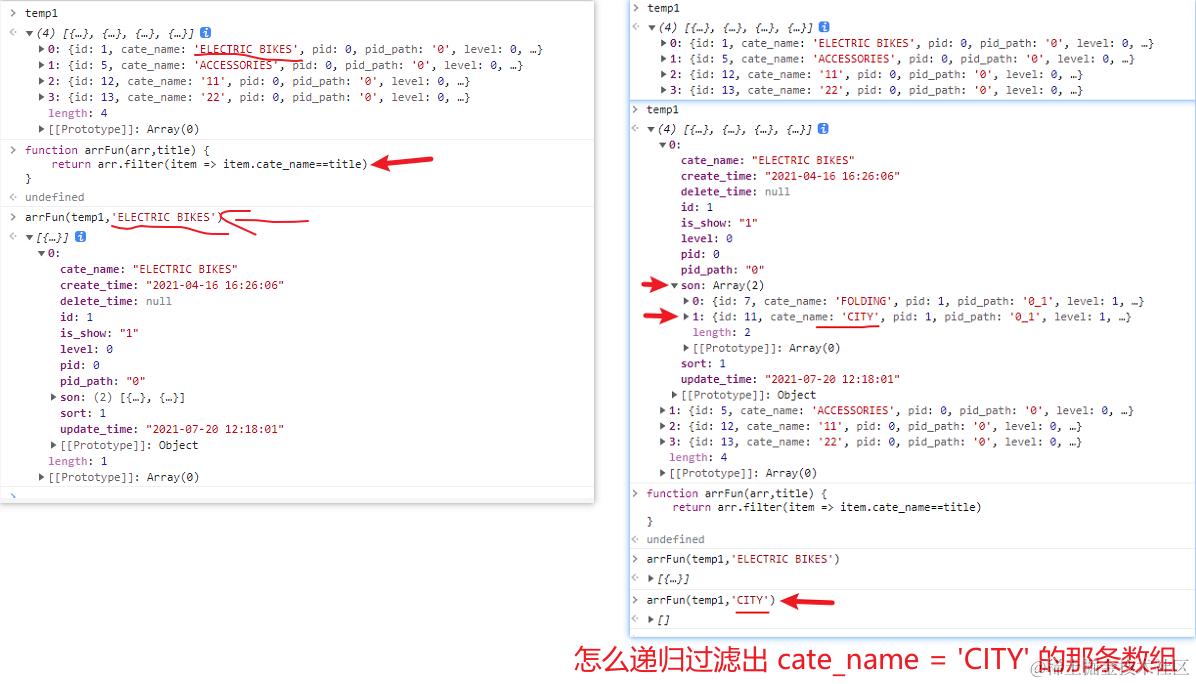
7.递归——搜索深层的内容
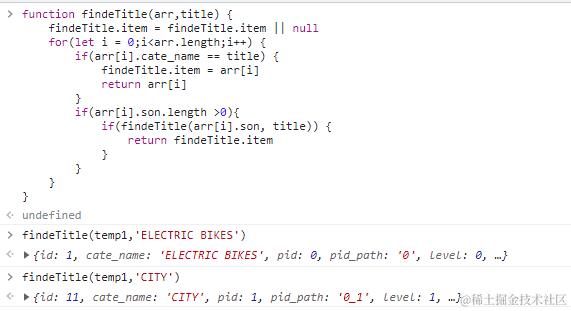
function findeTitle(arr,title) {
    findeTitle.item = findeTitle.item || null
    for(let i = 0;i<arr.length;i++) {
        if(arr[i].cate_name == title) {
            findeTitle.item = arr[i]    // 记录你查找到的那个对象
            return arr[i]
        }
        if(arr[i].son.length >0){
            if(findeTitle(arr[i].son, title)) {  // 递归到底层后,需要拿到结果来验证是不是找到了;找到了就结束
                return findeTitle.item
            }
        }
    }
}
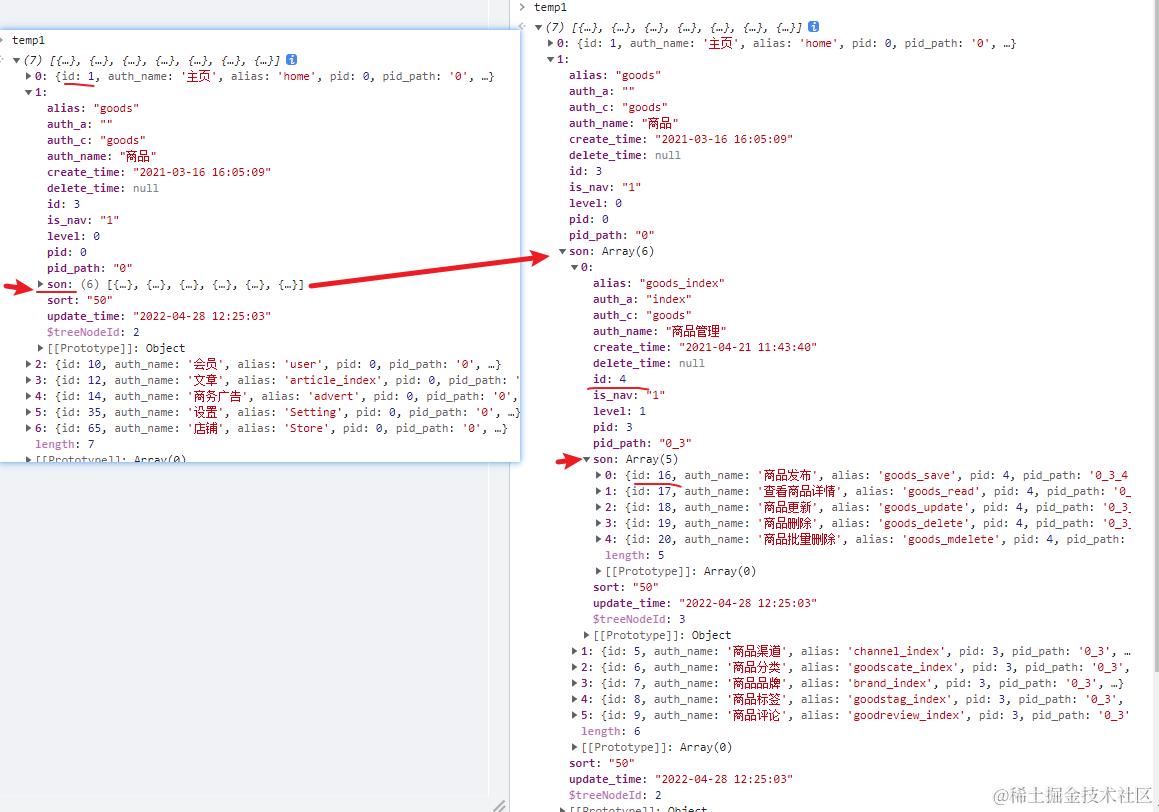
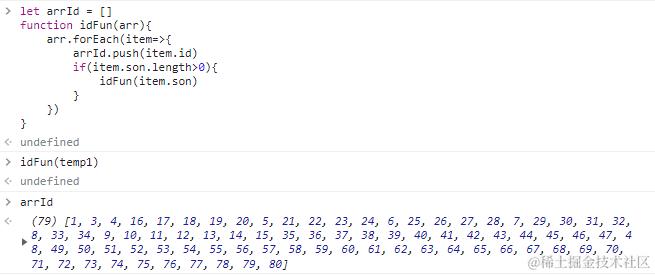
8.递归——把所有的id提取出来放在一个数组里
9.封装 时间戳 转换 时间
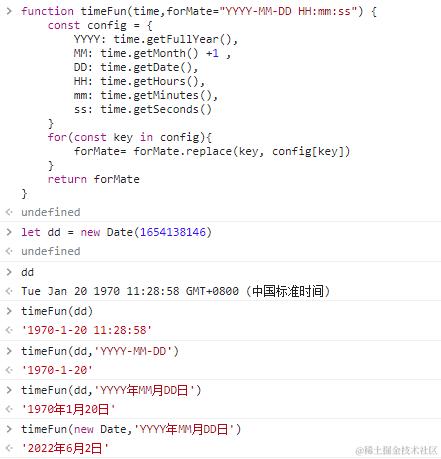
function timeFun(time,forMate="YYYY-MM-DD HH:mm:ss") {
    const config = {
        YYYY: time.getFullYear(),
        MM: time.getMonth() +1 ,
        DD: time.getDate(),
        HH: time.getHours(),
        mm: time.getMinutes(),
        ss: time.getSeconds()
    }
    for(const key in config){
        forMate= forMate.replace(key, config[key])
    }
    return forMate
}
改良版
function timeFun(time, forMate = 'YYYY-MM-DD HH:mm:ss') {
  let times = null
  if (!time) times = new Date()
  if (['Number'].includes(getType(time)) && time.toString().length == 10) time = time * 1000
  if (['Number', 'String'].includes(getType(time))) times = new Date(time)
  if (['Date'].includes(getType(time))) times = time
  const config = {
    YYYY: numAdd0(times.getFullYear()),
    MM: numAdd0(times.getMonth() + 1),
    DD: numAdd0(times.getDate()),
    HH: numAdd0(times.getHours()),
    mm: numAdd0(times.getMinutes()),
    ss: numAdd0(times.getSeconds())
  }
  Object.keys(config).forEach(key => {
    forMate = forMate.replace(key, config[key])
  })
  return forMate
}

function getType(value) {
  return Object.prototype.toString.call(value).slice(8, -1)
}

function numAdd0(value) {
  return value > 9 ? value.toString() : '0' + value
}

timeFun(1659369599) // '2022-08-01 23:59:59'
timeFun(1659369599,'YYYY-MM-DD')  // '2022-08-01'
// 时间封装
function timeFun(time, forMate = 'YYYY-MM-DD HH:mm:ss') {
  let times = null;
  if (!time) {
    times = new Date();
  } else {
    if (['Date'].includes(getType(time))) {
      times = time;
    } else {
      times = time.toString();
      times = times.length == 10 ? new Date(times * 1000) : new Date(times);
    }
  }
  const config = {
    YYYY: numAdd0(times.getFullYear()),
    MM: numAdd0(times.getMonth() + 1),
    DD: numAdd0(times.getDate()),
    HH: numAdd0(times.getHours()),
    mm: numAdd0(times.getMinutes()),
    ss: numAdd0(times.getSeconds()),
  };
  Object.keys(config).forEach(key => {
    forMate = forMate.replace(key, config[key]);
  });
  return forMate;
}
function getType(value) {
  return Object.prototype.toString.call(value).slice(8, -1);
}
function numAdd0(value) {
  return value > 9 ? value.toString() : '0' + value;
}
10.提取2个数组中不同的元素
const a = [1,2,3]
const b = [1,2,3,'a','b','c']
let resultArr = []
for(let i = 0;i<b.length;i++){
    if(a.indexOf(b[i]) == -1){
        resultArr.push(b[i])
    }
}
console.log(resultArr)    // ['a', 'b', 'c']
11. css所有选择器都不可以是纯数字
部分苹果手机 这部分代码 页面上没有显示,部分美国的用户手机电脑也都 页面上没有显示。国内的安卓机、大部分苹果机、全部电脑页面都正常显示。
原因如下:css所有选择器都不可以是纯数字,id不能是全数字的,可能其他浏览器处理了这样不规范的写法,ios新版本没有处理就会有问题。
修改:改成字母加数字,:key="app-${item.key}"
二、Vue逻辑处理
1. vue3使用路由
<script setup>
import { useRouter, useRoute } from 'vue-router'  //导入路由
const route = useRoute()     // 声明变量路由一定要在最外层
const router = useRouter()   // 声明变量路由一定要在最外层

function navClick(name) {
    router.push({ name })
}
</script>
2. 在 vue2 中使用 element3
例如使用element3的图标,在vue2中的data需要return下
<el-input v-model="teleNumber" autofocus:prefix-icon="User" />

<script>
import { User, Unlock } from '@element-plus/icons-vue'

export default {
   data () {
    return {
      User: User
    }
  },
}
</script>
三、兼容
1. 手机上打印输出错误
以下2种都可
<script src="https://lf6-cdn-tos.bytecdntp.com/cdn/expire-1-M/eruda/2.4.1/eruda.min.js"></script>
<script>
  eruda.init()
</script>
    <script src="https://cdn.bootcdn.net/ajax/libs/vConsole/3.7.0/vconsole.min.js"></script>
    <script>
        new VConsole()
    </script>
2.element.path
element.path[1]   // 安卓机、PC目前都正常使用, 但 苹果机不支持,会报错误

element.target.parentNode  // 推荐使用这种
element.path 和 element.composedPath() 是一样的;
path是谷歌浏览器私有的,其他浏览器不支持;
composedPath()是w3c标准,除ie外都支持。
文档地址:developer.mozilla.org/zh-CN/docs/…
3. Window:resize 事件
一般遇到响应式,js会用到 Window:resize ,当文档视图(窗口)发生变化时则触发自己写的逻辑事件(比如改变某宽高以便达到响应式效果)。
问题:Window:resize 的文档视图(窗口)不仅仅是宽度,同时还有高度。在电脑PC端不会遇到问题,但在不同手机的浏览器就会出现兼容性,此时就需要加个判断条件在只有文档视图(窗口)的宽度发生变化时才触发自己写的逻辑事件。
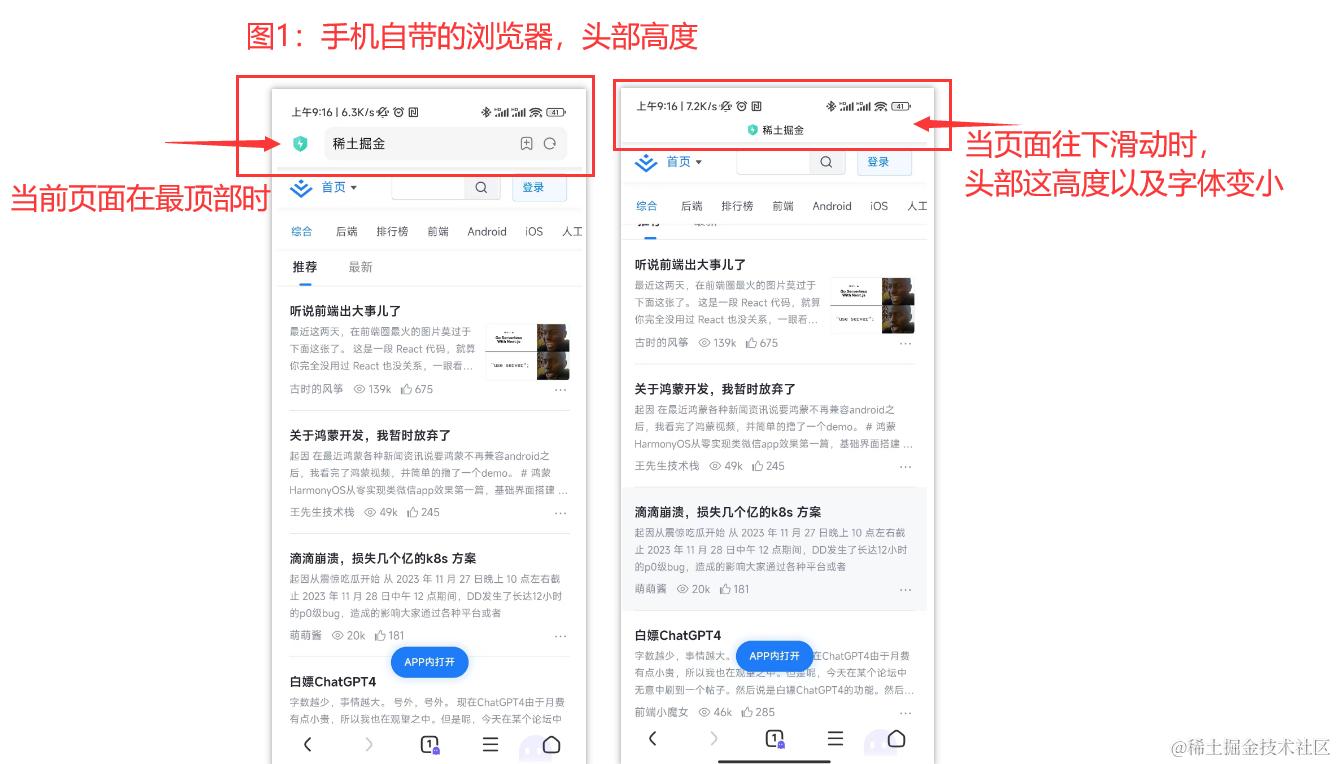
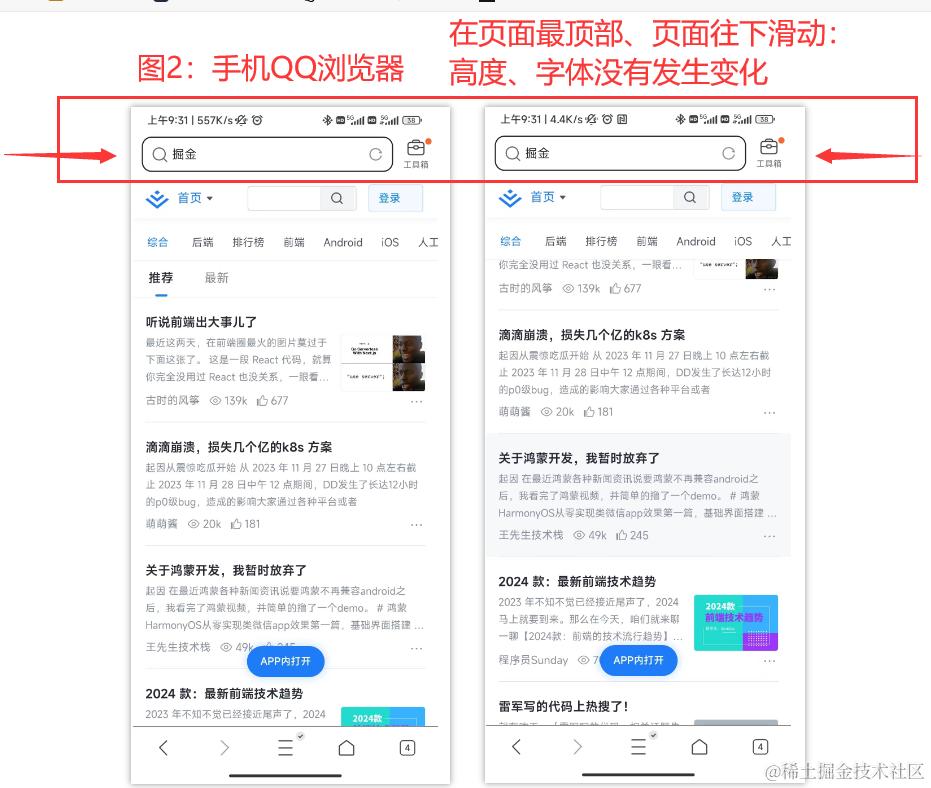
// 电脑端PC没有问题,但是手机端浏览器打开,部分浏览器当页面向下滑动时,高度会发生变化,则也会触发Window:resize函数
	$(window).resize(function () {
		init();
		console.log('浏览器宽度:' + $(window).width(), $(window).width());
	});
// 修改:加个判断条件在只有文档视图(窗口)的宽度发生变化时才触发自己写的逻辑事件。
  let oldWidth =$(window).width();
	$(window).resize(function(){
        if(oldWidth!=$(window).width()) {
            init();
            oldWidth = $(window).width()
            console.log('浏览器宽度:' + $(window).width(),$(window).width());
        }
    });
四、Element 框架
1. 修改el-switch开关value默认值
el-switch的默认值是false和true;
可以通过 active-value 和 inactive-value 来修改默认值 支持 boolean / string / number类型
// el-switch的默认值是 '1' 和 '0'
  <el-switch
    v-model="is_show"
    :active-value="'1'"
    :inactive-value="'0'"
  />
2. 表格中修改el-switch开关状态
当你点击修改状态时,结果你并没有修改,你点击取消关闭时,switch的状态依旧改变了,这是因为v-model双向绑定原理,点击开关时会实时改变状态,只需要把v-model改为:value=""即可
  <el-switch
    :value="scope.row.is_show"
    :active-value="'1'"
    :inactive-value="'0'"
    @change="switchChange(scope.row.is_show)"
  />