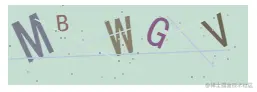
效果图
实现js代码
<script type="text/javascript">
let code = ''
function captcha(option = {}) {
let h = option.height || 80
let w = option.width || 240
let len = option.len || 5
let lineLen = option.lineLen || 5
let dotLen = option.dotLen || 40
let el = option.el || '#canvas'
let isLine = option.line || true
let isDot = option.dot || true
let result = ''
let isClick = option.isClick || true
const temp = option.data || 'abcdefghijklmnopqrstuvwxyz0123456789'.toUpperCase();
function rn(min, max) {
return Math.floor(Math.random() * (max - min) + min)
}
function rc(min, max) {
return `rgb(${rn(min, max)},${rn(min, max)},${rn(min, max)})`
}
const canvas = document.querySelector(el)
const ctx = canvas.getContext('2d')
ctx.fillStyle = rc(180, 230)
ctx.fillRect(0, 0, w, h)
for (let i = 0; i < len; i++) {
let str = temp[rn(0, temp.length - 1)]
let fs = rn(18, h)
let deg = rn(-30, 30)
ctx.font = fs + 'px Simhei'
ctx.textBaseline = 'top'
ctx.fillStyle = rc(80, 150)
ctx.save()
ctx.translate(w / len * i + 10, 15)
ctx.rotate(deg * Math.PI / 180)
ctx.fillText(str, -10, -10)
ctx.restore()
result += str
}
function line() {
for (let i = 0; i < lineLen; i++) {
ctx.beginPath()
ctx.moveTo(rn(0, w), rn(0, h))
ctx.lineTo(rn(0, w), rn(0, h))
ctx.strokeStyle = rc(180, 230)
ctx.closePath()
ctx.stroke()
}
}
line && line()
function dot() {
while (dotLen) {
ctx.beginPath()
ctx.arc(rn(0, w), rn(0, h), 1, 0, 2 * Math.PI)
ctx.closePath()
ctx.fillStyle = rc(150, 200)
ctx.fill()
dotLen--
}
}
dot && dot()
isClick && (canvas.onclick = () => {
captcha()
})
return result
}
code = captcha()
完整 demo
<!DOCTYPE html>
<html lang="en">
<head>
<meta charset="UTF-8">
<meta name="viewport" content="width=device-width, initial-scale=1.0">
<title>captcha</title>
</head>
<body>
<canvas id="canvas"></canvas>
  <script type="text/javascript">
    let code = ''
    function captcha(option = {}) {
      // 基本参数配置
      let h = option.height || 80 // canvas 画布的高
      let w = option.width || 240 // canvas 画布的宽
      let len = option.len || 5   // 验证码的长度
      let lineLen = option.lineLen || 5 // 干扰线的数量
      let dotLen = option.dotLen || 40 // 干扰小圆点的数量
      let el = option.el || '#canvas'  // dom的id
      let isLine = option.line || true  // 是否添加干扰线
      let isDot = option.dot || true    // 是否添加干扰小圆点
      let result = '' // 验证码
      let isClick = option.isClick || true
      const temp = option.data || 'abcdefghijklmnopqrstuvwxyz0123456789'.toUpperCase(); // 取值范围

      // 生成随机数
      function rn(min, max) {
        return Math.floor(Math.random() * (max - min) + min)
      }
      // 随机生成颜色
      function rc(min, max) {
        return `rgb(${rn(min, max)},${rn(min, max)},${rn(min, max)})`
      }
      //  获取画布的dom
      const canvas = document.querySelector(el)
      const ctx = canvas.getContext('2d')

      // 在canvas上绘制背景颜色
      ctx.fillStyle = rc(180, 230)
      ctx.fillRect(0, 0, w, h)
      // 随机字符串
      for (let i = 0; i < len; i++) {
        // 随机获取字母或数组
        let str = temp[rn(0, temp.length - 1)]
        // 随机获取字体大小
        let fs = rn(18, h)
        // 随机获取字体旋转角度
        let deg = rn(-30, 30)
        // 设置字体大小及字体
        ctx.font = fs + 'px Simhei'
        // 设置文字基线
        ctx.textBaseline = 'top'
        // 填充字体的颜色
        ctx.fillStyle = rc(80, 150)
        ctx.save()
        // 设置字体的位移
        ctx.translate(w / len * i + 10, 15)
        // 设置字体旋转
        ctx.rotate(deg * Math.PI / 180)
        ctx.fillText(str, -10, -10)
        // 每循环一次恢复位置
        ctx.restore()
        result += str
      }

      // 随机生成干扰线
      function line() {
        for (let i = 0; i < lineLen; i++) {
          ctx.beginPath()
          ctx.moveTo(rn(0, w), rn(0, h))
          ctx.lineTo(rn(0, w), rn(0, h))
          ctx.strokeStyle = rc(180, 230)
          ctx.closePath()
          ctx.stroke()
        }
      }
      line && line()
      // 随机生成干扰小圆点
      function dot() {
        while (dotLen) {
          ctx.beginPath()
          ctx.arc(rn(0, w), rn(0, h), 1, 0, 2 * Math.PI)
          ctx.closePath()
          ctx.fillStyle = rc(150, 200)
          ctx.fill()
          dotLen--
        }
      }
      dot && dot()
      // 点击事件
      isClick && (canvas.onclick = () => {
        captcha()
      })
      return result
    }
    code = captcha()
</script>
</body>
</html>