一、准备
React 16前的生命周期在React 16引入fiber之后就不合适了,因为如果要开启async rendering,在render函数之前的所有函数可能会被React暂停、中止或重新启动,都有可能被执行多次。因此React16以后,为了优化性能,做了以下调整:
- 删除的生命周期:
componentWillMount、componentWillReceiveProps、componentWillUpdate; - 添加的生命周期:
getDerivedStateFromProps、getSnapshotBeforeUpdate
新增的生命周期介绍:
-
static getDerivedStateFromProps(props, state)这个生命周期函数可以从新的属性映射新的状态装箱。实际上就是将传入的props映射到state上面 -
getSnapshotBeforeUpdate这个生命周期函数被调用于render之后,可以读取但无法使用DOM的时候,它可以使组件在可能更改之前从DOM捕获一些信息。此函数返回的任何值都将作为参数传递给componentDidUpdate()的第三个参数
二、实现getDerivedStateFromProps
1. 思路
从上图可知,getDerivedStateFromProps函数是在接收新状态之后、重新渲染之前触发,因此这个方法的处理逻辑,我们写在forceUpdate方法中。入参为props、state。有变化的状态会覆盖,无变化的状态保留,也就是说所以状态都会合并。
2. 实现
2-1. src/index.js
import React from "./react";
import ReactDOM from "./react-dom";

class Counter extends React.Component {
  constructor(props) {
    super(props);
    this.state = {
      number: 0,
    };
    console.log("Counter 1.constructor");
  }

  handleClick = () => {
    this.setState({
      number: this.state.number + 1,
    });
  };

  render() {
    console.log("Counter 3.render");
    return (
      <div>
        <p>{this.state.number}</p>
        <ChildCounter count={this.state.number} />
        <button onClick={this.handleClick}>+</button>
      </div>
    );
  }
}

class ChildCounter extends React.Component {
  constructor(props) {
    super(props);
    this.state = {
      number: 0,
      title: "ChildCounter",
    };
  }

  // 此方法设置为静态的原因:不希望用户在此方法调用this,setSatate引起死循环
  static getDerivedStateFromProps(nextProps, nextState) {
    const { count } = nextProps;
    if (count % 2) {
      // 如果此处没有return 永远都是接收过来的0
      return { number: count * 2 };
    } else {
      return { number: count * 3 };
    }
  }
  render() {
    console.log("ChildCounter 2.render");
    return (
      <div>
        {/* 属性会进行合并 */}
        {this.state.title}: {this.state.number}
      </div>
    );
  }
}

ReactDOM.render(<Counter />, document.getElementById("root"));
2-2. src/component.js
此文件只需按照思路修改forceUpdate即可
import { compareToVdom, findDOM } from "./react-dom";

export let updateQueue = {
  // 控制同步更新和异步更新
  isBatchingUpdate: false,
  // 记录异步更新的
  updaters: [],
  // 批量更新
  batchUpdate() {
    for (let updater of updateQueue.updaters) {
      updater.updateComponent();
    }
    updateQueue.isBatchingUpdate = false;
    updateQueue.updaters.length = 0;
  },
};

/** 更新器 */
class Updater {
  constructor(classInstance) {
    // 保存实例
    this.classInstance = classInstance;
    // 等待更新的状态数组
    this.pendingStates = [];
    // 状态更新后的回调
    this.callbacks = [];
  }

  addState(partialState, callback) {
    this.pendingStates.push(partialState);
    if (typeof callback === "function") {
      this.callbacks.push(callback);
    }
    // 触发更新
    this.emitUpdate();
  }

  // 不论是状态更新,还是属性更新,都会执行emitUpdate
  emitUpdate(nextProps) {
    this.nextProps = nextProps;
    // 说明当前是批量更新模式
    if (updateQueue.isBatchingUpdate) {
      // 批量更新为异步,先存入数组
      updateQueue.updaters.push(this);
    } else {
      this.updateComponent();
    }
  }

  updateComponent() {
    // 解构出实例、等待更新的状态
    let { nextProps, classInstance, pendingStates } = this;
    // 属性更新/状态更新,都会进行更新
    if (nextProps || pendingStates.length > 0) {
      shouldUpdate(classInstance, this.nextProps, this.getState());
    }
  }

  /** 基于老状态和pendingStates获取新状态 */
  getState() {
    let { classInstance, pendingStates } = this;
    let { state } = classInstance; //老状态
    // 每个分状态 ==> 合并属性
    pendingStates.forEach((nextState) => {
      if (typeof nextState === "function") {
        nextState = nextState(state);
      }
      state = { ...state, ...nextState };
    });
    // 清空等待更新的分状态数组
    pendingStates.length = 0;
    return state;
  }
}

function shouldUpdate(classInstance, nextProps, nextState) {
  let willUpdate = true;
  // 如果有shouldComponentUpdate方法,并且其执行结果是false的话,才会把willUpdate的值改文false
  if (
    classInstance.shouldComponentUpdate &&
    !classInstance.shouldComponentUpdate(nextProps, nextState)
  ) {
    willUpdate = false;
  }
  if (willUpdate && classInstance.componentWillUpdate) {
    classInstance.componentWillUpdate();
  }
  if (nextProps) {
    classInstance.props = nextProps;
  }
  // 把新状态赋值,不管更不更新,赋值都会执行
  classInstance.state = nextState;
  // 让类的实例强行更新,即页面更新
  if (willUpdate) {
    classInstance.forceUpdate();
  }
}

class Component {
  // 当子类继承父类的时候,父类的静态属性也是可以继承的
  // 函数组件和类组件编译后,都会变成函数,因此加上isReactComponent属性来区分是函数组件还是类组件
  static isReactComponent = true;
  constructor(props) {
    this.props = props;
    this.state = {}; // 初始值
    this.updater = new Updater(this);
  }

  /** 更新分状态 */
  setState(partialState, callback) {
    this.updater.addState(partialState, callback);
  }

  /** 根据新的属性状态,计算新的要渲染的虚拟DOM */
  forceUpdate() {
    //获取老的虚拟DOM
    let oldRenderVdom = this.oldRenderVdom;
    //获取老的真实DOM
    // let oldDOM = oldRenderVdom.dom;
    let oldDOM = findDOM(oldRenderVdom);
> > >     if (this.constructor.getDerivedStateFromProps) {
> > >       let newState = this.constructor.getDerivedStateFromProps(
> > >         this.props,
> > >         this.state
> > >       );
> > >       if (newState) {
> > >         this.state = {
> > >           ...this.state,
> > >           ...newState,
> > >         };
> > >       }
> > >     }
    // 基于新的属性和状态,计算新的真实DOM
    let newRenderVdom = this.render();
    compareToVdom(oldDOM.parentNode, oldRenderVdom, newRenderVdom);
    // 使下次更新时以上次的新DOM为比较
    this.oldRenderVdom = newRenderVdom;
    if (this.componentDidUpdate) {
      this.componentDidUpdate(this.props, this.state);
    }
  }
}

export { Component };
三、实现getSnapshotBeforeUpdate
1. 思路
getSnapshotBeforeUpdate调用的返回值作为componentDidUpdate的第三个参数传入,因此我们在componentDidUpdate中就可以解构出dom的相关信息(本案例中获取dom的scrollTop、scrollHeight)
demo:
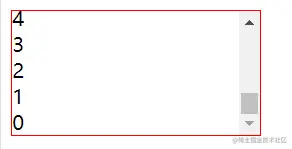
每一秒内容区都会增加一条数据,数据虽然不断增加,但是保持滚动条固定在底部。
2. 实现
2-1. src/index.js
import React from "./react";
import ReactDOM from "./react-dom";
class ScrollingList extends React.Component {
  constructor(props) {
    super(props);
    this.state = { messages: [] };
    this.wrapper = React.createRef();
  }

  addMessage() {
    this.setState((state) => ({
      messages: [`${state.messages.length}`, ...state.messages],
    }));
  }

  componentDidMount() {
    this.timeID = window.setInterval(() => {
      //设置定时器
      this.addMessage();
    }, 1000);
  }

  componentWillUnmount() {
    //清除定时器
    window.clearInterval(this.timeID);
  }

  getSnapshotBeforeUpdate() {
    //获取当前根节点的scrollHeight,传到componentDidUpdate 的参数perScrollHeight
    return {
      prevScrollTop: this.wrapper.current.scrollTop,
      prevScrollHeight: this.wrapper.current.scrollHeight,
    };
  }

  componentDidUpdate(
    pervProps,
    pervState,
    { prevScrollHeight, prevScrollTop }
  ) {
    //当前向上卷去的高度加上增加的内容高度
    this.wrapper.current.scrollTop =
      prevScrollTop + (this.wrapper.current.scrollHeight - prevScrollHeight);
  }

  render() {
    let style = {
      height: "100px",
      width: "200px",
      border: "1px solid red",
      overflow: "auto",
    };

    return (
      <div style={style} ref={this.wrapper}>
        {this.state.messages.map((message, index) => (
          <div key={index}>{message}</div>
        ))}
      </div>
    );
  }
}

ReactDOM.render(<ScrollingList />, document.getElementById("root"));
2-2. src/component.js
import { compareToVdom, findDOM } from "./react-dom";

export let updateQueue = {
  // 控制同步更新和异步更新
  isBatchingUpdate: false,
  // 记录异步更新的
  updaters: [],
  // 批量更新
  batchUpdate() {
    for (let updater of updateQueue.updaters) {
      updater.updateComponent();
    }
    updateQueue.isBatchingUpdate = false;
    updateQueue.updaters.length = 0;
  },
};

/** 更新器 */
class Updater {
  constructor(classInstance) {
    // 保存实例
    this.classInstance = classInstance;
    // 等待更新的状态数组
    this.pendingStates = [];
    // 状态更新后的回调
    this.callbacks = [];
  }

  addState(partialState, callback) {
    this.pendingStates.push(partialState);
    if (typeof callback === "function") {
      this.callbacks.push(callback);
    }
    // 触发更新
    this.emitUpdate();
  }

  // 不论是状态更新,还是属性更新,都会执行emitUpdate
  emitUpdate(nextProps) {
    this.nextProps = nextProps;
    // 说明当前是批量更新模式
    if (updateQueue.isBatchingUpdate) {
      // 批量更新为异步,先存入数组
      updateQueue.updaters.push(this);
    } else {
      this.updateComponent();
    }
  }

  updateComponent() {
    // 解构出实例、等待更新的状态
    let { nextProps, classInstance, pendingStates } = this;
    // 属性更新/状态更新,都会进行更新
    if (nextProps || pendingStates.length > 0) {
      shouldUpdate(classInstance, this.nextProps, this.getState());
    }
  }

  /** 基于老状态和pendingStates获取新状态 */
  getState() {
    let { classInstance, pendingStates } = this;
    let { state } = classInstance; //老状态
    // 每个分状态 ==> 合并属性
    pendingStates.forEach((nextState) => {
      if (typeof nextState === "function") {
        nextState = nextState(state);
      }
      state = { ...state, ...nextState };
    });
    // 清空等待更新的分状态数组
    pendingStates.length = 0;
    return state;
  }
}

function shouldUpdate(classInstance, nextProps, nextState) {
  let willUpdate = true;
  // 如果有shouldComponentUpdate方法,并且其执行结果是false的话,才会把willUpdate的值改文false
  if (
    classInstance.shouldComponentUpdate &&
    !classInstance.shouldComponentUpdate(nextProps, nextState)
  ) {
    willUpdate = false;
  }
  if (willUpdate && classInstance.componentWillUpdate) {
    classInstance.componentWillUpdate();
  }
  if (nextProps) {
    classInstance.props = nextProps;
  }
  // 把新状态赋值,不管更不更新,赋值都会执行
  classInstance.state = nextState;
  // 让类的实例强行更新,即页面更新
  if (willUpdate) {
    classInstance.forceUpdate();
  }
}

class Component {
  // 当子类继承父类的时候,父类的静态属性也是可以继承的
  // 函数组件和类组件编译后,都会变成函数,因此加上isReactComponent属性来区分是函数组件还是类组件
  static isReactComponent = true;
  constructor(props) {
    this.props = props;
    this.state = {}; // 初始值
    this.updater = new Updater(this);
  }

  /** 更新分状态 */
  setState(partialState, callback) {
    this.updater.addState(partialState, callback);
  }

  /** 根据新的属性状态,计算新的要渲染的虚拟DOM */
  forceUpdate() {
    //获取老的虚拟DOM
    let oldRenderVdom = this.oldRenderVdom;
    //获取老的真实DOM
    // let oldDOM = oldRenderVdom.dom;
    let oldDOM = findDOM(oldRenderVdom);
    if (this.constructor.getDerivedStateFromProps) {
      let newState = this.constructor.getDerivedStateFromProps(
        this.props,
        this.state
      );
      if (newState) {
        this.state = {
          ...this.state,
          ...newState,
        };
      }
    }
    // 基于新的属性和状态,计算新的真实DOM
    let newRenderVdom = this.render();
> > >     let snapshot =
> > >       this.getSnapshotBeforeUpdate && this.getSnapshotBeforeUpdate();
    compareToVdom(oldDOM.parentNode, oldRenderVdom, newRenderVdom);
    // 使下次更新时以上次的新DOM为比较
    this.oldRenderVdom = newRenderVdom;
    if (this.componentDidUpdate) {
> > >       this.componentDidUpdate(this.props, this.state, snapshot);
    }
  }
}

export { Component };