事件流
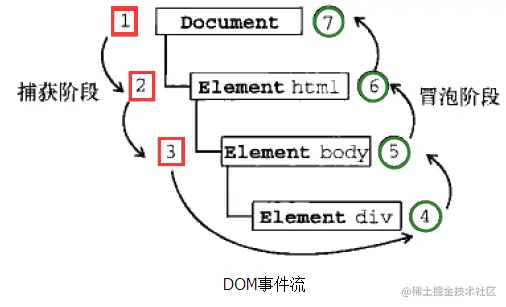
    事件流默认是冒泡事件流
    事件流先进行1-捕获,2-执行过程,3-冒泡
事件流 =》 {
    提出缘由: 盒子嵌套层数过多
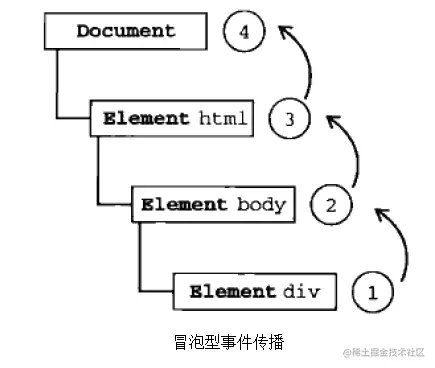
    分为: 冒泡事件流,IE公司提出
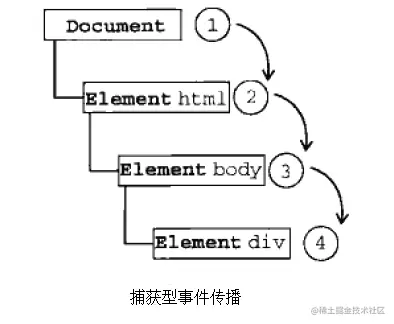
          捕获事件流,网景公司提出
    捕获事件流,由最外层的盒子事件依次往里捕获
    冒泡事件流,由里往外冒泡执行
}
完整的事件流(捕获=>执行过程=>冒泡)
捕获事件流流程(由外到内捕获)
冒泡事件流流程(由里到外冒泡)
CSS样式:
    * {
            margin-left: 30px;
            margin-top: 30px;
        }
        #box {
            width: 400px;
            height: 400px;
            border: 2px solid greenyellow;
        }

        #content {
            width: 300px;
            height: 300px;
            border: 2px solid rgb(47, 161, 255);
        }

        #text {
            width: 200px;
            height: 200px;
            border: 2px solid rgb(120, 47, 255);
        }

        #sp {
            display: block;
            width: 100px;
            height: 100px;
            border: 2px solid rgb(255, 106, 47);
        }
HTML结构:
    <div id="box">
        外层盒子
        <div id="content">
            二层盒子
            <div id="text">
                三层盒子
                <span id="sp">
                    span底层盒子
                </span>
            </div>
        </div>
    </div>
Script事件
const box = document.getElementById('box')
const content = document.getElementById('content')
const btextox = document.getElementById('text')
const sp = document.getElementById('sp')
box.addEventListener('click', function() {
console.log('addEventListener-true=>box');
}, true)
content.addEventListener('click', function() {
console.log('addEventListener-true=>content');
}, true)
btextox.addEventListener('click', function() {
console.log('addEventListener-true=>btextox');
}, true)
sp.addEventListener('click', function() {
console.log('addEventListener-true=>sp');
}, true)
box.addEventListener('click', function() {
console.log('addEventListener-false=>box');
}, false)
content.addEventListener('click', function() {
console.log('addEventListener-false=>content');
}, false)
btextox.addEventListener('click', function() {
console.log('addEventListener-false=>btextox');
}, false)
sp.addEventListener('click', function() {
console.log('addEventListener-false=>sp');
}, false)
box.onclick = function() {
console.log('onclick=>box');
}
content.onclick = function() {
console.log('onclick=>content');
}
btextox.onclick = function() {
console.log('onclick=>btextox');
}
sp.onclick = function() {
console.log('onclick=>sp');
}