0/前言
xgboost有两大类接口:
    <1>XGBoost原生接口,及陈天奇开源的xgboost项目,import xgboost as xgb
    <2>scikit-learn api接口,及python的sklearn库

并且xgboost能够实现 分类 和 回归 两种任务。
并且对于分类任务,xgboost可以实现 二分类 和 多分类

“reg:linear” —— 线性回归。
“reg:logistic”—— 逻辑回归。

“binary:logistic”—— 二分类的逻辑回归问题,输出为概率。
“binary:logitraw”—— 二分类的逻辑回归问题,输出的结果为wTx。
“count:poisson”—— 计数问题的poisson回归,输出结果为poisson分布。在poisson回归中,max_delta_step的缺省值为0.7。(used to safeguard optimization)


“multi:softmax” –让XGBoost采用softmax目标函数处理多分类问题,
                 同时需要设置参数num_class(类别个数)

“multi:softprob” –和softmax一样,但是输出的是ndata * nclass结构的向量,
                  可以将该向量reshape(映射)成ndata行nclass列的矩阵。
                  每一行数据表示被预测样本所属于每个类别的概率。

“rank:pairwise” –set XGBoost to do ranking task by minimizing the pairwise loss
1/demo1(原生接口)
二分类,特征是连续型的数据
label是0和1
import xgboost as xgb
from sklearn import metrics
from sklearn.cross_validation import train_test_split
from sklearn import datasets
iris = datasets.load_iris()
data = iris.data[:100]
print(data)
print(data.shape)
label = iris.target[:100]
print(label)
train_x, test_x, train_y, test_y = train_test_split(data, label, random_state=0)
dtrain = xgb.DMatrix(train_x, label=train_y)
dtest = xgb.DMatrix(test_x)
params={'booster':'gbtree',
'objective': 'binary:logistic',
'eval_metric': 'auc',
'max_depth':4,
'lambda':10,
'subsample':0.75,
'colsample_bytree':0.75,
'min_child_weight':2,
'eta': 0.025,
'seed':0,
'nthread':8,
'silent':1}
watchlist = [(dtrain,'train')]
model = xgb.train(params,
dtrain,
num_boost_round= 100,
evals= watchlist)
ypred = model.predict( dtest )
y_pred = (ypred >= 0.5)*1
print('AUC: %.4f' % metrics.roc_auc_score(test_y, ypred))
print('ACC: %.4f' % metrics.accuracy_score(test_y, y_pred))
print('Precesion: %.4f' % metrics.precision_score(test_y, y_pred))
print('Recall: %.4f' % metrics.recall_score(test_y, y_pred))
print('F1-score: %.4f' % metrics.f1_score(test_y, y_pred))
print(metrics.confusion_matrix(test_y, y_pred))
2/demo2(sklearn的接口)
from xgboost.sklearn import XGBClassifier
from numpy import loadtxt
from sklearn.model_selection import train_test_split
from sklearn.metrics import accuracy_score
from xgboost import plot_importance
from matplotlib import pyplot
data = loadtxt('dataset_001.csv', delimiter=",")
X = data[:,0:8]
Y = data[:,8]
X_train, X_test, y_train, y_test = train_test_split(X, Y,
test_size=0.33,
random_state=90)
xgboost_model = XGBClassifier()
eval_set = [(X_test, y_test)]
xgboost_model.fit(X_train,
y_train,
early_stopping_rounds=10,
eval_metric="logloss",
eval_set=eval_set,
verbose=False)
y_pred = xgboost_model.predict( X_test )
predictions = [round(i) for i in y_pred]
accuracy = accuracy_score(y_test, predictions)
print("Accuracy: %.2f%%" % (accuracy * 100.0))
xgboost_model.fit(X, Y)
plot_importance( xgboost_model )
pyplot.show()
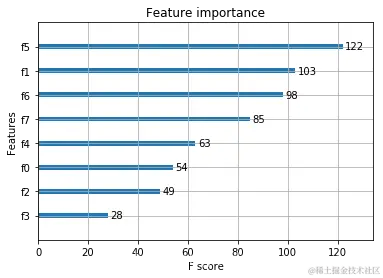
网格搜索
如何确定最佳的参数组合呢
下面是三个超参数的一般实践最佳值,可以先将它们设定为这个范围,然后画出 learning curves,再调解参数找到最佳模型:
learning_rate = 0.1 或更小,越小就需要多加入弱学习器;
tree_depth = 2~8;
subsample = 训练集的 30
接下来我们用 GridSearchCV 来进行调参会更方便一些: 可以调的超参数组合有:
树的个数和大小 (n_estimators and max_depth).
学习率和树的个数 (learning_rate and n_estimators).
行列的 subsampling rates (subsample, colsample_bytree and colsample_bylevel).
# 下面以学习率 learning rate 为例
from sklearn.model_selection import GridSearchCV
from sklearn.model_selection import StratifiedKFold
model = XGBClassifier()
learning_rate = [0.0001, 0.001, 0.01, 0.1, 0.2, 0.3]
param_grid = dict(learning_rate=learning_rate)
kfold = StratifiedKFold(n_splits=10, shuffle=True, random_state=7)
grid_search = GridSearchCV(model,
param_grid,
scoring="neg_log_loss",
n_jobs=-1, cv=kfold)
grid_result = grid_search.fit(X, Y)
print("Best: %f using %s" % (grid_result.best_score_, grid_result.best_params_))
means = grid_result.cv_results_['mean_test_score']
stds = grid_result.cv_results_['std_test_score']
params = grid_result.cv_results_['params']
for mean, stdev, param in zip(means, stds, params):
print("%f (%f) with: %r" % (mean, stdev, param))
-0.689650 (0.000242) with: {‘learning_rate’: 0.0001}
-0.661274 (0.001954) with: {‘learning_rate’: 0.001}
-0.530747 (0.022961) with: {‘learning_rate’: 0.01}
-0.483013 (0.060755) with: {‘learning_rate’: 0.1}
-0.515440 (0.068974) with: {‘learning_rate’: 0.2}
-0.557315 (0.081738) with: {‘learning_rate’: 0.3}