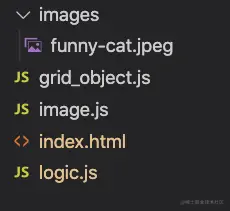
文件列表
- index.html
- grid_object.js
- logic.js
- image.js
- images/funny-cat.jpeg
index.html
<!doctype html>
<html>
<head>
<style>
canvas {
border: 1px solid #000000;
}
</style>
</head>
<body>
<canvas id="tri" width="600" height="600" style="width:600px; height:600px">
</canvas>
<script id="vertex_shader" type="myshader">
precision mediump int;
precision mediump float;
uniform mat3 u_all;
attribute vec2 a_PointVertex;
attribute vec2 a_PointUV;
varying vec2 uv;
varying vec2 pos;
void main() {
vec3 coord = u_all * vec3(a_PointVertex, 1.0);
gl_Position = vec4(coord.x, coord.y, 0.0, 1.0);
uv = a_PointUV;
uv.y = 1.0 - uv.y;
pos = coord.xy;
}
</script>
<script id="fragment_shader" type="myshader">
precision mediump int;
precision mediump float;
uniform sampler2D u_funny_cat;
uniform vec2 u_lightPos;
varying vec2 uv;
varying vec2 pos;
void main() {
vec4 sample_color = texture2D(u_funny_cat, uv);
gl_FragColor = vec4(sample_color.xyz, 1.0);
}
</script>
<script type="text/javascript" src="image.js"></script>
<script type="text/javascript" src="grid_object.js"></script>
<script type="text/javascript" src="logic.js"></script>
</body>
</html>
image.js
var images_loaing_ok = false;
function isPowerOf2(value) {
return (value & (value - 1)) === 0;
}
function CreateTextureAndLoadImage(gl, loading_callback) {
let texture = gl.createTexture();
gl.bindTexture(gl.TEXTURE_2D, texture);
var image = new Image();
image.src = "images/funny-cat.jpeg";
image.addEventListener('load', function () {
gl.bindTexture(gl.TEXTURE_2D, texture);
gl.texImage2D(gl.TEXTURE_2D, 0, gl.RGBA, gl.RGBA, gl.UNSIGNED_BYTE, image);
if (isPowerOf2(image.width) && isPowerOf2(image.height)) {
gl.generateMipmap(gl.TEXTURE_2D);
} else {
console.log("image loading , not Power of 2");
gl.texParameteri(gl.TEXTURE_2D, gl.TEXTURE_WRAP_S, gl.CLAMP_TO_EDGE);
gl.texParameteri(gl.TEXTURE_2D, gl.TEXTURE_WRAP_T, gl.CLAMP_TO_EDGE);
gl.texParameteri(gl.TEXTURE_2D, gl.TEXTURE_MIN_FILTER, gl.LINEAR);
}
images_loaing_ok = true;
loading_callback();
});
return;
}
grid_object.js
class GridObject {
constructor(scalex, scaley, posx, posy) {
this.scalex = scalex;
this.scaley = scaley;
this.posx = posx;
this.posy = posy;
this.modelUpdated = false;
this.glbuffer = null;
this.a_PointVertex = null;
this.a_PointUV = null;
this.rotate = 0;
this.uv = { leftbottom: [0, 0], topright: [1, 1] };
}
genData(gl) {
this.data = [
-1, -1, this.uv.leftbottom[0], this.uv.leftbottom[1],
1, -1, this.uv.topright[0], this.uv.leftbottom[1],
1, 1, this.uv.topright[0], this.uv.topright[1],
1, 1, this.uv.topright[0], this.uv.topright[1],
-1, 1, this.uv.leftbottom[0], this.uv.topright[1],
-1, -1, this.uv.leftbottom[0], this.uv.leftbottom[1],
];
this.dataArr = new Float32Array(this.data);
this.pointCount = 6;
if (this.glbuffer != null) {
gl.deleteBuffer(this.glbuffer);
this.a_PointVertex = null;
}
this.glbuffer = gl.createBuffer();
gl.bindBuffer(gl.ARRAY_BUFFER, this.glbuffer);
gl.bufferData(gl.ARRAY_BUFFER, this.dataArr, gl.STATIC_DRAW);
this.modelUpdated = true;
}
render(gl, program) {
gl.bindBuffer(gl.ARRAY_BUFFER, this.glbuffer);
if (this.modelUpdated) {
this.modelUpdated = false;
if (this.a_PointVertex == null) {
this.a_PointVertex = gl.getAttribLocation(program, 'a_PointVertex');
}
if (this.a_PointUV == null) {
this.a_PointUV = gl.getAttribLocation(program, 'a_PointUV');
}
}
gl.vertexAttribPointer(this.a_PointVertex, 2, gl.FLOAT, false, 16, 0);
gl.enableVertexAttribArray(this.a_PointVertex);
gl.vertexAttribPointer(this.a_PointUV, 2, gl.FLOAT, false, 16, 8);
gl.enableVertexAttribArray(this.a_PointUV);
let rad = ((2 * Math.PI) / 360) * this.rotate;
gl.uniformMatrix3fv(u_all_loc, false, genMat3ForGL(this.scalex,
this.scaley, rad, this.posx, this.posy
));
gl.drawArrays(gl.TRIANGLES, 0, this.pointCount);
}
}
logic.js
var pointCanvas = null;
var gl = null;
var u_all_loc = null;
var u_color = null;
var gridList = [];
var NineGrid = [-1, -1, -1, -1, -1, -1, -1, -1, -1];
var NineGridNeigbour = [
[3, -1, -1, 1],
[4, -1, 0, 2],
[5, -1, 1, -1],
[6, 0, -1, 4],
[7, 1, 3, 5],
[8, 2, 4, -1],
[-1, 3, -1, 7],
[-1, 4, 6, 8],
[-1, 5, 7, -1],
];
function NineGridFind(cur, dir) {
return NineGridNeigbour[cur][dir];
}
function NineGridEmpty() {
let idx = 0;
for (; idx <= 8; idx++) {
if (NineGrid[idx] == -1) {
return idx;
}
}
return -1;
}
var program = null;
var frameCounter = 0;
function Main() {
gl_init();
generateGrid(gl);
CreateTextureAndLoadImage(gl, gl_draw);
}
function genMat3ForGL(a, b, alpha, A, B) {
let mat3 = [
a * Math.cos(alpha), a * Math.sin(alpha), 0,
-b * Math.sin(alpha), b * Math.cos(alpha), 0,
A, B, 1,
];
return new Float32Array(mat3);
}
function generateGrid(gl) {
let level = 0;
let tempGrid;
let xScale = 1 / 3 - 0.01;
let yScale = 1 / 3 - 0.01;
for (; level <= 2; level++) {
tempGrid = new GridObject(xScale, yScale, -2 / 3, -2 / 3 + level * (2 / 3));
tempGrid.uv.leftbottom[1] = (1 / 3) * level;
tempGrid.uv.topright[0] = 1 / 3;
tempGrid.uv.topright[1] = 1 / 3 + (1 / 3) * level;
gridList.push(tempGrid);
NineGrid[0 + level * 3] = 0 + level * 3;
tempGrid = new GridObject(xScale, yScale, 0, -2 / 3 + level * (2 / 3));
tempGrid.uv.leftbottom[0] = 1 / 3;
tempGrid.uv.leftbottom[1] = (1 / 3) * level;
tempGrid.uv.topright[0] = 2 / 3;
tempGrid.uv.topright[1] = 1 / 3 + (1 / 3) * level
gridList.push(tempGrid);
NineGrid[1 + level * 3] = 1 + level * 3;
if (level < 2) {
tempGrid = new GridObject(xScale, yScale, 2 / 3, -2 / 3 + level * (2 / 3));
tempGrid.uv.leftbottom[0] = 2 / 3;
tempGrid.uv.leftbottom[1] = (1 / 3) * level;
tempGrid.uv.topright[0] = 3 / 3;
tempGrid.uv.topright[1] = 1 / 3 + (1 / 3) * level;
gridList.push(tempGrid);
NineGrid[2 + level * 3] = 2 + level * 3;
}
}
gridList.forEach(element => {
element.genData(gl);
});
}
function gl_init() {
pointCanvas = document.getElementById('tri');
pointCanvas.addEventListener("click", function __handler__(evt) {
let x = evt.clientX;
let y = evt.clientY;
let rect = pointCanvas.getBoundingClientRect();
x -= rect.left;
y -= rect.top;
x -= pointCanvas.width / 2;
x /= pointCanvas.width / 2;
y = pointCanvas.height - y;
y -= pointCanvas.height / 2;
y /= pointCanvas.height / 2;
gl.uniform2f(u_lightPos, x, y);
gl_draw();
});
window.onkeyup = function (event) {
console.log(event.keyCode);
let emptyIdx = NineGridEmpty();
let target = -1;
let posxMove = 0;
let posyMove = 0;
if (event.keyCode == 87) {
target = NineGridFind(emptyIdx, 1);
posyMove = 2 / 3;
} else if (event.keyCode == 83) {
target = NineGridFind(emptyIdx, 0);
posyMove = -2 / 3;
} else if (event.keyCode == 65) {
target = NineGridFind(emptyIdx, 3);
posxMove = -2 / 3;
} else if (event.keyCode == 68) {
target = NineGridFind(emptyIdx, 2);
posxMove = 2 / 3;
}
console.log('target', target, 'emptyIdx', emptyIdx);
if (target == -1) {
return;
}
let targetGrid = gridList[NineGrid[target]];
targetGrid.posx += posxMove;
targetGrid.posy += posyMove;
NineGrid[emptyIdx] = NineGrid[target];
NineGrid[target] = -1;
console.log(NineGrid);
gl_draw();
};
gl = pointCanvas.getContext('webgl', { preserveDrawingBuffer: true });
var vertex_shader_code = document.getElementById('vertex_shader').textContent;
var vertex_shader = gl.createShader(gl.VERTEX_SHADER);
gl.shaderSource(vertex_shader, vertex_shader_code);
gl.compileShader(vertex_shader);
const v_compiled = gl.getShaderParameter(vertex_shader, gl.COMPILE_STATUS);
if (!v_compiled) {
const v_theError = gl.getShaderInfoLog(vertex_shader);
console.error(v_theError);
gl.deleteShader(vertex_shader);
}
var fragment_shader_code = document.getElementById('fragment_shader').textContent;
var fragment_shader = gl.createShader(gl.FRAGMENT_SHADER);
gl.shaderSource(fragment_shader, fragment_shader_code);
gl.compileShader(fragment_shader);
const f_compiled = gl.getShaderParameter(fragment_shader, gl.COMPILE_STATUS);
if (!f_compiled) {
const f_theError = gl.getShaderInfoLog(fragment_shader);
console.error(f_theError);
gl.deleteShader(fragment_shader);
}
program = gl.createProgram();
gl.attachShader(program, vertex_shader);
gl.attachShader(program, fragment_shader);
gl.linkProgram(program);
gl.useProgram(program);
uniforms_init(gl);
}
function uniforms_init(gl) {
u_all_loc = gl.getUniformLocation(program, "u_all");
u_lightPos = gl.getUniformLocation(program, "u_lightPos");
}
function gl_draw() {
gl.enable(gl.CULL_FACE);
gl.enable(gl.DEPTH_TEST);
gl.clearColor(0, 0, 0, 0);
gl.clear(gl.COLOR_BUFFER_BIT | gl.DEPTH_BUFFER_BIT);
frameCounter++;
gridList.forEach(element => {
element.render(gl, program);
});
}
Main();



