在windows系统下,运行如下的python代码,可以直接查看图片的pixel值,BGR值,GRAY值,HSV值;
`#include "opencv2/core.hpp"
#include "opencv2/imgproc.hpp" #include "opencv2/video.hpp" #include "opencv2/videoio.hpp" #include "opencv2/highgui.hpp" #include "opencv2/imgproc/imgproc_c.h" #include #include #include
using namespace std; using namespace cv;`
int main(int argc, const char** argv) { // 加载图像到内存 Mat myImg = imread("3.jpg");
// 判断图像是否存在
if (myImg.empty())
{
	cout << "could not find image..." << endl;
	return -1;
}

Mat hsvImg;
Mat outputhsvImg;
// 将RGB图像myImg转化为HSV图像hsvImg
cvtColor(myImg, hsvImg, COLOR_BGR2HSV);

// 定义一个与hsvImg图像一样大小的像素值都是(255,255,255,)的空白图像outputhsvImg,用于实时显示,可忽略
outputhsvImg = Mat(hsvImg.rows, hsvImg.cols, CV_8UC3, cv::Scalar(255, 255, 255));

// 显示原图
imshow("origin", myImg);
waitKey(1);
double H = 0.0, S = 0.0, V = 0.0;

// 建立输出文件流
ofstream ofile;
ofile.open("3_jpg.txt");
ofile << "图像3.jpg每一像素的HSV值:" << endl;
ofile << "序号\t坐标\tH\tS\tV" << endl;

for (int i = 0; i < hsvImg.rows; i++)
{
	for (int j = 0; j < hsvImg.cols; j++)
	{
		// 读取每一点HSV值,存在H,S,V变量中。
		H = hsvImg.at<Vec3b>(i, j)[0];
		S = hsvImg.at<Vec3b>(i, j)[1];
		V = hsvImg.at<Vec3b>(i, j)[2];

		// 将当前H,S,V值更新到空白图像中,用于显示,便于观察
		outputhsvImg.at<Vec3b>(i, j)[0] = H;
		outputhsvImg.at<Vec3b>(i, j)[1] = S;
		outputhsvImg.at<Vec3b>(i, j)[2] = V;

		// 显示新的实时图像
		imshow("outputhsvImage", outputhsvImg);
		char key = (char)waitKey(1);
		if (key == 27)
			return 0;

		// 输出当前像素点坐标及对应H,S,V值。
		cout << "第" << i*hsvImg.rows + j << "个像素点(" << i << "," << j << ")的HSV值为:"
			<< " H: " << H << " S: " << S << " V: " << V<<endl;

		// 将图片的HSV值写入文件
		ofile << i*hsvImg.rows + j <<"\t"<<"(" <<i<<","<<j <<")"<<"\t"<< H <<"\t"
			 << S << "\t"<< V << endl;
	}
}

//关闭文件流
ofile.close();

return 0;
} `
    # -*- coding:utf-8 -*-

    import cv2

    img = cv2.imread('11_13/120002.jpg')
    gray = cv2.cvtColor(img, cv2.COLOR_BGR2GRAY)
    hsv = cv2.cvtColor(img, cv2.COLOR_BGR2HSV)

    def mouse_click(event, x, y, flags, para):
        if event == cv2.EVENT_LBUTTONDOWN:  # 左边鼠标点击
            print('PIX:', x, y)
            print("BGR:", img[y, x])
            print("GRAY:", gray[y, x])
            print("HSV:", hsv[y, x])

    if __name__ == '__main__':
        cv2.namedWindow("img")
        cv2.setMouseCallback("img", mouse_click)
        while True:
            cv2.imshow('img', img)
            if cv2.waitKey() == ord('q'):
                break
        cv2.destroyAllWindows()
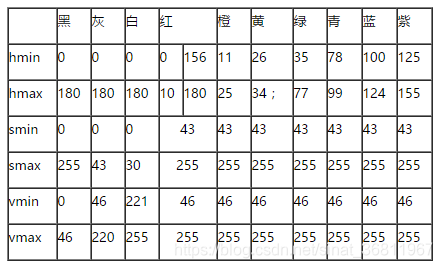
附一张opencv下HSV范围图片: