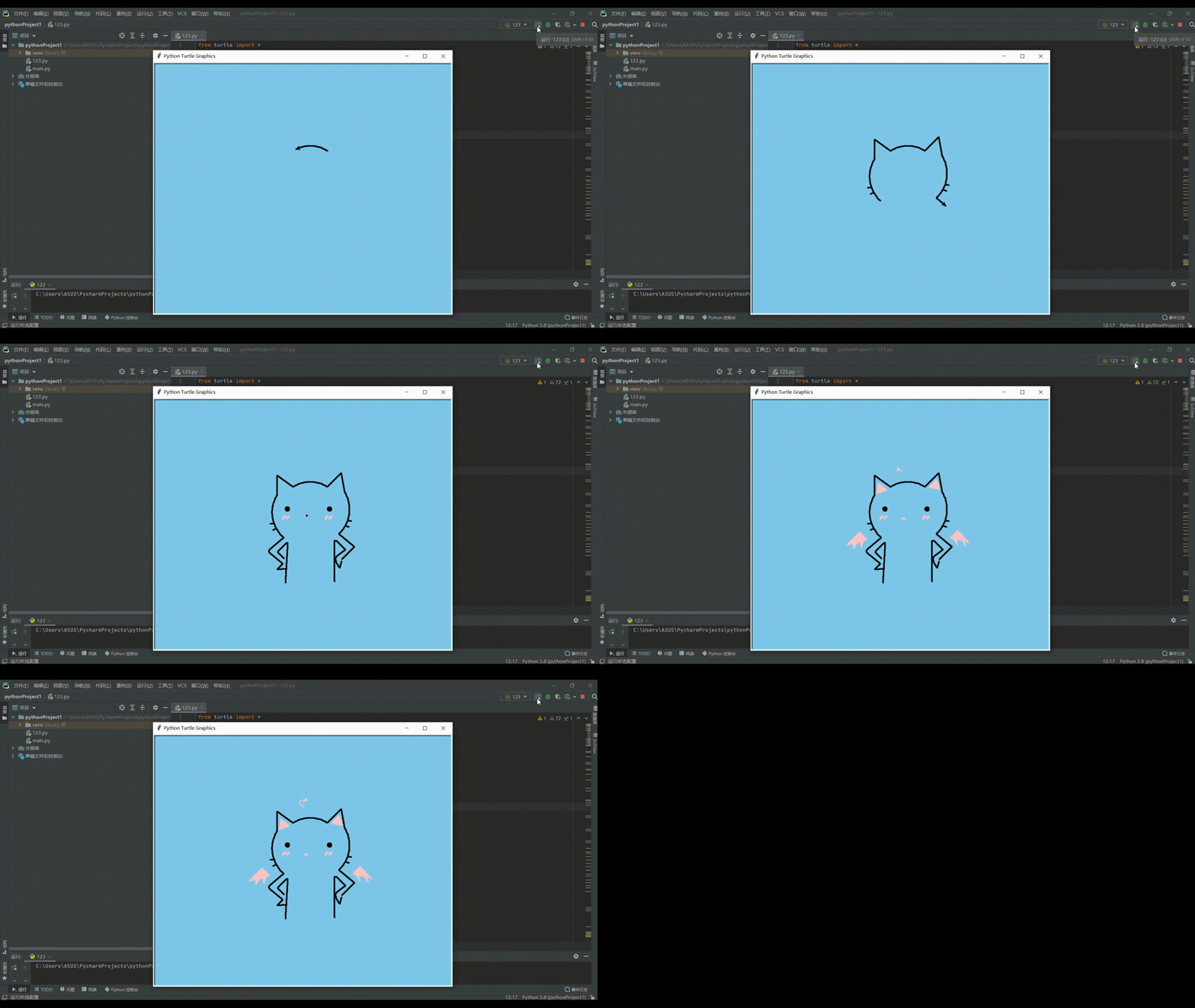
一起用代码吸猫!本文正在参与【喵星人征文活动】
1.先认识Python Turtle的一些属性才能开始画哦
turtle.forward(distance):向当前画笔方向移动distance像素长度
turtle.backward(distance):向当前画笔相反方向移动distance像素长度
turtle.right(degree):顺时针移动degree°
turtle.left(degree):逆时针移动degree°
turtle.pendown():移动时绘制图形,缺省时也为绘制
turtle.goto(x,y):将画笔移动到坐标为x,y的位置
turtle.penup():提起笔移动,不绘制图形,用于另起一个地方绘制
turtle.circle():画圆,半径为正(负),表示圆心在画笔的左边(右边)画圆
setx( ):将当前x轴移动到指定位置
sety( ):将当前y轴移动到指定位置
setheading(angle):设置当前朝向为angle角度
home():设置当前画笔位置为原点,朝向东。
dot(r):绘制一个指定直径和颜色的圆点
turtle.fillcolor(colorstring):绘制图形的填充颜色
turtle.color(color1, color2):同时设置pencolor=color1, fillcolor=color2
turtle.filling():返回当前是否在填充状态
turtle.begin_fill():准备开始填充图形
turtle.end_fill():填充完成
turtle.hideturtle():隐藏画笔的turtle形状
turtle.showturtle():显示画笔的turtle形状
认识这些属性就可以画出你心里最可爱的猫咪啦,我们画一个猫咪玩一玩
实践过程
1.初始化
bgcolor('Sky Blue')//画布背景颜色
pu()
goto(60,100)//初始位置
pensize(4)//画笔大小
pendown()//移动时绘制图形
2.整体代码
先画头再画身体再画脸接着画修饰
from turtle import *
#curvemove和heart两个函数用于绘画爱心
def curvemove():
    for i in range(200):
        right(1)
        forward(0.1)
def heart(x,y,s):
    pu()
    goto(x,y)
    seth(s)
    pendown()
    begin_fill()
    left(140)
    forward(11.1)
    curvemove()
    left(120)
    curvemove()
    forward(11.1)
    end_fill()
#初始化画笔画布背景
# setup(600,600)
bgcolor('Sky Blue')
pu()
goto(60,100)
pensize(4)
pendown()
#给猫咪画左半边的头哦
for i in range(150,212,2):
    seth(i)
    fd(3)
seth(145)
fd(50)
left(125)
fd(50)
for i in range(240,318,2):
    if i==290:
        seth(190)
        fd(10)
        seth(10)
        fd(10)
    elif i==300:
        seth(200)
        fd(10)
        seth(20)
        fd(10)
    seth(i)
    fd(3)
#给可爱猫咪画右半边的头
pu()
goto(60,100)
pendown()
seth(45)
fd(50)
right(125)
fd(50)
for i in range(-60,-138,-2):
    if i==-110:
        seth(-10)
        fd(10)
        seth(170)
        fd(10)
    elif i==-120:
        seth(-20)
        fd(10)
        seth(160)
        fd(10)
    seth(i)
    fd(3)
##我们猫咪的头头到这里就画好,接下来画身体外观了
seth(-40)
fd(52)
seth(-135)
fd(45)
pu()
seth(-105)
fd(5)
pendown()
fd(17)
for i in range(130,106,-3):
    seth(i)
    fd(2.5)
for i in range(106,30,-10):
    seth(i)
    fd(2)
seth(38)
fd(25)
seth(135)
fd(31)
seth(169)
fd(6)
seth(270)
fd(105)
#右边的身子画好了
#开始画左边的身子
pu()
goto(-52,-30)
pendown()
seth(220)
fd(48)#52
seth(250)
fd(3)
seth(270)
fd(3)
seth(290)
fd(2)
seth(-40)
fd(44)
seth(228)
fd(20)
seth(5)
fd(22)
#画叉腰的动作
pu()
goto(-52,-84)
seth(133)
pendown()
fd(22)
seth(90)
fd(2)
seth(60)
fd(2)
seth(45)
fd(29)
seth(0)
fd(3)
seth(-93)
fd(102)
#叉腰动作结束 接下来画嘴巴 眼睛
pu()
goto(-43,38)
seth(0)
pendown()
begin_fill()
circle(5)
end_fill()
pu()
fd(108)
pendown()
begin_fill()
circle(5)
end_fill()
#调色环节
pu()
goto(60,24)
pencolor("pink")
pensize(6)
seth(225)
pendown()
fd(7)
pu()
goto(70,24)
seth(225)
pendown()
fd(7)
#右半边调色完毕
pu()
goto(-49,24)
seth(225)
pendown()
fd(7)
#左边的颜色
pu()
pencolor("pink")
pensize(6)
goto(-39,24)
seth(225)
pendown()
fd(7)
#画嘴巴
pu()
pensize(4)
pencolor("pink")
goto(5,21)
seth(-45)
pendown()
fd(5)
goto(5,21)
seth(225)
fd(5)
#给耳朵填充颜色
pu()
goto(-40,92)
seth(80)
pendown()
fillcolor("pink")
begin_fill()
circle(14,360,3)
end_fill()
pu()
goto(72,100)
seth(-74)
pendown()
begin_fill()
circle(14,360,3)
end_fill()
#酷酷的黑翅膀
pu()
pensize(4)
color('pink', 'pink')
begin_fill()
goto(-90,-35)
seth(135)
pendown()
fd(25)
seth(225)
fd(45)
seth(25)
fd(15)
seth(-80)
pensize(2)
fd(15)
seth(55)
fd(15)
seth(25)
fd(10)
seth(-80)
fd(15)
seth(75)
fd(15)
goto(-90,-35)
end_fill()
#最后一个翅膀
pu()
goto(125,-30)
seth(45)
pendown()
begin_fill()
fd(25)
seth(-45)
fd(45)
seth(155)
fd(15)
seth(-80)
fd(15)
seth(120)
fd(17)
seth(170)
fd(15)
seth(-80)
fd(15)
seth(120)
fd(17)
goto(125,-30)
end_fill()
# #画5颗心
speed(100000)
color('pink', 'pink')
pensize(2)
heart(0,140,0)
heart(-125,0,30)
heart(140,0,-30)
heart(145,-85,-30)
heart(-132,-85,30)
exit.onclick()
done()
3.效果展示