一.Node.js是什么
1.Node.js的官方解释
www.runoob.com/nodejs/node…
2.下载(官网下载稳定版本)
nodejs.org/zh-cn/
3.实现一个简单的hello语句
console.log('你好,node.js')
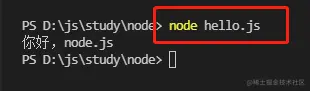
二.Node.js创建第一个应用
1.为什么使用Node.js
- 使用Node.js,不仅仅是在实现一个应用,同时还实现了整个HTTP服务
2.利用插件生成一个基础的node.js文件
var http = require('http');
http.createServer(function (request, response) {
response.writeHead(200, {'Content-Type': 'text/plain'});
response.end('Hello World 111');
}).listen(8081);
console.log('Server running at http://127.0.0.1:8081/');
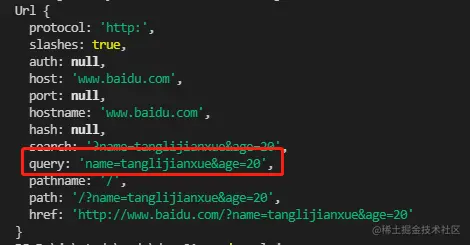
3.URL模板的使用
const url = require('url')
var api = 'http://www.baidu.com?name=tanglijianxue&age=20'
console.log(url.parse(api))
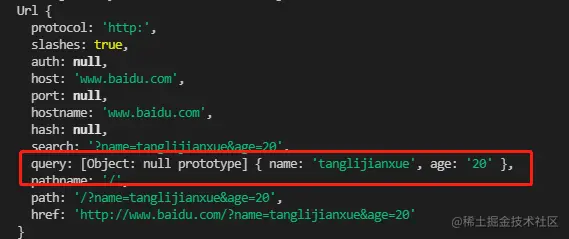
const url = require('url')
var api = 'http://www.baidu.com?name=tanglijianxue&age=20'
console.log(url.parse(api,true))
三.nodemon和supervisor
npm install -g nodemon
npm install -g supervisor
四.什么是CommonJs
1.什么是CommonJs
- CommonJs就是模块化的标准,nodejs就是CommonJs的实现
2.node中的模块
- 例如:HTTP模块,URL模块,FS模块
- 自定义模块
3. CommonJs中自定义模块的规定
- 把公共的功能抽离成为一个单独的js文件作为一个模块
- 写在一个文件下
const http = require('http')
function formatApi(api) {
return 'http://www.baidu.com' + api
}
http.createServer(function(req,res){
res.writeHead(200,{"Content-type":"text/html;charset=utf-8"});
res.write('棠梨煎雪1226')
let api = formatApi('api/plist')
res.write(api)
res.end()
}).listen(3000)
- 模块化
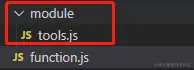
function formatApi(api) {
return 'http://www.baidu.com' + api
}
exports.formatApi = formatApi
const http = require('http')
const tools = require('./module/tools.js')
console.log(tools)
http.createServer(function(req,res){
res.writeHead(200,{"Content-type":"text/html;charset=utf-8"});
res.write('棠梨煎雪1226')
let api = tools.formatApi('api/plist')
res.write(api)
res.end()
}).listen(3000)
- 两种暴露方法(exports和module.exports)
const obj = {
get: function() {
console.log('从服务器获取数据')
},
post: function() {
console.log('提交数据')
}
}
exports.xxxx = obj
module.exports = obj
- 模块化引入(node_modules文件夹下可直接引入)
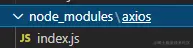
- node_modules文件夹下直接引入,但不写index.js怎么办?
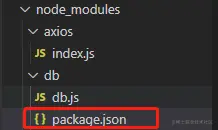
var db = require('db')
db.add()
{
"name": "db",
"version": "1.0.0",
"description": "",
"main": "db.js",
"scripts": {
"test": "echo \"Error: no test specified\" && exit 1"
},
"keywords": [],
"author": "",
"license": "ISC"
}
五.Node.js中的包、npm、第三方模块、package.json以及cnpm
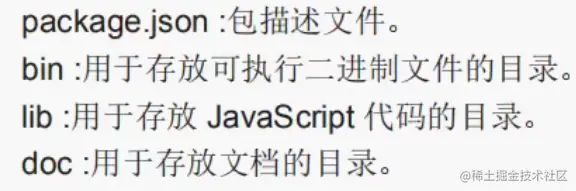
1.Node.js中的包
2.npm
www.npmjs.com/
- 在Node.js中通过npm命令来下载第三方模块的包
- npm是世界上最大的开放源代码的生态系统
注:npm是随着Node.js一起安装的包管理工具,能解决Node.js代码部署上的很多问题
3.package.json
- 创建:npm init 或者 pm init --yes
- --save-dev:开发时依赖
- --save:运行时依赖
4.淘宝镜像
npm install -g cnpm --registry=https:
六.Node.js中的fs模块的使用
1.fs.stat 检测是文件还是目录

const fs = require('fs')
fs.stat('./module',(err,data)=>{
if (err) {
console.log(err);
return
}
console.log(`是文件:${data.isFile()}`)
console.log(`是目录:${data.isDirectory()}`)
})

2.fs.mkdir 创建目录
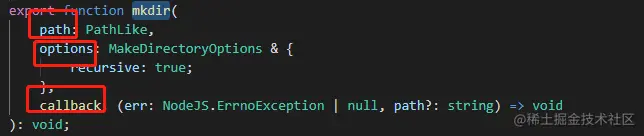
const fs = require('fs')
fs.mkdir('./css',(err)=>{
if (err) {
console.log(err);
return
}
console.log('创建成功')
})

3.fs.writeFile 创建写入文件

const fs = require('fs')
fs.writeFile('./html/index.html','你好,棠梨煎雪1226',(err)=>{
if (err) {
console.log(err);
return
}
console.log('创建写入文件成功')
})

4.fs.appendFile 追加文件

const fs = require('fs')
fs.appendFile('css/index.css','body{color:red}',(err)=>{
  if (err) {
    console.log(err)
    return
  }
  console.log('appendFile 成功')
})

5. fs.readFile 读取文件
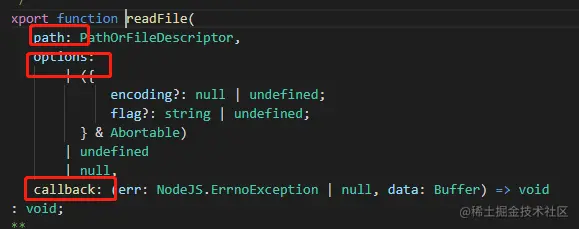
const fs = require('fs')
fs.readFile('./html/index.html',(err,data)=>{
   if (err) {
    console.log(err);
    return
  }
  console.log(data)
  console.log(data.toString())
})

6. fs.readdir 读取目录

const fs = require('fs')
fs.readdir('./html',(err,data)=>{
   if (err) {
    console.log(err);
    return
  }
  console.log(data)
})

7. fs.rename 重命名

const fs = require('fs')
fs.rename('./html/aaa.html','./html/abc.html',(err)=>{
   if (err) {
    console.log(err);
    return
  }
  console.log('重命名成功')
})

8. fs.rmdir 删除目录
- 确保目录下是空的才可以删除目录
- 先删除文件 ----- 再删除目录

const fs = require('fs')
fs.rmdir('./html',(err)=>{
   if (err) {
    console.log(err);
    return
  }
  console.log('删除目录成功')
})

9. fs.unlink 删除文件

const fs = require('fs')
fs.unlink('./html/abc.html',(err)=>{
   if (err) {
    console.log(err);
    return
  }
  console.log('删除文件成功')
})

10. 插件推荐
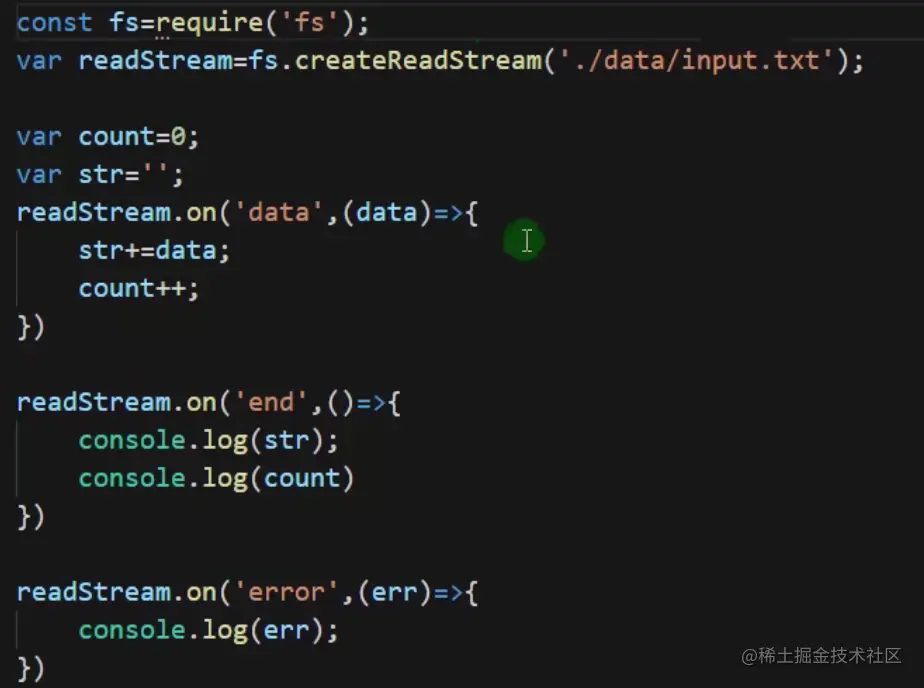
11. fs.createReadStream 从文件中读取数据
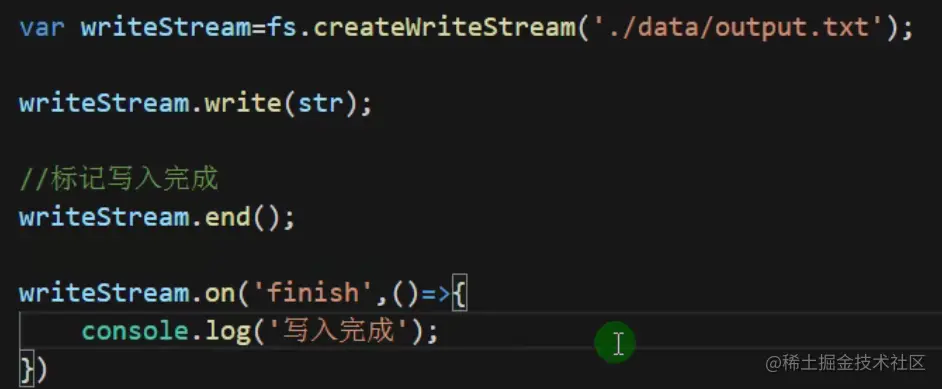
12. fs.createWriteStream 写入文件
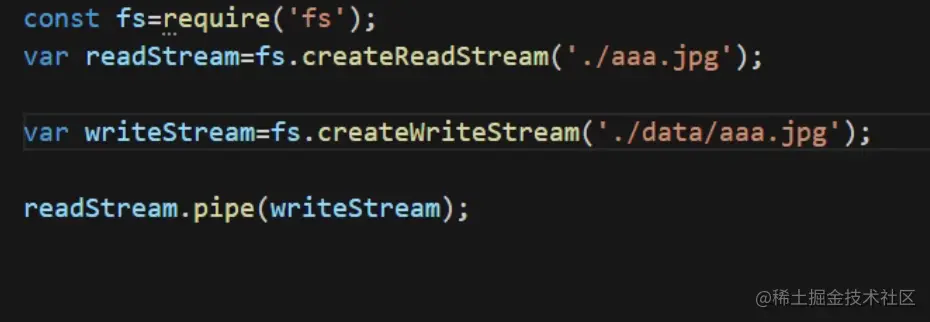
13. 管道流
- 把一张图片复制到另一个文件夹下
 c
c