

请求
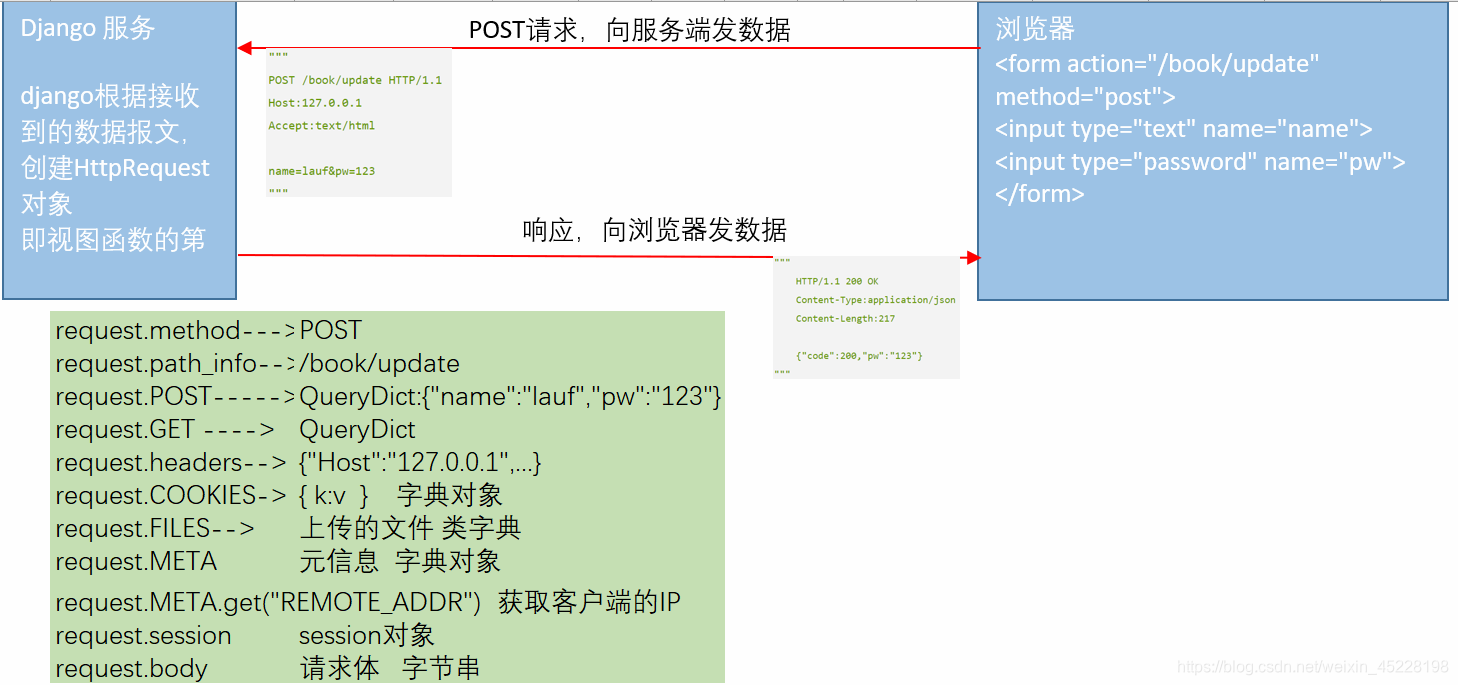
浏览器通过http协议,给服务器发送的数据
"""
POST /book/update HTTP/1.1
Host:127.0.0.1
Accept:text/html

name=lauf&pw=123
"""
请求行
请求头
请求空行
请求体
响应
服务端接收请求、处理请求、回复浏览器的数据
"""
	HTTP/1.1 200 OK
	Content-Type:application/json
	Content-Length:217

	{"code":200,"pw":"123"}
"""
响应行
响应头
响应空行
响应体
请求的方法
GET,请求指定的页面,数据以的方式传输 如:
"""
	GET:
	1.在浏览器的地址栏,输入 http://www.baidu.com
	回车,发送GET 请求
	2.<a href="http://www.baidu.com" target="_blank">百度</a> 点击超链接,发送GET 请求

	GET请求传输数据:
	https://baike.baidu.com/item/%E8%B5%B5%E4%B8%BD%E9%A2%96/10075976?fr=aladdin
"""
POST,以提交数据的方式,请求,数据在请求体中
"""
	常见的POST请求
	<form action="/book/update/" method="post"> #get 时数据拼接查询字符串

		<input type="text" name="name" value="">
		<input type="password" name="pw" value="">
	</form>
"""
PUT,向服务器发送数据,取代指定文档中的内容 DELETE,删除指定的页面 HEAD,类似GET,获取报头 。。。
django中的请求对象
视图函数的第一个参数request,即为请求对象 django.http.HttpRequest 对象,django收到请求后,根据数据报文创建HttpRequest对象
request对象的属性/方法:
request.path_info, URL字符串,不含查询字符串
request.get_full_path(), 包含查询字符串
如:
/index?a=10&b=20

 request.GET.get("b") --> "30"
request.GET.getlist("b") -->["20","30"]
request.method, 请求的方法 request.GET, GET请求提交的数据 QueryDict对象 request.POST, POST请求提交的数据 QueryDict对象 request.headers 请求头 字典对象 request.body 请求体的字节串 request.META 元信息 字典 request.FILES 上传文件 类字典 request.COOKIES cookie信息,字典 request.session session 对象 request.scheme 请求的协议
django中的响应对象
django.http.HttpResponse content,响应体 str/html 字符串 content_type,数据类型 status,状态码
django.http.JsonResponse(dict)对接前端Ajax django.shortcuts.render(request,"index.html",data_dict)#模板内直接使用key
from django.http import HttpResponse
def view_func(request):

	#逻辑处理
	return HttpResponse("ok",content_type="text/html",status)
	#字符串/html字符串
常用的Content-Type:
text/html, html 文件
text/css,css文件
text/javascript,js文件
text/plain ,纯文本
application/json,json文件
application/xml,xml文件
multipart/form-data,文件提交
HttpResponse子类
django.http.HttpResponseRedirect("/book/list/") 302临时重定向 等价于: from django.shortcuts import redirect,render
def view_func(request):
	#验证用户 密码
	#正确
	return redirect("/index/")
	#验证错误
	return redirect("/login/") #浏览器地址栏 显示此地址
	#浏览器端重定向 window.location.href="/login/"
HttpResponseNotModified()不传参数 304未更改 HttpResponseBadRequest 400错误请求 HttpResponseNotFound("NOT FOUND") 404未找到 HttpResponseForbidden("无权限访问") 403禁止 HttpResponseServerError 500服务内部错误
视图函数处理
def vieww_func(request):
	if request.method == "GET":
		#处理GET请求
	elif request.method == "POST":
		#处理POST 请求
	else:
		#其他
	return HttpResponse("xxxxx")
练习
GET 请求http://127.0.0.1:8000/calc?x=10&y=20&op=add 服务器返回计算结果
#urls.py>
from django.urls import path,include
from django.contrib import admin

urlpatterns = [
	path("admin/",admin.site.urls),
	path("calc",calculate),
]

#views.py>
def calculate(request):
	x = float(request.GET.get("x"))
	y = float(request.GET.get("y"))
	op = request.GET.get("op")
	if op == "add":
		return HttpResponse("计算结果:%s"%str(x+y))
	elif op == "sub":
		return HttpResponse("计算结果%s"%str(x-y))
	elif op == "mul":
		return xxx
	elif op == "div":
		return xxx

