踩坑
如果点击打印地图,没有反应也不报错。考虑一下几点
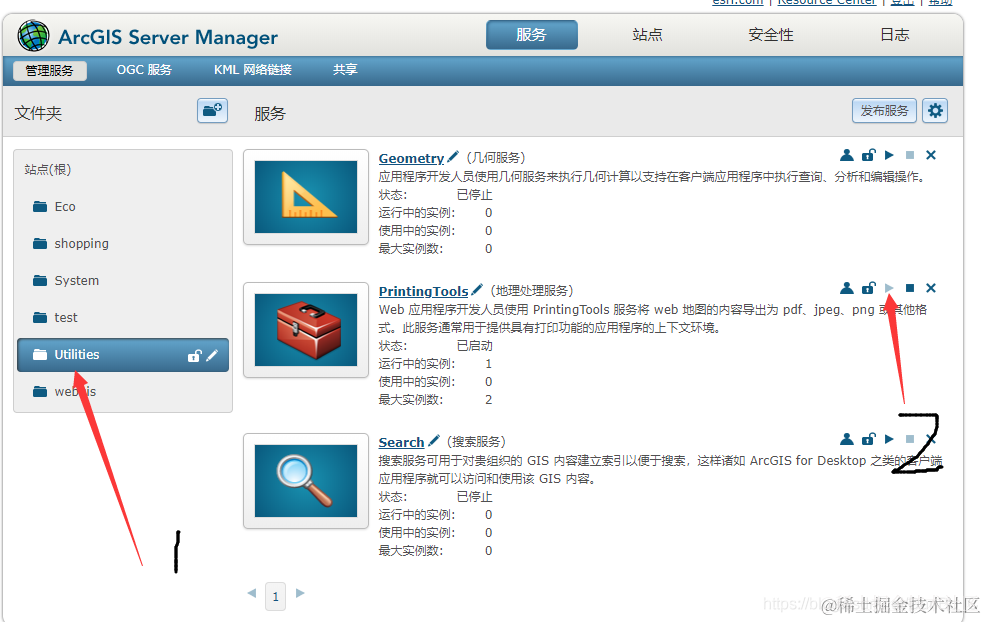
- ArcGIS Server中的地理处理服务没有开
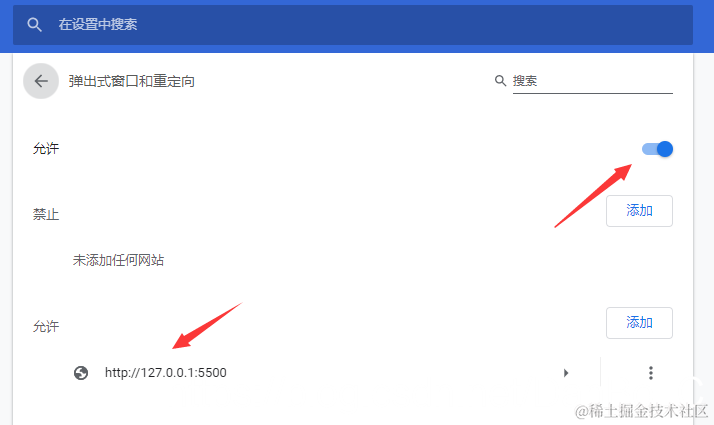
- 浏览器阻止了弹出窗口
解决
- 运行服务
- 浏览器的弹出窗口,点击允许。如果没有弹出在浏览器
设置 -> 网站设置 -> 弹出式窗口和重定向中打开允许,或者在允许中添加测试页面的地址。
- 当地图内存很大的时候,回调函数有可能会超时,这种情况下,会产生打印的pdf,执行回调函数中的内容需要等很久,具体时间视地图大小而定,因为已经响应超时。这种情况请继续看
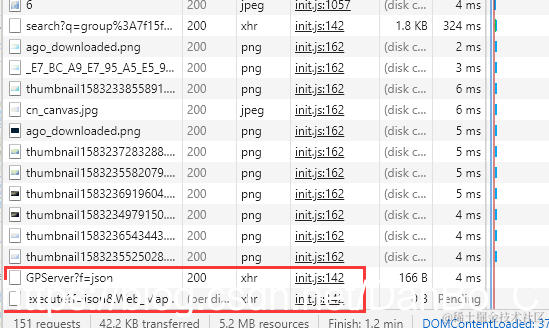
- 打开控制台,查看资源,刷新页面,重新请求资源,点击打印,在最下面会增加两个资源

- 双击第二个资源,这是打印执行后服务器所返回的
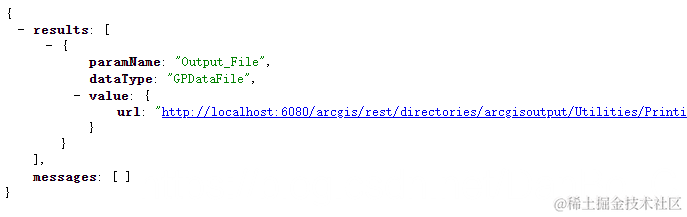
- 出现这个,说明是成功了,但是弹出窗口还需要等待,可以直接点击
value -> url打开pdf,这个就是返回的pdf的地址
- 这里报错状态码为500,说明是地理处理服务没有打开。打开后重新运行解决。
贴代码
<!DOCTYPE html>
<html xmlns="http://www.w3.org/1999/xhtml">
<head>
<meta http-equiv="Content-Type" content="text/html; charset=utf-8"/>
<title>地图打印</title>
<link rel="stylesheet" href="https://js.arcgis.com/3.28/esri/css/esri.css" />
<script src="https://js.arcgis.com/3.28/"></script>
<script src="https://code.jquery.com/jquery-1.12.4.js"></script>
<style type="text/css">
.MapClass{
width:100%;
height:500px;
border:1px solid #000;
}
</style>
<script type="text/javascript">
require(["esri/map",
"dojo/dom","dojo/on","dojo/query",
"esri/layers/ArcGISDynamicMapServiceLayer",
"esri/symbols/SimpleMarkerSymbol",
"esri/symbols/SimpleLineSymbol",
"esri/symbols/SimpleFillSymbol",
"esri/toolbars/draw",
"esri/graphic",
"esri/tasks/PrintTask",
"esri/tasks/PrintTemplate",
"esri/tasks/PrintParameters",
"dojo/colors",
"dojo/domReady!"],
function (Map,dom,on,query,
ArcGISDynamicMapServiceLayer,
SimpleMarkerSymbol,
SimpleLineSymbol,
SimpleFillSymbol,
Draw,
Graphic,
PrintTask,PrintTemplate,PrintParameters,
Color) {
var map = new esri.Map("mapDiv");
var layer = new esri.layers.ArcGISDynamicMapServiceLayer
("http://localhost:6080/arcgis/rest/services/ecology/beijing_2012_3/MapServer");
map.addLayer(layer);
var toolBar = new Draw(map);
lineSymbol = new SimpleLineSymbol(SimpleLineSymbol.STYLE_DASH, new Color([255, 0, 0]), 3);
polygonSymbol = new SimpleFillSymbol(SimpleFillSymbol.STYLE_SOLID, lineSymbol, new Color([255, 0, 0, 0.25]));
query(".pbtn").on("click",function(event){
toolBar.activate(Draw.POLYGON, {
showTooltips:true
})
})
on(toolBar,"draw-end",function(result){
var geometry=result.geometry;
var graphicpoint= new Graphic(geometry, polygonSymbol);
map.graphics.add(graphicpoint);
toolBar.deactivate();
})
on(dom.byId("Btn"),"click",function(){
var printMap = new PrintTask("http://localhost:6080/arcgis/rest/services/Utilities/PrintingTools/GPServer/Export%20Web%20Map%20Task");
var template = new PrintTemplate();
var params = new PrintParameters();
printMap.outSpatialReference = map.SpatialReference
template.exportOptions = {
width: 850,
height: 650,
dpi: 96
};
template.format = "PDF";
template.layout = "MAP_ONLY";
PrintTemplate
params.map = map;
params.template = template;
printMap.execute(params, function(result){
if (result != null) {
window.open(result.url);
}
})
})
});
</script>
</head>
<body>
<div id="mapDiv" class="MapClass"></div>
<button class="pbtn" >画多边形</button>
<input id="Btn" type="button" value="地图打印" />
</body>
</html>