day09授课笔记
作业
public class Exer1 {
public static void main(String[] args) {
TriAngle t = new TriAngle(3, 4);
t.area();
t.setBase(4.5);
t.setHeight(5.4);
t.area();
}
}
class TriAngle {
private double base;
private double height;
public TriAngle() {
}
public TriAngle(double base, double height) {
this.base = base;
this.height = height;
}
public double getBase() {
return base;
}
public void setBase(double base) {
this.base = base;
}
public double getHeight() {
return height;
}
public void setHeight(double height) {
this.height = height;
}
public void area() {
System.out.println(base * height / 2);
}
}
package com.atguigu.homework;
public class Exer2 {
public static void main(String[] args) {
RectangleUtil util = new RectangleUtil();
Rectangle[] arr = util.getRectangleArray(5, 1, 10);
util.print(arr);
util.sortRectangleArray(arr);
util.print(arr);
}
}
class RectangleUtil {
public Rectangle[] getRectangleArray(int length, int low, int high) {
Rectangle arr[] = new Rectangle[length];
for (int i = 0; i < arr.length; i++) {
arr[i] = new Rectangle();
double random1 = Math.round((Math.random() * (high - low) + low) * 100) / 100.0;
double random2 = Math.round((Math.random() * (high - low) + low) * 100) / 100.0;
double maxRandom = (random1 >= random2) ? random1 : random2;
double minRandom = (random1 < random2) ? random1 : random2;
arr[i].setLength(maxRandom);
arr[i].setWidth(minRandom);
}
return arr;
}
public void print(Rectangle[] arr) {
for (int i = 0; i < arr.length; i++) {
System.out.println(arr[i].showLengthAndWidth() + ",面积为:" + arr[i].area());
}
}
public void sortRectangleArray(Rectangle[] arr) {
for (int i = 0; i < arr.length - 1; i++) {
for (int j = 0; j < arr.length - 1 - i; j++) {
if (arr[j].area() > arr[j + 1].area()) {
Rectangle temp = arr[j];
arr[j] = arr[j + 1];
arr[j + 1] = temp;
}
}
}
}
}
class Rectangle {
private double length;
private double width;
public double getLength() {
return length;
}
public void setLength(double length) {
this.length = length;
}
public double getWidth() {
return width;
}
public void setWidth(double width) {
this.width = width;
}
public double area() {
return length * width;
}
public String showLengthAndWidth() {
return "长:" + length + ",宽:" + width;
}
}
package com.atguigu.homework;
public class Exer3 {
public static void main(String[] args) {
Bank bank = new Bank();
bank.addCustomer("国华","桑");
bank.addCustomer("锐达","曲");
bank.addCustomer("忠超","汤");
int numOfCustomers = bank.getNumOfCustomers();
System.out.println("目前银行中的客户个数为:" +numOfCustomers);
bank.getCustomer(0).setAccount(new Account(1000));
bank.getCustomer(0).getAccount().withdraw(600);
}
}
class Account{
private double balance;
public Account(double init_balance){
this.balance = init_balance;
}
public double getBalance(){
return balance;
}
public void deposit(double amt){
if(amt > 0){
this.balance += amt;
System.out.println("存入金额:" + amt + ",账户余额:" + this.balance);
}
}
public void withdraw(double amt){
if(amt <= this.balance){
this.balance -=amt;
System.out.println("取出金额:" + amt + ",账户余额:" + this.balance);
}else{
System.out.println("账户余额不足,取款失败!!");
}
}
}
class Customer{
private String firstName;
private String lastName;
private Account account;
public Customer(String f, String l){
this.firstName = f;
this.lastName = l;
}
public String getFirstName(){
return firstName;
}
public String getLastName(){
return lastName;
}
public void setAccount(Account account){
this.account = account;
}
public Account getAccount(){
return account;
}
}
class Bank{
private Customer[] customers;
private int numberOfCustomer;
public Bank(){
customers = new Customer[10];
}
public void addCustomer(String f,String l){
Customer cust = new Customer(f,l);
customers[numberOfCustomer++] = cust;
}
public int getNumOfCustomers(){
return numberOfCustomer;
}
public Customer getCustomer(int index){
if(index < 0 || index >= numberOfCustomer){
return null;
}
return customers[index];
}
}
知识点1:package 和 import关键字的使用
package com.atguigu.java;
import java.lang.reflect.Field;
import java.util.ArrayList;
import java.util.HashMap;
import java.util.Map;
import java.sql.Date;
import java.util.Scanner;
import java.util.Map.Entry;
import static java.lang.Math.PI;
import static java.lang.System.out;
public class PackageImportTest {
    public static void main(String[] args) {
        Scanner scann = new Scanner(System.in);
        String str = "hello";
        System.out.println(str);

        Person p1 = new Person();

        ArrayList list = new ArrayList();
        HashMap map = new HashMap();

        Field f = null;

        java.util.Date date1 = new java.util.Date();
        Date date2 = new Date(234234L);

        out.println(PI);

        Entry entry = null;
    }
}
知识点2:面向对象的特征之二:继承性
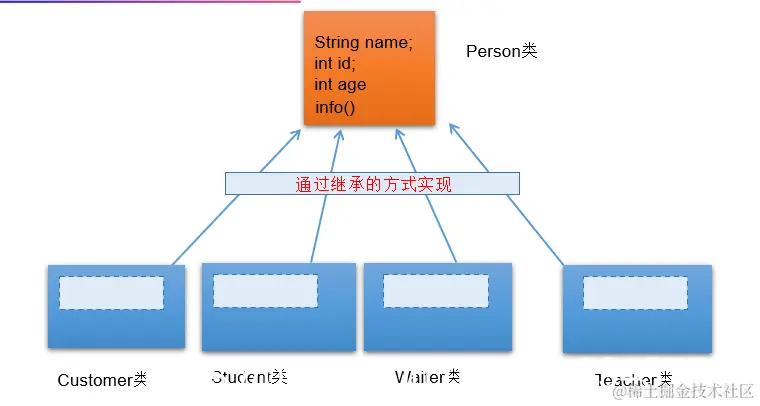
面向对象的特征二:继承性
 *  1. 继承性的好处?
 *  > 继承的出现减少了代码冗余,提高了代码的复用性。
 *  > 继承的出现,更有利于功能的扩展。
 *  > 继承的出现让类与类之间产生了关系,提供了多态的前提。
2.格式:class A extends B
*    其中:A:子类、SubClass
*         B:父类、超类、基类、SuperClass
* 3.
* 3.1 继承性的特点:当子类继承父类以后,就获取了父类中声明的结构:属性、方法
* 3.2 子类在继承父类之后,获取父类结构之余,还可以定义自己特有的结构:属性、方法。
*     子类、父类  不同于 高中讲的集合、子集的概念。
*
* 4. 说明:
* ① 不要仅为了获取其他类中某个功能而去继承
* ② java规定:类的继承是单继承性的。
* ③ java中的子父类是相对的。
* ④ 明确两个概念:直接父类、间接父类
package com.atguigu.java;
public class Creature {
char gender;
public void breath(){
System.out.println("呼吸....");
}
}
package com.atguigu.java;
public class Person extends Creature{
String name;
private int age;
public int getAge() {
return age;
}
public void setAge(int age) {
this.age = age;
}
public Person(){}
public Person(String name,int age){
this.name = name;
this.age = age;
}
public void eat(){
System.out.println("人吃饭。。。");
}
public void sleep(){
System.out.println("人睡觉....");
}
public void useTool(){
System.out.println("人可以使用工具");
}
}
package com.atguigu.java;
public class Student extends Person{
String major;
public void study(){
System.out.println("学生上学学习");
}
public void show(){
System.out.println("name : " + name + ", age : " + getAge());
}
}
public class ExtendsTest {
public static void main(String[] args) {
Student s1 = new Student();
s1.name = "曲锐达";
s1.eat();
s1.show();
s1.gender = '男';
s1.breath();
s1.setAge(12);
System.out.println(s1.getAge());
s1.major = "计算机科学与技术";
s1.study();
}
}
知识点3:方法的重写
方法的重写(override \ overwrite)
*
* 1. 回顾:方法的重载(overload):
*    "两同一不同":同一个类中相同方法名,形参列表不同的多个方法间彼此构成重载。
*
* 2. 方法的重写(override / overwrite)
*   2.1 使用前提:在子类继承父类以后,我们可以在子类中对父类同名同参数列表的方法进行覆盖操作。
*   2.2 此覆盖操作,即为方法的重写
*   2.3 当子类重写父类的方法之后,通过子类对象调用此同名同参数的方法时,实际调用的是子类重写父类的方法。
*
* 3.
*    方法的声明: 权限修饰符  返回值类型  方法名(形参列表) {方法体}
*    方法的重写的规则:
*    ① 子类重写的方法 与 父类被重写的方法的 方法名、形参列表必须一致。
*    ② 子类重写的方法的权限修饰符 不小于 父类被重写的方法的权限修饰符。
*          > 子类不能重写父类中声明为private权限的方法。换句话说,private的方法不能被重写。
*    ③ 如果父类被重写的方法的返回值类型为void,则子类重写的方法的返回值类型也必须为void
*      如果父类被重写的方法的返回值类型为基本数据类型,则子类重写的方法的返回值类型也必须为相同的基本数据类型。
*      如果父类被重写的方法的返回值类型为引用数据类型,则子类重写的方法的返回值类型可以与父类使用的类型相同,或是父类使用的数据类型的子类
*
*    ④ 后续异常处理时讲:子类重写的方法抛出的异常类型 不大于 类被重写的方法抛出的异常类型
*
*    ##########################################################
*   补充说明:子类与父类中同名同参数的方法必须同时声明为static的,或同时声明为非static的。
*
*
* 4. java.lang.Object是所有java类(非Object类)的根父类
*
* 面试题:区分方法的重载和重写?
*
* 5. 类的属性、构造器不存在重写!
方法的重写应用举例:
* 1. class Circle{
*
* public double findArea() {}
*
* }
*
* class Clinder extends Circle{
*
* public double findArea() {}
* }
*
* 2.
* class Account{
* double balance;
* public void deposit(double amt){}
* public void withdraw(double amt){}
* }
*
*
* class CheckAccount extends Account{
* double protectBalance;
* public void withdraw(double amt){}
* *}
*
* 3. Object类中声明了equals(),此方法在很多的子类中都进行了重写。比如:String、日期类等
package com.atguigu.java1;
public class Person {
String name;
private int age;
public int getAge() {
return age;
}
public void setAge(int age) {
this.age = age;
}
public Person(){}
public Person(String name,int age){
this.name = name;
this.age = age;
}
public void eat(){
System.out.println("人吃饭。。。");
}
public void eat(String food){
}
private void sleep(){
System.out.println("人睡觉....");
}
public void useTool(){
System.out.println("人可以使用工具");
}
public int getHight(){
return 0;
}
public Person getObject(){
return null;
}
}
package com.atguigu.java1;
public class Student extends Person {
String major;
public void study(){
System.out.println("学生上学学习");
}
public void show(){
System.out.println("name : " + name + ", age : " + getAge());
}
public void eat(){
System.out.println("学生应该多吃有营养的食物");
}
public void sleep(){
System.out.println("学生要保证每天8小时的睡眠");
}
public int getHight(){
return 1;
}
public Student getObject(){
return null;
}
@Override
public void useTool() {
}
}
知识点4: 4种权限的测试
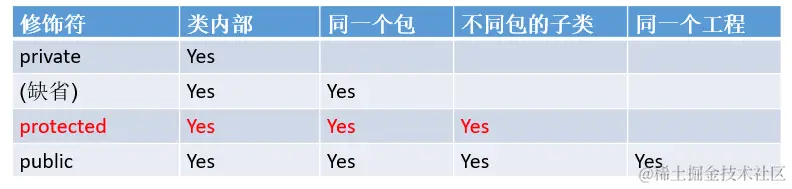
知识点5:super关键字的使用
* super可以调用:属性、方法、构造器
*
*  super可以理解为:父类的
1. super调用属性、方法
我们在子类的方法中,显式的通过“super.属性”或"super.方法"的方式,调用父类中的属性或方法。不过很多时候我们可以考虑省略此"super."。但是:
① (尽量避免出现)当子父类中声明相同名字的属性时,如果在子类中要显式调用父类中的属性时,必须使用"super.属性",表明调用的父类中同名的属性
② 当子类重写了父类的方法时,如果在子类中要显式的调用父类中被重写的方法时,必须使用"super.方法",表明调用的是父类被重写的方法。
① 格式:"super(形参列表)"
② 我们可以在子类的构造器中显式的使用"super(形参列表)",调用父类中指定的构造器
③ 子类构造器中如果使用"super(形参列表)"的话,必须声明在构造器的首行
④ 结合"this(形参列表)",我们得出结论:构造器中"this(形参列表)"和"super(形参列表)"最多只能声明一个
⑤ 我们在构造器的首行,没有显式的声明"this(形参列表)"和"super(形参列表)",则默认调用"super()"
⑥ 如果一个类有n个构造器,则最多有 n - 1个构造器中使用"this(形参列表)",则另一个一定使用了"super()"
 *
package com.atguigu.java3;
public class Person {
String name;
private int age;
String id = "1001";
public int getAge() {
return age;
}
public void setAge(int age) {
this.age = age;
}
public Person() {
System.out.println("我是Person()");
}
public Person(String name, int age) {
this.name = name;
this.age = age;
}
public void eat() {
System.out.println("人吃饭。。。");
}
public void sleep() {
System.out.println("人睡觉....");
}
public void useTool() {
System.out.println("人可以使用工具");
}
}
package com.atguigu.java3;
public class Student extends Person {
String major;
String id = "1002";
public void study(){
System.out.println("学生上学学习");
}
public void show(){
System.out.println("name : " + super.name + ", age : " + getAge());
super.eat();
super.sleep();
}
public void info(){
System.out.println("id = " + id);
System.out.println("id = " + this.id);
System.out.println("id = " + super.id);
System.out.println("name = " + this.name);
}
public void eat() {
System.out.println("学生多吃有营养的食物");
}
public void info1(){
super.eat();
this.eat();
eat();
}
public Student(){
super("Tom",12);
}
public Student(String major){
this.major = major;
}
}
练习题目
package com.atguigu.exer1;
public class Circle {
private double radius;
public Circle() {
radius = 1;
}
public void setRadius(double radius) {
this.radius = radius;
}
public double getRadius() {
return radius;
}
public double findArea() {
return Math.PI * radius * radius;
}
}
package com.atguigu.exer1;
import java.lang.reflect.GenericSignatureFormatError;
public class Cylinder extends Circle {
private double length;
public Cylinder() {
length = 1;
}
public double getLength() {
return length;
}
public void setLength(double length) {
this.length = length;
}
public double findVolume() {
return super.findArea() * length;
}
@Override
public double findArea() {
return Math.PI * getRadius() * getRadius() * 2 + 2 * Math.PI * getRadius() * length;
}
}
package com.atguigu.exer1;
public class CylinderTest {
public static void main(String[] args) {
Cylinder c = new Cylinder();
System.out.println("底面圆的半径为:" + c.getRadius() + "\t\t高为" + c.getLength() + "\t\t圆柱的体积为:" + c.findVolume());
double area = c.findArea();
System.out.println("圆柱的表面积为:" + area);
}
}