

官网下载UEditor
UEditor Github地址
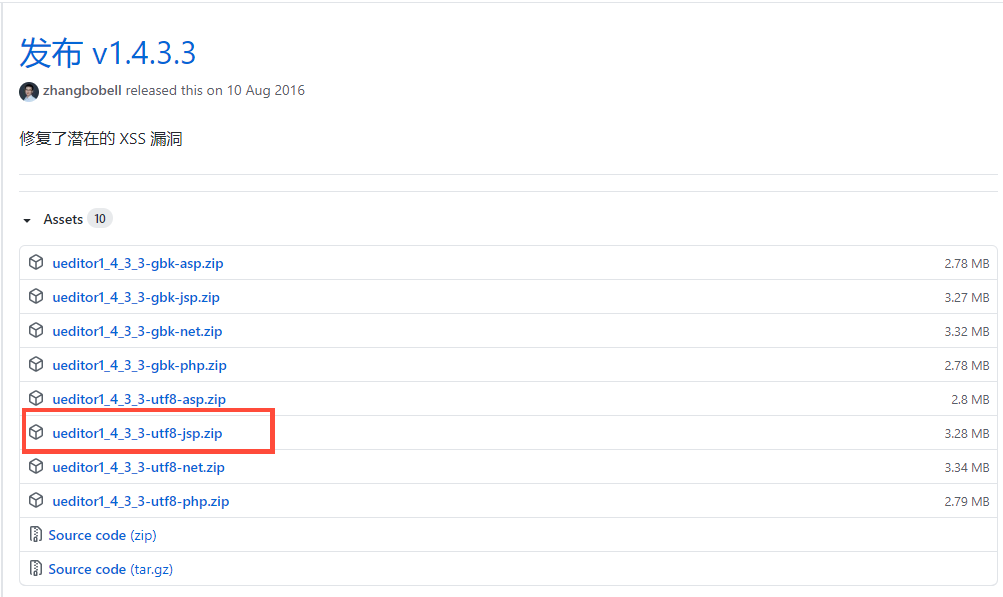 后台使用的是
java所以这里使用的是utf8 jsp版本。
配置富文本
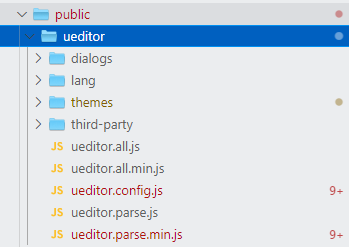
下载完成后,将包解压,jsp文件夹和index.html文件是demo可以删除。
静态目录(
public文件夹)下新建ueditor文件夹将解压内容放入。
下载vue-ueditor-wrap方便使用并集成百度富文本;vue-ueditor-wrap是一个“包装”了 UEditor 的 Vue 组件,支持通过 v-model 来绑定富文本编辑器的内容,让 UEditor 的使用简单到像 Input 框一样。
npm install vue-ueditor-wrap
项目components文件夹下新建editor.vue文件
<template>
  <vue-ueditor-wrap :config="myConfig" v-model="copyContent" :editor-id="editorId"></vue-ueditor-wrap>
</template>

<script>
import VueUeditorWrap from 'vue-ueditor-wrap';

export default {
  name: 'Editor',
  components: {
    VueUeditorWrap
  },
  data() {
    return {
      editorId: `editor-${new Date().getTime()}`, //唯一id,防止editor缓存
      copyContent: ''
    };
  },
  props: {
    // 富文本高度
    initialFrameHeight: {
      type: Number,
      default() {
        return 400;
      }
    },
    // 富文本内容
    content: {
      type: String,
      default: ''
    },
    // 富文本是否只读状态
    readonly:{
      type:Boolean,
      default:false
    }
  },
  computed: {
    myConfig() {
      return {
        // 如果需要上传功能,找后端小伙伴要服务器接口地址,否则无法上传,上传功能需后端配合。
        serverUrl: '',
        // 你的UEditor资源存放的路径,相对于打包后的index.html(路由使用history模式注意使用绝对路径或者填写正确的相对路径)
        UEDITOR_HOME_URL: './ueditor/',
        // 编辑器不自动被内容撑高
        autoHeightEnabled: false,
        // 初始容器高度
        initialFrameHeight: this.initialFrameHeight,
        // 初始容器宽度
        initialFrameWidth: '100%',
        // 关闭自动保存
        enableAutoSave: true,
        // 是否启用元素路径,默认是true显示
        elementPathEnabled: false,
        // 是否开启字数统计
        wordCount: false,
        zIndex:2999,
        readonly: this.readonly
      };
    }
  },
  model: {
    prop: 'content',
    event: 'change'
  },
  watch: {
    copyContent(val) {
      let me = this;
      me.$emit('change', val);
    },
    content:{
      immediate:true,
      handler(val){
        let me = this;
        me.copyContent = val;
      }
    }
  }
};
</script>
使用富文本
<template>
	<Editor initialFrameHeight='300' v-model="introduce" />
<template>
<script>
  import Editor from 'components/editor';
  export default {
  	components: { Editor },
    data() {
    	return {
      	introduce: ''
      }
    }
  }
</script>
附:修改toolbars行高
如果需要更改工具栏工具行高过高的情况
找到
public->ueditor->themes->css->ueditor.css文件,搜索 .edui-default .edui-toolbar .edui-combox .edui-combox-body和 .edui-default .edui-toolbar样式,在最后追加 line-height: initial即可。