

项目中多处用到图片上传及裁剪的功能,为了共用组件且保证组件的灵活样式,特地地配合vue插槽实现了一个组件。
组件
下载 vue-cropper
npm install vue-cropper
上传组件imgUpload.vue
<template>
  <article id='img-upload'>
    <section class="img-upload-content" :style="uploadStyle">
      <div class="have-img" v-if="copyPath">
        <el-image class="img" :src="copyPath" fit="contain" />
        <div class="img-slot">
          <el-upload :action="action" :show-file-list="false" :on-change="uploadChange" with-credentials>
            <i class="el-icon-edit-outline"></i>
          </el-upload>
          <i @click="deleteImg" class="el-icon-delete"></i>
          <i @click="toCropImg" class="el-icon-crop"></i>
        </div>
      </div>
      <template v-else>
        <slot name='defCover' v-if="btnUpload"></slot>
        <el-upload class="imgUpload" :action="action" :show-file-list="false" :on-change="uploadChange" with-credentials v-else>
          <slot name='imgUpload'></slot>
        </el-upload>
      </template>
    </section>
    <slot name='tip'></slot>
    <el-upload :action="action" :show-file-list="false" :on-change="uploadChange" with-credentials v-if="btnUpload">
      <slot name='btnUpload'></slot>
    </el-upload>
    <img-crop v-bind="$attrs" :crop-visibility="cropVisibility" :fileInfo="fileInfo" :crop-picture="cropPicture" @finishCrop="finishCrop" @close="cropVisibility=false" />
  </article>
</template>

<script>
import ImgCrop from './imgCrop';

export default {
  name: 'ImgUpload',
  components: { ImgCrop },
  props: {
    width: String,
    height: String,
    path: String,
    maxSize: {
      type: Number,
      default: 5 * 1024 * 1024
    },
    bgColor: {
      type: String,
      default: 'white'
    },
    border: {
      type: Boolean,
      default: false
    },
    borderWidth: {
      type: String,
      default: '1px'
    },
    borderColor: {
      type: String,
      default: '#d1d1d1'
    },
    borderStyle: {
      type: String,
      default: 'solid'
    },
    borderRadius: {
      type: String,
      default: '5px'
    },
    btnUpload: {
      type: Boolean,
      default: false
    }
  },
  model: {
    prop: 'path',
    event: 'change'
  },
  data() {
    return {
      copyPath: '',
      fileInfo: null,
      cropVisibility: false,
      cropPicture: ''
    };
  },
  computed: {
    uploadStyle() {
      let borderObj = {
        borderWidth: this.borderWidth,
        borderRadius: this.borderRadius,
        borderColor: this.borderColor,
        borderStyle: this.borderStyle
      };
      let styleObj = {
        width: this.width,
        height: this.height,
        backgroundColor: this.bgColor
      };
      if (this.border) {
        Object.assign(styleObj, borderObj);
      }
      return styleObj;
    },
    action() {
      let me = this;
      // 向后端要图片上传地址
      return '';
    },
    maxImageSize() {
      let me = this;
      let _M = me.maxSize / 1024 / 1024;
      let _Kb = me.maxSize / 1024 + '';
      if (_M >= 1) {
        let y = String(_M).indexOf('.') + 1;
        if (y > 0) {
          return _M.toFixed(2) + 'M';
        } else {
          return _M + 'M';
        }

      } else {
        return parseInt(_Kb) + 'Kb';
      }
    }
  },
  watch: {
    path: {
      immediate: true,
      handler(val) {
        let me = this;
        me.copyPath = val;
      }
    }
  },
  methods: {
    uploadChange(file) {
      let me = this;
      if (file.size > me.maxSize) {
        me.$message.error('上传失败,图片大于' + this.maxImageSize);
        return;
      }
      me.fileInfo = file;
      if (file.response) {
        me.$nextTick(() => {
          me.cropPicture = file.response.data.fullPath;
          me.cropVisibility = true;
        });
      }
    },
    toCropImg() {
      let me = this;
      let index = me.copyPath.lastIndexOf('/');
      let str = this.copyPath.substring(index + 1);
      me.fileInfo = { name: str };
      me.cropPicture = me.copyPath;
      me.cropVisibility = true;
    },
    finishCrop(data) {
      let me = this;
      me.copyPath = data;
      me.$emit('change', data);
    },
    deleteImg() {
      let me = this;
      me.copyPath = '';
      me.$emit('change', '');
    }
  }
};
</script>

<style scoped lang="scss">
#img-upload {
  .img-upload-content {
    overflow: hidden;
    .have-img {
      width: 100%;
      height: 100%;
      position: relative;
      .img {
        width: 100%;
        height: 100%;
      }
      .img-slot {
        position: absolute;
        top: 0;
        left: 0;
        bottom: 0;
        right: 0;
        background-color: #424242;
        z-index: 1;
        background-color: rgba(0, 0, 0, 0.5);
        transition: 0.3s;
        display: flex;
        justify-content: space-evenly;
        align-items: flex-end;
        opacity: 0;

        i {
          cursor: pointer;
          line-height: 40px;
          font-style: normal;
          font-weight: 400;
          font-size: 20px;
          color: white;
        }
      }
      &:hover .img-slot {
        opacity: 1;
      }
    }
  }
  .imgUpload {
    height: 100%;
    ::v-deep .el-upload {
      width: 100%;
      height: 100%;
    }
  }
}
</style>
上传组件引入裁剪组件imgCrop.vue
<template>
  <article v-if="cropVisibility">
    <el-dialog :visible.sync="cropVisibility" title="剪裁图片" :close-on-click-modal="false" append-to-body width="800px">
      <div style="width: 760px;height: 480px">
        <vueCropper
          ref="cropper"
          :img="option.img"
          :outputSize="option.size"
          :full="option.full" :canMove="option.canMove" :canMoveBox="option.canMoveBox"
          :centerBox="option.centerBox"
          :autoCrop="option.autoCrop" :autoCropWidth="option.autoCropWidth"
          :autoCropHeight="option.autoCropHeight" :fixedBox="option.fixedBox"
          :fixed="option.fixed"
          :fixedNumber="option.fixedNumber"/>
      </div>
      <template v-slot:footer>
        <el-button size="small" @click="$emit('close')">取 消</el-button>
        <el-button size="small" type="primary" @click="finish">确认</el-button>
      </template>
    </el-dialog>
  </article>
</template>

<script>
import {VueCropper} from 'vue-cropper';

export default {
  name: 'imgCrop',
  components: {VueCropper},
  props: {
    cropVisibility: {
      type: Boolean,
      default: false
    },
    fileInfo: {
      type: Object,
      default: () => {
        return {};
      }
    },
    cropPicture: {
      type: String,
      default: ''
    },
    fixedNumber: {
      type: Array,
      default: () => {
        return [480, 270];
      }
    }
  },
  computed: {
    option() {
      let me = this;
      let obj = {
        img: me.cropPicture,
        outputSize: 1, // 裁剪生成图片的质量  (默认:1)
        full: false, // 是否输出原图比例的截图 选true生成的图片会非常大  (默认:false)
        canMove: true, // 上传图片是否可以移动  (默认:true)
        canMoveBox: false, // 截图框能否拖动  (默认:true)
        centerBox: true,//截图框是否被限制在图片里面
        autoCrop: true, // 是否默认生成截图框  (默认:false)
        autoCropWidth: me.fixedNumber[0], // 默认生成截图框宽度  (默认:80%)
        autoCropHeight: me.fixedNumber[1], // 默认生成截图框高度  (默认:80%)
        fixedBox: true, // 固定截图框大小 不允许改变  (默认:false)
        fixed: true,//是否开启截图框宽高固定比例
        fixedNumber: me.fixedNumber//截图框宽高比例
      };
      return obj;
    }
  },
  methods: {
    finish() {
      let me = this;
      let formData = new FormData();
      me.$refs.cropper.getCropBlob((data) => {
        let _obj = {name: me.fileInfo.name};//原图url
        let X = me.fileInfo.name.substring(me.fileInfo.name.lastIndexOf('.'), me.fileInfo.name.length);
        _obj.name = me.fileInfo.name.substring(0, me.fileInfo.name.lastIndexOf('.'));
        let reg = /^[\u4e00-\u9fa5\\_a-zA-Z0-9]+$/;
        if (!reg.test(_obj.name)) {
          _obj.name = _obj.name.replace(/[^\u4e00-\u9fa5\\_a-zA-Z0-9]+/g, '');
        }
        _obj.name = _obj.name + X;
        formData.append('file', data, _obj.name);
        me.$api.post('上传图片接口', formData).then(res => {
          me.$emit('finishCrop', res.data.fullPath);
          me.$emit('close');
        });
      });

    }
  }
};
</script>
效果1
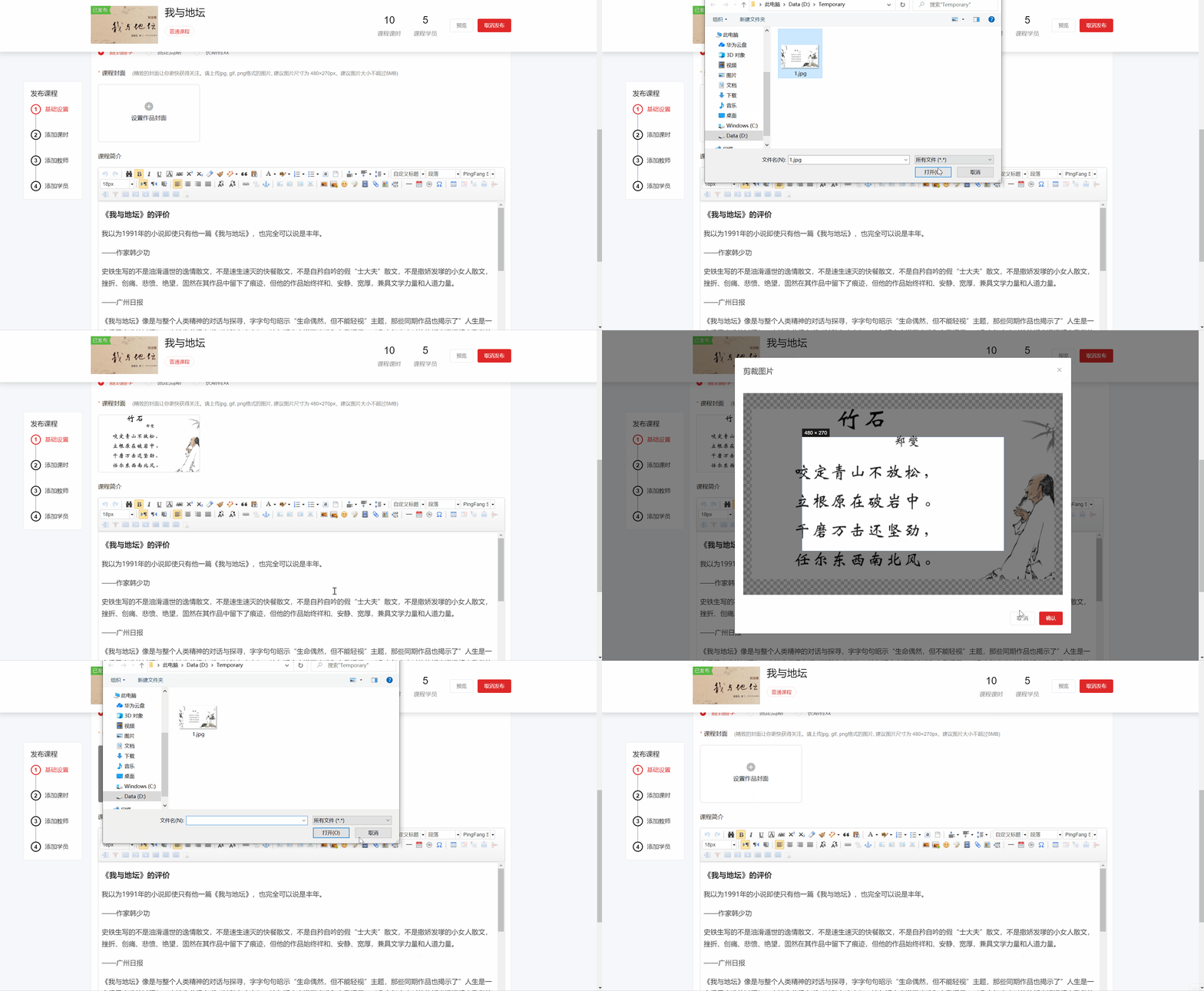
<template>
	<img-upload v-model="cover" width='240px' height='135px' border>
    <template #imgUpload>
      <div style="width: 100%;height: 100%;" class="flex flex-direction-column flex-content-center flex-align-center">
        <em class="el-icon-circle-plus" style=" font-size: 23px;color: #b8b8b8;"></em>
        <span style="font-size: 14px;font-weight: 400;color: #0f0f0f;">设置作品封面</span>
      </div>
	  </template>
  </img-upload>
</template>

<script>
  import ImgUpload from 'components/imgUpload';
  export default {
  	components: { ImgUpload },
    data() {
    	return {
      	cover: ''
      }
    }
  }
</script>
效果2
<template>
  <img-upload v-model="poster" width='480px' height='270px' bgColor='#f5f7fa' btnUpload>
    <template #defCover>
      <div style="width:100%;height:100%" class="flex flex-content-center flex-align-center">
        <i style="font-size:50px;color:#909399" class="el-icon-picture-outline"></i>
      </div>
    </template>
    <template #tip>
      <p class="padding-vertical color-info">请上传jpg, gif, png格式的图片, 建议图片尺寸为 480×270px。建议图片大小不超过5MB。</p>
    </template>
    <template #btnUpload>
      <el-button type="primary" size="small">上传新图片</el-button>
    </template>
  </img-upload>
</template>

<script>
  import ImgUpload from 'components/imgUpload';
  export default {
  	components: { ImgUpload },
    data() {
    	return {
      	poster: ''
      }
    }
  }
</script>