notice-toast
文档与演示

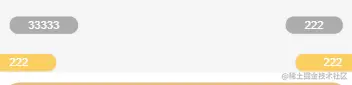
use
import { JNoticeToast, noticeToastPlugin } from 'jeft-vue/components/notice-toast'
props
| 参数 | 类型 | 默认值 | 描述 |
|---|
| show | Boolean | false | 显示 |
| delay | Number | 3000 | 时间间隔 |
| items | []Item | [] | 消息列表 |
| color | Color | rgba(253, 180,0, 0.6) | 背景颜色 |
| textColor | Color | #fff | 文字颜色 |
| position | absolute/fixed | absolute | 定位方式 |
| top | Number/String | 70 | 据顶部距离 |
| basePosition | left/right | left | 左侧/右侧 |
| type | half/all | all | 半圆形/全圆形 |
| zIndex | Number | 100 | 层级 |
item
| 参数 | 类型 | 默认值 | 描述 |
|---|
| userAvatar | String | '' | 可不传 |
| message | String | '' | 文字信息 |
plugin
Vue.use(noticeToastPlugin)
showToast() {
      this.noticeToastShow = !this.noticeToastShow
      this.$noticeToast({
        show: this.noticeToastShow,
        items: this.noticeToastItems
      })
    }
demo
  <j-notice-toast :show="show" :items="items"></j-notice-toast>
  <j-notice-toast
    :show="show"
    type="half"
    top="200"
    :items="items"
  ></j-notice-toast>
data() {
    return {
      show: true,
      items: [
        {
          message: "1发布了...",
        },
        {
          message: "2发布了",
        },
        {
          message: "3获得了...",
        },
      ],
    };
  },
  mounted() {
    this.$noticeToast({
      show: true,
      items: this.items,
      basePosition: "right",
      top: 60,
    });
  },
  beforeDestroy() {
    this.$noticeToast({
      show: false,
    });
    this.show = false;
  },



