vue2移动端城市选择
文档与演示
自定义城市
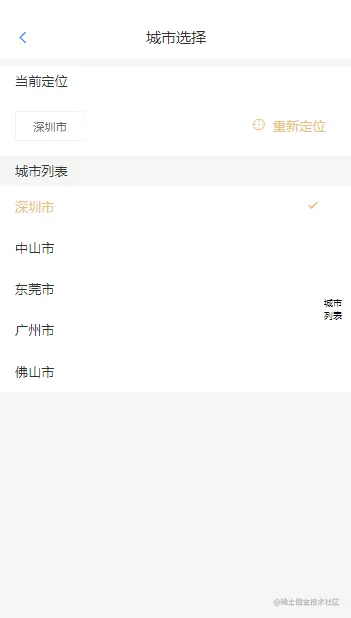
默认城市数据
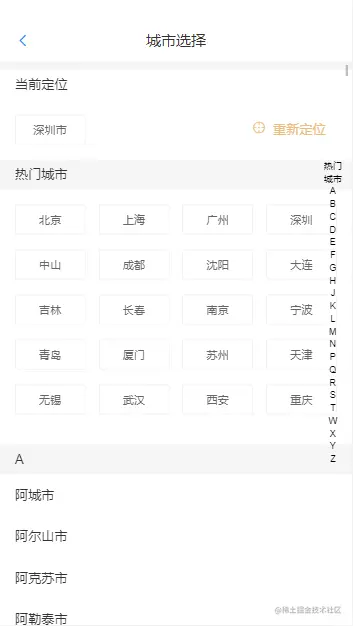
插件地址-jeft-vue
引入
import locationCity from 'jeft-vue/components/location-city'
props
| 参数 | 类型 | 默认值 | 描述 |
|---|
| value | Boolean | false | 显示组件 |
| location | Function | null | 定位方法,如果为空则不显示头部定位模块 |
| title | string | '城市选择' | 组件标题 |
| city | string | defaultSelectCity | 默认选中城市 - cityData.js中可更改 |
| locationCity | string | defaultSelectCity | 默认选中城市 - cityData.js中可更改 |
| color | Color | '#e9bd80' | 显示组件 |
| safeAreaInsetTop | Boolean | false | 顶部安全 |
| paddingTop | string/number | 0 | 自定义顶部高度-一般是状态栏高度 |
cityList
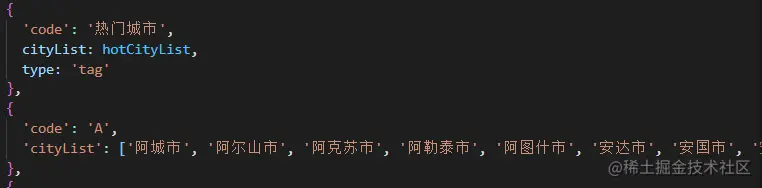
- type为tag则为标签模式
- type为空或cell,则单独占一行
demo1 - 默认城市数据
    <j-location-city
      v-model="show"
      :locationCity.sync="locationCity"
      :city.sync="city"
    ></j-location-city>

      <j-button :style="{ marginBottom: '15px' }" @click="show = true" round
        >默认城市数据-{{ city }}</j-button
      >
demo2 - 自定义城市参数
    <j-location-city
      v-model="show1"
      :hotCityList="[]"
      :cityList="cityList"
      :locationCity.sync="locationCity"
      :location="location"
      :city.sync="city1"
    ></j-location-city>

      <j-button :style="{ marginBottom: '15px' }" @click="show1 = true" round
        >自定义城市参数-{{ city1 }}-locationCity{{ locationCity }}</j-button
      >
demo3 - 自定义城市2-tag
    <j-location-city
      v-model="show2"
      :hotCityList="[]"
      :cityList="cityList2"
      :locationCity.sync="locationCity"
      :location="location"
      :city.sync="city2"
      :paddingTop="30"
    ></j-location-city>

    <j-button :style="{ marginBottom: '15px' }" @click="show2 = true" round
        >自定义城市2-tag-参数-{{ city2 }}</j-button
      >
data() {
    return {
      show: false,
      city: "深圳市",
      show1: false,
      city1: "深圳市",
      locationCity: "广州市",
      cityList: [
        {
          code: "城市列表",
          cityList: ["深圳市", "中山市", "东莞市", "广州市", "佛山市"],
        },
      ],

      show2: false,
      city2: "深圳市",
      cityList2: [
        {
          code: "城市列表",
          cityList: ["深圳市", "中山市", "东莞市", "广州市", "佛山市"],
          type: "tag",
        },
      ],
    };
  },
  methods: {
    goBack() {
      history.back();
    },
    async location() {
      return "深圳市";
    },
  },



