实现一个简单的 Vue.js。用于理解 Vue响应式原理。这里不做Virtual DOM 、render部分,选择直接操作DOM。
- Vue负责把data的数据注入到Vue实例中,并调用Observer和Compiler。
- Observer负责进行数据的响应化处理,核心就是使用了Object.defineProperty实现的。
- Compiler负责解析指令和插值表达式。
- Dep负责收集依赖,添加观察者。通知data对应的所有观察者Watcher来更新视图。在Observer类的每一个data转换get和set时,会创建一个Dep实例,用来负责收集依赖并发送通知。在每一个data中在get中收集依赖,在set中通知Watcher实例视图。
- Watcher类负责数据更新后,使关联视图重新渲染。
MVVM模型
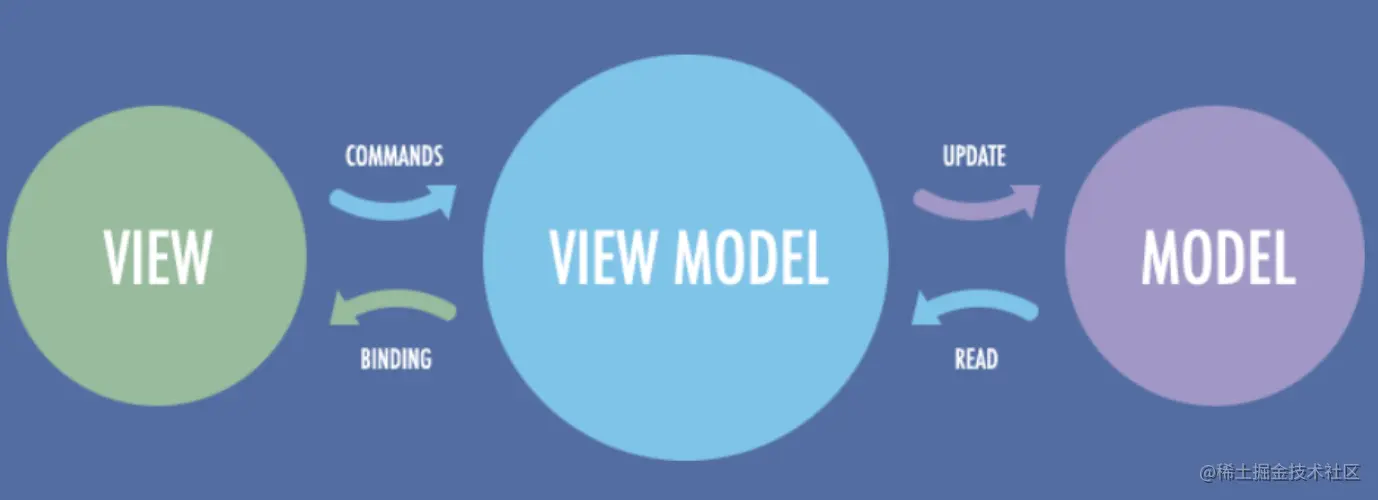
Vue的设计思想
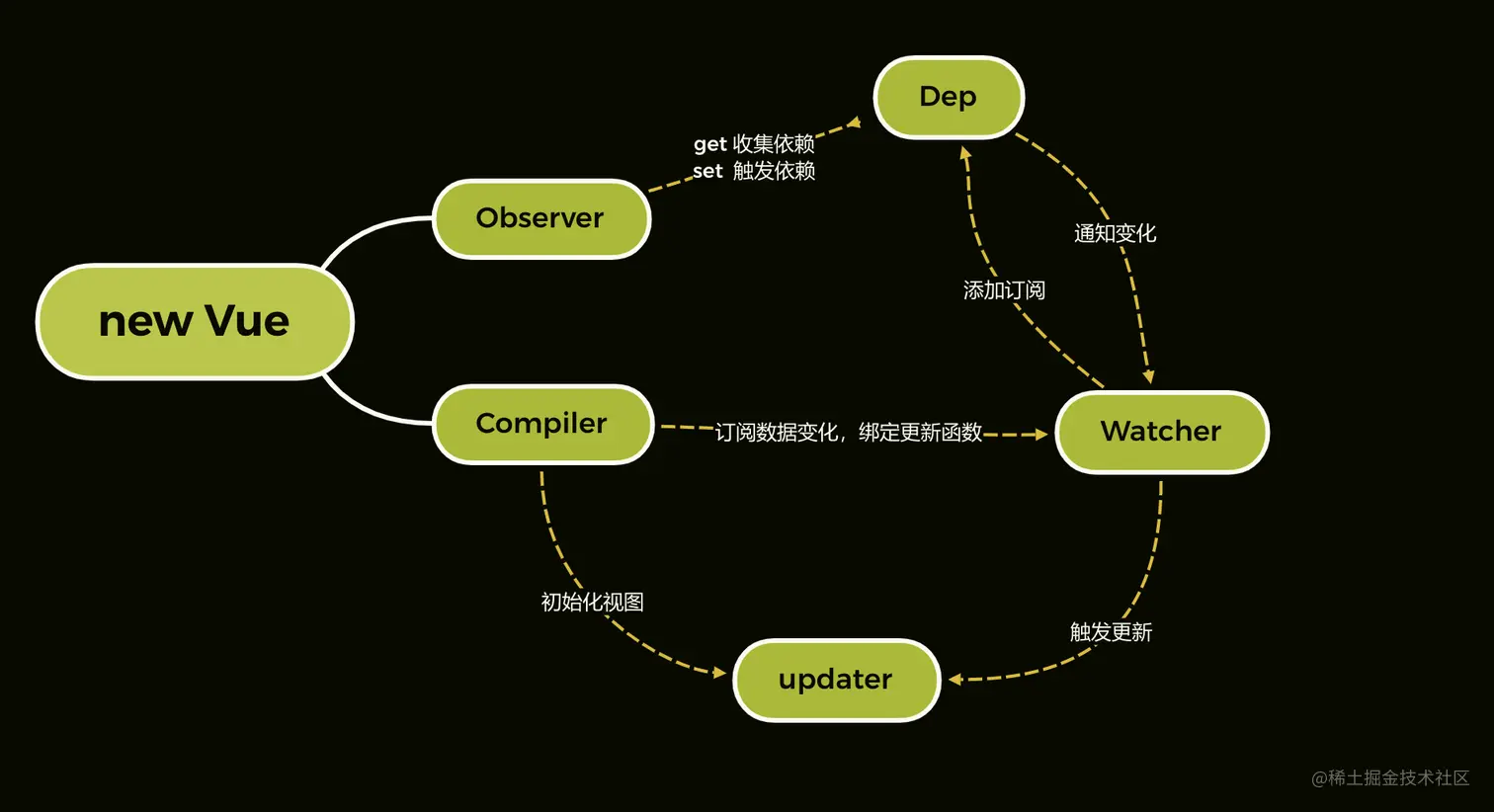
Vue的数据响应式
function definReactive(obj, key, val) {
observer(val)
Object.defineProperty(obj, key, {
get() {
console.log(`get ${key}`)
return val
},
set(newVal) {
if (newVal !== val) {
console.log(`set ${newVal}`)
observer(val)
val = newVal
}
},
})
}
function observer(obj) {
if (typeof obj !== 'object' || obj === null) return
Object.keys(obj).forEach((key) => {
definReactive(obj, key, obj[key])
})
}
const obj = {
name: 'name',
a: 'a',
b: {
c: 'c',
},
}
observer(obj)
function set(obj, key, val) {
definReactive(obj, key, val)
}
Vue实现
-
new Vue的实现
function definReactive(obj, key, val) {
observer(val)
const dep = new Dep()
Object.defineProperty(obj, key, {
get() {
Dep.target && dep.addDep(Dep.target)
console.log(`get ${key}`)
return val
},
set(newVal) {
if (newVal !== val) {
console.log(`set ${newVal}`)
observer(val)
val = newVal
dep.notify()
}
},
})
}
function observer(obj) {
if (typeof obj !== 'object' || obj === null) return
new Observer(obj)
}
function proxy(data, vm) {
Object.keys(data).forEach((key) => {
Object.defineProperty(vm, key, {
get() {
return vm.$data[key]
},
set(newVal) {
vm.$data[key] = newVal
},
})
})
}
class Vue {
constructor(options) {
this.$options = options
this.$el = options.el
this.$data = options.data
observer(this.$data)
proxy(this.$data, this)
new Compiler(this.$el, this)
}
}
-
Compiler的实现
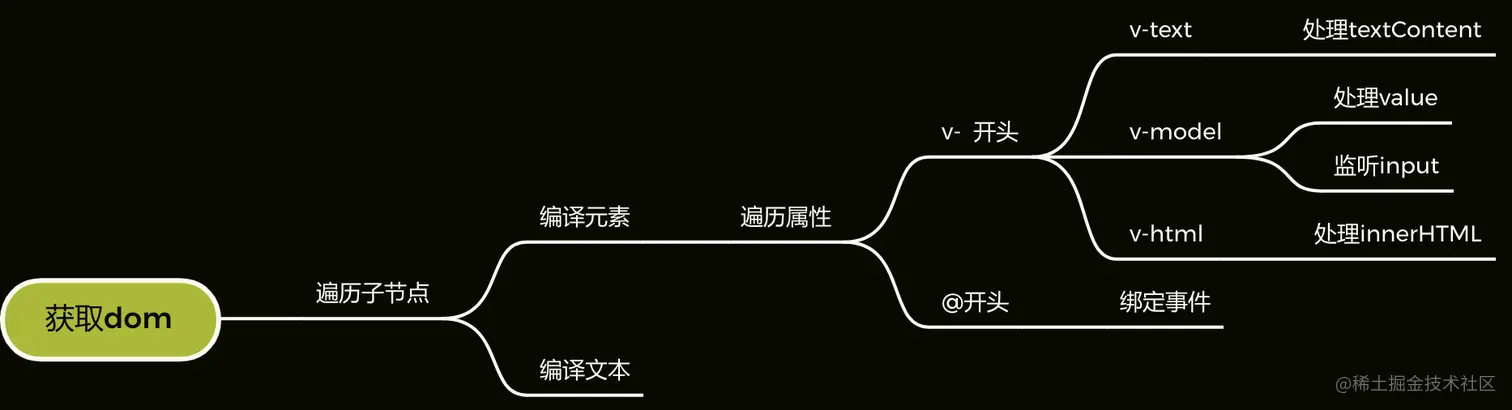
class Compiler {
constructor(el, vm) {
this.$vm = vm
this.$el = document.querySelector(el)
if (this.$el) {
this.compile(this.$el)
}
}
compile(el) {
const childNodes = el.childNodes
childNodes.forEach((node) => {
if (this.isElement(node)) {
if (node.childNodes.length > 0) {
this.compile(node)
}
this.compileElement(node)
} else if (this.isInertText(node)) {
this.compileText(node)
}
})
}
isElement(node) {
return node.nodeType === 1
}
isInertText(node) {
return node.nodeType === 3 && /{{(.*)}}/.test(node.textContent)
}
isDir(attr) {
return attr.startsWith('h-')
}
isEvent(attr) {
return attr.startsWith('@')
}
compileText(node) {
this.update(node, RegExp.$1, 'text')
}
compileElement(node) {
const attributes = node.attributes
Array.from(attributes).forEach((attr) => {
const attrName = attr.name
const exp = attr.value
if (this.isDir(attrName)) {
const dir = attrName.substring(2)
this[dir] && this[dir](node, exp)
} else if (this.isEvent(attrName)) {
const dir = attrName.substring(1)
this.eventHandler(node, exp, dir)
}
})
}
eventHandler(node, exp, dir) {
const fn = this.$vm.$options.methods && this.$vm.$options.methods[exp]
node.addEventListener(dir, fn.bind(this.$vm))
}
text(node, exp) {
this.update(node, exp, 'text')
}
textUpdater(node, val) {
node.textContent = val
}
html(node, exp) {
this.update(node, exp, 'html')
}
htmlUpdater(node, val) {
node.innerHTML = val
}
model(node, exp) {
this.update(node, exp, 'model')
node.addEventListener('input', (e) => {
this.$vm[exp] = e.target.value
})
}
modelUpdater(node, val) {
node.value = val
}
update(node, exp, dir) {
const fn = this[dir + 'Updater']
fn && fn(node, this.$vm[exp])
new Watcher(this.$vm, exp, function(val) {
fn && fn(node, val)
})
}
}
-
Observer的实现
class Observer {
constructor(value) {
this.value = value
this.walk(this.value)
}
walk(obj) {
Object.keys(obj).forEach((key) => {
definReactive(obj, key, obj[key])
})
}
}
-
Watcher的实现
class Watcher {
constructor(vm, key, updateFn) {
this.vm = vm
this.key = key
this.updateFn = updateFn
Dep.target = this
this.vm[this.key]
Dep.target = null
}
update() {
this.updateFn.call(this.vm, this.vm[this.key])
}
}
-
Dep实现
class Dep {
constructor() {
this.deps = []
}
addDep(dep) {
this.deps.push(dep)
}
notify() {
this.deps.forEach((dep) => dep.update())
}
}
-
兼容数组响应式实现
const orginalProto = Array.prototype
const arrayProto = Object.create(orginalProto)
;[('push', 'pop', 'shift', 'unshift')].forEach((method) => {
arrayProto[method] = function() {
orginalProto[method].apply(this, arguments)
const dep = new Dep()
dep.notify()
}
})
class Observer {
constructor(value) {
this.value = value
if (typeof value === 'object') {
this.walk(this.value)
} else if (Array.isArray(value)) {
this.arrayWalk(value)
}
}
arrayWalk(obj) {
obj.__proto__ = arrayProto
const keys = Object.keys()
for (let i = 0; i < keys.length; i++) {
observer(obj[i])
}
}
walk(obj) {
Object.keys(obj).forEach((key) => {
definReactive(obj, key, obj[key])
})
}
}
最终实现
function definReactive(obj, key, val) {
observer(val)
const dep = new Dep()
Object.defineProperty(obj, key, {
get() {
Dep.target && dep.addDep(Dep.target)
console.log(`get ${key}`)
return val
},
set(newVal) {
if (newVal !== val) {
console.log(`set ${newVal}`)
observer(val)
val = newVal
dep.notify()
}
},
})
}
const orginalProto = Array.prototype
const arrayProto = Object.create(orginalProto)
;[('push', 'pop', 'shift', 'unshift')].forEach((method) => {
arrayProto[method] = function() {
orginalProto[method].apply(this, arguments)
const dep = new Dep()
dep.notify()
}
})
function observer(obj) {
if (typeof obj !== 'object' || obj === null) return
new Observer(obj)
}
function proxy(data, vm) {
Object.keys(data).forEach((key) => {
Object.defineProperty(vm, key, {
get() {
return vm.$data[key]
},
set(newVal) {
vm.$data[key] = newVal
},
})
})
}
class Vue {
constructor(options) {
this.$options = options
this.$el = options.el
this.$data = options.data
observer(this.$data)
proxy(this.$data, this)
new Compiler(this.$el, this)
}
}
class Compiler {
constructor(el, vm) {
this.$vm = vm
this.$el = document.querySelector(el)
if (this.$el) {
this.compile(this.$el)
}
}
compile(el) {
const childNodes = el.childNodes
childNodes.forEach((node) => {
if (this.isElement(node)) {
if (node.childNodes.length > 0) {
this.compile(node)
}
this.compileElement(node)
} else if (this.isInertText(node)) {
this.compileText(node)
}
})
}
isElement(node) {
return node.nodeType === 1
}
isInertText(node) {
return node.nodeType === 3 && /{{(.*)}}/.test(node.textContent)
}
isDir(attr) {
return attr.startsWith('h-')
}
isEvent(attr) {
return attr.startsWith('@')
}
compileText(node) {
this.update(node, RegExp.$1, 'text')
}
compileElement(node) {
const attributes = node.attributes
Array.from(attributes).forEach((attr) => {
const attrName = attr.name
const exp = attr.value
if (this.isDir(attrName)) {
const dir = attrName.substring(2)
this[dir] && this[dir](node, exp)
} else if (this.isEvent(attrName)) {
const dir = attrName.substring(1)
this.eventHandler(node, exp, dir)
}
})
}
eventHandler(node, exp, dir) {
const fn = this.$vm.$options.methods && this.$vm.$options.methods[exp]
node.addEventListener(dir, fn.bind(this.$vm))
}
text(node, exp) {
this.update(node, exp, 'text')
}
textUpdater(node, val) {
node.textContent = val
}
html(node, exp) {
this.update(node, exp, 'html')
}
htmlUpdater(node, val) {
node.innerHTML = val
}
model(node, exp) {
this.update(node, exp, 'model')
node.addEventListener('input', (e) => {
this.$vm[exp] = e.target.value
})
}
modelUpdater(node, val) {
node.value = val
}
update(node, exp, dir) {
const fn = this[dir + 'Updater']
fn && fn(node, this.$vm[exp])
new Watcher(this.$vm, exp, function(val) {
fn && fn(node, val)
})
}
}
class Dep {
constructor() {
this.deps = []
}
addDep(dep) {
this.deps.push(dep)
}
notify() {
this.deps.forEach((dep) => dep.update())
}
}
class Watcher {
constructor(vm, key, updateFn) {
this.vm = vm
this.key = key
this.updateFn = updateFn
Dep.target = this
this.vm[this.key]
Dep.target = null
}
update() {
this.updateFn.call(this.vm, this.vm[this.key])
}
}
class Observer {
constructor(value) {
this.value = value
if (typeof value === 'object') {
this.walk(this.value)
} else if (Array.isArray(value)) {
this.arrayWalk(value)
}
}
arrayWalk(obj) {
obj.__proto__ = arrayProto
const keys = Object.keys()
for (let i = 0; i < keys.length; i++) {
observer(obj[i])
}
}
walk(obj) {
Object.keys(obj).forEach((key) => {
definReactive(obj, key, obj[key])
})
}
}
结语
- 响应式其实是使用了Object.defineProperty进行数据的劫持,使用Observer进行响应式处理。
- 数组遍历每一个值,都让其变化响应式。
- 获取节点,判断是元素还是插值文本,文本直接渲染,元素遍历属性做属性处理
- 在数据变化的时候进行订阅并执行对应的更新函数重新渲染。一个key就是一个watcher,
- 由于一个key是可以多次使用,建立Dep,一个key只有一个Dep但是可以有多个watcher, Dep中管理多个watcher,在订阅的时候添加,并统一执行更新,做到精确更新。