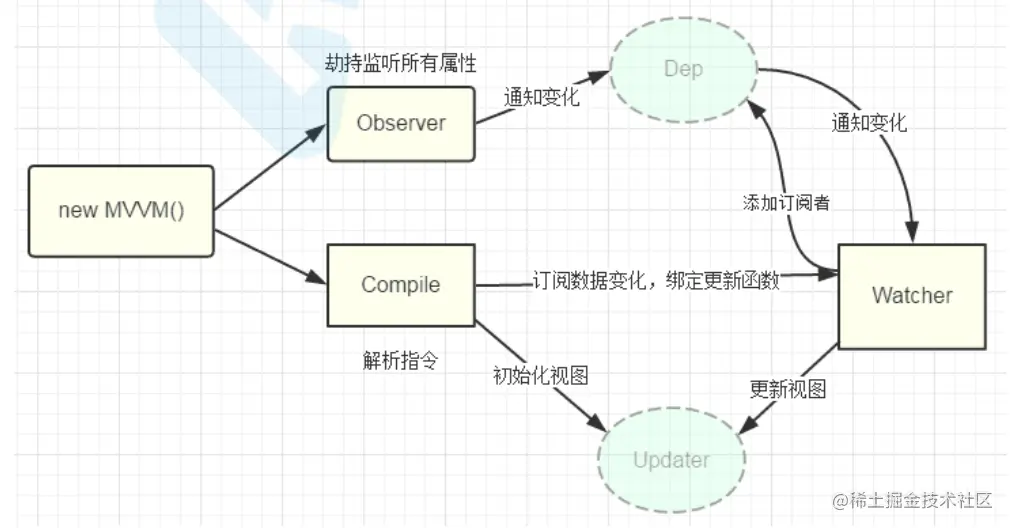
- new Vue() 初始化 完成对data数据 的劫持监听 Compile解析指令渲染模板 初始化视图 同时定义一个更新函数和Watcher 将来对应的数据发生变化时 Watcher会调用更新函数 从而更新视图
- data的key可能再视图中出现多次 所以每一个key都需要一个管家Dep来管理Watcher 只要data中数据一旦变化 会首先找到对应的Dep 通知所有的Watcher 执行更新函数 然后更新视图
    // 递归
    observe(val);

    // Dep在这创建
    const dep = new Dep()

    Object.defineProperty(obj, key, {
      get() {
        // 依赖收集
        Dep.target && dep.addDep(Dep.target)
        return val;
      },
      set(newVal) {
        if (val !== newVal) {
          observe(newVal);
          val = newVal;

          dep.notify()
        }
      },
    });
  }


function observe(obj){
    if(typeof obj !== "object" || obj == null){
        return obj
    }

    new Observer(obj)
}

class Observer{
    constructor(obj){
        this.value = obj

        if(Array.isArray(obj)){

        }else{
            this.walk(obj)
        }
    }
    walk(obj){
        Object.keys(obj).forEach((key)=>{
            defineReactive(obj,key,obj[key])
        })
    }
}

// 给data数据做代理
function proxy(vm) {
    Object.keys(vm.$data).forEach((key) => {
      Object.defineProperty(vm, key, {
        get() {
          return vm.$data[key];
        },
        set(v) {
          vm.$data[key] = v;
        },
      });
    });
  }

class GVue{
    constructor(options){
        this.$options = options
        this.$data = options.data

        // 数据响应式处理
        observe(this.$data)

        // 代理
        proxy(this)

        new Compile(options.el ,this)
    }
}

class Compile {
    // el-宿主,vm-KVue实例
    constructor(el, vm) {
      this.$vm = vm;
      this.$el = document.querySelector(el);

      this.compile(this.$el);
    }

    compile(el) {
      // 遍历el dom树
      el.childNodes.forEach((node) => {
        if (this.isElement(node)) {
          // element
          // 需要处理属性和子节点
          // console.log("编译元素", node.nodeName);
          this.compileElement(node);

          // 递归子节点
          if (node.childNodes && node.childNodes.length > 0) {
            this.compile(node);
          }
        } else if (this.isInter(node)) {
          // console.log("编译插值表达式", node.textContent);
          // 获取表达式的值并赋值给node
          this.compileText(node);
        }
      });
    }

    isElement(node) {
      return node.nodeType === 1;
    }

    // {{xxx}}
    isInter(node) {
      return node.nodeType === 3 && /\{\{(.*)\}\}/.test(node.textContent);
    }

    isDir(attr) {
      return attr.startsWith("k-");
    }

    // 更新函数,
    update(node, exp, dir) {
      // init
      const fn = this[dir + 'Updater']
      fn && fn(node, this.$vm[exp])

      // update: 创建Watcher
      new Watcher(this.$vm, exp, function(val) {
        fn && fn(node, val)
      })
    }

    // 编译文本,将{{ooxx}}
    compileText(node) {
      this.update(node, RegExp.$1, 'text')
    }

    textUpdater(node, val) {
      node.textContent = val
    }

    // 处理元素所有动态属性
    compileElement(node) {
      Array.from(node.attributes).forEach((attr) => {
        const attrName = attr.name;
        const exp = attr.value;

        // 判断是否是一个指令
        if (this.isDir(attrName)) {
          // 执行指令处理函数
          // k-text, 关心text
          const dir = attrName.substring(2);
          this[dir] && this[dir](node, exp)
        }
      });
    }

    // k-text处理函数
    text(node, exp) {
      this.update(node, exp, 'text')
    }

    // k-html
    html(node, exp) {
      this.update(node, exp, 'html')
    }

    htmlUpdater(node, val) {
      node.innerHTML = val
    }
  }
  class Watcher {
    constructor(vm, key, updateFn) {
      this.vm = vm
      this.key = key
      this.updateFn = updateFn

      // 读取一下key的值,触发其get,从而收集依赖
      Dep.target = this
      this.vm[this.key]
      Dep.target = null
    }

    update() {
      this.updateFn.call(this.vm, this.vm[this.key])
    }
  }


class Dep{
    constructor(){
        this.deps = []
    }

    addDep(dep){
        this.deps.push(dep)
    }

    notify(){
        console.log('notify')
        this.deps.forEach(dep => dep.update())
    }
}