Core Graphics绘图代码一般都是写在.m文件中- (void)drawRect:(CGRect)rect;函数中
思考一下这几个问题
一、Core Graphics绘图的步骤
1.获取上下文
2.创建路径、拼接路径、将路径添加到上下文中
3.渲染,就是将上下文中的路径显示出来
4.释放路径
具体可以参考C画直线,如果有想去可以去看看其他样例
二、一些基本的图形练习
1.C画直线
CGContextRef ctx = UIGraphicsGetCurrentContext();
CGMutablePathRef path = CGPathCreateMutable();
CGPathMoveToPoint(path, **NULL**, 0, 0);
CGPathAddLineToPoint(path, **NULL**, 50, 50);
CGContextAddPath(ctx, path);
CGContextStrokePath(ctx);
CFRelease(path);
2.OC画直线
//创建路径对象
UIBezierPath *path=[UIBezierPath bezierPath]
//通过路径对象拼接路径
[path moveToPoint:CGPointMake(0, 0)]
[path addLineToPoint:CGPointMake(50, 50)]
//渲染
[path stroke]
3.矩形
UIBezierPath *path= [UIBezierPath bezierPathWithRect:CGRectMake(100, 100, 100, 100)];
[path stroke];
CGContextAddRect(ctx, CGRectMake(100, 100, 100, 100));
4.圆角矩形
UIBezierPath *path= [UIBezierPath bezierPathWithRoundedRect:CGRectMake(100, 100, 100, 100) cornerRadius:10]
[path stroke]
5.椭圆(Oval,Ellipse)
//oc画椭圆,
UIBezierPath *path= [UIBezierPath bezierPathWithOvalInRect:CGRectMake(0, 0, 200, 100)]
[path stroke]
//c画椭圆
CGContextRef ctx= UIGraphicsGetCurrentContext()
CGContextAddEllipseInRect(ctx, CGRectMake(0, 0, 200, 100))
CGContextStrokePath(ctx)
6.圆(托过画弧线的方式)
UIBezierPath *path = [UIBezierPath bezierPathWithArcCenter:CGPointMake(50, 50) radius:40.0 startAngle:0 endAngle:M_PI clockwise:**YES**];
[path stroke];
CGContextRef ctx = UIGraphicsGetCurrentContext();
CGContextAddArc(ctx, 70, 50, 50, 0, M_PI, 1);
CGContextStrokePath(ctx);
7.其他,设置线宽、线头样式,设置线段连接处的样式
//oc----画粗线
UIBezierPath *path1 = [[UIBezierPath alloc] init]
[path1 moveToPoint:CGPointMake(20, 20)]
[path1 addLineToPoint:CGPointMake(100, 80)]
[path1 addLineToPoint:CGPointMake(180, 20)]
[path1 setLineWidth:10]
[path1 setLineJoinStyle:kCGLineJoinRound]
[path1 setLineCapStyle:kCGLineCapRound]
8.渲染的方式
CGContextRef ctx = UIGraphicsGetCurrentContext();
CGContextMoveToPoint(ctx, 50, 50);
CGContextAddLineToPoint(ctx, 100, 100);
CGContextAddLineToPoint(ctx, 150, 50);
CGContextClosePath(ctx);
CGContextSetLineWidth(ctx, 10);
[[UIColor redColor] setFill];
[[UIColor blueColor] setStroke];
CGContextDrawPath(ctx, kCGPathFillStroke);
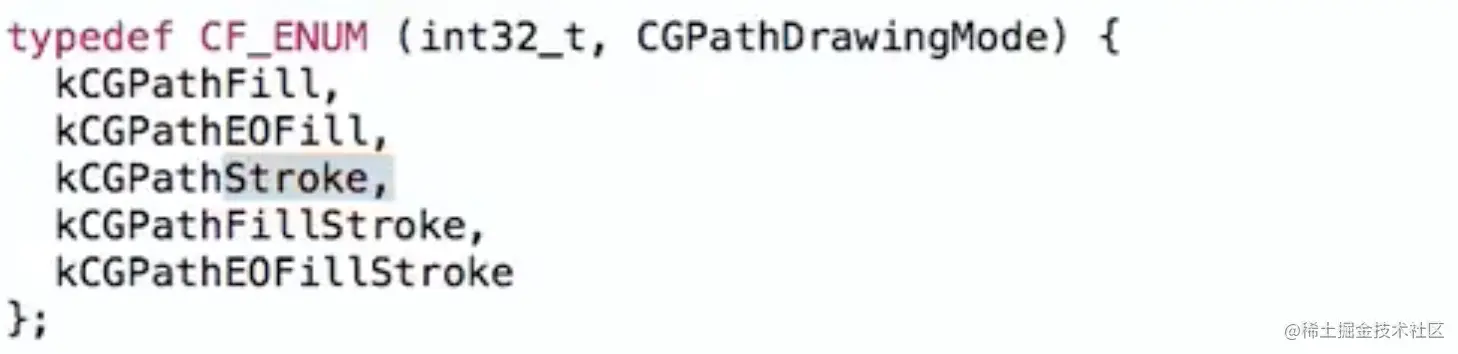
//oc填充,不要忘了关闭路径
UIBezierPath *path = [[UIBezierPath alloc] init]
[path moveToPoint:CGPointMake(50, 50)]
[path addLineToPoint:CGPointMake(100, 100)]
[path addLineToPoint:CGPointMake(150, 50)]
[path addLineToPoint:CGPointMake(50, 50)]
[path closePath]
[path setLineWidth:10]
[[UIColor greenColor] setFill]
[[UIColor blackColor] setStroke]
[path stroke]
[path fill]