talk is cheap; show me the code;
code construction
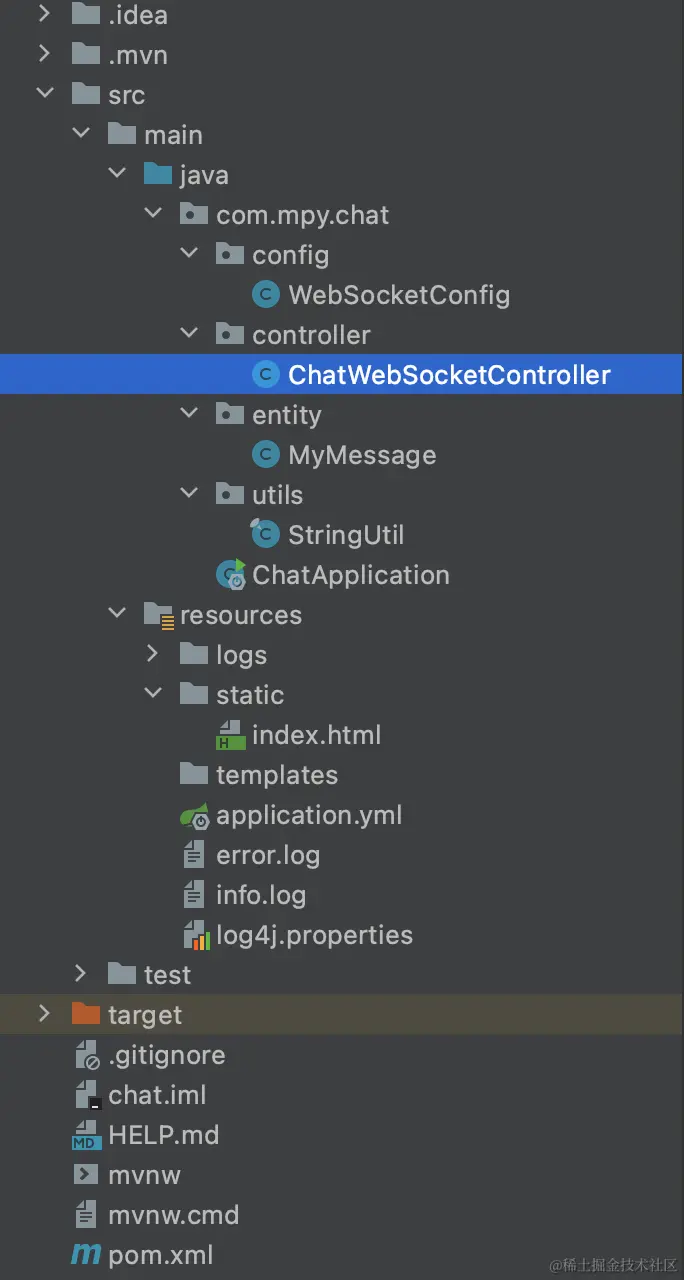
pom.xml
<?xml version="1.0" encoding="UTF-8"?>
<project xmlns="http://maven.apache.org/POM/4.0.0" xmlns:xsi="http://www.w3.org/2001/XMLSchema-instance"
xsi:schemaLocation="http://maven.apache.org/POM/4.0.0 https://maven.apache.org/xsd/maven-4.0.0.xsd">
<modelVersion>4.0.0</modelVersion>
<parent>
<groupId>org.springframework.boot</groupId>
<artifactId>spring-boot-starter-parent</artifactId>
<version>2.5.4</version>
<relativePath/>
</parent>
<groupId>com.mpy</groupId>
<artifactId>chat</artifactId>
<version>0.0.1-SNAPSHOT</version>
<name>chat</name>
<description>Demo project for websocket</description>
<properties>
<java.version>1.8</java.version>
</properties>
<dependencies>
<dependency>
<groupId>org.springframework.boot</groupId>
<artifactId>spring-boot-starter-web</artifactId>
<exclusions>
<exclusion>
<groupId>org.springframework.boot</groupId>
<artifactId>spring-boot-starter-logging</artifactId>
</exclusion>
</exclusions>
</dependency>
<dependency>
<groupId>org.springframework.boot</groupId>
<artifactId>spring-boot-starter-log4j</artifactId>
<version>1.3.8.RELEASE</version>
</dependency>
<dependency>
<groupId>org.springframework.boot</groupId>
<artifactId>spring-boot-starter-websocket</artifactId>
</dependency>
<dependency>
<groupId>com.alibaba</groupId>
<artifactId>fastjson</artifactId>
<version>1.2.47</version>
</dependency>
<dependency>
<groupId>org.springframework.boot</groupId>
<artifactId>spring-boot-devtools</artifactId>
<scope>runtime</scope>
<optional>true</optional>
</dependency>
<dependency>
<groupId>org.projectlombok</groupId>
<artifactId>lombok</artifactId>
<optional>true</optional>
</dependency>
<dependency>
<groupId>org.springframework.boot</groupId>
<artifactId>spring-boot-starter-test</artifactId>
<scope>test</scope>
</dependency>
</dependencies>
<build>
<plugins>
<plugin>
<groupId>org.springframework.boot</groupId>
<artifactId>spring-boot-maven-plugin</artifactId>
<configuration>
<excludes>
<exclude>
<groupId>org.projectlombok</groupId>
<artifactId>lombok</artifactId>
</exclude>
</excludes>
</configuration>
</plugin>
</plugins>
</build>
</project>
config > WebSocketConfig
package com.mpy.chat.config;
import org.springframework.context.annotation.Bean;
import org.springframework.context.annotation.Configuration;
import org.springframework.web.socket.server.standard.ServerEndpointExporter;
@Configuration
public class WebSocketConfig {
@Bean
public ServerEndpointExporter serverEndpointExporter() {
return new ServerEndpointExporter();
}
}
controller > ChatWebSocketController
package com.mpy.chat.controller;
import com.alibaba.fastjson.JSONObject;
import com.alibaba.fastjson.JSON;
import com.mpy.chat.entity.MyMessage;
import com.mpy.chat.utils.StringUtil;
import org.springframework.stereotype.Component;
import javax.websocket.*;
import javax.websocket.server.PathParam;
import javax.websocket.server.ServerEndpoint;
import java.util.*;
import java.util.concurrent.atomic.AtomicInteger;
import org.apache.log4j.Logger;
@ServerEndpoint("/chat/{userId}")
@Component
public class ChatWebSocketController {
private final Logger logger = Logger.getLogger(ChatWebSocketController.class);
private static AtomicInteger onlineCount = new AtomicInteger(0);
public static List<ChatWebSocketController> webSocketSet = new ArrayList<>();
public static List<String> userList = new ArrayList<>();
private Session session;
public String userId = "";
@OnOpen
public void onOpen(Session session, @PathParam("userId") String userId) {
this.session = session;
this.userId = userId;
this.userList.add(userId) ;
webSocketSet.add(this);
onlineCount.incrementAndGet();
logger.info("有新连接加入!" + userId + "当前在线用户数为" + onlineCount.get());
JSONObject msg = new JSONObject();
try {
msg.put("msg", "连接成功");
msg.put("status", "SUCCESS");
msg.put("userId", userId);
sendMessage(JSON.toJSONString(msg));
} catch (Exception e) {
logger.debug("IO异常");
}
}
@OnClose
public void onClose(@PathParam("userId") String userId ) {
webSocketSet.remove(this);
onlineCount.decrementAndGet();
logger.info("用户"+ userId +"退出聊天!当前在线用户数为" + onlineCount.get());
}
@OnMessage
public void onMessage(String message, @PathParam("userId") String userId ) {
logger.info("来自客户端" + userId + "的消息:" + message);
try {
MyMessage myMessage = JSON.parseObject(message, MyMessage.class);
String messageContent = myMessage.getMessage();
String messageType = myMessage.getMessageType();
if("1".equals(messageType)){
String recUser = myMessage.getUserId();
sendInfo(messageContent,recUser,userId);
}else{
sendGroupInfo(messageContent,userId);
}
} catch (Exception e) {
logger.error("解析失败:{}", e);
}
}
@OnError
public void onError(Throwable error) {
logger.debug("Websocket 发生错误");
error.printStackTrace();
}
public synchronized void sendMessage(String message) {
this.session.getAsyncRemote().sendText(message);
}
public void sendInfo( String message , String recUser,String sendUser) {
JSONObject msgObject = new JSONObject();
for (ChatWebSocketController item : webSocketSet) {
if (StringUtil.equals(item.userId, recUser)) {
logger.info("给用户" + recUser + "传递消息:" + message);
msgObject.put("message",message);
msgObject.put("sendUser",sendUser);
item.sendMessage(JSON.toJSONString(msgObject));
}
}
}
public void sendGroupInfo(String message,String sendUser) {
JSONObject msgObject = new JSONObject();
if (StringUtil.isNotEmpty(webSocketSet)) {
for (ChatWebSocketController item : webSocketSet) {
logger.info("回送消息:" + message);
msgObject.put("message",message);
msgObject.put("sendUser",sendUser);
item.sendMessage(JSON.toJSONString(msgObject));
}
}
}
@Override
public boolean equals(Object o) {
if (this == o) {
return true;
}
if (o == null || getClass() != o.getClass()) {
return false;
}
ChatWebSocketController that = (ChatWebSocketController) o;
return Objects.equals(session, that.session);
}
@Override
public int hashCode() {
return Objects.hash(session);
}
}
entity > MyMessage
package com.mpy.chat.entity;
import java.io.Serializable;
public class MyMessage implements Serializable {
private static final long serialVersionUID = 1L;
private String userId;
private String message;
private String messageType;
public String getUserId() {
return userId;
}
public void setUserId(String userId) {
this.userId = userId;
}
public String getMessage() {
return message;
}
public void setMessage(String message) {
this.message = message;
}
public String getMessageType() {
return messageType;
}
public void setMessageType(String messageType) {
this.messageType = messageType;
}
}
utils > StringUtil
package com.mpy.chat.utils;
import java.lang.reflect.Array;
import java.util.*;
import java.util.regex.Matcher;
import java.util.regex.Pattern;
public final class StringUtil {
public static boolean isEmpty(Object object) {
if (object == null) {
return true;
}
if (object instanceof String && "".equals(((String) object).trim())) {
return true;
}
if (object instanceof List && ((List) object).size() == 0) {
return true;
}
if (object instanceof Map && ((Map) object).isEmpty()) {
return true;
}
if (object instanceof CharSequence && ((CharSequence) object).length() == 0) {
return true;
}
if (object instanceof Arrays && (Array.getLength(object) == 0)) {
return true;
}
return false;
}
public static boolean isNotEmpty(Object object) {
return !isEmpty(object);
}
public static int strFirstIndex(String c, String string) {
Matcher matcher = Pattern.compile(c).matcher(string);
if (matcher.find()) {
return matcher.start() + 1;
} else {
return -1;
}
}
public static boolean equals(Object obj1, Object obj2) {
if (obj1 instanceof String && obj2 instanceof String) {
obj1 = ((String) obj1).replace("\*", "");
obj2 = ((String) obj2).replaceAll("\*", "");
if (obj1.equals(obj2) || obj1 == obj2) {
return true;
}
}
if (obj1.equals(obj2) || obj1 == obj2) {
return true;
}
return false;
}
public static String[] separatorByBytes(double[] bytes, String content) {
String[] contentArray = new String[bytes.length];
double[] array = new double[bytes.length + 1];
array[0] = 0;
System.arraycopy(bytes, 0, array, 1, bytes.length);
for (int i = 0; i < bytes.length; i++) {
content = content.substring((int) (array[i] * 2));
contentArray[i] = content;
}
String[] strings = new String[bytes.length];
for (int i = 0; i < contentArray.length; i++) {
strings[i] = contentArray[i].substring(0, (int) (bytes[i] * 2));
}
return strings;
}
public static int appearNumber(String srcText, String findText) {
int count = 0;
Pattern p = Pattern.compile(findText);
Matcher m = p.matcher(srcText);
while (m.find()) {
count++;
}
return count;
}
public static String[] setStr(String str) {
int m = str.length() / 2;
if (m * 2 < str.length()) {
m++;
}
String[] strings = new String[m];
int j = 0;
for (int i = 0; i < str.length(); i++) {
if (i % 2 == 0) {
strings[j] = "" + str.charAt(i);
} else {
strings[j] = strings[j] + str.charAt(i);
j++;
}
}
return strings;
}
public static String reverseString2(String s) {
if (s.length() > 0) {
StringBuffer buffer = new StringBuffer(s);
return buffer.reverse().toString();
} else {
return "";
}
}
public static String getRandomString(int length) {
String base = "abcdefghijklmnopqrstuvwxyz0123456789";
Random random = new Random();
StringBuffer sb = new StringBuffer();
for (int i = 0; i < length; i++) {
int number = random.nextInt(base.length());
sb.append(base.charAt(number));
}
return sb.toString();
}
}
resources > static > index.html
<!DOCTYPE HTML>
<html>
<head>
<meta http-equiv="Content-Type" content="text/html; charset=utf-8" />
<title>WebSocket Chat Demo</title>
<style>
html,body {
margin: 0;
padding: 0;
}
* {
box-sizing: content-box;
}
.bottom-box {
height: 50px;
position: fixed;
bottom: 0;
left: 0;
right: 0;
background: #000;
display: flex;
}
input {
flex: 1;
}
ul {
padding: 10px;
}
li {
margin: 20px 0;
}
.left {
text-align: left;
}
.left span, .right span {
display: inline-block;
border-radius: 5px;
padding: 5px 10px;
}
.left span {
background: #ff9900;
color: #000;
}
.right {
text-align: right;
}
.right span {
background: #2db7f5;
color: #000;
}
.sendBtn {
width: 150px;
text-align: center;
color: #fff;
background: #19be6b;
line-height: 50px;
}
ul, li {
list-style: none;
}
</style>
</head>
<body>
<ul class="msg-list">
</ul>
<div class="bottom-box">
<input id="inputContent" type="text" style="width:600px;"/>
<div class="sendBtn" onclick="send()">Send</div>
</div>
</body>
<script src="https://cdn.bootcdn.net/ajax/libs/jquery/3.6.0/jquery.min.js"></script>
<script type="text/javascript">
document.onkeydown = function (e) {
var theEvent = window.event || e;
var code = theEvent.keyCode || theEvent.which || theEvent.charCode;
if (code == 13) {
send();
}
}
var websocket = null;
if ('WebSocket' in window) {
var userId = parseInt(Math.random() * 1000000) + "";
websocket = new WebSocket("ws://xuewangshi.com:8005/chat/"+ userId);
} else {
alert('Not support websocket')
}
websocket.onerror = function() {
};
websocket.onopen = function(event) {
}
websocket.onmessage = function(event) {
let data = event.data ? JSON.parse(event.data) : {};
console.log(data)
data.message && setMessageInnerHTML(data);
}
websocket.onclose = function() {
setMessageInnerHTML("close");
}
window.onbeforeunload = function() {
websocket.close();
}
function setMessageInnerHTML(data) {
let id = 'id'+ Date.now();
let htmlStr = `
<li id="${id}" class="${data.sendUser == userId ? 'right' : 'left'}">
${data.sendUser !== userId ? `user${data.sendUser}:` : ''}<span>${data.message}</span>
</li>
`
$('.msg-list').append(htmlStr)
setTimeout(() => {
document.getElementById(id).scrollIntoView(true);
},100)
}
function closeConnection() {
websocket.close();
}
function send() {
var message = document.getElementById('inputContent').value;
let mesObj = {
message,
messageType: '2',
userId
}
message && websocket.send(JSON.stringify(mesObj));
document.getElementById('inputContent').value = '';
}
</script>
</html>
resources > application.yml
logging:
config: classpath:log4j.properties
server:
port: 8005
resources > log4j.properties
log4j.rootLogger=DEBUG,error,CONSOLE,info
log4j.appender.CONSOLE=org.apache.log4j.ConsoleAppender
log4j.appender.CONSOLE.layout=org.apache.log4j.PatternLayout
log4j.appender.CONSOLE.layout.ConversionPattern=%d{yyyy-MM-dd-HH-mm} [%t] [%c] [%p] - %m%n
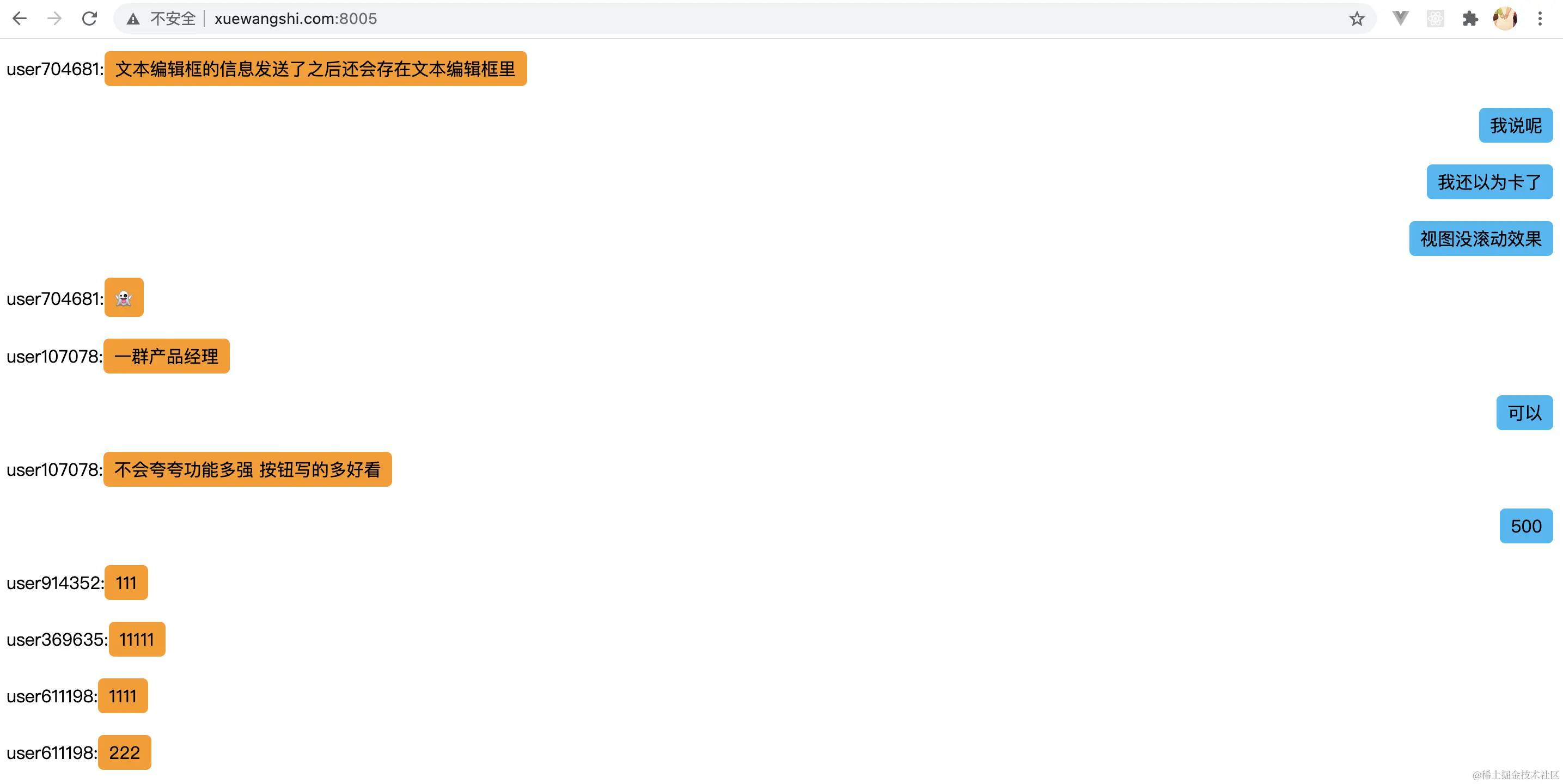
done! online test with my friends
参考来源 juejin.cn/post/700533…