拾几。手写JavaScript
5.1 数组扁平化
const arr = [1, [2, [3, [4, 5]]], 6];
方法一:使用flat()
const res1 = arr.flat(Infinity);
方法二:利用正则(但数据类型都会变为字符串)
const res2 = JSON.stringify(arr).replace(/\[|\]/g, '').split(',');
方法三:正则改良版本
const res3 = JSON.parse('[' + JSON.stringify(arr).replace(/\[|\]/g, '') + ']');
方法四:使用reduce
const flatten = arr => {
  return arr.reduce((pre, cur) => {
    return pre.concat(Array.isArray(cur) ? flatten(cur) : cur);
  }, [])
}
const res4 = flatten(arr);
方法五:函数递归
const res5 = [];
const fn = arr => {
  for (let i = 0; i < arr.length; i++) {
    if (Array.isArray(arr[i])) {
      fn(arr[i]);
    } else {
      res5.push(arr[i]);
    }
  }
}
fn(arr);
附加题 一:拉平至指定层级
// reduce + 递归
function flat(arr, num = 1) {
  return num > 0
    ? arr.reduce(
        (pre, cur) =>
          pre.concat(Array.isArray(cur) ? flat(cur, num - 1) : cur),
        []
      )
    : arr.slice();
}
var arr = [1, 2, [3, 4], 1, [[2], [3]], [[[1, 2], 3], 1], 2, [3, 5]];
flat(arr, Infinity);
5.1 数组去重
const arr = [1, 1, '1', 17, true, true, false, false, 'true', 'a', {}, {}];
// => [1, '1', 17, true, false, 'true', 'a', {}, {}]
方法一:利用Set
const res1 = Array.from(new Set(arr));
方法二:两层for循环+splice
const unique1 = arr => {
  let len = arr.length;
  for (let i = 0; i < len; i++) {
    for (let j = i + 1; j < len; j++) {
      if (arr[i] === arr[j]) {
        arr.splice(j, 1);
        // 每删除一个树,j--保证j的值经过自加后不变。同时,len--,减少循环次数提升性能
        len--;
        j--;
      }
    }
  }
  return arr;
}
方法三:利用indexOf
当然也可以用include、filter,思路大同小异。
const unique2 = arr => {
  const res = [];
  for (let i = 0; i < arr.length; i++) {
    if (res.indexOf(arr[i]) === -1) res.push(arr[i]);
  }
  return res;
}
方法四:利用include
const unique3 = arr => {
  const res = [];
  for (let i = 0; i < arr.length; i++) {
    if (!res.includes(arr[i])) res.push(arr[i]);
  }
  return res;
}
方法五:利用filter
const unique4 = arr => {
  return arr.filter((item, index) => {
    return arr.indexOf(item) === index;
  });
}
方法六:利用Map
const unique5 = arr => {
  const map = new Map();
  const res = [];
  for (let i = 0; i < arr.length; i++) {
    if (!map.has(arr[i])) {
      map.set(arr[i], true)
      res.push(arr[i]);
    }
  }
  return res;
}
5.1 类数组转化为数组
方法一:Array.from
Array.from(document.querySelectorAll('div'))
方法二:Array.prototype.slice.call()
Array.prototype.slice.call(document.querySelectorAll('div'))
// 或
Array.prototype.splice.call(arrayLike, 0);
方法三:扩展运算符
[...document.querySelectorAll('div')]
方法四:利用concat
Array.prototype.concat.apply([], document.querySelectorAll('div'));
5.1 扁平对象列表 ==> 树形结构Tree
自己的写法
function returnTreeList(list) { // 主函数 返回树状结构
  const treeList = [];
  // 根节点不唯一
  const superior = list.filter(a => a.superior === null);
  for (let i = 0; i < superior.length; i++) {
    treeList.push(recursiveTree(list, superior[i].id));
  }
  // deleteChildren(treeList);
  return treeList;
}

function recursiveTree(data, id) { // 递归 处理树状结构
  const node = data.find(a => a.id === id) || {};
  node.children = data.filter(a => a.superior === id).map(a => recursiveTree(data, a.id));
  return node;
}

function deleteChildren(node) { // 删除无子节点的children字段
  node.map(v => {
    if (v.children.length === 0) v.children = '';
    else deleteChildren(v.children);
  });
}

var list = [{id:1,superior:null},{id:2,superior:1}];
var treeList = returnTreeList(list);
面试了十几个高级前端,竟然连(扁平数据结构转Tree)都写不出来
var arr = [
    {id: 1, name: '部门1', pid: 0},
    {id: 2, name: '部门2', pid: 1},
    {id: 3, name: '部门3', pid: 1},
    {id: 4, name: '部门4', pid: 3},
    {id: 5, name: '部门5', pid: 4},
]

function arrayToTree(items) {
  const result = [];   // 存放结果集
  const itemMap = {};  //
  for (const item of items) {
    const id = item.id;
    const pid = item.pid;

    if (!itemMap[id]) {
      itemMap[id] = {
        children: [],
      }
    }

    itemMap[id] = {
      ...item,
      children: itemMap[id]['children']
    }

    const treeItem =  itemMap[id];

    if (pid === 0) {
      result.push(treeItem);
    } else {
      if (!itemMap[pid]) {
        itemMap[pid] = {
          children: [],
        }
      }
      itemMap[pid].children.push(treeItem)
    }

  }
  return result;
}

arrayToTree(arr)
5.1 构造函数模式 + 原型模式
构造函数模式
function Person(name) {
    this.name = name;
    this.getName = getName;
}

function getName() {
    console.log(this.name);
}

var person1 = new Person('kevin');
构造函数模式与原型模式双剑合璧。
function Person(name) {
    this.name = name;
}

Person.prototype = {
    constructor: Person,
    getName: function () {
        console.log(this.name);
    }
};

var person1 = new Person();
5.1 继承
0.1 ES5 继承
// 创建一个父类
function Parent(){}
Parent.prototype.getName = function(){ return '沐华' }
// 子类
function Child(){}

// 方式一
Child.prototype = Object.create(Parent.prototype)
Child.prototype.constructor = Child // 重新指定 constructor
// 方式二
Child.prototype = Object.create(Parent.prototype,{
  constructor:{
    value: Child,
    writable: true, // 属性能不能修改
    enumerable: true, // 属性能不能枚举(可遍历性),比如在 for in/Object.keys/JSON.stringify
    configurable: true, // 属性能不能修改属性描述对象和能否删除
  }
})

console.log(new Child().getName) // 沐华
0.2 ES6 继承
// 创建一个父类
class Parent(){
  constructor(props){
    this.name = '沐华'
  }
}
// 创建一个继承自父类的子类
class Child extends Parent{
  // props是继承过来的属性, myAttr是自己的属性
  constructor(props, myAttr){
    // 调用父类的构造函数,相当于获得父类的this指向
    super(props)
  }
}
console.log(new Child().name) // 沐华
1.原型链继承
缺点:
- 1.引用类型的属性被所有实例共享
- 2.在创建 Child 的实例时,不能向Parent传参
function Parent () {
    this.name = 'kevin';
}

Parent.prototype.getName = function () {
    console.log(this.name);
}

function Child () {

}

Child.prototype = new Parent();

var child1 = new Child();

console.log(child1.getName()) // kevin
2.借用构造函数(经典继承)
优点:
- 1.避免了引用类型的属性被所有实例共享
- 2.可以在 Child 中向 Parent 传参
缺点:
- 方法都在构造函数中定义,每次创建实例都会创建一遍方法。
function Parent () {
    this.names = ['kevin', 'daisy'];
}

function Child () {
    Parent.call(this);
}

var child1 = new Child();

child1.names.push('yayu');

console.log(child1.names); // ["kevin", "daisy", "yayu"]

var child2 = new Child();

console.log(child2.names); // ["kevin", "daisy"]
3.组合继承
原型链继承和经典继承双剑合璧。
优点:
- 融合原型链继承和构造函数的优点,是JavaScript中最常用的继承模式。
function Parent (name) {
    this.name = name;
    this.colors = ['red', 'blue', 'green'];
}

Parent.prototype.getName = function () {
    console.log(this.name)
}

function Child (name, age) {

    Parent.call(this, name);

    this.age = age;

}

Child.prototype = new Parent();
Child.prototype.constructor = Child;

var child1 = new Child('kevin', '18');

child1.colors.push('black');

console.log(child1.name); // kevin
console.log(child1.age); // 18
console.log(child1.colors); // ["red", "blue", "green", "black"]

var child2 = new Child('daisy', '20');

console.log(child2.name); // daisy
console.log(child2.age); // 20
console.log(child2.colors); // ["red", "blue", "green"]
5.1 call、apply、bind
基础数据
var obj = {
  a: 1,
  b: 2,
}

function method (v1, v2) {
  return this.a + this.b + v1 + v2;
}
- function.call(thisArg, arg1, arg2, ...)
Function.prototype.liccCall = function (ctx, ...args) {
  if (typeof this !== 'function') {
    throw new TypeError('Type Error');
  }
  // * 如果传 null || undefined 则指向 window || global
  ctx = ctx ? Object(ctx) : global;

  const fn = Symbol('fn');
  ctx[fn] = this;

  const res = ctx[fn](...args);
  delete ctx[fn];
  return res;
};

console.log('======= method.call():', method.call(1, 3, 4, 5));
console.log('======= method.liccCall():', method.liccCall(1, 3, 4, 5));
- function.apply(thisArg, [arg1, arg2, ...])
Function.prototype.liccApply = function (ctx, args) {
  if (typeof this !== 'function') {
    throw new TypeError('Type Error');
  }
  // * 如果传 null || undefined 则指向 window || global
  ctx = ctx ? Object(ctx) : global;

  const fn = Symbol('fn');
  ctx[fn] = this;

  // * args 可能为 undefined 的情况需要判空
  const res = args ? ctx[fn](...args) : ctx[fn]();
  delete ctx[fn];
  return res;
};

console.log('======= method.apply():', method.apply(1, [3, 4, 5]));
console.log('======= method.liccApply():', method.liccApply(1, [3, 4, 5]));
- function.bind(thisArg, arg1, arg2, ...)()
Function.prototype.liccBind = function (ctx, ...args) {
  if (typeof this !== 'function') {
    throw new Error("Type Error");
  }

  // 保存this的值
  var self = this;

  return function F() {
    // 考虑new的情况
    if (this instanceof F) {
      return new self(...args, ...arguments)
    }
    return self.apply(ctx, [...args, ...arguments])
  }
};

console.log('======= method.bind():', method.bind(obj, 3, 4, 5)());
console.log('======= method.liccBind():', method.liccBind(obj, 3, 4, 5)());
5.2 new
function newOperator(ctor, ...args) {
  if (typeof ctor !== 'function') {
    throw new TypeError('Type Error');
  }
  const obj = Object.create(ctor.prototype);
  const res = ctor.apply(obj, args);

  const isObject = typeof res === 'object' && res !== null;
  const isFunction = typeof res === 'function';
  return isObject || isFunction ? res : obj;
}
5.3 instanceof
const myInstanceof = (left, right) => {
  // 基本数据类型都返回false
  if (typeof left !== 'object' || left === null) return false;
  let proto = Object.getPrototypeOf(left);
  while (true) {
    if (proto === null) return false;
    if (proto === right.prototype) return true;
    proto = Object.getPrototypeOf(proto);
  }
}
5.4 Object.assign
Object.defineProperty(Object, 'assign', {
  value: function(target, ...args) {
    if (target == null) {
      return new TypeError('Cannot convert undefined or null to object');
    }

    // 目标对象需要统一是引用数据类型,若不是会自动转换
    const to = Object(target);

    for (let i = 0; i < args.length; i++) {
      // 每一个源对象
      const nextSource = args[i];
      if (nextSource !== null) {
        // 使用for...in和hasOwnProperty双重判断,确保只拿到本身的属性、方法(不包含继承的)
        for (const nextKey in nextSource) {
          if (Object.prototype.hasOwnProperty.call(nextSource, nextKey)) {
            to[nextKey] = nextSource[nextKey];
          }
        }
      }
    }
    return to;
  },
  // 不可枚举
  enumerable: false,
  writable: true,
  configurable: true,
})
5.5 throttle(节流)
高频时间触发,但n秒内只会执行一次,所以节流会稀释函数的执行频率。
应用场景:监听滚动条加载数据、滚动页面图片懒加载等
const throttle = (fn, time) => {
  let flag = true;
  return function() {
    if (!flag) return;
    flag = false;
    setTimeout(() => {
      fn.apply(this, arguments);
      flag = true;
    }, time);
  }
}
大圣老师的写法
// 1. 节流
var throttle = function (fn, wait = 1000) {
  let prev = new Date();
  return function (...arguments) {
    // console.log('======= arguments:', arguments);
    let now = new Date();
    if (now - prev > wait) {
      fn.apply(this, arguments);
      prev = now;
    }
  }
}
// 用户滚动后的实际操作
let num = 1;
var handleAjax = function () {
  console.log('======= num++:', num++);
}
// 监听用户滚动事件
document.addEventListener('scroll', throttle(handleAjax), false);
5.6 debounce(防抖)
触发高频时间后n秒内函数只会执行一次,如果n秒内高频时间再次触发,则重新计算时间。
应用场景:输入框模糊查询、输入词语联想搜索、快速点击同一按钮等
const debounce = (fn, time) => {
  let timeout = null;
  return function() {
    clearTimeout(timeout)
    timeout = setTimeout(() => {
      fn.apply(this, arguments);
    }, time);
  }
};
自己的写法
// 2. 防抖
function debounce (fn, wait = 1000) {
  var timeout;
  return function (...arguments) {
    clearTimeout(timeout)
    timeout = setTimeout(fn, wait);
  }
}
// 用户滚动后的实际操作
let num = 1;
var handleAjax = function () {
  console.log('======= num++:', num++);
}
// 监听用户滚动事件
document.addEventListener('scroll', debounce(handleAjax), false);
5.7 函数柯里化
function curry(fn, args) {
    var length = fn.length;
    args = args || [];

    return function() {
        var _args = args.slice(0),
            arg, i;
        for (i = 0; i < arguments.length; i++) {
            arg = arguments[i];
            _args.push(arg);
        }

        if (_args.length < length) {
            return curry.call(this, fn, _args);
        }
        else {
            return fn.apply(this, _args);
        }
    }
}

var fn = curry(function(a, b, c) {
    console.log([a, b, c]);
});

fn("a", "b", "c") // ["a", "b", "c"]
fn("a", "b")("c") // ["a", "b", "c"]
fn("a")("b")("c") // ["a", "b", "c"]
fn("a")("b", "c") // ["a", "b", "c"]
5.8 数据双向绑定
let obj = {}
let input = document.getElementById('input')
let box = document.getElementById('box')
// 数据劫持
Object.defineProperty(obj, 'text', {
  configurable: true,
  enumerable: true,
  get() {
    // 获取数据就直接拿
    console.log('获取数据了')
  },
  set(newVal) {
    // 修改数据就重新赋值
    console.log('数据更新了')
    input.value = newVal
    box.innerHTML = newVal
  }
})
// 输入监听
input.addEventListener('keyup', function(e) {
  obj.text = e.target.value
})
5.8 watch
使用 Object.defineProperty 方法
(function(){
    var root = this;
    function watch(obj, name, func){
        var value = obj[name];

        Object.defineProperty(obj, name, {
            get: function() {
                return value;
            },
            set: function(newValue) {
                value = newValue;
                func(value)
            }
        });

        if (value) obj[name] = value
    }

    this.watch = watch;
})()

// 使用
var obj = {
    value: 1
}

watch(obj, "value", function(newvalue){
    document.getElementById('container').innerHTML = newvalue;
})

document.getElementById('button').addEventListener("click", function(){
    obj.value += 1
});
我们使用 proxy 再来写一下 watch 函数。使用效果如下:
(function() {
    var root = this;

    function watch(target, func) {

        var proxy = new Proxy(target, {
            get: function(target, prop) {
                return target[prop];
            },
            set: function(target, prop, value) {
                target[prop] = value;
                func(prop, value);
            }
        });

        return proxy;
    }

    this.watch = watch;
})()

var obj = {
    value: 1
}

var newObj = watch(obj, function(key, newvalue) {
    if (key == 'value') document.getElementById('container').innerHTML = newvalue;
})

document.getElementById('button').addEventListener("click", function() {
    newObj.value += 1
});
5.9 Promise
Promise() + then()
/**
 * 淳淳模拟手写
 * 1. 实现 resolve 和 reject
 *    1.1 状态不可变更
 *    1.2 throw
 * 2. 实现 then
 *    2.1 定时器情况
 *    2.2 链式调用
 *    2.3 微任务
 * 3. 其他方法
 *    3.1 all
 *    3.2 any
 *    3.3 race
 *    3.4 allSettled
*/
class LeePromise{
  // 静态属性
  static PENDING = 'pending';
  static FULFILLED = 'fulfilled';
  static REJECTED = 'rejected';

  // 构造方法
  constructor (executor) {
    // 初始化值
    this.initValue();
    // 初始化this指向
    this.initBind();
    // 捕获 executor 中的 throw 报错
    try {
      executor(this.resolve, this.reject);
    } catch (error) {
      // 捕捉到错误直接执行 reject
      this.reject(error);
    }
  }

  initValue() {
    // 最终的值
    this.PromiseResult = '';
    // 状态
    this.PromiseState = LeePromise.PENDING;
    // 保存成功的回调函数
    this.onFulfilledCallbacks = [];
    // 保存失败的回调函数
    this.onRejectedCallbacks = [];
  }

  initBind() {
    this.resolve = this.resolve.bind(this);
    this.reject = this.reject.bind(this);
  }

  resolve(value) {
    // state是不可变的
    if (this.PromiseState !== LeePromise.PENDING) return false;
    // 如果执行 resolve,状态变为 FULFILLED
    this.PromiseState = LeePromise.FULFILLED;
    // 终值为传进来的值
    this.PromiseResult = value;
    // 执行保存的成功回调
    while (this.onFulfilledCallbacks.length) {
      this.onFulfilledCallbacks.shift()(this.PromiseResult);
    }
    // console.log('value:', value);
  }

  reject(reason) {
    // state是不可变的
    if (this.PromiseState !== LeePromise.PENDING) return false;
    // 如果执行 reject,状态变为 REJECTED
    this.PromiseState = LeePromise.REJECTED;
    // 终值为传进来的reason
    this.PromiseResult = reason;
    // 执行保存的失败回调
    while (this.onRejectedCallbacks.length) {
      this.onRejectedCallbacks.shift()(this.PromiseResult);
    }
    // console.log('reason:', reason);
  }

  then(onFulfilled, onRejected) {
    // 接收两个回调 onFulfilled, onRejected

    // 参数校验,确保一定是函数
    onFulfilled = typeof onFulfilled === 'function' ? onFulfilled : value => value;
    onRejected = typeof onRejected === 'function' ? onRejected : reason => { throw(reason) };

    var thenPromise = new LeePromise((resolve, reject) => {
      var callbackPromise = cb => {
        // 因为整个 Promise 的 then 需要异步执行,暂时用 setTimeout 代替微任务队列
        setTimeout(() => {
          try {
            const x = cb(this.PromiseResult);
            // console.log('======= x:', x);
            if (x === LeePromise) {
              throw new Error('不能返回自身');
            }
            if (x instanceof LeePromise) {
              // 如果返回值是Promise
              // 如果返回值是promise对象,返回值为成功,新promise就是成功
              // 如果返回值是promise对象,返回值为失败,新promise就是失败
              // 谁知道返回的promise是失败成功?只有then知道
              x.then(resolve, reject);
            } else {
              // 非 Promise 直接成功
              resolve(x);
            }
          } catch (error) {
            reject(error);
          }
        }, 0);
      }

      switch (this.PromiseState) {
        case LeePromise.FULFILLED:
          /** 成功的 then 会走这里 */
          // onFulfilled(this.PromiseResult);
          callbackPromise(onFulfilled);
          break;
        case LeePromise.REJECTED:
          /** 失败的 then 会走这里 */
          // onRejected(this.PromiseResult);
          callbackPromise(onRejected);
          break;
        default:
          /** promise 中有定时器时会走这 */
          // this.onFulfilledCallbacks.push(onFulfilled.bind(this));
          this.onFulfilledCallbacks.push(callbackPromise.bind(this, onFulfilled));
          // this.onRejectedCallbacks.push(onRejected.bind(this));
          this.onRejectedCallbacks.push(callbackPromise.bind(this, onRejected));
          break;
      }
    });

    // 返回包装后的新 promise 对象
    return thenPromise;
  }
}
各种测试结果
/** 测试用例 */
// 1. 实现 resolve 和 reject
var test1 = new LeePromise((resolve, reject) => {
  // throw('这是报错');
  resolve('成功了');
  reject('失败了');
});
console.log('======= test1:', test1);

// 2. 实现 then
var test2 = new LeePromise((resolve, reject) => {
  // throw('这是报错');
  resolve('成功了');
  reject('失败了');
});
test2.then(
  1, '2' // 测试不是函数类型的错误
  // res => console.log('then:', res),
  // err => console.log('then:', err)
);
console.log('======= test2:', test2);

// 2.1 定时器情况
var test21 = new LeePromise((resolve, reject) => {
  setTimeout(() => {
    resolve('成功了');
    reject('失败了');
  }, 1000);
});
test21.then(
  res => console.log('then:', res),
  err => console.log('then:', err)
);
console.log('======= test21:', test21);

// 2.2 链式调用
const test22 = new LeePromise((resolve, reject) => {
  resolve(100);
});
test22.then(
  res => {
    console.log('then:', res); // 100
    return 2 * res;
  },
  err => console.log(err)
).then(
  res => {
    console.log('then then:', res); // 200
    return new LeePromise((resolve, reject) => resolve(3 * res));
  },
  err => console.log(err)
).then(
  res => console.log('then then then:', res), // 600
  err => console.log(err)
);
console.log('======= test22:', test22);

// 2.3 微任务
console.log('sync:', 50);
1. all
全对再返回,一个错误就返回
- 接收一个Promise数组,数组中如有非Promise项,则此项当做成功
- 如果所有Promise都成功,则返回成功结果数组
- 如果有一个Promise失败,则返回这个失败结果
    static all(promises) {
        const result = []
        let count = 0
        return new MyPromise((resolve, reject) => {
            const addData = (index, value) => {
                result[index] = value
                count++
                if (count === promises.length) resolve(result)
            }
            promises.forEach((promise, index) => {
                if (promise instanceof MyPromise) {
                    promise.then(res => {
                        addData(index, res)
                    }, err => reject(err))
                } else {
                    addData(index, promise)
                }
            })
        })
    }
2. any(any与all相反)
全错再返回,一个正确就返回
注:如果成功的那个没有返回值,一直不返回
- 接收一个Promise数组,数组中如有非Promise项,则此项当做成功
- 如果有一个Promise成功,则返回这个成功结果
- 如果所有Promise都失败,则报错
    static any(promises) {
        return new Promise((resolve, reject) => {
            let count = 0
            promises.forEach((promise) => {
                promise.then(val => {
                    resolve(val)
                }, err => {
                    count++
                    if (count === promises.length) {
                        reject(new AggregateError('All promises were rejected'))
                    }
                })
            })
        })
    }
3. race
一个结束就返回,无论对错
- 接收一个Promise数组,数组中如有非Promise项,则此项当做成功
- 哪个Promise最快得到结果,就返回那个结果,无论成功失败
    static race(promises) {
        return new MyPromise((resolve, reject) => {
            promises.forEach(promise => {
                if (promise instanceof MyPromise) {
                    promise.then(res => {
                        resolve(res)
                    }, err => {
                        reject(err)
                    })
                } else {
                    resolve(promise)
                }
            })
        })
    }
4. allSettled
全部结束再返回
- 接收一个Promise数组,数组中如有非Promise项,则此项当做成功
- 把所有Promise的结果,集合成数组,返回
    static allSettled(promises) {
        return new Promise((resolve, reject) => {
            const res = []
            let count = 0
            const addData = (status, value, i) => {
                res[i] = {
                    status,
                    value
                }
                count++
                if (count === promises.length) {
                    resolve(res)
                }
            }
            promises.forEach((promise, i) => {
                if (promise instanceof MyPromise) {
                    promise.then(res => {
                        addData('fulfilled', res, i)
                    }, err => {
                        addData('rejected', err, i)
                    })
                } else {
                    addData('fulfilled', promise, i)
                }
            })
        })
    }
5.x AJAX
const getJSON = function(url) {
  return new Promise((resolve, reject) => {
    const xhr = XMLHttpRequest ? new XMLHttpRequest() : new ActiveXObject('Mscrosoft.XMLHttp');
    xhr.open('GET', url, false);
    xhr.setRequestHeader('Accept', 'application/json');
    xhr.onreadystatechange = function() {
      if (xhr.readyState !== 4) return;
      if (xhr.status === 200 || xhr.status === 304) {
        resolve(xhr.responseText);
      } else {
        reject(new Error(xhr.responseText));
      }
    }
    xhr.send();
  })
}
5.x 图片懒加载
可以给img标签统一自定义属性data-src='default.png',当检测到图片出现在窗口之后再补充src属性,此时才会进行图片资源加载。
function lazyload() {
  const imgs = document.getElementsByTagName('img');
  const len = imgs.length;
  // 视口的高度
  const viewHeight = document.documentElement.clientHeight;
  // 滚动条高度
  const scrollHeight = document.documentElement.scrollTop || document.body.scrollTop;
  for (let i = 0; i < len; i++) {
    const offsetHeight = imgs[i].offsetTop;
    if (offsetHeight < viewHeight + scrollHeight) {
      const src = imgs[i].dataset.src;
      imgs[i].src = src;
    }
  }
}

// 可以使用节流优化一下
window.addEventListener('scroll', lazyload);
5.x 滚动加载
原理就是监听页面滚动事件,分析clientHeight、scrollTop、scrollHeight三者的属性关系。
window.addEventListener('scroll', function() {
  const clientHeight = document.documentElement.clientHeight;
  const scrollTop = document.documentElement.scrollTop;
  const scrollHeight = document.documentElement.scrollHeight;
  if (clientHeight + scrollTop >= scrollHeight) {
    // 检测到滚动至页面底部,进行后续操作
    // ...
  }
}, false);
5.x 深拷贝
var obj = {
  number: 233,
  string: 'String',
  boolean: false,
  null: null,
  undefind: undefined,
  NaN: NaN,
  array: [{ name: '小明' }, { age: 18 }],
  function: function funcName () {
    console.log('this', this);
  },
  date: new Date(),
  reg: new RegExp(),
}

function deepClone (targetObj) {
  let temp;
  if (typeof targetObj === 'object') {
    if (targetObj === null) {
      temp = null;
    } else {
      if (targetObj instanceof Date) {
        temp = targetObj;
      } else if (targetObj instanceof RegExp) {
        temp = targetObj;
      } else if (targetObj instanceof Array) {
        temp = [];
        for (let i = 0, len = targetObj.length; i < len; i++) {
          temp.push(deepClone(targetObj[i]));
        }
      } else {
        temp = {};
        for (const j in targetObj) {
          temp[j] = deepClone(targetObj[j]);
        }
      }
    }
  } else {
    temp = targetObj;
  }
  return temp;
};

console.log(deepClone(obj));
5.x 获取URL参数
var url = 'https://juejin.cn/' +
  '?utm_source=gold_browser_extension' +
  '&' +
  'param={"adad":"wewq"}' +
  '&' +
  'url=https://www.baidu.com/?baiduparam=666' +
  '&' +
  'juejinparam=thisIsJJ' +
  '';

/**
 * 获取iframe的指定参数
 * @param variable 参数的key名
 * (传variable即获取当前String参数,不传即获取全部参数Object对象)
 */
function getIframeParams(variable = '') {
  // 最终得到的参数字符串
  // let paramStr = window.location.search.substring(1);
  let paramStr = url.slice(url.indexOf('?') + 1);
  paramStr = decodeURIComponent(paramStr);
  if (paramStr === '') {
    return {};
  }
  const paramsObj = new Object();
  // * 需要解析的参数(此处需要及时更新)
  const keys = ['utm_source', 'param', 'url', 'juejinparam', 'baiduparam']; // ,
  // 将所有参数按索引存储为一个对象
  const keysObj = new Object();
  // tslint:disable-next-line:prefer-for-of
  for (let i = 0; i < keys.length; i++) {
    const idx = paramStr.indexOf(keys[i]);
    if (idx >= 0) {
      keysObj[idx] = keys[i];
    }
  }
  // 遍历参数对象
  const entries = Object.entries(keysObj);
  for (let k = 0; k < entries.length; k++) {
    // 加上 = 算一个字符
    const start = entries[k][0] * 1 + entries[k][1].length + 1;
    // 去掉倒数第一个 & 算一个字符
    const end = k + 1 < entries.length ? (entries[k + 1][0] * 1 - 1) : 99999;
    const value = paramStr.slice(start, end);
    // 单独获取某个值
    if (variable !== '') {
      return value;
    }
    paramsObj[entries[k][1]] = value;
  }
  return paramsObj;
}

console.log(getIframeParams());
5.x 解析字符串
var a = { b: 123, c: '456', e: '789' }
var str = `a{a.b}aa{a.c}aa {a.d}aaaa`

function fn(str) {
    return str.replace(/{\w\.\w}/g, ($1) => {
        const { groups: { value } } = /{\w\.(?<value>\w)}/.exec($1);
        return a[value] || $1;
    })
}

fn(str) // "a123aa456aa {a.d}aaaa"
const fn1 = (str, obj) => {
	let res = '';
    // 标志位,标志前面是否有{
	let flag = false;
	let start;
	for (let i = 0; i < str.length; i++) {
		if (str[i] === '{') {
			flag = true;
			start = i + 1;
			continue;
		}
		if (!flag) res += str[i];
		else {
			if (str[i] === '}') {
				flag = false;
				res += match(str.slice(start, i), obj);
			}
		}
	}
	return res;
}
// 对象匹配操作
const match = (str, obj) => {
	const keys = str.split('.').slice(1);
	let index = 0;
	let o = obj;
	while (index < keys.length) {
		const key = keys[index];
		if (!o[key]) {
			return `{${str}}`;
		} else {
			o = o[key];
		}
		index++;
	}
	return o;
}
拾几。前端算法
4.0 排序算法
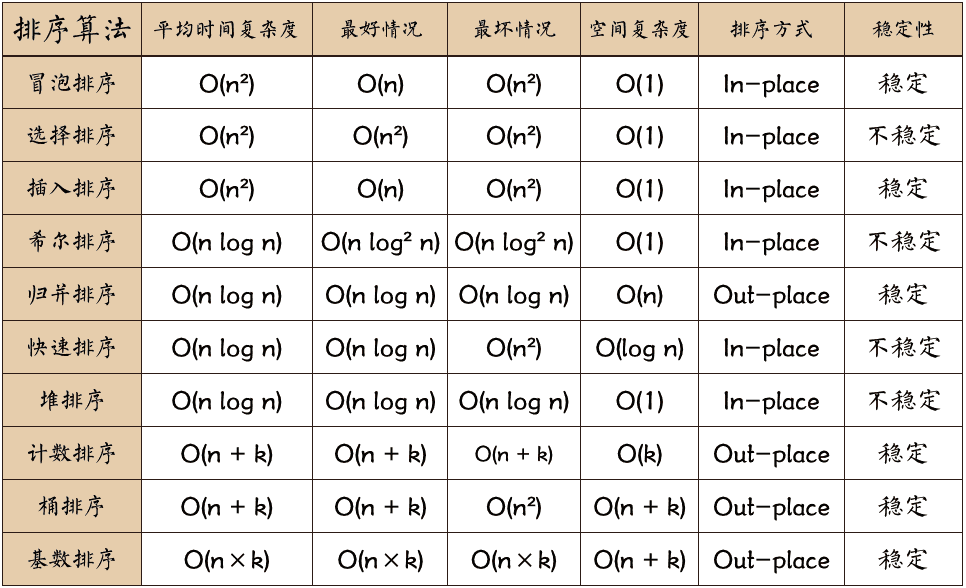
4.0.1 关于时间复杂度:
- 平方阶 (O(n2)) 排序
- 各类简单排序:直接插入、直接选择和冒泡排序。
- 线性对数阶 (O(nlog2n)) 排序
- 快速排序、堆排序和归并排序;
- O(n1+§)) 排序,§ 是介于 0 和 1 之间的常数。
- 希尔排序
- 线性阶 (O(n)) 排序
- 基数排序,此外还有桶、箱排序。
4.0.2 关于稳定性:
- 稳定的排序算法:冒泡排序、插入排序、归并排序和基数排序。
- 不是稳定的排序算法:选择排序、快速排序、希尔排序、堆排序。
4.0.3 名词解释:
- n:数据规模
- k:“桶”的个数
- In-place:占用常数内存,不占用额外内存
- Out-place:占用额外内存
- 稳定性:排序后 2 个相等键值的顺序和排序之前它们的顺序相同
4.1 冒泡排序
冒泡排序(Bubble Sort)也是一种简单直观的排序算法。它重复地走访过要排序的数列,一次比较两个元素,如果他们的顺序错误就把他们交换过来。走访数列的工作是重复地进行直到没有再需要交换,也就是说该数列已经排序完成。这个算法的名字由来是因为越小的元素会经由交换慢慢“浮”到数列的顶端。
作为最简单的排序算法之一,冒泡排序给我的感觉就像 Abandon 在单词书里出现的感觉一样,每次都在第一页第一位,所以最熟悉。冒泡排序还有一种优化算法,就是立一个 flag,当在一趟序列遍历中元素没有发生交换,则证明该序列已经有序。但这种改进对于提升性能来说并没有什么太大作用。
4.1.1 算法步骤
- 比较相邻的元素。如果第一个比第二个大,就交换他们两个。
- 对每一对相邻元素作同样的工作,从开始第一对到结尾的最后一对。这步做完后,最后的元素会是最大的数。
- 针对所有的元素重复以上的步骤,除了最后一个。
- 持续每次对越来越少的元素重复上面的步骤,直到没有任何一对数字需要比较。
4.1.2 什么时候最快
当输入的数据已经是正序时(都已经是正序了,我还要你冒泡排序有何用啊)。
4.1.3 什么时候最慢
当输入的数据是反序时(写一个 for 循环反序输出数据不就行了,干嘛要用你冒泡排序呢,我是闲的吗)。
4.1.4 动图演示

4.1.5 JavaScript 代码实现
4.1.5.1 【最佳】增加判断标识,及时跳出循环
function bubbleSort3 (arr) {
  for (let i = 0; i < arr.length; i++) {
    let bool = false;
    for (let j = arr.length - 1; j > i; j--) {
      if (arr[j - 1] > arr[j]) {
        [arr[j - 1], arr[j]] = [arr[j], arr[j - 1]];
        bool = true;
      }
    }
    if (!bool) break;
  }
  // console.log('======= arr:', JSON.stringify(arr));
}
console.time('bubbleSort3 耗时');
bubbleSort3(arr);
console.timeEnd('bubbleSort3 耗时');
4.1.5.2 每趟排序结束记录最后交换的位置,下一趟只扫描到此即可
function bubbleSort4 (arr) {
  let i = arr.length - 1;
  while (i > 0) {
    let pos = 0;
    for (let j = 0; j < i.length; j++) {
      if (arr[j] > arr[j + 1]) {
        [arr[j], arr[j + 1]] = [arr[j + 1], arr[j]];
        pos = j;
      }
    }
    i = pos;
  }
  // console.log('======= arr:', JSON.stringify(arr));
}
console.time('bubbleSort4 耗时');
bubbleSort4(arr);
console.timeEnd('bubbleSort4 耗时');
4.2 快速排序
快速排序是由东尼·霍尔所发展的一种排序算法。在平均状况下,排序 n 个项目要 Ο(nlogn) 次比较。在最坏状况下则需要 Ο(n2) 次比较,但这种状况并不常见。事实上,快速排序通常明显比其他 Ο(nlogn) 算法更快,因为它的内部循环(inner loop)可以在大部分的架构上很有效率地被实现出来。
快速排序使用分治法(Divide and conquer)策略来把一个串行(list)分为两个子串行(sub-lists)。
快速排序又是一种分而治之思想在排序算法上的典型应用。本质上来看,快速排序应该算是在冒泡排序基础上的递归分治法。
快速排序的名字起的是简单粗暴,因为一听到这个名字你就知道它存在的意义,就是快,而且效率高!它是处理大数据最快的排序算法之一了。虽然 Worst Case 的时间复杂度达到了 O(n²),但是人家就是优秀,在大多数情况下都比平均时间复杂度为 O(n logn) 的排序算法表现要更好,可是这是为什么呢,我也不知道。好在我的强迫症又犯了,查了 N 多资料终于在《算法艺术与信息学竞赛》上找到了满意的答案:
快速排序的最坏运行情况是 O(n²),比如说顺序数列的快排。但它的平摊期望时间是 O(nlogn),且 O(nlogn) 记号中隐含的常数因子很小,比复杂度稳定等于 O(nlogn) 的归并排序要小很多。所以,对绝大多数顺序性较弱的随机数列而言,快速排序总是优于归并排序。
4.2.1 算法步骤
-
从数列中挑出一个元素,称为 “基准”(pivot);
-
重新排序数列,所有元素比基准值小的摆放在基准前面,所有元素比基准值大的摆在基准的后面(相同的数可以到任一边)。在这个分区退出之后,该基准就处于数列的中间位置。这个称为分区(partition)操作;
-
递归地(recursive)把小于基准值元素的子数列和大于基准值元素的子数列排序;
递归的最底部情形,是数列的大小是零或一,也就是永远都已经被排序好了。虽然一直递归下去,但是这个算法总会退出,因为在每次的迭代(iteration)中,它至少会把一个元素摆到它最后的位置去。
4.2.2 动图演示

4.2.3 JavaScript 代码实现
4.2.3.1 【量大,最优】普通遍历
function quickSort1 (arr, leftV, rightV) {
  let len = arr.length;
  let partitionIndex;
  // ! left 和 right 不能单纯的用 left || 0 去判断,因为会错失值就是 0 的情况
  let left = typeof leftV !== 'number' ? 0 : leftV;
  let right = typeof rightV !== 'number' ? len - 1 : rightV;
  if (left < right) {
    partitionIndex = partition1(arr, left, right);
    quickSort1(arr, left, partitionIndex - 1);
    quickSort1(arr, partitionIndex + 1, right);
  }
  // console.log('======= arr:', JSON.stringify(arr));
  return arr;
}
function partition1 (arr, left, right) {
  let pivot = left;
  let index = pivot + 1;
  for (let i = index; i <= right; i++) {
    if (arr[i] < arr[pivot]) {
      // swap(arr, i, index);
      [arr[i], arr[index]] = [arr[index], arr[i]];
      index++;
    }
  }
  // swap(arr, pivot, index - 1);
  [arr[pivot], arr[index - 1]] = [arr[index - 1], arr[pivot]];
  return index - 1;
}
function swap (arr, i, j) {
  var temp = arr[i];
  arr[i] = arr[j];
  arr[j] = temp;
}
// 报错:RangeError: Maximum call stack size exceeded
console.time('quickSort1 耗时');
quickSort1(arr);
console.timeEnd('quickSort1 耗时');
4.2.3.1 【量小,最优】阮一峰的思路
function quickSort2 (arr) {
  if (arr.length <= 1) return arr;
  let pivotIndex = Math.floor(arr.length / 2);
  let pivot = arr.splice(pivotIndex, 1)[0]; // ! 是 splice 不是 slice
  let left = [];
  let right = [];
  for (let i = 0; i < arr.length; i++) {
    arr[i] < pivot ? left.push(arr[i]) : right.push(arr[i]);
  }
  const res = quickSort2(left).concat([pivot], quickSort2(right));
  // console.log('======= arr:', JSON.stringify(res));
  return res;
}
console.time('quickSort2 耗时');
quickSort2(arr);
console.timeEnd('quickSort2 耗时');
4.3 插入排序
插入排序的代码实现虽然没有冒泡排序和选择排序那么简单粗暴,但它的原理应该是最容易理解的了,因为只要打过扑克牌的人都应该能够秒懂。插入排序是一种最简单直观的排序算法,它的工作原理是通过构建有序序列,对于未排序数据,在已排序序列中从后向前扫描,找到相应位置并插入。
插入排序和冒泡排序一样,也有一种优化算法,叫做拆半插入。
4.3.1 算法步骤
-
将第一待排序序列第一个元素看做一个有序序列,把第二个元素到最后一个元素当成是未排序序列。
-
从头到尾依次扫描未排序序列,将扫描到的每个元素插入有序序列的适当位置。(如果待插入的元素与有序序列中的某个元素相等,则将待插入元素插入到相等元素的后面。)
4.3.2 动图演示

4.3.3 JavaScript 代码实现
4.3.3.1 【最优】for + if
function insertionSort2 (arr) {
  let temp;
  for (let i = 1; i < arr.length; i++) { // ! i 从 1 开始
    temp = arr[i];
    // console.log('======= i:', i);
    let j = i - 1;
    // ! 如果把 let j = i - 1 放在 for 第一个参数,最后会多出个 NaN: 8
    // 因为 j 只是 for 内部块级作用域的变量,j + 1 === undefind + 1 === NaN
    // 所以 arr[j + 1] = arr[NaN] = 8
    for (j; j >= 0; j--) { // ! j >= 0 不是 j > 0
      // console.log('======= jjj:', j);
      if (arr[j] > temp) {
        arr[j + 1] = arr[j];
      } else {
        break;
      }
    }
    // console.log('======= j:', j);
    arr[j + 1] = temp;
  }
  // console.log('======= arr:', JSON.stringify(arr));
}
console.time('insertionSort2 耗时');
insertionSort2(arr);
console.timeEnd('insertionSort2 耗时');
4.3.3.2 普通遍历 + while
function insertionSort1 (arr) {
  let len = arr.length;
  let pi; // previous index
  let e; // current element
  for (let i = 1; i < len; i++) { // ! i 从 1 开始
    pi = i - 1;
    e = arr[i];
    // ! 前一个指针 > 0 && 前一个元素 > 当前元素
    while (pi >= 0 && arr[pi] > e) {
      // ! 后一个指针 <== 当前指针
      arr[pi + 1] = arr[pi];
      // ! 指针往前移一位
      pi--;
    }
    // ! 后一个指针 = 当前元素
    arr[pi + 1] = e;
  }
  // console.log('======= arr:', JSON.stringify(arr));
}
console.time('insertionSort1 耗时');
insertionSort1(arr);
console.timeEnd('insertionSort1 耗时');
4.4 选择排序
选择排序是一种简单直观的排序算法,无论什么数据进去都是 O(n²) 的时间复杂度。所以用到它的时候,数据规模越小越好。唯一的好处可能就是不占用额外的内存空间了吧。
4.4.1 算法步骤
-
首先在未排序序列中找到最小(大)元素,存放到排序序列的起始位置
-
再从剩余未排序元素中继续寻找最小(大)元素,然后放到已排序序列的末尾。
-
重复第二步,直到所有元素均排序完毕。
4.4.2 动图演示

4.4.3 JavaScript 代码实现
function selectionSort(arr) {
    var len = arr.length;
    var minIndex, temp;
    for (var i = 0; i < len - 1; i++) {
        minIndex = i;
        for (var j = i + 1; j < len; j++) {
            if (arr[j] < arr[minIndex]) {     // 寻找最小的数
                minIndex = j;                 // 将最小数的索引保存
            }
        }
        temp = arr[i];
        arr[i] = arr[minIndex];
        arr[minIndex] = temp;
    }
    return arr;
}
4.5 二分查找
构造数据前提条件(绝对正序排列)
let arr = [1, 3, 4, 6, 6, 9, 12]; // 正序
// for (let i = 0; i < 10; i++) { arr.push(Math.floor(Math.random() * 1000)); } // 乱序
// arr.sort((a, b) => a - b); // 绝对升序排列
// console.log('======= 原始数组:', arr);
三种变式
- 第一个 ===key 的元素
- 第一个 >=key 的元素
- 最后一个 <=key 的元素
function binarySearch1 (arr, key) {
  let left = 0;
  let right = arr.length; // ! 是否需要 len - 1
  let mid;
  while (left <= right) {
    mid = (left + right) >> 1; // ! 等同于 Math.floor();
    if (arr[mid] >= key) {
      right = mid - 1;
    } else {
      left = mid + 1;
    }
  }
  /** 1. 第一个 ===key 的元素 → -1 */
  if (left <= arr.length && arr[left] === key) {
    return left;
  } else {
    return -1;
  }
  /** 2. 第一个 >=key 的元素 → 3 */
  // return left;
  /** 3. 最后一个 <=key 的元素 → 2 */
  // return right;
}
console.time('binarySearch1 耗时');
console.log(binarySearch1(arr, 5));
console.timeEnd('binarySearch1 耗时');
又三种变式
- 最后一个 ===key 的元素
- 第一个 >key 的元素
- 最后一个 <=key 的元素
function binarySearch2 (arr, key) {
  let left = 0;
  let right = arr.length;
  let mid;
  while (left <= right) {
    mid = (left + right) >> 1;
    if (arr[mid] > key) { // ! 唯一区别 >= 改成 >
      right = mid - 1;
    } else {
      left = mid + 1;
    }
  }
  /** 1. 最后一个 ===key 的元素 → -1 */
  if (right <= arr.length && arr[right] === key) { // ! 第二个区别 判断并返回 right
    return right;
  } else {
    return -1;
  }
  /** 2. 第一个 >key 的元素 → 3 */
  // return left;
  /** 3. 最后一个 <=key 的元素 → 2 */
  // return right;
}
console.time('binarySearch2 耗时');
console.log(binarySearch2(arr, 5));
console.timeEnd('binarySearch2 耗时');
4.6 获取树的最大深度
原始数据
  var treeArr={
    name:'root',
    child:[
      {
        name: 'a',
        child: [
          {
            name: 'b',
            child: [
              {name: 'd'},
              {
                name: 'e',
                child:[
                  {name: 'h'},
                  {
                    name: 'i',
                    child: [
                      {name: 'j'}
                    ]
                  },
                ]
              },
            ],
          },
          {
            name: 'c',
            child: [
              {name: 'f'},
              {
                name: 'g',
                child:[
                {name: 'k'},
                {name: 'l'},
                {name: 'm'},
                {name: 'n'},
                ]
              },
            ]
          },
        ]
      }
    ]
  }
算法实现
  var deepArr = [];				//定义存放每条路径深度的数组
  getDeep(treeArr,0,deepArr);	//调用函数,三个参数分别为,结点,计数器,以及存放深度的数组

  function getDeep(data,i,deepArr){
  	//获取当前结点的子数组,并且打印当前结点的值
  	console.log(data.name)
    var treeRoot = data.child
    //如果当前结点没有子数组了(没有子结点)就跳出当前递归,并且使计数器+1,并把计数器i的值存入深度数组中
    if(!treeRoot){
      i++
      deepArr.push(i);
      return
    }
    //如果当前结点有子数组,就要使计数器+1
    i++
    //通过for循环来找出每一条路径,对遍历到的结点使用递归
    for(let j=0;j<treeRoot.length;j++){
      getDeep(treeRoot[j],i,deepArr)		//递归时传入的就是当前结点的第j个子结点,当这第j个子结点中的所有子孙结点全部遍历完成之后,再去遍历第j+1个结点的所有子孙结点
    }
  }
  //最后的到的这个深度数组,就可以通过对每一项进行比较从而得出最大值即最大深度
  deepArr.sort((a,b) => b - a)
  console.log(deepArr[0])
4.7 深度优先遍历
优缺点
- 占内存少但速度较慢
- 能找出所有解决方案
- 优先搜索一棵子树,然后是另一棵,所以和广搜对比,有着内存需要相对较少的优点
- 要多次遍历,搜索所有可能路径,标识做了之后还要取消。
- 在深度很大的情况下效率不高
数据结构如下,查找西宁市的数据
var tree = {
    name: '中国',
    children: [
        {
            name: '北京',
            children: [
                {
                    name: '朝阳群众',
                    children: [
                        {
                            name: '西宁市',
                            code: '0521',
                        }
                    ]
                },
                {
                    name: '海淀区',
                },
                {
                    name: '昌平区',
                },
            ],
        },
        {
            name: '浙江省',
            children: [
                {
                    name: '杭州市',
                    code: '0571',
                },
                {
                    name: '嘉兴市',
                },
                {
                    name: '绍兴市',
                },
                {
                    name: '宁波市',
                },
            ],
        },
    ],
};
var node = dfs/bfs(tree, '西宁市');
console.log(node); // 输出: { name: '西宁市', code: '0521' }
递归写法
function dfs(tree, name){
    if(tree.name === name){
        return tree;
    }
    if(!tree.name && !tree.children){
        return null
    }
    for(let i = 0; i < tree.children.length; i++){
        var result = dfs(tree.children[i], name)
        if(result){
            return result;
        }
    }
    return null
}
 /*
* 深度遍历
* 思路:遍历第一层,得到每一个item,获取其中的name,再对item下一级的children进行递归
* */
function dfs(arr) {
    let result = [];
    for(let key in arr) {
        let item = arr[key];
        result.push(item.name);
        if(item.children) result.push(...dfs(item.children))
    }
    return result;
}
非递归写法
根据先进后出原则,我们从右即左,按深度方式遍历(找到终止循环break)
function dfs(tree, name){
    var stack = [], result = {};
    stack.push(tree)
    while(stack.length != 0){
        var item = stack.pop();
        if(item.name == name){
            result = item;
            break
        }
        let children = item.children;
        if(children){
            for(let i = children.length - 1; i >= 0; i--){
                stack.push(children[i])
            }
        }
    }    return result
}
4.8 广度优先遍历
优势:
占内存多但速度较快,在距离和深度成正比的情况下能较快地求出最优解。- 对于解决最短或最少问题特别有效,而且寻找深度小
- 每个结点只访问一遍,结点总是以最短路径被访问,所以第二次路径确定不会比第一次短
- 内存耗费量大(需要开大量的数组单元用来存储状态)
递归写法
/*
*   思路:递归方式
* 	因为是按层进行递归,所以遇到children并不能马上进行,应该先定义数组收集好下层的children,当前层遍历完后再递归下一层
* 	例如:在遍历[a, a2]时,收集数组的下层[b,c,d,b2,c2,d2],依次类推
* */
function bfs(arr) {
    let result= [];
    let cacheLevel = []; // 记录下层待遍历的数组
    for(let key in arr) {
        let item = arr[key];
        result.push(item.name)
        if(item.children) cacheLevel.push(...item.children);
    }
    if(cacheLevel.length > 0) result.push(...bfs(cacheLevel));
    return result;
}
优化:队列思维实现
/*
* 队列思维实现:队列方式
* 思路:创建一个队列,不断读取第一个队列,发现下层有要遍历的则添加进队列中,然后每遍历完自身就去掉,知道队列中把所有的都遍历完。
* */
function queueBfs(arr) {
    let result = [];
    let queue = arr;
    while(queue.length > 0) {
        let item  = queue[0];
        result.push(item.name);
        if(item.children) queue.push(...item.children);
        queue.shift();
    }
    return result
}
非递归写法
根据先进先出原则,我们从上到下,按层级一层一层往下遍历 (找到终止循环break)
// 非递归算法 广度优先
function bfs(tree,name){
    var queue = [],result = {};;
    queue.unshift(tree);
    while(queue.length!=0){
        var item = queue.shift();
        if(item.name == name){
            result = item;
            break
        }
        var children=item.children;
        if(children){
            for(let i = 0; i < children.length; i++){
                queue.push(children[i])
            }
        }
    }    return result
}
4.9 构造二叉树
function Node (data, left, right) {
    this.data = data;
    this.left = left;
    this.right = right;
    this.show = function () {
        return this.data;
    };
}

function BST () {
    this.root = null;
    this.insert = function (data) {
        var node = new Node(data, null, null);
        if (this.root === null) {
            this.root = node;
        } else {
            var current = this.root;
            var parent;
            while (true) {
                parent = current;
                if (data < current.data) {
                    current = current.left;
                    if (current === null) {
                        parent.left = node;
                        break;
                    }
                } else {
                    current = current.right;
                    if(current === null) {
                        parent.right = node;
                        break;
                    }
                }
            }
        }
    };
    // 中序遍历
    this.inOrder = function (node) {
        if (node !== null) {
            this.inOrder(node.left);
            console.log(node.show());
            this.inOrder(node.right);
        }
    };
    // 先序遍历
    this.preOrder = function (node) {
        if (node !== null) {
            console.log(node.show());
            this.preOrder(node.left);
            this.preOrder(node.right);
        }
    };
    // 后序遍历
    this.afterOrder = function (node) {
        if (node !== null) {
            this.afterOrder(node.left);
            this.afterOrder(node.right);
            console.log(node.show());
        }
    };

    this.getMin = function () {
        var current = this.root;
        while (current.left !== null) {
            current = current.left;
        }
        return current.data;
    };


    this.getMax = function () {
        var current = this.root;
        while (current.right !== null) {
            current = current.right;
        }
        return current.data;
    };

    this.find = function (data) {
        var current = this.root;
        while (current !== null) {
            if (data < current.data) {
                current = current.left;
            } else if (data > current.data) {
                current = current.right;
            } else {
                return current;
            }
        }
        return null;
    };


    this.remove = function (data) {
        this.root = this._removeNode(this.root, data); //将根节点转换
    };

    this._getSmallest = function (node) {
        while(node.left!=null){
            node=node.left;
        }
        return node;
    };


    this._removeNode = function (node, data) {
        if (node === null) {
            return null;
        }
        if (data === node.data) {
            // 如果没有子节点
            if (node.right === null && node.left === null) {
                return null;
            }
            // 如果没有左子节点
            if (node.left === null) {
                return node.right;//直接指向其右节点
            }
            // 如果没有右子节点
            if (node.right === null) {
                return node.left;
            }
            // 如果有两个节点
            if (node.right !== null && node.left !== null) {
                var tempNode = this._getSmallest(node.right);   // 找到最小的右节点
                node.data = tempNode.data;
                node.right = this._removeNode(node.right, tempNode.data);    // 依次寻找
                return node;
            }
        } else if (data < node.data){
            node.left = this._removeNode(node.left, data);
            return node;
        } else {
            node.right = this._removeNode(node.right, data);
            return node;
        }
    };
}

二叉树  数据结构的使用方法如下:

复制代码
var bst = new BST ();
bst.insert(40);
bst.insert(20);
bst.insert(70);
bst.insert(60);
bst.insert(75);
bst.insert(71);
bst.insert(73);

bst.inOrder(bst.root);
bst.remove(70);
console.log("----------------");
bst.inOrder(bst.root);
console.log("----------------");
console.log(bst.find(73))