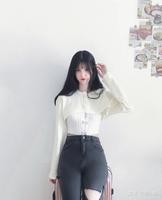
说明下:该模型只能扣取人物
pip
pip install opencv-python
python -m pip install paddlepaddle -i https://mirror.baidu.com/pypi/simple
pip install -i https://mirror.baidu.com/pypi/simple paddlehub
读取图片
import os
import cv2
import matplotlib.pyplot as plt
list_all=[]#初始化一个空列表
for root ,dirs,files in os.walk(r'C:\Users\Shineion\Desktop\tu'):
    for name in files:
        file_path=os.path.join(root,name)#包含路径的文件
        list_all.append(file_path)
print(len(list_all))
img =[cv2.imread(image_path) for image_path in list_all]
for i in range(len(list_all)):
   cv2.imshow('result{}'.format(i),img[i])
cv2.waitKey()
cv2.destroyAllWindows()
抠图开始
import numpy as np
import paddlehub as hub
module = hub.Module(name="deeplabv3p_xception65_humanseg")
input_dict = {"image": list_all}
# execute predict and print the result
results = module.segmentation(data=input_dict)
for i in range(len(list_all)):
    print(results[i]["data"].shape)
    prediction = results[i]["data"]#得到是空白图,
    prediction= prediction.astype(np.uint8)
    dst = cv2.bitwise_and(img[i], img[i],mask=prediction)#与运算
    cv2.imshow('result{0}'.format(i),dst)
    cv2.imwrite(r"C:\Users\Shineion\Desktop\tu\result{}.jpg".format(i),dst)
cv2.waitKey()
cv2.destroyAllWindows()