自定义组件父子组件传参 和 传递事件 用了语法糖v-module
一 传统的传参写法:父传子 和 子传父
一 父传子 传递参数

1.在父组件传递参数:   :is-fllowed="article.is_followed"
 <fllow-user class="follow-btn" :userId="article.aut_id" :is-fllowed="article.is_followed" @upodate-is_fllow="article.is_followed = $event" />


在子组件 props接收参数
  props: {
    isFllowed: {
      type: Boolean,
      required: true
    }
},

二: 子传父:传递事件

2.在子组件传递事件:  this.$emit('upodate-is_fllow', !this.value),

在父组件接收事件:@upodate-is_fllow="article.is_followed = $event"
<fllow-user class="follow-btn" :userId="article.aut_id" :is-fllowed="article.is_followed" @upodate-is_fllow="article.is_followed = $event" />
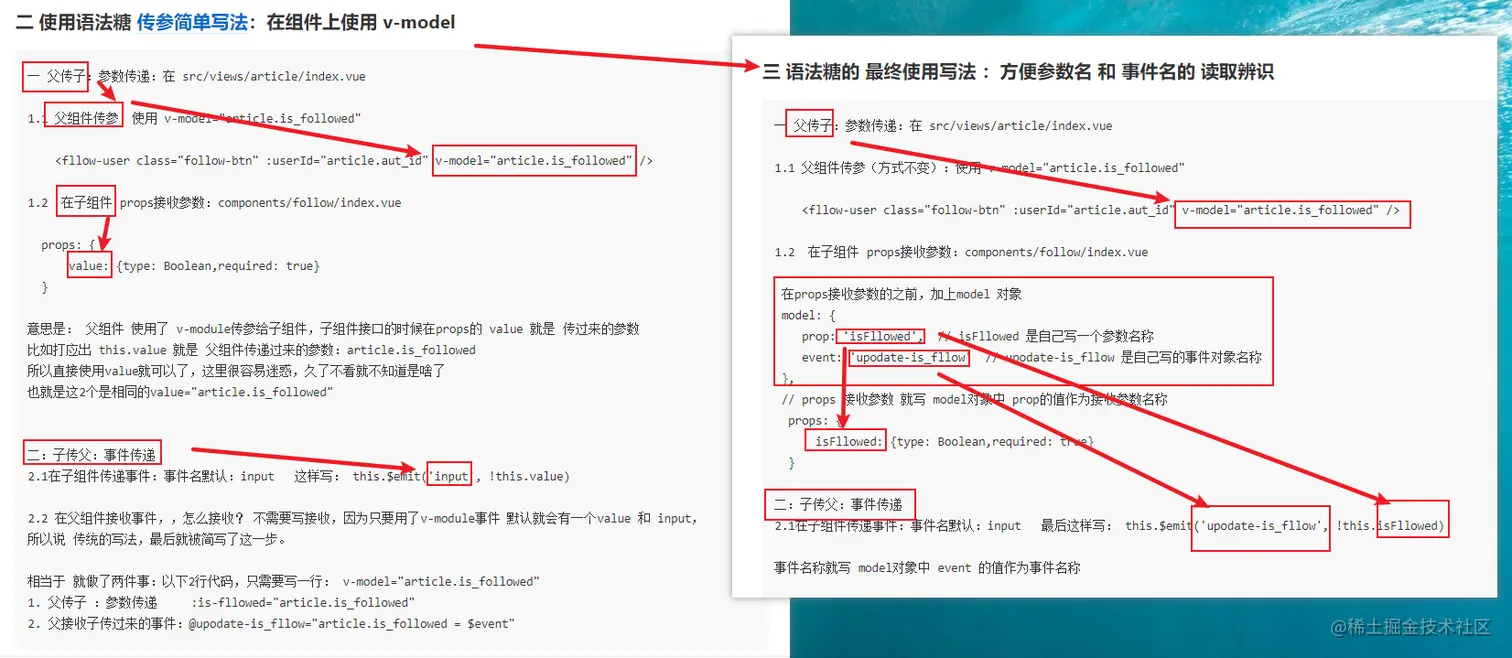
二 使用语法糖 传参简单写法:在组件上使用 v-model
一 父传子:参数传递:在 src/views/article/index.vue

1.1 父组件传参:使用 v-model="article.is_followed"

    <fllow-user class="follow-btn" :userId="article.aut_id" v-model="article.is_followed" />

1.2  在子组件 props接收参数:components/follow/index.vue

  props: {
      value: {type: Boolean,required: true}
  }

意思是: 父组件 使用了 v-module传参给子组件,子组件接口的时候在props的 value 就是 传过来的参数
比如打应出 this.value 就是 父组件传递过来的参数:article.is_followed
所以直接使用value就可以了,这里很容易迷惑,久了不看就不知道是啥了
也就是这2个是相同的value="article.is_followed"


二:子传父:事件传递
2.1在子组件传递事件:事件名默认:input   这样写: this.$emit('input', !this.value)

2.2 在父组件接收事件,,怎么接收? 不需要写接收,因为只要用了v-module事件 默认就会有一个value 和 input,
所以说 传统的写法,最后就被简写了这一步。

相当于 就做了两件事:以下2行代码,只需要写一行: v-model="article.is_followed"
1. 父传子 :参数传递 	:is-fllowed="article.is_followed"
2. 父接收子传过来的事件:@upodate-is_fllow="article.is_followed = $event"
三 语法糖的 最终使用写法 :方便参数名 和 事件名的 读取辨识
一 父传子:参数传递:在 src/views/article/index.vue
1.1 父组件传参(方式不变):使用 v-model="article.is_followed"
<fllow-user class="follow-btn" :userId="article.aut_id" v-model="article.is_followed" />
1.2 在子组件 props接收参数:components/follow/index.vue
在props接收参数的之前,加上model 对象
model: {
prop: 'isFllowed',
event: 'upodate-is_fllow'
},
props: {
isFllowed: {type: Boolean,required: true}
}
二:子传父:事件传递
2.1在子组件传递事件:事件名默认:input 最后这样写: this.$emit('upodate-is_fllow', !this.isFllowed)
事件名称就写 model对象中 event 的值作为事件名称
最后:
一个组件上只能使用一次v-module :如果有多个数据需要实现类似 v-modul的效果怎么办?
可以使用 .sync 修饰符 例如 <text-document v-bind.sync="doc"></text-document>,
这样会把 `doc` 对象中的每一个 property (如 `title`) 都作为一个独立的 prop 传进去,然后各自添加用于更新的 `v-on` 监听器。
: 修改的地方