<html lang="en">
<head>
<meta charset="UTF-8" />
<meta http-equiv="X-UA-Compatible" content="IE=edge" />
<meta name="viewport" content="width=device-width, initial-scale=1.0" />
<title>Document</title>
</head>
<style>
.wrapper {
display: flex;
margin: 50px auto;
width: 800px;
overflow: hidden;
border-radius: 8px;
padding: 15px;
box-shadow: 20px 20px 60px #bebebe, -20px -20px 60px #ffffff;
}
.text {
font-size: 20px;
overflow: hidden;
text-overflow: ellipsis;
text-align: justify;
position: relative;
line-height: 1.5;
max-height: 4.5em;
transition: 0.3s max-height;
}
.text::before {
content: '';
height: calc(100% - 26px);
float: right;
}
.text::after {
content: '';
width: 999vw;
height: 999vw;
position: absolute;
box-shadow: inset calc(100px - 999vw) calc(30px - 999vw) 0 0 #fff;
margin-left: -100px;
}
.btn {
position: relative;
float: right;
clear: both;
margin-left: 20px;
font-size: 16px;
padding: 0 8px;
background: #3f51b5;
line-height: 24px;
border-radius: 4px;
color: #fff;
cursor: pointer;
}
.btn::after {
content: '展开';
}
.exp {
display: none;
}
.exp:checked + .text {
max-height: none;
}
.exp:checked + .text::after {
visibility: hidden;
}
.exp:checked + .text .btn::before {
visibility: hidden;
}
.exp:checked + .text .btn::after {
content: '收起';
}
.btn::before {
content: '...';
position: absolute;
left: -5px;
color: #333;
transform: translateX(-100%);
}
</style>
<body>
<div class="wrapper">
<input id="exp1" class="exp" type="checkbox" />
<div class="text">
<label class="btn" for="exp1"></label>
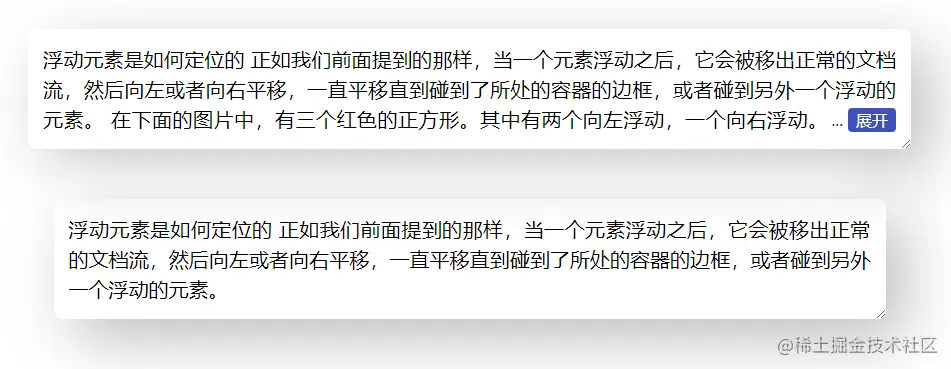
浮动元素是如何定位的
正如我们前面提到的那样,当一个元素浮动之后,它会被移出正常的文档流,然后向左或者向右平移,一直平移直到碰到了所处的容器的边框,或者碰到另外一个浮动的元素。
在下面的图片中,有三个红色的正方形。其中有两个向左浮动,一个向右浮动。要注意到第二个向左浮动的正方形被放在第一个向左浮动的正方形的右边。如果还有更多的正方形这样浮动,它们会继续向右堆放,直到填满容器一整行,之后换行至下一行。
</div>
</div>
<div class="wrapper">
<input id="exp2" class="exp" type="checkbox" />
<div class="text">
<label class="btn" for="exp2"></label>
浮动元素是如何定位的
正如我们前面提到的那样,当一个元素浮动之后,它会被移出正常的文档流,然后向左或者向右平移,一直平移直到碰到了所处的容器的边框,或者碰到另外一个浮动的元素。
</div>
</div>
</body>
</html>
 摘至CSS 实现多行文本“展开收起” (juejin.cn)


