

Github默认分支由master变更为main.
Overview
受 tools.ietf.org/id/draft-kn… 影响, github 于 2020年10月1日后, 修改默认分支为 main, 详见The default branch for newly-created repositories is now main.
Steps
master 重命名为 main
git branch -m master main
同步至远端
git push -u origin main
修改 Github 仓库默认分支
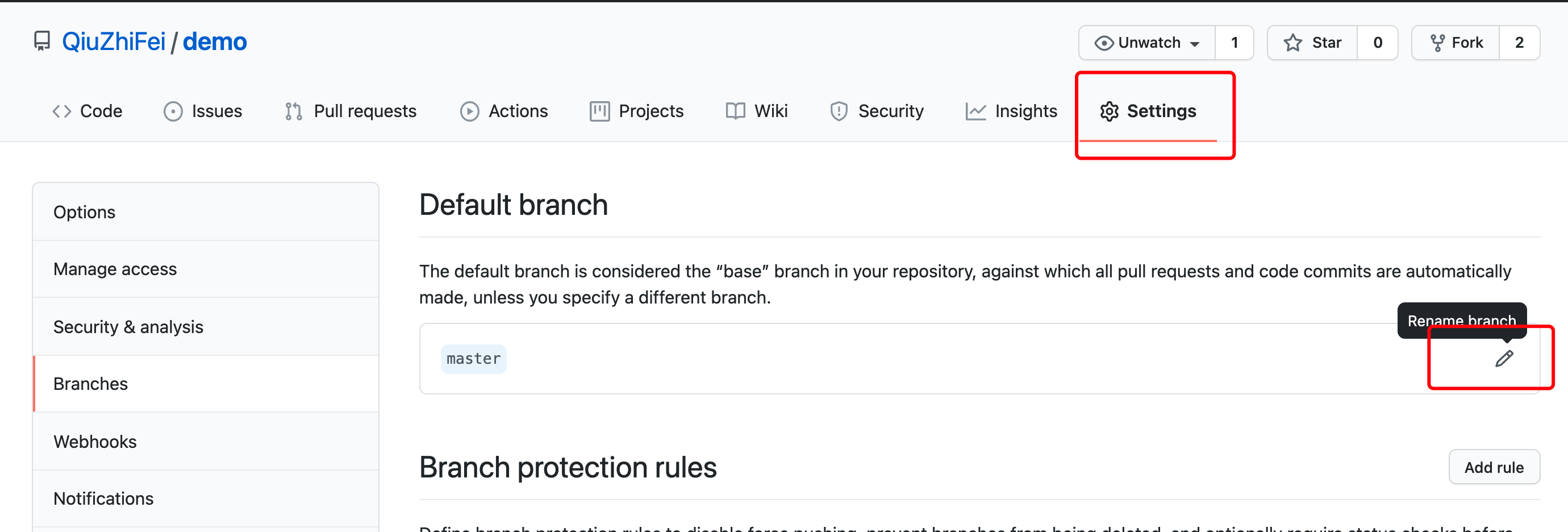
浏览器打开 Github 仓库, 点击 Settings -> Branches 修改默认分支为 main.
或者使用 GitHub REST API.
curl \

-X PATCH \

-H "Accept: application/vnd.github.v3+json" \

-H "Authorization: token {access_token}" \

https://api.github.com/repos/{owner}/{repo} \

-d '{"default_branch":"main"}'
删除旧的 master 分支
git push --delete origin master
修改本地 git init 默认分支
git config --global init.defaultBranch main
使用 github-renaming
使用 github-renaming 可以更简单修改默认分支.
gem install github-renaming

github-renaming default-branch <old-branch> <new-branch> -t <token> -r <user/repo>

