

Renaming the default branch from master to main on Github.
Overview
Based on the suggestion by the Conservancy, GitHub renamed the master branch to main branch.
To learn more about the changes, see The default branch for newly-created repositories is now main.
Steps
Rename local master branch
git branch -m master main
Push main to remote repo
git push -u origin main
Update default branch on Github
Open GitHub repository in the browser, click Settings -> Branches and change the default branch to main.
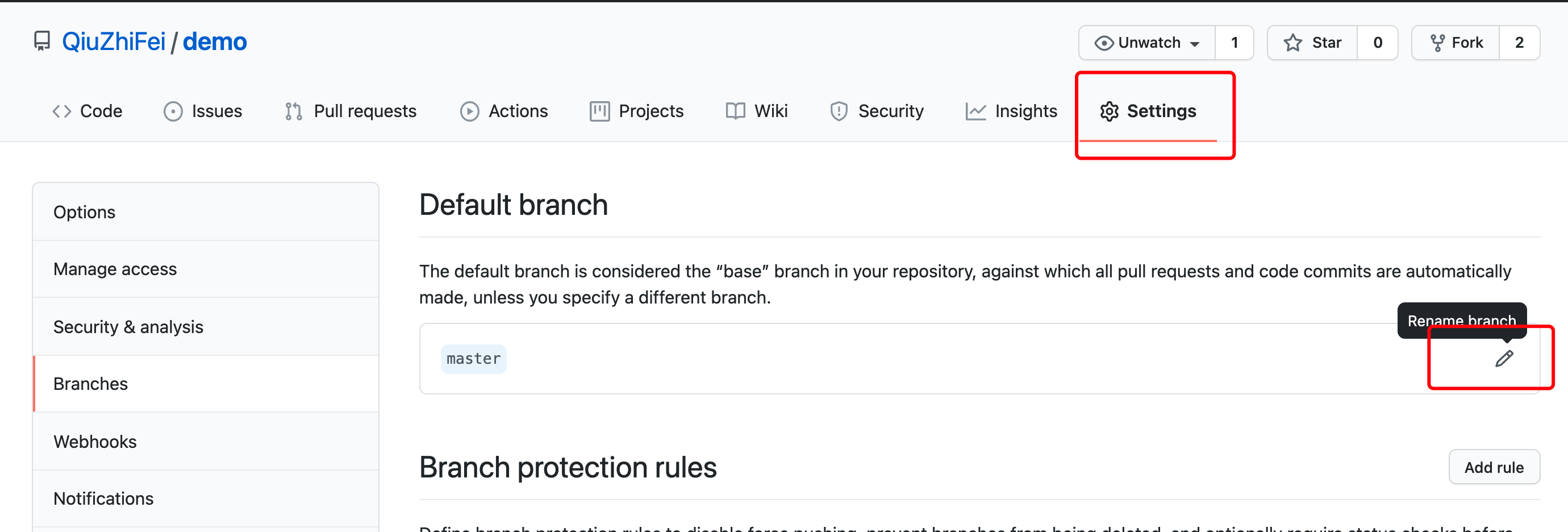
Or using GitHub REST API.
curl \

-X PATCH \

-H "Accept: application/vnd.github.v3+json" \

-H "Authorization: token {access_token}" \

https://api.github.com/repos/{owner}/{repo} \

-d '{"default_branch":"main"}'
Delete master branch
git push --delete origin master
Changing the default for new local repositories
git config --global init.defaultBranch main
Using github-renaming
github-renaming, renaming the default branch of our own repositories on GitHub easily.
gem install github-renaming

github-renaming default-branch <old-branch> <new-branch> -t <token> -r <user/repo>

