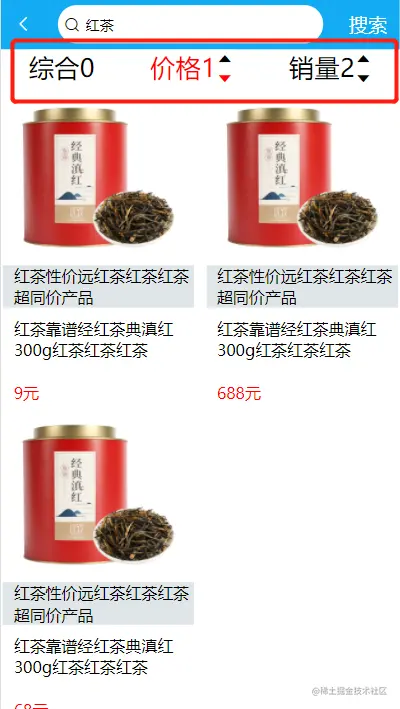
前端
<template>
<div class="search-list">
<div class="tab">
<ul>
<li v-for="(item,index) in tabList.data" :key="index" @click="changeTab(index)">
<div class="filter">
<div :class="tabList.currentIndex == index ? 'active':''">{{item.name}}{{index}}</div>
<div class="icons" v-if="index !=0">
<i class="iconfont icon-caret-up" :class=" item.status == 1 ? 'active':''"></i>
<i class="iconfont icon-caret-down" :class=" item.status == 2 ? 'active':''"></i>
</div>
</div>
</li>
</ul>
</div>
<div class="shop-list">
<ul>
<li v-for="(item,index) in shopList" :key="index">
<div class="shopImg">
<img :src="item.imgUrl" alt />
<span>{{item.title}}</span>
</div>
<div class="shopIntroduce">
<p>{{item.introduce}}</p>
<p>{{item.price}}元</p>
</div>
</li>
</ul>
</div>
</div>
</template>
<script>
import http from "@/common/api/request.js";
export default {
data() {
return {
tabList: {
currentIndex: 0,
data: [
{
name: "综合",
},
{
name: "价格",
status: 0,
key: "price",
},
{
name: "销量",
status: 0,
key: "num",
},
],
},
shopList: [
],
};
},
created() {
this.getData();
},
methods: {
async getData() {
await http
.$axios({
url: "/api/goods/shopList",
params: {
searchName: this.$route.query.key,
...this.orderBy,
},
})
.then((res) => {
this.shopList = res;
});
},
changeTab(index) {
this.tabList.currentIndex = index;
let item = this.tabList.data[index];
console.log(item);
this.tabList.data.forEach((v, i) => {
if (i != index) {
v.status = 0;
}
if (index == this.tabList.currentIndex) {
item.status = item.status == 1 ? 2 : 1;
}
});
},
},
computed: {
orderBy() {
let obj = this.tabList.data[this.tabList.currentIndex];
let val = obj.status == 1 ? "asc" : "desc";
return { [obj.key]: val };
},
},
watch: {
$route() {
this.getData();
},
},
};
</script>
<style scoped>
.search-list {
display: flex;
flex-direction: column;
}
ul {
display: flex;
justify-content: space-around;
}
.filter {
display: flex;
}
.icons {
display: flex;
flex-direction: column;
}
.shopImg span {
background-color: rgba(194, 206, 209, 0.5);
padding-left: 0.266667rem;
}
.shopIntroduce {
font-size: 0.4rem;
padding-left: 0.266667rem;
margin-top: 0.266667rem;
}
.shopIntroduce p:last-child {
color: red;
margin-top: 0.533333rem;
}
.shop-list ul {
display: flex;
flex-wrap: wrap;
justify-content: space-between;
align-items: center;
box-sizing: border-box;
}
.shop-list ul li {
display: flex;
width: 4.8rem;
flex-direction: column;
margin: 0.053333rem;
}
.shopImg {
display: flex;
flex-direction: column;
font-size: 0.4rem;
}
.shop-list ul li img {
width: 100%;
height: 4.389333rem;
}
.active {
color: red;
}
</style>
后端
后端这种取值方式第一次见有点懵逼
1. 获取前端发过来的数据
router.get('/api/goods/shopList', function (req, res, next) {
let [searchNames, orderName] = Object.keys(req.query);
let [Name, order] = Object.values(req.query);
console.log(searchNames, orderName, Name, order);
connection.query('select * from shoplist where introduce like "%' + Name + '%" order by ' + orderName + ' ' + order + '', function (err, result) {
res.send({
code: 0,
data: result
})
})
})
mysql 表结构设计 zh代表综合

页面