react 安装 antd
npm install antd --save
或者
yarn antd
电脑有安装yarn可以选择yarn安装
正确的引入 antd 文件 往下翻可以找到 antd 文件代码
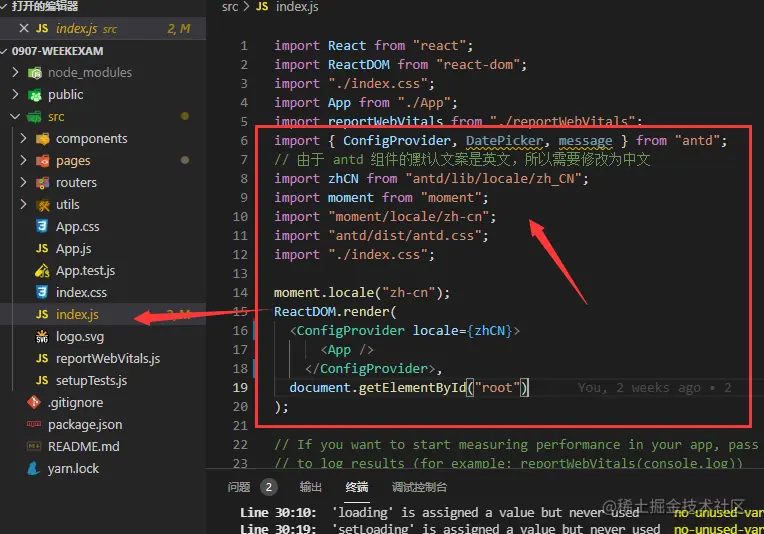
index.js引入 antd 文件
import { ConfigProvider, DatePicker, message } from 'antd';
import zhCN from 'antd/lib/locale/zh_CN';
import moment from 'moment';
import 'moment/locale/zh-cn';
import 'antd/dist/antd.css';
import './index.css';
moment.locale('zh-cn');
效果图展示如下

关于大量的叙述就放在注释当中了,为了降低疑惑,代码为整段写入
可以自行调试修改
import { PlusOutlined, LoadingOutlined } from "@ant-design/icons";
import { Upload, Modal, message, Button } from "antd";
import React, { useState, useMemo } from "react";
import qs from "qs";
function getBase64(file) {
return new Promise((resolve, reject) => {
const reader = new FileReader();
reader.readAsDataURL(file);
reader.onload = () => resolve(reader.result);
reader.onerror = (error) => reject(error);
});
}
function TableTwo(props) {
const [ImageUrl, setImageUrl] = useState(
"http://vueshop.glbuys.com/userfiles/head/590472285.jpeg"
);
const [previewVisible, setpreviewVisible] = useState(false);
const [previewImage, setpreviewImage] = useState("");
const [previewTitle, setpreviewTitle] = useState("");
const [nfileList, setFileList] = useState([]);
const [loading, setLoading] = useState(false);
const [upImgloading, setUpImgloading] = useState(false);
const handleChange = ({ file, fileList }) => {
const isJpgOrPng = file.type === "image/jpeg";
if (!isJpgOrPng) {
message.error("文件格式不正确!");
return isJpgOrPng;
}
const isLt50K = file.size <= 50 * 1024;
if (!isLt50K) {
message.error("文件大小不得超过50k!");
return isLt50K;
}
if (isJpgOrPng && isLt50K) {
setImageUrl(null);
setFileList(fileList);
if (file.status === "uploading") {
setUpImgloading(true);
return;
}
if (file.status === "done") {
setUpImgloading(false);
let url =
"http://vueshop.glbuys.com/userfiles/head/" +
file.response.data.msbox;
console.log(url);
}
}
};
const handlePreview = async (file) => {
if (!file.url && !file.preview) {
file.preview = await getBase64(file.originFileObj);
}
setpreviewImage(file.url || file.preview);
setpreviewVisible(true);
setpreviewTitle(
file.name || file.url.substring(file.url.lastIndexOf("/") + 1)
);
};
useMemo(() => {
let edit = props.location.search.substr(1);
if (edit) {
let editVal = edit ? qs.parse(edit) : {};
setImageUrl(editVal.img);
}
}, [props.location.search]);
const uploadButton = (
<div>
{upImgloading ? <LoadingOutlined /> : <PlusOutlined />}
<div style={{ marginTop: 8 }}>点击上传</div>
</div>
);
return (
<>
<Upload
// 图片上传接收的参数
name="headfile"
// 图片上传服务器地址
action="http://vueshop.glbuys.com/api/user/myinfo/formdatahead?token=1ec949a15fb709370f"
// 图片上传类型
listType="picture-card"
//上传列表
fileList={nfileList}
// 默认列表只能上传一条 多余的进行覆盖
maxCount={1}
//点击触发遮罩层方法 更新遮罩层 图片以及标题
onPreview={handlePreview}
//点击触发上传图片方法 判断格式 以及 文件大小 并且 更新上传图片
onChange={handleChange}
// 本地弹窗获取本地图片时 可获取的后缀
accept=".jpg,.jpeg,.png"
// 可选中多条数据上传
multiple={true}
>
{/* 三目运算符 判断 路由传递的图片是否存在 如果存在则显示 不存在 则显示上传按钮 */}
{ImageUrl ? (
<img style={{ width: 100, height: 100 }} src={ImageUrl} alt="" />
) : (
uploadButton
)}
</Upload>
{/* 遮罩层antd */}
<Modal
//模态框是否显示
visible={previewVisible}
//模态框标题
title={previewTitle}
//模态框页脚
footer={null}
//模态框点击右上角关闭模态框
onCancel={() => setpreviewVisible(false)}
>
{/* 模态框打开后显示当前点击的图片 */}
<img alt="example" style={{ width: "100%" }} src={previewImage} />
</Modal>
<p>
{/* 点击清空内容 */}
<Button
type="primary"
style={{ margin: "0 5px" }}
onClick={() => {
// 清空路由传递来的图片路径
setImageUrl();
// 清空上传图片列表数据
setFileList([]);
}}
>
取消
</Button>
</p>
</>
);
}
export default TableTwo;