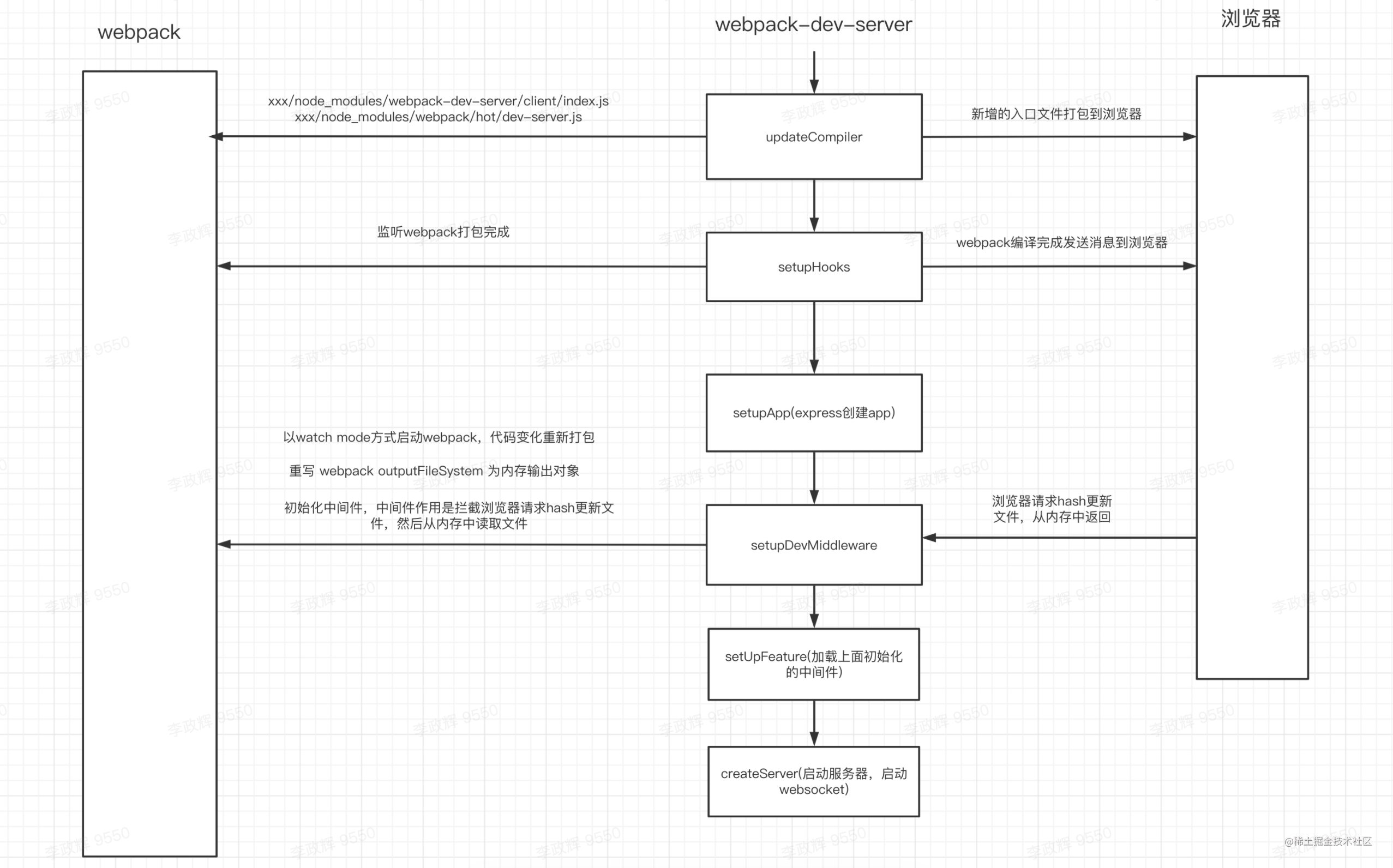
在 上一篇分享 中讲到热更新服务端都做了什么,总结如下
那热更新过程中浏览器都做了哪些,从上一篇分享中可以知道
-
xxx/node_modules/webpack-dev-server/client/index.jsxxx/node_modules/webpack/hot/dev-server.js被打包到前端代码中 -
代码改变之后,webpack会通知浏览器有代码改变,然后浏览器拉取最新的代码
监听代码变更 onSocketMessage
webpack-dev-server/client/index.js
var socket = require('./socket');
var sendMessage = require('./utils/sendMessage');
var reloadApp = require('./utils/reloadApp');
var onSocketMessage = {
invalid: function invalid() {
sendMessage('Invalid');
},
hash: function hash(_hash) {
status.currentHash = _hash;
},
ok: function ok() {
reloadApp(options, status);
},
};
// 启动socket服务, 注册hash,ok等消息类型的回调函数
socket(socketUrl, onSocketMessage);
是否触发热更新 reloadApp
作用:开启热更新配置,走热更新,如果没有开启,那么走浏览器重新刷新,如果项目嵌入在iframe中,那么重新刷新浏览器
webpack-dev-server/client/utils/reloadApp.js
function reloadApp(_ref, _ref2) {
  var hotReload = _ref.hotReload,
      hot = _ref.hot,
      liveReload = _ref.liveReload;
  var isUnloading = _ref2.isUnloading,
      currentHash = _ref2.currentHash;

  if (isUnloading || !hotReload) {
    return;
  }

  // 开启热更新
  if (hot) {
    [log.info](http://log.info/)('[WDS] App hot update...');
    var hotEmitter = require('webpack/hot/emitter');
    // 触发webpackHotUpdate事件
    hotEmitter.emit('webpackHotUpdate', currentHash);

    if (typeof self !== 'undefined' && self.window) {
      // broadcast update to window
      self.postMessage("webpackHotUpdate".concat(currentHash), '*');
    }
  } // allow refreshing the page only if liveReload isn't disabled
  else if (liveReload) {
  // 热加载,刷新浏览器
      var rootWindow = self; // use parent window for reload (in case we're in an iframe with no valid src)

      var intervalId = self.setInterval(function () {
        if (rootWindow.location.protocol !== 'about:') {
          // reload immediately if protocol is valid
          applyReload(rootWindow, intervalId);
        } else {
          rootWindow = rootWindow.parent;
          // 触发顶层刷新,如果项目是在iframe中
          if (rootWindow.parent === rootWindow) {
            // if parent equals current window we've reached the root which would continue forever, so trigger a reload anyways
            applyReload(rootWindow, intervalId);
          }
        }
      });
    }
  function applyReload(rootWindow, intervalId) {
    clearInterval(intervalId);
    [log.info](http://log.info/)('[WDS] App updated. Reloading...');
    rootWindow.location.reload();
  }
}
监听 webpackHotUpdate 事件,然后调用 module.hot.check 和 module.hot.apply 方法, 如果没有开始hmr的话,没有module.hot 属性,开启hmr后HotModuleReplacementPlugin这个插件在module上加上了hot属性
if (module.hot) {
        var lastHash;
        var upToDate = function upToDate() {
                return lastHash.indexOf(__webpack_hash__) >= 0;
        };
        var log = require("./log");
        var check = function check() {
                module.hot
                        .check()
                        .then(function(updatedModules) {
                              return module.hot.apply({})
                        })
                        .catch(function(err) {
                        });
        };
        var hotEmitter = require("./emitter");
        hotEmitter.on("webpackHotUpdate", function(currentHash) {
                lastHash = currentHash;
                // 与上一次的hash不同
                if (!upToDate()) {
                        check()
                }
        });
} else {
        throw new Error("[HMR] Hot Module Replacement is disabled.");
}
module.hot.check
作用:
1 下载hot-update.json文件
2 下载hot-update.js文件
3 执行下载的hot-update.js文件
webpack/bootstrap
function hotCheck(apply) {
                 hotApplyOnUpdate = apply;
                 hotSetStatus("check");
                 // 下载json文件
                 return hotDownloadManifest(hotRequestTimeout).then(function(update) {
                         hotSetStatus("prepare");
                         var promise = new Promise(function(resolve, reject) {
                                 hotDeferred = {
                                         resolve: resolve,
                                         reject: reject
                                 };
                         });
                         hotUpdate = {};
                         for(var chunkId in installedChunks)
                         // eslint-disable-next-line no-lone-blocks
                         {
                                 // 下载改变后的js文件
                                 hotEnsureUpdateChunk(chunkId);
                         }

                 });
         }
hotEnsureUpdateChunk
 function hotEnsureUpdateChunk(chunkId) {
       // 下载js
       hotDownloadUpdateChunk(chunkId);
 }

function hotDownloadUpdateChunk(chunkId) {
     // 通过script 标签加载更新后的js
     var script = document.createElement("script");
     script.charset = "utf-8";
     script.src = __webpack_require__.p + "" + chunkId + "." + hotCurrentHash + ".hot-update.js";
     if (null) script.crossOrigin = null;
     document.head.appendChild(script);
}
执行下载后的hot-update.js 文件,调用 webpackHotUpdate 方法
webpackHotUpdate("main",{
"./src/App.js": (function(module, __webpack_exports__, __webpack_require__) {
    // 改变后的代码
}
})
webpackHotUpdate
 this["webpackHotUpdate"] = // eslint-disable-next-line no-unused-vars
 function webpackHotUpdateCallback(chunkId, moreModules) {
         hotAddUpdateChunk(chunkId, moreModules);
         if (parentHotUpdateCallback) parentHotUpdateCallback(chunkId, moreModules);
 };
function hotAddUpdateChunk(chunkId, moreModules) {
     if (!hotAvailableFilesMap[chunkId] || !hotRequestedFilesMap[chunkId])
             return;
     hotRequestedFilesMap[chunkId] = false;
     for (var moduleId in moreModules) {
             if (Object.prototype.hasOwnProperty.call(moreModules, moduleId)) {
                     // 将要更新的moduleId 移到 hotUpdate
                     hotUpdate[moduleId] = moreModules[moduleId];
             }
     }
     if (--hotWaitingFiles === 0 && hotChunksLoading === 0) {
             hotUpdateDownloaded();
     }
}
hotUpdateDownloaded
 function hotUpdateDownloaded() {
         hotSetStatus("ready");
         // 这个deffered是在hotCheck中定义的
         var deferred = hotDeferred;
         hotDeferred = null;
         if (!deferred) return;
                 var outdatedModules = [];
                 for (var id in hotUpdate) {
                         if (Object.prototype.hasOwnProperty.call(hotUpdate, id)) {
                                 outdatedModules.push(toModuleId(id));
                         }
                 }
                 // 跳出module.hot.check
                 deferred.resolve(outdatedModules);
         }
 }

 var check = function check() {
        module.hot
                .check()
                .then(function(updatedModules) {
                      return module.hot.apply({})
                })
                .catch(function(err) {
                });
};
module.hot.apply
作用
- 找出过期模块
outdatedModules和过期依赖outdatedDependencies;
function hotApply() {
  // ...
  var outdatedDependencies = {};
  var outdatedModules = [];
  // 这个方法会手机过期模块以及哪些模块依赖过期模块
  function getAffectedStuff(updateModuleId) {
    var outdatedModules = [updateModuleId];
    var outdatedDependencies = {};
    // ...
    return {
        type: "accepted",
        moduleId: updateModuleId,
        outdatedModules: outdatedModules,
        outdatedDependencies: outdatedDependencies
    };
 };
  function addAllToSet(a, b) {
      for (var i = 0; i < b.length; i++) {
          var item = b[i];
          if (a.indexOf(item) < 0)
              a.push(item);
      }
  }
  // 这个hotUpdate:在 hotAddUpdateChunk 中给hotUpdate 赋值了
  for(var id in hotUpdate) {
      if(Object.prototype.hasOwnProperty.call(hotUpdate, id)) {
          // ... 省略多余代码
          if(hotUpdate[id]) {
              result = getAffectedStuff(moduleId);
          }
          if(doApply) {
              for(moduleId in result.outdatedDependencies) {
                 // 添加到 outdatedDependencies
                  addAllToSet(outdatedDependencies[moduleId], result.outdatedDependencies[moduleId]);
              }
          }
          if(doDispose) {
              // 添加到 outdatedModules
              addAllToSet(outdatedModules, [result.moduleId]);
              appliedUpdate[moduleId] = warnUnexpectedRequire;
          }
      }
  }
}
- 从缓存中删除过期模块、依赖和所有子元素的引用;
function hotApply() {
   // ...
    var idx;
    var queue = outdatedModules.slice();
    while(queue.length > 0) {
        moduleId = queue.pop();
        module = installedModules[moduleId];
        // ...
        // 移除缓存中的模块,这样就可以通过weback_require 重新执行代码了
        delete installedModules[moduleId];
        // 移除过期依赖中不需要使用的处理方法
        delete outdatedDependencies[moduleId];
        // 移除所有子元素的引用
        for(j = 0; j < module.children.length; j++) {
            var child = installedModules[module.children[j]];
            if(!child) continue;
            idx = child.parents.indexOf(moduleId);
            if(idx >= 0) {
                child.parents.splice(idx, 1);
            }
        }
    }
  // 从模块子组件中删除过时的依赖项
  var dependency;
  var moduleOutdatedDependencies;
  for(moduleId in outdatedDependencies) {
   if(Object.prototype.hasOwnProperty.call(outdatedDependencies, moduleId)) {
    module = installedModules[moduleId];
    if(module) {
     moduleOutdatedDependencies = outdatedDependencies[moduleId];
     for(j = 0; j < moduleOutdatedDependencies.length; j++) {
      dependency = moduleOutdatedDependencies[j];
      idx = module.children.indexOf(dependency);
      if(idx >= 0) module.children.splice(idx, 1);
     }
    }
   }
  }
- 将新模块代码添加到 modules 中,当下次调用
__webpack_require__(webpack 重写的require方法)方法的时候,就是获取到了新的模块代码了
function hotApply() {
   // ...
    for(moduleId in appliedUpdate) {
        if(Object.prototype.hasOwnProperty.call(appliedUpdate, moduleId)) {
            modules[moduleId] = appliedUpdate[moduleId];
        }
    }
}
参考文档
【Webpack】627- 了不起的 Webpack HMR 学习指南(含源码分析)_pingan8787-CSDN博客