UIApplication
- (void) testUIApplication {
UIApplication *app = [UIApplication shareApplication];
UIUserNotificationCategory *category = [[UIUserNotificationCategory alloc] init];
NSSet *set = [NSSet setWithObject:category];
UIUserNotificationSettings *settings = [UIUserNotificationSettings settingsTypes:UIUserNotificationTypeBadge categore:set];
[app registerUserNotificationSettings:setting];
app.applicationIconBadgeNumber = 10;
app.networkActivityIndicatorVisible = YES;
app.statusBarHidden = YES;
app.statusBarStyle = UIStatusBarStyleLightContent;
}
-(BOOL) prefersStatusBarHidden {
return YES;
}
应用启动过程
应用启动过程:
1. 入口 main.m main 函数
2. 创建自动释放池
3. 执行 UIApplicationMain 无限循环运行
4. 第三个参数 nil : 相当于 @"UIApplication" 创建一个应用程序对象
5. 应用代理对象
6. 将应用代理对象内的 UIWindow 实例化, 并设置为应用程序的 keyWindow
7. 加载配置文件中指定的storyboard[Main.storyboard]文件中带箭头的控制器
@implementation AppDelegate
- (BOOL) application:(UIApplication *) application didFinishLaunchingWithOPtions:(NSDictionary *) launchOptions {
return YES;
}
-(void) applicationWillResignActive:(UIApplication *) application {
}
-(void) applicationDidEnterBackground:(UIApplication *) application {
}
-(void) applicationWillEnterForeground:(UIApplication *) application {
}
-(void) applicationDidBecomeActive:(UIApplication *) application {
}
- (void) applicationWillTerminate:(UIApplication *) application {
}
@end
手动创建 UIWindow
UIWindow *win = [[UIWindow alloc] initWithFrame:CGRectMake(20, 20, 200, 200)];
win.backgroundColor = [UIColor redColor];
win.hidden = NO;
[self.view addSubview:win];
[[[UIApplication sharedApplication].windows lastObject] addSubview:win];
- (void)scene:(UIScens *)scene willConnectToSession:(UISeccion *)session options:(UISceneConnecionOptions *)connectionOptions {
if(@available(ios 13, *) && scene) {
self.window = [[UIWindow alloc] initWithWindowScene:(UIWindowScene *)scene];
self.window.frame = CGRectMake(0, 0, [UIScreen mainScreen].bounds.size.width, [UIScreen mainScreen].bounds.size.height);
UIStoryboard *mainStoryboard = [UIStoryboard storyboardWithName:@"Main" bundle:nil];
ViewController *viewController = [mainStoryboard instantiateViewControllerWithIdentifier:@"index"];
UINavigationController *nav = [[UINavigationController alloc] initWithRootViewController:viewController];
self.window.rootViewController = nav;
[self.window makeKeyAndVisible];
}
}
@property (strong, nonatomic) UIWindow *window;
- (BOOL)application:(UIApplication *)application didFinishLaunchingWithOptions:(NSDictionary *)launchOptions {
self.window = [[UIWindow alloc] initWithFrame:[UIScreen mainScreen].bounds];
ViewController *vc = [[ViewController alloc]init];
UINavigationController *nav = [[UINavigationController alloc] initWithRootViewController:vc];
self.window.rootViewController = nav;
[self.window makeKeyAndVisible];
return YES;
}
加载自定义ViewController (代码、storyboard、xib)
#import <UIKit/UIKit.h>
@interface AppDelegate : UIResponder <UIApplicationDelegate>
@end
@interface AppDelegate ()
@end
@implementation AppDelegate
- (BOOL) application:(UIApplication *) application didFinishLaunchingWithOPtions:(NSDictionary *) launchOptions {
self.window = [[UIWindow alloc] initWithFrame:[UIScreen mainScreen].bound];
CTViewController *viewController = [[CTViewController alloc] init];
self.window.rootViewController = viewController;
[self.window makeKeyAndVisible];
return YES;
}
@end
@interface AppDelegate ()
@end
@implementation AppDelegate
- (BOOL) application:(UIApplication *) application didFinishLaunchingWithOPtions:(NSDictionary *) launchOptions {
self.window = [[UIWindow alloc] initWithFrame:[UIScreen mainScreen].bound];
UIStoryboard *storyboard = [UIStoryboard storyboardWithName:@"CTStroryboard" bundle:nil];
UIViewController *viewController = [storyboard instantiateViewControllerWithIdentifier:@"login"];
self.rootViewController = viewController;
[self.window makeKeyAndVisible];
return YES;
}
@end
@interface AppDelegate ()
@end
@implementation AppDelegate
- (BOOL) application:(UIApplication *) application didFinishLaunchingWithOPtions:(NSDictionary *) launchOptions {
self.window = [[UIWindow alloc] initWithFrame:[UIScreen mainScreen].bound];
ViewController *viewController = [[CTViewController alloc] initWithNibName:@"xxx" bundle:nil];
self.rootViewController = viewController;
[self.window makeKeyAndVisible];
return YES;
}
@end
导航栏控制器 UINavigationController 控制多个界面切换
1. 创建导航栏控制器
UINavigationController *nav = [[UINavigationController alloc] init];
UINavigationController *nav = [[UINavigationController alloc] initWithRootViewcontroller:[[ViewController alloc] init]];
2. 显示下一个控制器
[viewController.navigationController pushViewController:[[ViewController alloc] init] animated:YES];
3. 返回上一个控制器
[viewController.navigationController popToRootViewControllerAnimated:YES];
4. 返回指定控制器,只能返回在栈中的实例 viewController.navigationController.viewControllers
[viewController.navigationController popToViewController:viewController animated:YES];
5. 配置导航栏
viewController.navigationItem.titleView;
viewController.navigationItem.backBarButtonItem;
viewController.navigationItem.leftBarButtonItem;
viewController.navigationItem.leftBarButtonItems;
viewController.navigationItem.rightBarButtonItems;
UITabBarController (底部tab按钮 + 控制多个界面切换)
#import "SceneDelegate.h"
@interface SceneDelegate ()
@end
@implementation SceneDelegate
- (void)scene:(UIScene *)scene willConnectToSession:(UISceneSession *)session options:(UISceneConnectionOptions *)connectionOptions {
self.window = [[UIWindow alloc] initWithWindowScene:(UIWindowScene *)scene];
self.window.frame = [UIScreen mainScreen].bounds;
UITabBarController *tabBarController = [[UITabBarController alloc] init];
self.window.rootViewController = tabBarController;
UIViewController *vc1 = [[UIViewController alloc] init];
vc1.view.backgroundColor = [UIColor redColor];
vc1.tabBarItem.title = @"红色界面";
vc1.tabBarItem.badgeValue = @"99";
UIViewController *vc2 = [[UIViewController alloc] init];
vc2.view.backgroundColor = [UIColor blueColor];
vc2.tabBarItem.title = @"蓝色界面";
vc2.tabBarItem.badgeValue = @"蓝色";
[tabBarController addChildViewController:vc1];
[tabBarController addChildViewController:vc2];
[self.window makeKeyAndVisible];
}
@end
控制器生命周期
#import "ViewController.h"
@interface ViewController ()
@end
@implementation ViewController
- (void)viewDidLoad {
[super viewDidLoad];
}
- (void)viewWillAppear:(BOOL)animated {
[super viewWillAppear:animated];
}
- (void)viewDidAppear:(BOOL)animated {
[super viewDidAppear:animated];
}
- (void)viewWillDisappear:(BOOL)animated {
[super viewWillDisappear:animated];
}
- (void)viewDidDisappear:(BOOL)animated {
[super viewDidDisappear:animated];
}
- (void)dealloc {
}
- (void)prepareForSegue:(UIStoryboardSegue *)segue sender:(id)sender {
}
@end
保存文件到沙盒中, 模型归档解档
[self.numberField becomeFirstResponder];
NSString *homePaht = NSHomeDirectory();
NSString *docPath = [homePath stringByAppendingString:@"/Documents"];
NSString *docPath = [homePath stringByAppendingPathComponent:@"Documents"];
NSString *docPath = NSSearchPathForDirectoriesInDomains(NSDocumentDirectory, NSUserDomainMask, YES)[0];
NSString *filePath = [docPath stringByAppendingPathComponent:@"xx.plist"];
NSArray *array = @["111", "222", "德玛西亚"];
[array writeToFile:filePath atomically:YES];
array = [NSArray arrayWithContentOfFile:filePath];
NSUserDefaults *preferences = [NSUserDefaults standardUserDefaults];
[preferences setObject:@"value" forKey:@"key"];
[preferences setBool:YES forKey:@"boolKey"];
NSString *value = [preferences objectForKey:@"key"];
BOOL boolKey = [preferences boolForKey:@"boolKey"];
@interface Person <NSSecureCoding>
@property(nonatamic, copy) NSString *name;
@property(nonatamic, assign) int *age;
@end
@implemention Persion
- (instancetype)initWithCoder:(NSCoder *)coder {
_name = [coder decodeObjectForKey:@"name"];
_age = [coder decodeIntForKey:@"age"];
}
- (void)encodeWithCoder:(NSCoder)coder {
[coder encodeObject:self.name forKey:@"name"];
[coder encodeInt:self.age forKey:@"age"];
}
@end
void main() {
Person *person = [[Person alloc] init];
person.name = @"xxx";
person.age = 18;
NSString *docPath = NSSearchPathForDirectoriesInDomains(NSDocumentDirectory, NSUserDomainMask, YES)[0];
NSString *personDataFilePath = [docPath stringByAppendingPathComponent:@"person.data"];
[NSKeyedArchiver archiveRootObject:person toFile:personDataFilePath];
Person *newPerson = [NSKeyedUnarchiver unarchiveObject:personDataFilePath];
}
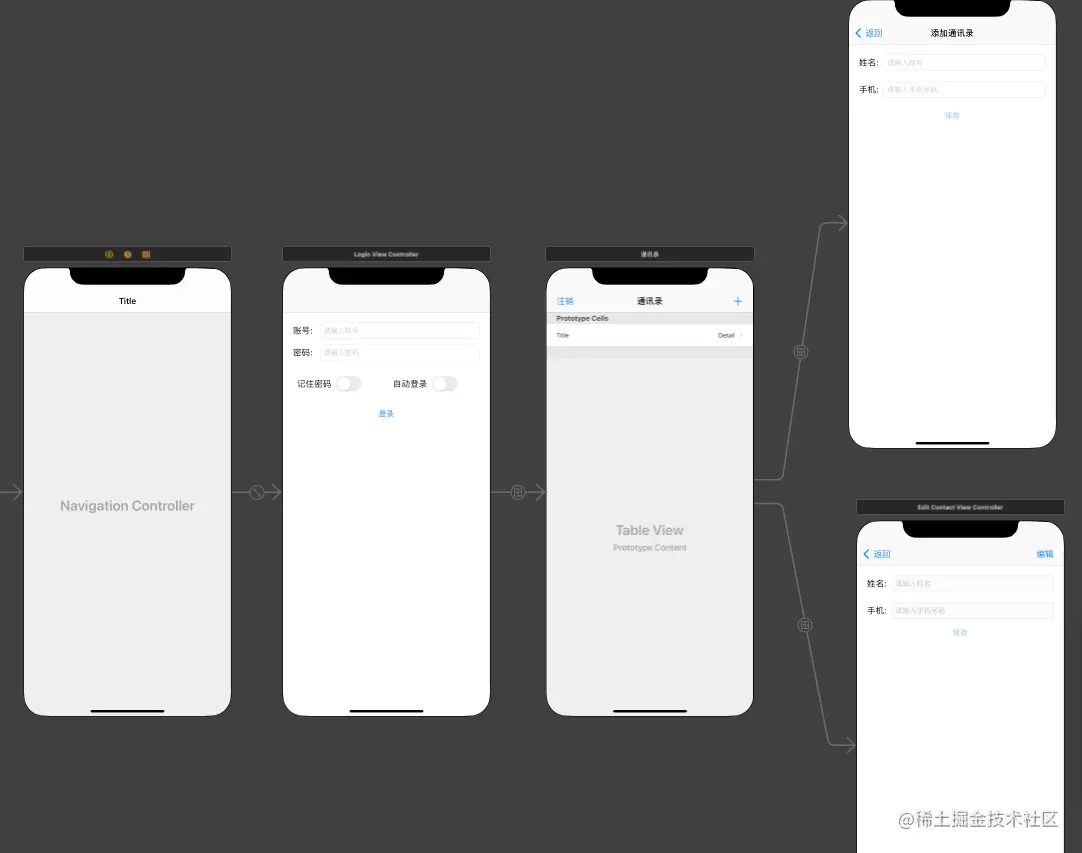
通讯录源码 (TabBar嵌套Navigation)
@interface IFContactModel : NSObject <NSSecureCoding>
@property (nonatomic, copy) NSString *username;
@property (nonatomic, copy) NSString *number;
@end
#import "IFContactModel.h"
@implementation IFContactModel
- (instancetype)initWithCoder:(NSCoder *)coder {
if (self = [super init]) {
_username = [coder decodeObjectForKey:@"username"];
_number = [coder decodeObjectForKey:@"number"];
}
return self;
}
- (void)encodeWithCoder:(NSCoder *)coder {
[coder encodeObject:self.username forKey:@"username"];
[coder encodeObject:self.number forKey:@"number"];
}
+ (BOOL)supportsSecureCoding {
return YES;
}
@end
@interface LoginViewController : UIViewController
@end
#import "LoginViewController.h"
#import "JGProgressHUD.h"
#define kUsername @"kUsername"
#define kPassword @"kPassword"
#define kRememberPassowrd @"kRememberPassowrd"
#define kAutoLogin @"kAutoLogin"
#define preferences [NSUserDefaults standardUserDefaults]
#define isEmpty(str) str == nil || [str isEqualToString:@""]
#define isNotEmpty(str) str != nil && ![str isEqualToString:@""]
@interface LoginViewController ()
@property (weak, nonatomic) IBOutlet UITextField *username;
@property (weak, nonatomic) IBOutlet UITextField *password;
@property (weak, nonatomic) IBOutlet UISwitch *rememberPassword;
@property (weak, nonatomic) IBOutlet UISwitch *autoLogin;
@property (weak, nonatomic) IBOutlet UIButton *btnLogin;
@end
@implementation LoginViewController
- (void)viewDidLoad {
[super viewDidLoad];
[self.username addTarget:self action:@selector(textChange) forControlEvents:UIControlEventEditingChanged];
[self.password addTarget:self action:@selector(textChange) forControlEvents:UIControlEventEditingChanged];
self.btnLogin.enabled = NO;
self.autoLogin.on = [preferences boolForKey:kAutoLogin];
self.rememberPassword.on = [preferences boolForKey:kRememberPassowrd];
if ([preferences boolForKey:kRememberPassowrd]) {
if (isNotEmpty([preferences objectForKey:kUsername])) {
self.username.text = [preferences objectForKey:kUsername];
}
if (isNotEmpty([preferences objectForKey:kPassword])) {
self.password.text = [preferences objectForKey:kPassword];
}
[self textChange];
}
if ([preferences boolForKey:kAutoLogin]) {
[self login:self.btnLogin];
} else {
if (isEmpty(self.username.text)) {
[self.username becomeFirstResponder];
} else if (isEmpty(self.password.text)) {
[self.password becomeFirstResponder];
}
}
}
- (void) textChange {
self.btnLogin.enabled = (self.username.text.length > 0 && self.password.text.length > 0) ? YES : NO;
}
- (IBAction)rememberPasswordChange:(UISwitch *)sender {
if (!sender.isOn) {
[self.autoLogin setOn:NO animated:YES];
}
[preferences setBool:self.rememberPassword.isOn forKey:kRememberPassowrd];
[preferences setBool:self.autoLogin.isOn forKey:kAutoLogin];
}
- (IBAction)autoLoginChange:(UISwitch *)sender {
if (sender.isOn) {
[self.rememberPassword setOn:YES animated:YES];
}
[preferences setBool:self.rememberPassword.isOn forKey:kRememberPassowrd];
[preferences setBool:self.autoLogin.isOn forKey:kAutoLogin];
}
- (IBAction)login:(UIButton *)sender {
__block JGProgressHUD *HUD = [[JGProgressHUD alloc] initWithStyle:JGProgressHUDStyleDark];
HUD.textLabel.text = @"Loading";
[HUD showInView:self.view];
dispatch_after(dispatch_time(DISPATCH_TIME_NOW, (int64_t)(1 * NSEC_PER_SEC)), dispatch_get_main_queue(), ^{
[HUD dismissAnimated:YES];
if ([self.username.text isEqualToString:@"1"] && [self.password.text isEqualToString:@"1"]) {
[self performSegueWithIdentifier:@"login2account" sender:nil];
if ([preferences boolForKey:kRememberPassowrd]) {
[preferences setObject:self.username.text forKey:kUsername];
[preferences setObject:self.password.text forKey:kPassword];
}
} else {
JGProgressHUD *errorView = [[JGProgressHUD alloc] initWithStyle:JGProgressHUDStyleDark];
errorView.textLabel.text = @"账号或密码错误";
errorView.indicatorView = [[JGProgressHUDErrorIndicatorView alloc] init];
[errorView showInView:self.view];
[errorView dismissAfterDelay:1.0];
}
});
}
@end
#import <UIKit/UIKit.h>
@interface ContactTableViewController : UITableViewController
@end
#import "ContactTableViewController.h"
#import "AddContactViewController.h"
#import "EditContactViewController.h"
#import "IFContactModel.h"
#define kContactsPath [NSSearchPathForDirectoriesInDomains(NSDocumentDirectory, NSUserDomainMask, YES)[0] stringByAppendingPathComponent:@"contacts.data"]
@interface ContactTableViewController () <AddContactDelegate, EditContactDelegate>
@property (nonatomic, strong) NSMutableArray *contacts;
@end
@implementation ContactTableViewController
- (void)viewDidLoad {
[super viewDidLoad];
self.contacts = [[NSMutableArray alloc] init];
NSSet *set = [NSSet setWithArray:@[[NSArray class], [IFContactModel class]]];
NSData *data = [NSData dataWithContentsOfFile:kContactsPath];
NSArray *tempArray = [NSKeyedUnarchiver unarchivedObjectOfClasses:set fromData:data error:nil];
[self.contacts addObjectsFromArray:tempArray];
}
#pragma mark - Table view data source
- (NSInteger)numberOfSectionsInTableView:(UITableView *)tableView {
return 1;
}
- (NSInteger)tableView:(UITableView *)tableView numberOfRowsInSection:(NSInteger)section {
return self.contacts.count;
}
- (UITableViewCell *)tableView:(UITableView *)tableView cellForRowAtIndexPath:(NSIndexPath *)indexPath {
UITableViewCell *cell = [tableView dequeueReusableCellWithIdentifier:@"contact" forIndexPath:indexPath];
IFContactModel *model = self.contacts[indexPath.row];
cell.textLabel.text = model.username;
cell.detailTextLabel.text = model.number;
return cell;
}
- (void)tableView:(UITableView *)tableView commitEditingStyle:(UITableViewCellEditingStyle)editingStyle forRowAtIndexPath:(NSIndexPath *)indexPath {
[self.contacts removeObjectAtIndex:indexPath.row];
[self cacheContacts];
[self.tableView deleteRowsAtIndexPaths:@[indexPath] withRowAnimation:UITableViewRowAnimationLeft];
}
#pragma mark - Navigation
- (void)prepareForSegue:(UIStoryboardSegue *)segue sender:(id)sender {
if ([segue.destinationViewController isKindOfClass:[AddContactViewController class]]) {
AddContactViewController * controller = (AddContactViewController *) segue.destinationViewController;
controller.delegate = self;
} else if ([segue.destinationViewController isKindOfClass:[EditContactViewController class]]) {
EditContactViewController * controller = (EditContactViewController *) segue.destinationViewController;
controller.delegate = self;
controller.contact = self.contacts[self.tableView.indexPathForSelectedRow.row];
}
}
- (IBAction)logout:(UIBarButtonItem *)sender {
UIAlertController *alert = [UIAlertController alertControllerWithTitle:@"是否确认注销?" message:@"注销后将返回登录" preferredStyle:UIAlertControllerStyleActionSheet];
UIAlertAction *logoutAction = [UIAlertAction actionWithTitle:@"注销" style:UIAlertActionStyleDestructive handler:^(UIAlertAction * _Nonnull action) {
[self.navigationController popViewControllerAnimated:YES];
}];
[alert addAction:[UIAlertAction actionWithTitle:@"取消" style:UIAlertActionStyleCancel handler:nil]];
[alert addAction:logoutAction];
[self presentViewController:alert animated:YES completion:^{}];
}
#pragma mark - AddContactDelegate
- (void) addContactWithController:(AddContactViewController *) controller andIFContact:(IFContactModel *) contactModel {
[self.contacts addObject:contactModel];
[self cacheContacts];
[self.tableView reloadData];
}
#pragma mark - EditContactDelegate
- (void) editContactWithEditContactViewController:(EditContactViewController *) controller andContact:(IFContactModel *) contactModel {
IFContactModel *con = self.contacts[self.tableView.indexPathForSelectedRow.row];
con.username = contactModel.username;
con.number = contactModel.number;
[self.tableView reloadData];
[self cacheContacts];
}
- (void)cacheContacts {
NSData *data = [NSKeyedArchiver archivedDataWithRootObject:self.contacts requiringSecureCoding:NO error:nil];
BOOL result = [data writeToFile:kContactsPath atomically:YES];
NSLog(@"%s , result = %d", __func__, result);
}
@end
#import <UIKit/UIKit.h>
#import "IFContactModel.h"
@class AddContactViewController;
@protocol AddContactDelegate <NSObject>
@optional
- (void) addContactWithController:(AddContactViewController *) controller andIFContact:(IFContactModel *) contactModel;
@end
@interface AddContactViewController : UIViewController
@property (nullable, nonatomic, weak) id<AddContactDelegate> delegate;
@end
#import "AddContactViewController.h"
@interface AddContactViewController ()
@property (weak, nonatomic) IBOutlet UITextField *username;
@property (weak, nonatomic) IBOutlet UITextField *number;
@property (weak, nonatomic) IBOutlet UIButton *btnSave;
@end
@implementation AddContactViewController
- (void)viewDidLoad {
[super viewDidLoad];
[self.username becomeFirstResponder];
}
- (IBAction)textChange:(UITextField *)sender {
self.btnSave.hidden = (self.username.text.length > 0 && self.number.text.length > 0) ? NO : YES;
}
- (IBAction)saveContact:(UIButton *)sender {
IFContactModel *con = [[IFContactModel alloc] init];
con.username = self.username.text;
con.number = self.number.text;
[self.delegate addContactWithController:self andIFContact:con];
[self.navigationController popViewControllerAnimated:YES];
}
@end
#import <UIKit/UIKit.h>
#import "IFContactModel.h"
@class EditContactViewController;
@protocol EditContactDelegate <NSObject>
@optional
- (void) editContactWithEditContactViewController:(EditContactViewController *) controller andContact:(IFContactModel *) contactModel;
@end
@interface EditContactViewController : UIViewController
@property(nonatomic, strong) IFContactModel *contact;
@property(nonatomic, weak) id<EditContactDelegate> delegate;
@end
#import "EditContactViewController.h"
@interface EditContactViewController ()
@property (weak, nonatomic) IBOutlet UIButton *btnSave;
@property (weak, nonatomic) IBOutlet UITextField *username;
@property (weak, nonatomic) IBOutlet UITextField *number;
@end
@implementation EditContactViewController
- (void)viewDidLoad {
[super viewDidLoad];
self.username.text = self.contact.username;
self.number.text = self.contact.number;
}
- (IBAction)editClick:(UIBarButtonItem *)sender {
BOOL canEdit = !self.username.enabled;
self.btnSave.hidden = !canEdit;
self.username.enabled = canEdit;
self.number.enabled = canEdit;
[sender setTitle:canEdit ? @"取消" : @"编辑"];
if (canEdit) {
[self.number becomeFirstResponder];
}
}
- (IBAction)saveContact:(id)sender {
IFContactModel * con = [[IFContactModel alloc] init];
con.username = self.username.text;
con.number = self.number.text;
[self.delegate editContactWithEditContactViewController:self andContact:con];
[self.navigationController popViewControllerAnimated:YES];
}
@end
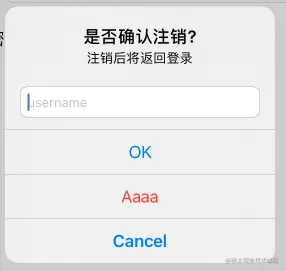
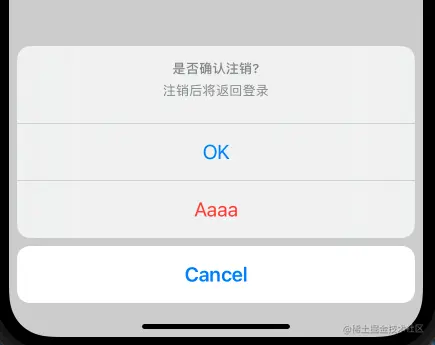
UIAlertController 弹窗
UIAlertController *alert = [UIAlertController alertControllerWithTitle:@"是否确认注销?" message:@"注销后将返回登录" preferredStyle:UIAlertControllerStyleActionSheet];
UIAlertAction *okAction = [UIAlertAction actionWithTitle:@"OK" style:UIAlertActionStyleDefault handler:^(UIAlertAction * _Nonnull action) {
NSLog(@"OK Action");
}];
UIAlertAction *cancelAction = [UIAlertAction actionWithTitle:@"Cancel" style:UIAlertActionStyleCancel handler:^(UIAlertAction * _Nonnull action) {
NSLog(@"Cancel Action");
}];
UIAlertAction *aAction = [UIAlertAction actionWithTitle:@"Aaaa" style:UIAlertActionStyleDestructive handler:^(UIAlertAction * _Nonnull action) {
NSLog(@"Cancel Action");
}];
[alert addAction:okAction];
[alert addAction:cancelAction];
[alert addAction:aAction];
[self presentViewController:alert animated:YES completion:^{
}];
UIAlertControllerStyleAlert 样式
UIAlertControllerStyleActionSheet 样式
presentViewController 打开新页面
#import "ViewController.h"
@interface ViewController ()
@end
@implementation ViewController
- (void)viewDidLoad {
[super viewDidLoad];
self.view.backgroundColor = [UIColor redColor];
}
- (void)touchesEnded:(NSSet<UITouch *> *)touches withEvent:(UIEvent *)event {
UIViewController *vc = [[UIViewController alloc] init];
vc.view.backgroundColor = [UIColor blueColor];
vc.modalPresentationStyle = UIModalPresentationFullScreen;
vc.modalTransitionStyle = UIModalTransitionStyleFlipHorizontal;
[self presentViewController:vc animated:YES completion:^{
NSLog(@"完成跳转");
}];
}
@end



