变量类型和计算
1.值类型(在栈中存储 key:value 的形式):undefined,number,string,Symbol,bollean,bigInt,null,
2.引用类型(在堆中存储,开辟了一个新的地址,指针指向地址):Object(Array,Function,Data)
typeof能判断哪些类型
值类型,函数
===和==的区别
基本类型的包装类过程
手写深拷贝
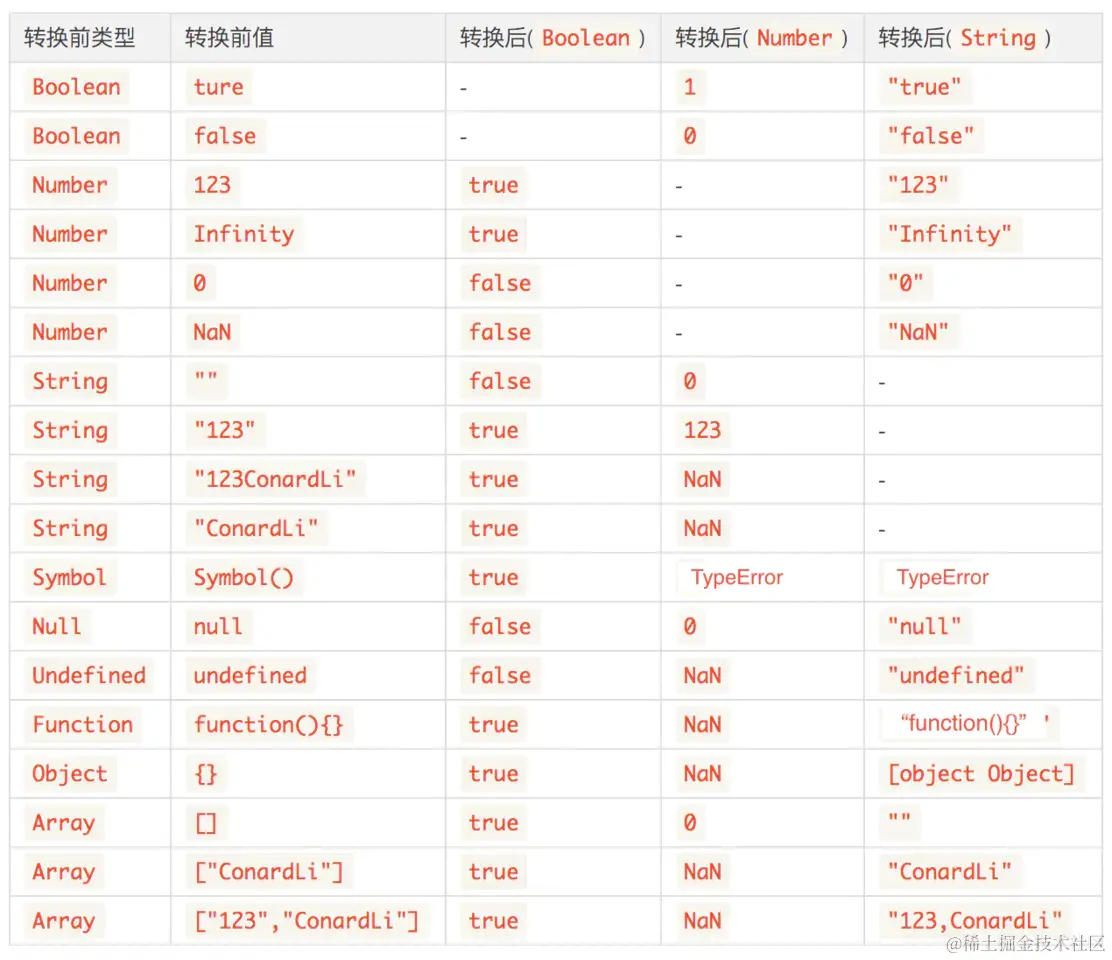
类型转换
原型
原型链
判断一个变量是否是数组
- Object.prototypeof.toString.call()
- Array.isArray()
- [] instanceof Array ([]的原型链上是否有Array.prototype)
- Array.prototype.isPrototypeOf([])
class原型本质
类数组转换为数组
- Array.form(arrayLike)
- [...arrayLike]
- Array.prototype.slice.call(arrayLike)
- Array.prototyoe.concat.call(arrayLike)
- Array.prototype.map.call(arrayLike, x => x)
- Array.prototype.filter.call(arrayLike, x => 1)
- Array.apply(null, arrayLike)
作用域和闭包
自由变量
- 一个变量在当前作用域没有定义,但是被使用了
- 向上级作用域一层一层查找,未找到,XX is not defined
闭包的应用
function debounce(func, wait) {
  let timer
  return function () {
    clearTimeout(timer)
    const context = this
    const args = arguments
    timer = setTimeout(function () {
      func.apply(context, args)
    }, wait)
  }
}
function throttle(fun,wait){
let timer;
return function(){
if(!timer){
timer = setTimeout(()=>{
fun()
timer = null;
},wait)
}
}
}
手写bind函数
异步和单线程(event loop)
为什么有异步
异步的应用场景
手写promise
- 三种状态(pending,fulfilled,rejected)
- fulilled ---> 触发then
- rejcted ---> 触发catch
then和catch怎么影响状态的变化
- then正常返回fulilled状态, 否则返回 rejected
- catch正常返回fulilled状态,否则返回rejected
js异步-进阶
event-loop
Event Loop如何执行
- 同步代码,一行一行执行
- 遇到异步,会先'记录'下,等待时机
- 时机到了,把异步任务移到callback queue(microTask queue && macroTask queue)中
- 如果call Stack为空(同步代码执行完) Event Loop开始工作
- 轮询查找Callback queue,如果有,移到Call stack中
- 继续轮询查找
理解event-loop
  1.调用栈,event-queue,web APIs
  2.同步代码放在调用栈中,异步代码放在异步任务队列中(宏任务队列,微任务队列)
宏任务微任务
- 宏任务(macroTask):script全部代码,SteTimeout,setInterVal,Ajax,Dom事件。Dom渲染后触发
- 微任务(microTask):Promise,async/await。 Dom渲染前触发
为什么微任务在宏任务之前触发
- 微任务是ES6语法规定的,宏任务是浏览器规定的(W3C语法),宏任务会被加入到Web APIs中,之后再加入到macroTask queue中,微任务直接加入到microTask queue中
- Call Stack(执行完同步任务后)清空
- 执行当前微任务
- 尝试DOM渲染
- 触发event Loop
DOM事件和event loop
- js是单线程的
- 异步(setTimeout,ajax)使用回调,基于event loop
- DOM事件也是基于回调,基于event loop
async/await
- 异步回调(callback hell)回调地狱问题,基于回调函数
- Promise.then()/catch() 链式调用,但也是基于回调函数
- async/await是同步语法,彻底消灭回调函数。
async/await和promise的关系
- 相辅相成,执行async函数,返回promise对象
- await相当于Promise里的then
- await后面的代码相当于Promise.resolve().then(()=>{代码})
for...of和async
- forEach()和async 同步执行 一次性执行
- for...of和async 异步执行 分步执行(迭代器)
js Web API
- js基础知识(ECMA规定)
- js Web API(W3C规定)
DOM
DOM节点操作
- 获取Dom节点:
- getElementById('') //元素
- getElementsByTagName('')//集合
- getElementsByClassName('') //集合
- querySelectorAll('') //集合
- attribute
- property
DOM结构操作
- 新增/插入节点
- createElement('')
- appendChild()
- 移动节点 appendChild()
- removeChild()
- 获取子节点/父节点
- parentNode
- childNodes
DOM性能
1. 对DOM查询做缓存
2. 将频繁操作改为一次操作
   1.创建文档片段 createDocumentFragement()
BOM操作
事件绑定
const btn = document.getElementById('')
btn.addEventListener('click',cb)
- 事件冒泡
阻止冒泡:event.stopPropagation()
- 事件代理
- 无限下拉列表,如何监听每个图片的点击
Ajax
const xhr = new XMLHttpRequest()
xhr.open('GET','/api',false)
xhr.onreadystatechange = function(){
    if(xhr.readyState === 4){
        if(xhr.status === 200){
            alert(xhr.responseText)
        }
    }
}
xhr.send(null)
跨域
- 什么是跨域?产生跨域的原因?
- 协议不同
- 域名不同
- 端口不同
- JSONP
function fn(data) {
  console.log(data)
}
function JSONP(url) {
  const div = document.getElementsByTagName('body')[0]
  const script = document.createElement('script')
  script.type = 'text/javascript'
  script.src = url
  div.appendChild(script)
}
JSONP('./json.json?callback=fn')
存储
- 本身用于浏览器和server通讯
- 通过document.cookie = ''可修改
- 存储大小,最大4KB
- HTML5专门为存储而设计的,最大可以存5M
- setItem(),getItem()
- 永久存储,除非手动删除
- 只存在于会话期间,浏览器关闭则清空