5、插件的定义和使用
基本写法
<!DOCTYPE html>
<html lang="en">
<head>
<meta charset="UTF-8">
<meta http-equiv="X-UA-Compatible" content="IE=edge">
<meta name="viewport" content="width=device-width, initial-scale=1.0">
<title>hello vue</title>
<script src="https://unpkg.com/vue@next"></script>
</head>
<body>
<div id="root"></div>
</body>
<script>
const myPlugin = {
install(app, options){
console.log(app, options);
}
}
const app = Vue.createApp({
template: `
<my-title />
`
});
app.component("my-title", {
template: `
<div>hello world!</div>
`
});
app.use(myPlugin, { name: "zibo" });
const vm = app.mount('#root');
</script>
</html>
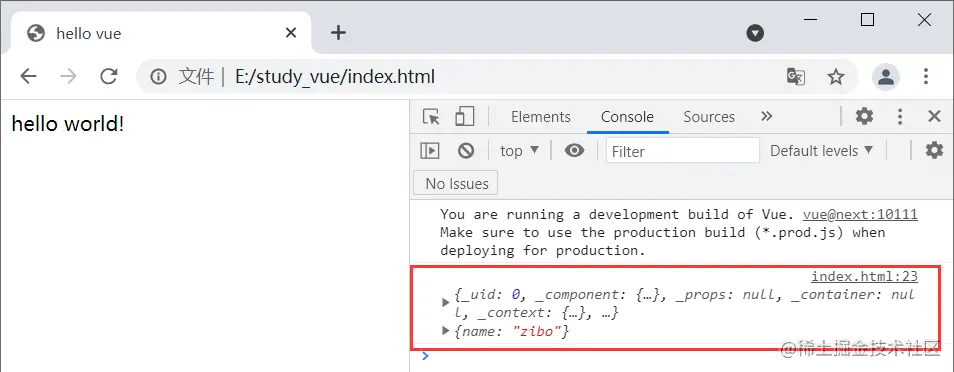
运行结果
使用插件做更多事情
<!DOCTYPE html>
<html lang="en">
<head>
<meta charset="UTF-8">
<meta http-equiv="X-UA-Compatible" content="IE=edge">
<meta name="viewport" content="width=device-width, initial-scale=1.0">
<title>hello vue</title>
<script src="https://unpkg.com/vue@next"></script>
</head>
<body>
<div id="root"></div>
</body>
<script>
const myPlugin = {
install(app, options){
app.provide('name', 'zibo');
app.directive('focus', {
mounted(el){
el.focus();
}
});
app.config.globalProperties.$sayHello = "hello zibo!";
}
}
const app = Vue.createApp({
template: `
<my-title />
`
});
app.component("my-title", {
inject: ['name'],
mounted(){
console.log(this.$sayHello);
},
template: `
<div>
<div>hello world!</div>
<div>{{name}}</div>
<input v-focus />
</div>
`
});
app.use(myPlugin, { name: "zibo" });
const vm = app.mount('#root');
</script>
</html>
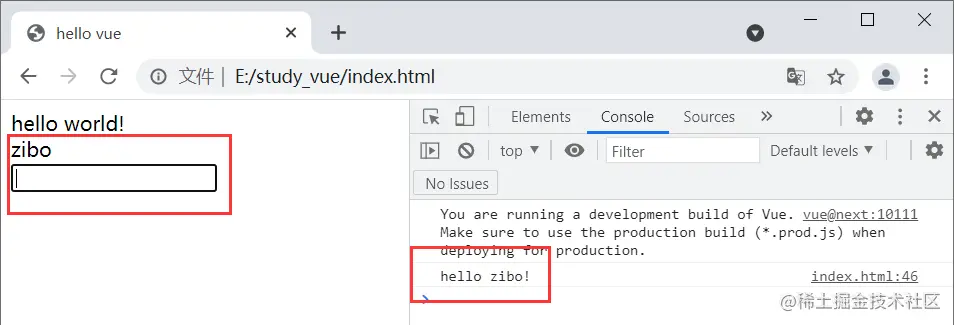
运行结果