本文章会分几部分进行,主要搭建一个微前端应用,可以在企业级别的项目中使用的
微前端框架:single-spa、single-spa-vue
项目框架:vue2 + elementui
因为single-spa是一个基础的微前端框架,了解了它的实现原理,再去看其它的微前端框架,就会非常容易了。
本教程基于single-spa进行,本教程结束以后也会出一个基于qiankun的微前端实践。
源码会实时更新,如果和文章有出入的话,以源码为准(ui很丑,忍一忍)
本文简介:本demo会有一个主项目single-spa-main,两个子项目single-spa-child-one(spa1)、single-spa-child-two(spa2),主项目内会包括两个子项目,并且子项目spa1内也引用的一个子模块spa2,对于spa1内引入的spa2只是一个思路,后续会出现的问题还不明确
废话结束,开始
第一步,我们先创建一个主项目
vue create single-spa-main
创建完项目,我们要对项目进行一下改造
const StatsPlugin = require('stats-webpack-plugin')
module.exports = {
publicPath: process.env.VUE_APP_PUBLIC_PATH,
outputDir: 'dist',
assetsDir: 'static',
runtimeCompiler: true,
productionSourceMap: false,
devServer: {
port: 9000,
hot: true,
headers:{'Access-Control-Allow-Origin':'*'}
},
configureWebpack: config => ({
output: {
library: 'singleMain',
libraryTarget: 'window'
},
plugins: [
new StatsPlugin('manifest.json', {
chunkModules: false,
entrypoints: true,
source: false,
chunks: false,
modules: false,
assets: false,
children: false,
exclude: [/node_modules/]
})
],
}),
chainWebpack: config => {},
css: {
extract: false,
loaderOptions: {
postcss: {
plugins: [
require('postcss-selector-namespace')({
namespace (css) {
if (css.includes("normalize.css")) return ''
return '.single-spa-main'
}
})
]
}
}
}
}
library、libraryTarget,把当前的项目挂到了window上
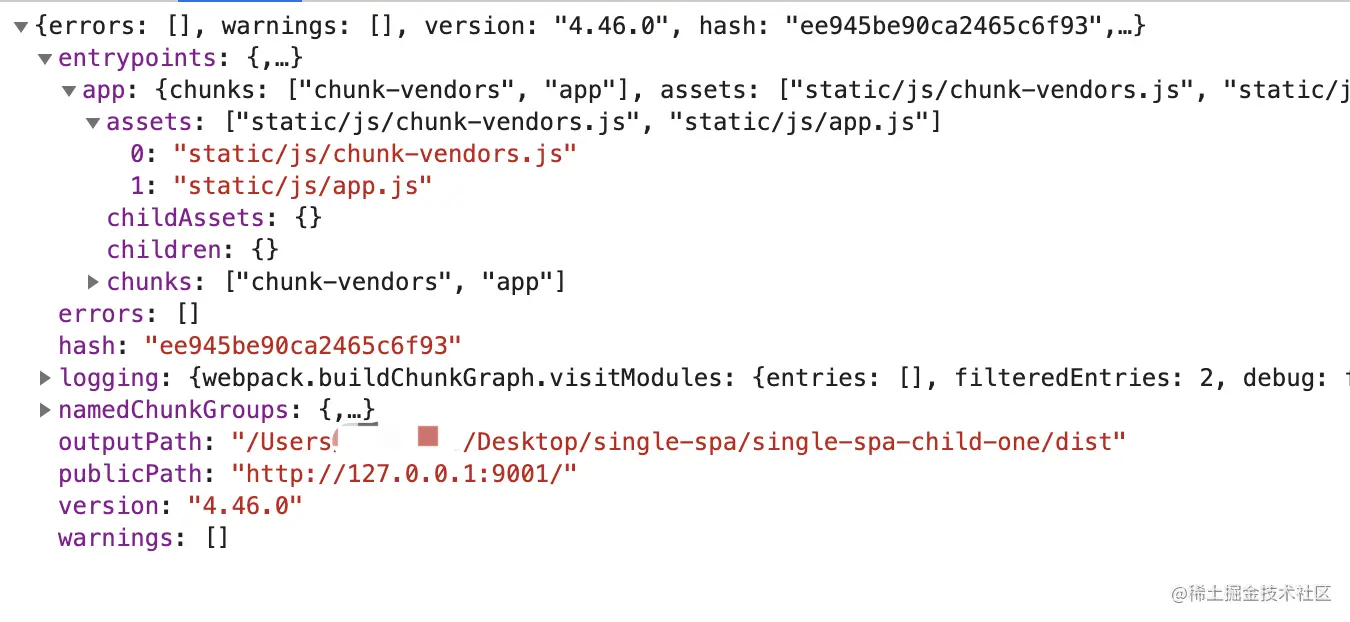
stats-webpack-plugin的作用是将构建的统计信息写入文件manifest.json,对这个plugin有兴趣的同学可以仔细看一看这个api
主要说一下postcss-selector-namespace这个api,这个api的作用是将css的最前面加一个作用域的限制,因为微前端的原理是将代码插入到主项目的一个标签下,所以直接css要加一个作用域规定生效的父级,这样才不会把css搞乱,如果设置成功了,启动项目,主项目的css之前就会有刚才设置的前缀,做到css隔离的效果。
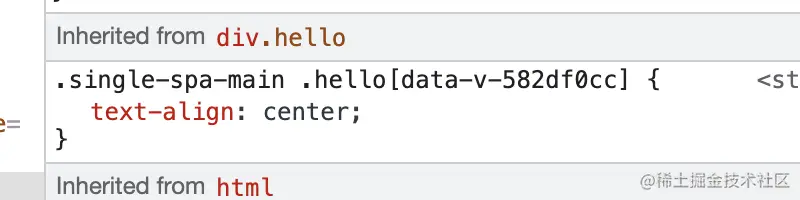
主项目暂时先改造到这里
第二步,我们创建一个子项目
vue create single-spa-child-one
同样我们对这个项目进行一下改造,改造方式基本一样,注意一下名字就可以了
const StatsPlugin = require('stats-webpack-plugin')
module.exports = {
publicPath: process.env.VUE_APP_PUBLIC_PATH,
outputDir: 'dist',
assetsDir: 'static',
runtimeCompiler: true,
productionSourceMap: false,
devServer: {
port: process.env.VUE_APP_PUBLIC_PORT,
hot: true,
headers:{'Access-Control-Allow-Origin':'*'}
},
configureWebpack: config => ({
output: {
library: 'singleChild1',
libraryTarget: 'window'
},
plugins: [
new StatsPlugin('manifest.json', {
chunkModules: false,
entrypoints: true,
source: false,
chunks: false,
modules: false,
assets: false,
children: false,
exclude: [/node_modules/]
})
],
}),
chainWebpack: config => {},
css: {
extract: false,
loaderOptions: {
postcss: {
plugins: [
require('postcss-selector-namespace')({
namespace () {
return '#singleChild1'
}
})
]
}
}
}
}
按照一样的方法,创建一个single-spa-child-two
项目创建结束了,接下来我们继续改造项目
第一步,在主项目内进行子项目的注册
先创建一个singlespaMain.js,在main中引入进来,这个文件的作用就是注册子项目
import { registerApplication, start } from 'single-spa'
import axios from 'axios'
import eventRoot from './eventRoot'
function createScript(url) {
return new Promise((resolve, reject) => {
const script = document.createElement('script')
script.src = url
script.onload = resolve
script.onerror = reject
const firstScript = document.getElementsByTagName('script')[0]
firstScript.parentNode.insertBefore(script, firstScript)
})
}
const getManifest = (url, bundle) => new Promise((resolve) => {
axios.get(url).then(async res => {
const { data } = res
const { entrypoints, publicPath } = data
const assets = entrypoints[bundle].assets
for (let i = 0; i < assets.length; i++) {
await createScript(publicPath + assets[i]).then(() => {
if (i === assets.length - 1) {
resolve()
}
})
}
})
})
const apps = [
{
name: 'singleChild1',
app: async () => {
let childModule = null
await getManifest(`${process.env.VUE_APP_CHILD_ONE}/manifest.json?v=${new Date().getTime()}`, 'app').then(() => {
childModule = window.singleChild1
})
return childModule
},
activeWhen: location => {
return location.pathname.startsWith('/singleChild1')
},
customProps: { baseUrl: '/singleChild1', eventRoot }
},
{
name: 'singleChild2',
app: async () => {
let childModule = null
await getManifest(`${process.env.VUE_APP_CHILD_TWO}/manifest.json?v=${new Date().getTime()}`, 'app').then(() => {
childModule = window.singleChild2
})
return childModule
},
activeWhen: location => {
return location.pathname.startsWith('/singleChild2')
},
customProps: { baseUrl: '/singleChild2', eventRoot }
}
]
apps.forEach(item => registerApplication(item))
start()
getManifest函数配合createScript函数,会把子项目打包出来的js,加载出来
我们在主项目创建一个eventRoot,作为整个项目的事件通讯工具,内部实现就是new一个新的vue出来,通过customProps,逐级向下传递
需要注意的是传递的baseUrl这个字段,这个字段是用来规定子项目的基础路由,由于子项目可能在不同的地方使用,那这个页面的路由就会出现不同的情况,如果在子项目把路由写死的话,路由就会耦合,不利于多项目的应用,在spa1项目引用spa2的时候回着重说一下这个的应用
这个就是mnifest请求到的数据
接下来改造一下路由
import Vue from 'vue'
import VueRouter from 'vue-router'
import HelloWorld from '@/views/HelloWorld.vue'
Vue.use(VueRouter)
const routes = [
{
path: '/',
name: 'HelloWorld',
component: HelloWorld,
children: [
{
path: 'singleChild1*',
name: 'singleChild1',
meta: {
keepAlive: true
}
},
{
path: 'singleChild2*',
name: 'singleChild2',
meta: {
keepAlive: true
}
}
]
}
]
export default new VueRouter({
mode: 'history',
routes
})
路由的改动基本都很小,在需要加载子项目的路由下加上children就可以了
接下来就是helloword这个组件
<template>
  <div class="hello">
    <el-tabs v-model="tabsname">
      <el-tab-pane label="用户管理" name="first">
        用户管理
        <div id="singleChild1"></div>
      </el-tab-pane>
      <el-tab-pane label="配置管理" name="second">
        配置管理
      </el-tab-pane>
      <el-tab-pane label="角色管理" name="third">
        角色管理
        <div id="singleChild2"></div>
      </el-tab-pane>
      <el-tab-pane label="定时任务补偿" name="fourth">定时任务补偿</el-tab-pane>
    </el-tabs>
  </div>
</template>
这个页面只需要把id标签加到对应的位置就可以
主项目的改造到这里基本就可以告一段落了,先改造子项目,让这个应用跑起来
先从spa2下手,因为spa1里面也会引入spa2,所以spa1留到最后改造
import Vue from 'vue'
import App from './App.vue'
import singleSpaVue from 'single-spa-vue'
import routerList from './router'
import registerRouter from './util/registerRouter'
Vue.config.productionTip = false
const appOptions = {
el: '#singleChild2',
render: h => h(App)
}
if (!window.singleSpaNavigate) {
delete appOptions.el
appOptions.router = registerRouter('', routerList)
new Vue(appOptions).$mount('#app')
}
let vueLifecycle = ''
export function bootstrap ({ baseUrl, eventRoot }) {
console.log('singleChild2 bootstrap', baseUrl)
appOptions.router = registerRouter(baseUrl, routerList)
Vue.prototype.eventRoot = eventRoot
vueLifecycle = singleSpaVue({
Vue,
appOptions
})
return vueLifecycle.bootstrap(() => {})
}
export function mount () {
console.log('singleChild2 mount')
return vueLifecycle.mount(() => {})
}
export function unmount () {
console.log('singleChild2 unmount')
return vueLifecycle.unmount(() => {})
}
import HelloWorld from '@/views/HelloWorld.vue'
export default [
{
path: '/',
name: 'HelloWorld',
component: HelloWorld
}
]
import Vue from 'vue'
import VueRouter from 'vue-router'
export default function (baseUrl = '', routerList) {
Vue.use(VueRouter)
return new VueRouter({
base: baseUrl || '',
mode: 'history',
routes: routerList
})
}
启动两个项目,进入到对应的tab下,页面就能加载出来了
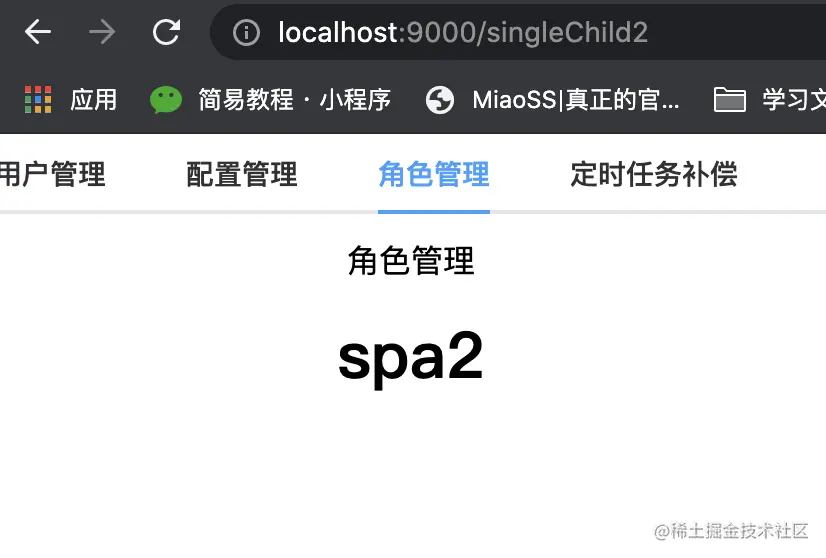
这里直接把跨项目事件加进去
<template>
<div class="hello">
<h1>spa2</h1>
<button @click="qiehuan">xiu~~切换</button>
</div>
</template>
<script>
export default {
name: 'HelloWorld',
methods: {
qiehuan() {
this.eventRoot.$emit('goFourth')
}
}
}
</script>
<!-- Add "scoped" attribute to limit CSS to this component only -->
<style scoped></style>
点击的时候会向上emit一个事件,我们在其他项目内对这个事件进行一下监听就可以了
<template>
<div class="hello">
<el-tabs v-model="tabsname" :before-leave="qiehuan">
<el-tab-pane label="用户管理" name="first">
用户管理
<div id="singleChild1"></div>
</el-tab-pane>
<el-tab-pane label="配置管理" name="second">
配置管理
</el-tab-pane>
<el-tab-pane label="角色管理" name="third">
角色管理
<div id="singleChild2"></div>
</el-tab-pane>
<el-tab-pane label="定时任务补偿" name="fourth">定时任务补偿</el-tab-pane>
</el-tabs>
</div>
</template>
<script>
import eventRoot from '@/eventRoot'
export default {
name: 'HelloWorld',
data () {
return {
tabsname: 'second'
}
},
created () {
eventRoot.$on('goFourth', this.goFourth)
},
methods: {
qiehuan (changeName) {
if (changeName === 'first') {
this.$router.push({
path: '/singleChild1'
})
} else if (changeName === 'third') {
this.$router.push({
path: '/singleChild2'
})
} else if (this.tabsname === 'first' || this.tabsname === 'third') {
this.$router.push({
path: '/'
})
}
},
goFourth () {
this.qiehuan('fourth')
this.tabsname = 'fourth'
}
}
}
</script>
<style scoped>
.hello {
text-align: center;
}
</style>
下面我们来进行spa1项目的改造,因为在我们的计划当中spa1既是一个子项目,同时也要把spa2当做一个子模块引入进来,所以spa1既是一个子项目,也是一个主项目
import Vue from 'vue'
import App from './App.vue'
import singleSpaVue from 'single-spa-vue'
import routerList from './router'
import registerRouter from './util/registerRouter'
import singlespaSpa1 from './singlespaSpa1'
import eventRoot from './eventRoot'
Vue.config.productionTip = false
const appOptions = {
el: '#singleChild1',
render: h => h(App)
}
if (!window.singleMain) {
delete appOptions.el
appOptions.router = registerRouter('', routerList)
singlespaSpa1('', eventRoot)
Vue.prototype.eventRoot = eventRoot
new Vue(appOptions).$mount('#app')
}
let vueLifecycle = ''
export function bootstrap ({ baseUrl, eventRoot }) {
console.log('singleChild1 bootstrap', baseUrl)
appOptions.router = registerRouter(baseUrl, routerList)
singlespaSpa1(baseUrl, eventRoot)
Vue.prototype.eventRoot = eventRoot
vueLifecycle = singleSpaVue({
Vue,
appOptions
})
return vueLifecycle.bootstrap(() => {})
}
export function mount () {
console.log('singleChild1 mount')
return vueLifecycle.mount(() => {})
}
export function unmount () {
console.log('singleChild1 unmount')
return vueLifecycle.unmount(() => {})
}
import { registerApplication, start } from 'single-spa'
import axios from 'axios'
function createScript(url) {
return new Promise((resolve, reject) => {
const script = document.createElement('script')
script.src = url
script.onload = resolve
script.onerror = reject
const firstScript = document.getElementsByTagName('script')[0]
firstScript.parentNode.insertBefore(script, firstScript)
})
}
const getManifest = (url, bundle) => new Promise((resolve) => {
axios.get(url).then(async res => {
const { data } = res
const { entrypoints, publicPath } = data
const assets = entrypoints[bundle].assets
for (let i = 0; i < assets.length; i++) {
await createScript(publicPath + assets[i]).then(() => {
if (i === assets.length - 1) {
resolve()
}
})
}
})
})
const apps = function (baseUrl, eventRoot) {
return [
{
name: 'singleChild2',
app: async () => {
let childModule = null
await getManifest(`${process.env.VUE_APP_CHILD_TWO}/manifest.json?v=${new Date().getTime()}`, 'app').then(() => {
childModule = window.singleChild2
})
return childModule
},
activeWhen: location => {
return location.pathname.startsWith(`${baseUrl}/spa1spa2`)
},
customProps: { baseUrl: `${baseUrl}/spa1spa2`, eventRoot }
}
]
}
export default function (baseUrl, eventRoot) {
apps(baseUrl, eventRoot).forEach(item => registerApplication(item))
start()
}
import Vue from 'vue'
import HelloWorld from '@/views/HelloWorld.vue'
import Test1 from '@/views/test1.vue'
export default [
{
path: '/',
name: 'HelloWorld',
component: HelloWorld,
children: [
{
path: 'spa1spa2',
name: 'singleChild2',
component: Vue.component('singleChild2', {
render: h => h('div', { attrs: { id: 'singleChild2' } })
}),
meta: {
keepAlive: true
}
}
]
},
{
path: '/test1',
name: 'test1',
component: Test1
}
]
<template>
<div class="hello">
<h1>spa1</h1>
<button @click="showSpa2">showSpa2</button>
<router-view />
<button @click="go">gotest</button>
</div>
</template>
<script>
export default {
name: 'HelloWorld',
methods: {
showSpa2 () {
this.$router.push({
name: 'singleChild2'
})
},
go () {
this.$router.push({
name: 'test1'
})
}
}
}
</script>
<style scoped>
.hello {
font-size: 30px;
}
</style>
同样的地方就不多说了,不同地方:
1、主要就是singlespaSpa1这个加载子模块的文件输出变成了一个函数,因为子模块的加载依赖一个baseUrl,子项目的baseurl又是上一个项目传递过来的,还有全局的eventRoot需要传递,所以这里就变成了一个函数的形式
2、这里判断是不是独立运行的需要用主项目挂载window上的library判断,也就是window.singleMain,因为我们这个项目也引入了single-spa,所以window.singleSpaNavigate一定会存在
3、路由为什么没有用主项目的*这种形式,不建议用这个形式,会在页面上多出很多判断,router-view是最好的
4、这里还需要创建一个eventRoot,用于在不依赖主项目的情况下,实现与子模块的通信
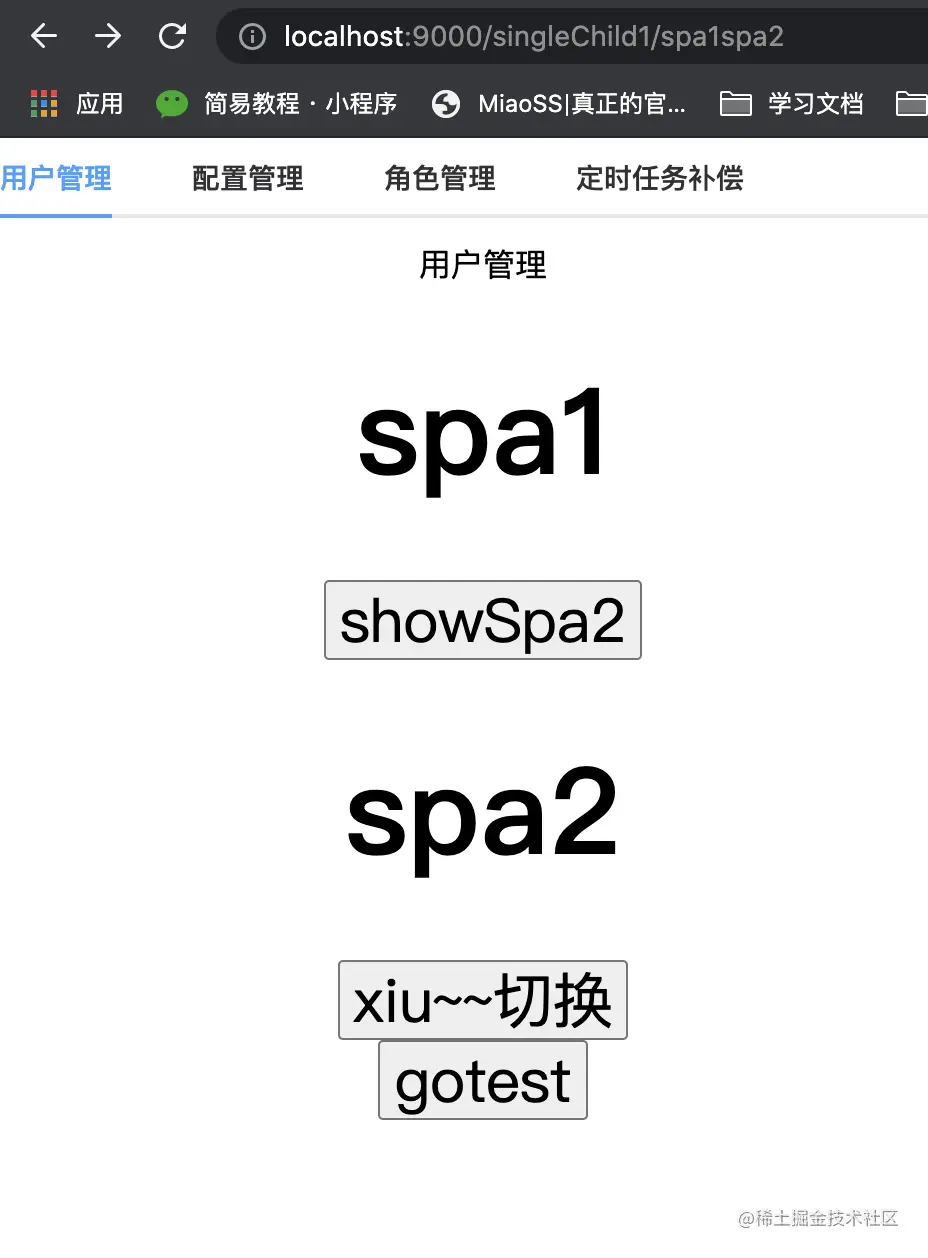
如果启动没问题,页面应该是这样的
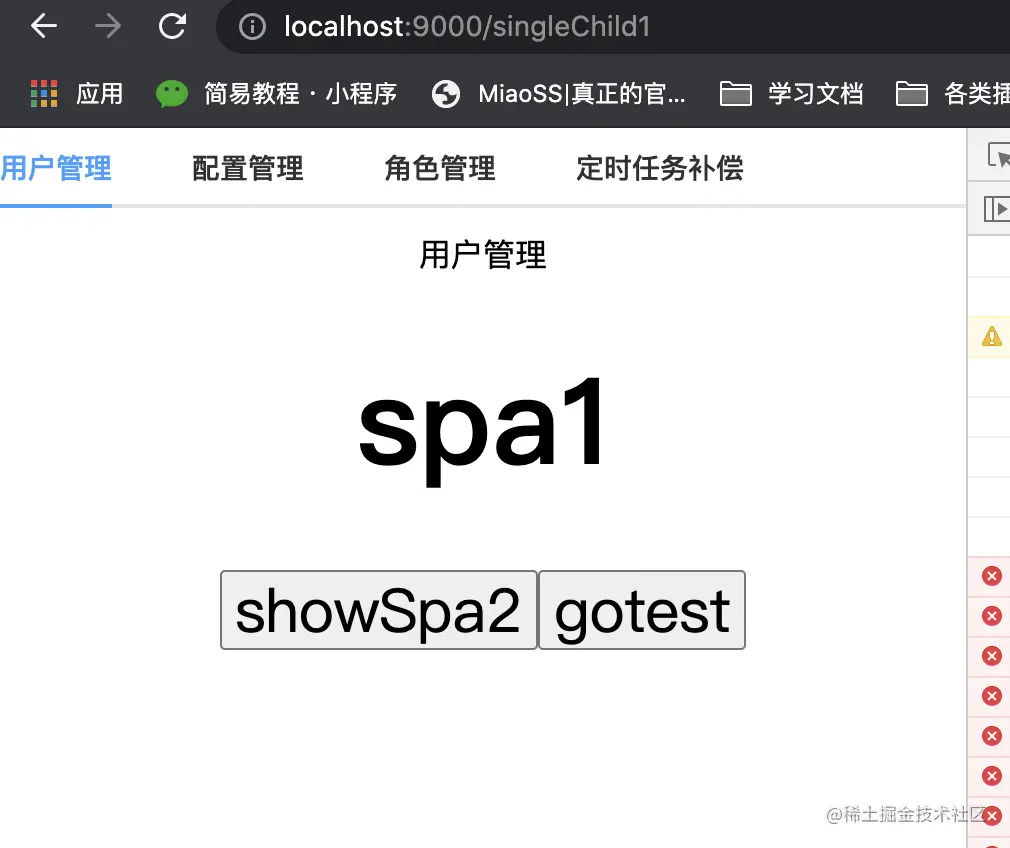
点击showSpa2以后
文章到此就已经结束了,后面还会在出一个关于优化的文章,关于以上只是一个最基本的代码配置,如果项目复杂的话,根据自己的需求在改造