主机和VMware共享文件
- 虚拟机设置共享文件夹
- 虚拟机显示共享文件夹
- 首先cd /mnt
- 然后看一下这个文件夹下是否有东西ls,若没有,新建文件夹hgfs,mkdir hgfs创建此文件
- 执行vmhgfs-fuse /mnt/hgfs (需要这个文件夹无内容)
- 再进入hgfs文件夹,即可看到我们在Windows端的共享文件;
Centos下载文件
- yum(推荐)Ubuntu则是用apt-get
- wegt 一般来说著名的linux系统基本上分两大类:
- RedHat系列:Redhat、Centos、Fedora等
- Debian系列:Debian、Ubuntu等 RedHat 系列:
- 常见的安装包格式 rpm包,安装rpm包的命令是“rpm -参数”
- 包管理工具 yum
- 支持tar包 Debian系列:
- 常见的安装包格式 deb包,安装deb包的命令是“dpkg -参数”
- 包管理工具 apt-get
- 支持tar包
虚拟机配置java环境
- 打开配置文件
vim /etc/profile - 在末尾添加
export JAVA_HOME=/usr/local/java/jdk1.8.0_171 export JRE_HOME=${JAVA_HOME}/jre export CLASSPATH=.:${JAVA_HOME}/lib:${JRE_HOME}/lib export PATH=${JAVA_HOME}/bin:$PATH - 使环境变量生效
source /etc/profile - 添加软链接
ln -s /usr/local/java/jdk1.8.0_171/bin/java /usr/bin/java - 检查
docker 创建镜像
docker commit 方式创建
docker 配置开发环境
必须先在/mnt/hgfs目录下,执行vmhgfs-fuse /mnt/hgfs,拉取到主机(windows)上的配置
docker ps -a 有时容器没有显示端口号,先启动容器,再看下是否还是没有显示端口号
修改docker容器的端口映射和挂载目录
方法一:删除原有容器,重新建新容器(推荐)
这个解决方案最为简单,把原来的容器删掉,重新建一个。当然这次不要忘记加上端口映射。
优缺点:优点是简单快捷,在测试环境使用较多。缺点是如果是数据库镜像,那重新建一个又要重新配置一次,就比较麻烦了。
方法二:修改容器配置文件,重启docker服务
容器的配置文件路径:/var/lib/docker/containers/[hash_of_the_container]/hostconfig.json
其中的hashofthecontainer是docker镜像的hash值,可以通过docker ps或者docker inspect containername查看。(CONTAINER ID就可以看出来)
按需修改端口, 按需修改挂载目录(权限和属主属组要相同),然后重启docker服务,再启动容器服务就可以了。
{
    "Binds": [
        "/mnt/hgfs/vmware-file/nacos/conf:/home/nacos/conf"
    ],
 }
和config.v2.json修改MountPoints
systemctl restart docker
优缺点:这个方法的优点是没有副作用,操作简单。缺点是需要重启整个docker服务,如果在同一个宿主机上运行着多个容器服务的话,就会影响其他容器服务。
nginx
- 拉取镜像
docker pull nginx - 创建容器
docker run -d -p 80:80 --name mynginx nginx - 拷贝配置文件
nginx.confdocker cp mynginx:/etc/nginx/nginx.conf /mnt/hgfs/vmware-file/nginx - 删除原先创建的容器,重新创建容器并添加挂载本地文件
docker run -it -p 80:80 --name mynginx -v /mnt/hgfs/vmware-file/nginx/nginx.conf:/etc/nginx/nginx.conf nginx - 验证挂载本地文件是否成功
说明配置文件本地挂载成功
- 测试访问nginx
http://192.168.57.130:80
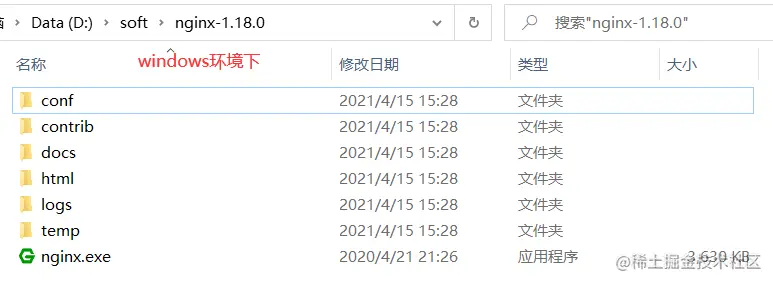
ps:windows下的nginx目录和linux下的nginx目录结构不同
mysql
- 拉取镜像
docker pull centos/mysql-57-centos7 - 创建容器
docker run -d -p 3306:3306 --name mysql5.7 centos/mysql-57-centos7 - 登录mysql 默认用户名为root,密码为空,
docker exec -it mysql5.7 /bin/bashmysql-u root --p - 登录后,修改用户名和密码
set password for root@localhost = password('新密码');
nacos
- 拉取镜像
docker pull nacos/nacos-server - 创建容器
docker run -d -p 8848:8848 --name mynacos nacos/nacos-server - 拷贝配置文件
docker cp mynacos:/home/nacos/conf /mnt/hgfs/vmware-file/nacos - 测试访问nacos
http://192.168.57.130:8848/nacos,注意连接后面带/nacos,默认登录名和密码都是nacos - 查看配置文件
- 更换数据库为mysql,nacos默认的是嵌入式的数据库dery不便我们观察数据,更换为mysql5.7版本(nacos官方镜像不支持8.xx高版本)
- 修改容器挂载文件(方式一) 以单机形式运行
docker run -d -p 8848:8848 --name testnacos -v /mnt/hgfs/vmware-file/nacos/conf:/home/nacos/conf --env MODE=standalone nacos/nacos-server - 修改容器挂载文件(方式二)
hostconfig.json修改Binds
config.v2.json修改MountPoints
seata
- 拉取镜像
docker pull seataio/seata-server - 创建容器
docker run -d -p 8091:8091 --name myseata seataio/seata-server - 拷贝配置文件
docker cp myseata:/mnt/hgfs/vmware-file/seata-server/resources /seata-server/resources - 重建容器
docker run -d -p 8091:8091 --name myseata -v /mnt/hgfs/vmware-file/seata-server/resources:/seata-server/resources seataio/seata-server - 创建数据库和sql
https://github.com/seata/seata/tree/develop/script/server - 修改配置,指定seata注册到nacos,事务保存在数据库
registry {
  # file 、nacos 、eureka、redis、zk、consul、etcd3、sofa
  type = "nacos"

  nacos {
    application = "seata-server"
    serverAddr = "192.168.57.130:8848"
    group = "SEATA_GROUP"
    namespace = ""
    cluster = "default"
    username = "nacos"
    password = "nacos"
  }
  eureka {
    serviceUrl = "http://localhost:8761/eureka"
    application = "default"
    weight = "1"
  }
  redis {
    serverAddr = "localhost:6379"
    db = 0
    password = ""
    cluster = "default"
    timeout = 0
  }
  zk {
    cluster = "default"
    serverAddr = "127.0.0.1:2181"
    sessionTimeout = 6000
    connectTimeout = 2000
    username = ""
    password = ""
  }
  consul {
    cluster = "default"
    serverAddr = "127.0.0.1:8500"
    aclToken = ""
  }
  etcd3 {
    cluster = "default"
    serverAddr = "http://localhost:2379"
  }
  sofa {
    serverAddr = "127.0.0.1:9603"
    application = "default"
    region = "DEFAULT_ZONE"
    datacenter = "DefaultDataCenter"
    cluster = "default"
    group = "SEATA_GROUP"
    addressWaitTime = "3000"
  }
  file {
    name = "file.conf"
  }
}

config {
  # file、nacos 、apollo、zk、consul、etcd3
  type = "file"

  nacos {
    serverAddr = "127.0.0.1:8848"
    namespace = ""
    group = "SEATA_GROUP"
    username = ""
    password = ""
    dataId = "seataServer.properties"
  }
  consul {
    serverAddr = "127.0.0.1:8500"
    aclToken = ""
  }
  apollo {
    appId = "seata-server"
    ## apolloConfigService will cover apolloMeta
    apolloMeta = "http://192.168.1.204:8801"
    apolloConfigService = "http://192.168.1.204:8080"
    namespace = "application"
    apolloAccesskeySecret = ""
    cluster = "seata"
  }
  zk {
    serverAddr = "127.0.0.1:2181"
    sessionTimeout = 6000
    connectTimeout = 2000
    username = ""
    password = ""
    nodePath = "/seata/seata.properties"
  }
  etcd3 {
    serverAddr = "http://localhost:2379"
  }
  file {
    name = "file.conf"
  }
}
## transaction log store, only used in seata-server
store {

  ## lock&session store mode: file、db、redis
  lock {
    mode = "db"
  }

  session {
    mode = "db"
  }

  ## rsa decryption public key
  publicKey = ""
  ## file store property
  file {
    ## store location dir
    dir = "sessionStore"
    # branch session size , if exceeded first try compress lockkey, still exceeded throws exceptions
    maxBranchSessionSize = 16384
    # globe session size , if exceeded throws exceptions
    maxGlobalSessionSize = 512
    # file buffer size , if exceeded allocate new buffer
    fileWriteBufferCacheSize = 16384
    # when recover batch read size
    sessionReloadReadSize = 100
    # async, sync
    flushDiskMode = async
  }

  ## database store property
  db {
    ## the implement of javax.sql.DataSource, such as DruidDataSource(druid)/BasicDataSource(dbcp)/HikariDataSource(hikari) etc.
    datasource = "druid"
    ## mysql/oracle/postgresql/h2/oceanbase etc.
    dbType = "mysql"
    driverClassName = "com.mysql.jdbc.Driver"
    ## if using mysql to store the data, recommend add rewriteBatchedStatements=true in jdbc connection param
    url = "jdbc:mysql://192.168.57.130:3306/seata?characterEncoding=utf8&autoReconnect=true"
    user = "用户名"
    password = "密码"
    minConn = 5
    maxConn = 100
    globalTable = "global_table"
    branchTable = "branch_table"
    lockTable = "lock_table"
    queryLimit = 100
    maxWait = 5000
  }

  ## redis store property
  redis {
    ## redis mode: single、sentinel
    mode = "single"
    ## single mode property
    single {
      host = "127.0.0.1"
      port = "6379"
    }
    ## sentinel mode property
    sentinel {
      masterName = ""
      ## such as "10.28.235.65:26379,10.28.235.65:26380,10.28.235.65:26381"
      sentinelHosts = ""
    }
    password = ""
    database = "0"
    minConn = 1
    maxConn = 10
    maxTotal = 100
    queryLimit = 100
  }
}