一、下载vuex
yarn add vuex -S
二、在src下新建一个文件夹store/index.js
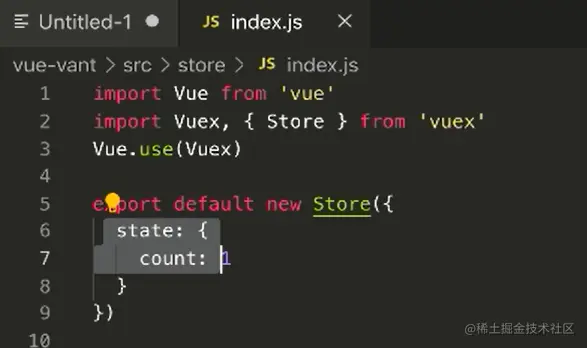
三、在main.js中引入store/index.js,并挂载
import store from './store'

new Vue({
    store
})
四、在App.vue中使用
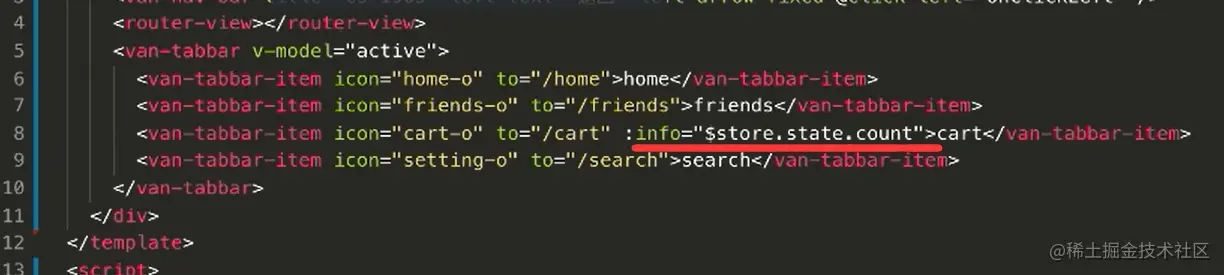
在实际项目中(mall_phone)实现购物车
1.懒人方法:直接执行:vue add vuex命令,在src中生成了store文件夹与index.js文件,并且自动进行引入、挂载,index.js文件中也会有默认格式
2.实现首页底部导航的购物车里的数量的动态改变

1.在store/index.js中的state中设置count属性,且给App.vue中的购物车模块标签添加属性::badge="$store.getters.getAllCart",就会显示count的值(写死的)
<van-tabbar-item
        icon="cart-o"
        to="/cart"
        :badge="$store.state.count"
      ></van-tabbar-item>
state: {
    count: 9
  }
2.在上一步的基础上,实现动态变化
- 先在store/index.js中的getters里定义一个函数来计算count值,并在state中添加一个cart属性
getAllCart(state) {
let c = 0
state.cart.forEach(item => {
c += item.count
})
return c
}
state: {
count: 0,
cart: JSON.parse(localStorage.getItem('cart') || '[]')
}
<van-tabbar-item
        icon="cart-o"
        to="/cart"
        :badge="$store.getters.getAllCart"
      ></van-tabbar-item>
3.实现点击加入购物车,在cart.vue中获取到数据信息
1.在goodsinfo中的加入购物车按钮,添加点击事件,触发函数,用来传递商品信息
<van-button type="danger" size="small" @click="addCart"
            >加入购物车</van-button
          >
addCart() {
const goodsinfo = {
id: this.id,
src: this.lunbolist[0].src,
price: this.goodsInfo.sell_price,
title: this.goodsInfo.title,
selected: true,
count: this.value,
timer: null
}
this.$store.commit('addCart', goodsinfo)
}
2.在store/index.js获取商品信息,并保存到本地
mutations: {
addCart(state, goodsinfo) {
let flag = false
state.cart.forEach(item => {
if (item.id === goodsinfo.id) {
item.count += goodsinfo.count
flag = true
}
})
if (!flag) {
state.cart.push(goodsinfo)
}
localStorage.setItem('cart', JSON.stringify(state.cart))
}
},
- 每次定义函数时,可以先不急着往下实现,先打印一下看是否接受到了数据,比如此处的addCart函数,可以先打印一下console.log(goodsinfo),看是否有内容(这样容易找到问题所在,防止满屏报红)
3.获取到数值后,将商品信息渲染到页面(cart.vue)
<template>
  <div class="cart">
    <div class="cart-list" v-for="item in $store.state.cart" :key="item.id">
      <div class="cart-l">
      // 开关
        <van-switch v-model="item.selected" />
      </div>
      // 商品信息
      <div class="cart-r">
        <van-card
          :num="item.count"
          :price="item.price + '.00'"
          :title="item.title"
          :thumb="item.src"
        >
        // 添加了一个步进器插槽,用来实现增加减少count(count是全局的,一个变,所有的都变)
          <div slot="desc" class="step">
            <van-stepper v-model="item.count" />
          </div>
        </van-card>
      </div>
    </div>
    // 提交订单组件,同时可以动态实现总价的改变
    <van-submit-bar
      :price="$store.getters.getAllPrice * 100"
      button-text="提交订单"
    />
  </div>
</template>
<script>
export default {
  data: () => ({})
}
</script>
<style lang="less">
.cart {
  width: 100%;
  padding: 10px;
  .cart-list {
    display: flex;
    border: 1px solid #e5e5e5;
    padding: 4px;
    margin-bottom: 10px;
    .cart-l {
      display: flex;
      flex: 1;
      // 居中
      align-items: center;
      justify-content: center;
    }
    .cart-r {
      flex: 3;
      .step {
        margin: 10px;
      }
    }
  }
}
</style>
4.实现总价的变化
- 在store/index.js中的getters中定义函数用于实现总价
getAllPrice(state) {
let price = 0
state.cart.forEach(item => {
if (item.selected === true) {
price += item.count * item.price
}
})
return price
}
<van-submit-bar
      :price="$store.getters.getAllPrice * 100"
      button-text="提交订单"
    />



