6 Alternatives to Classes in Python
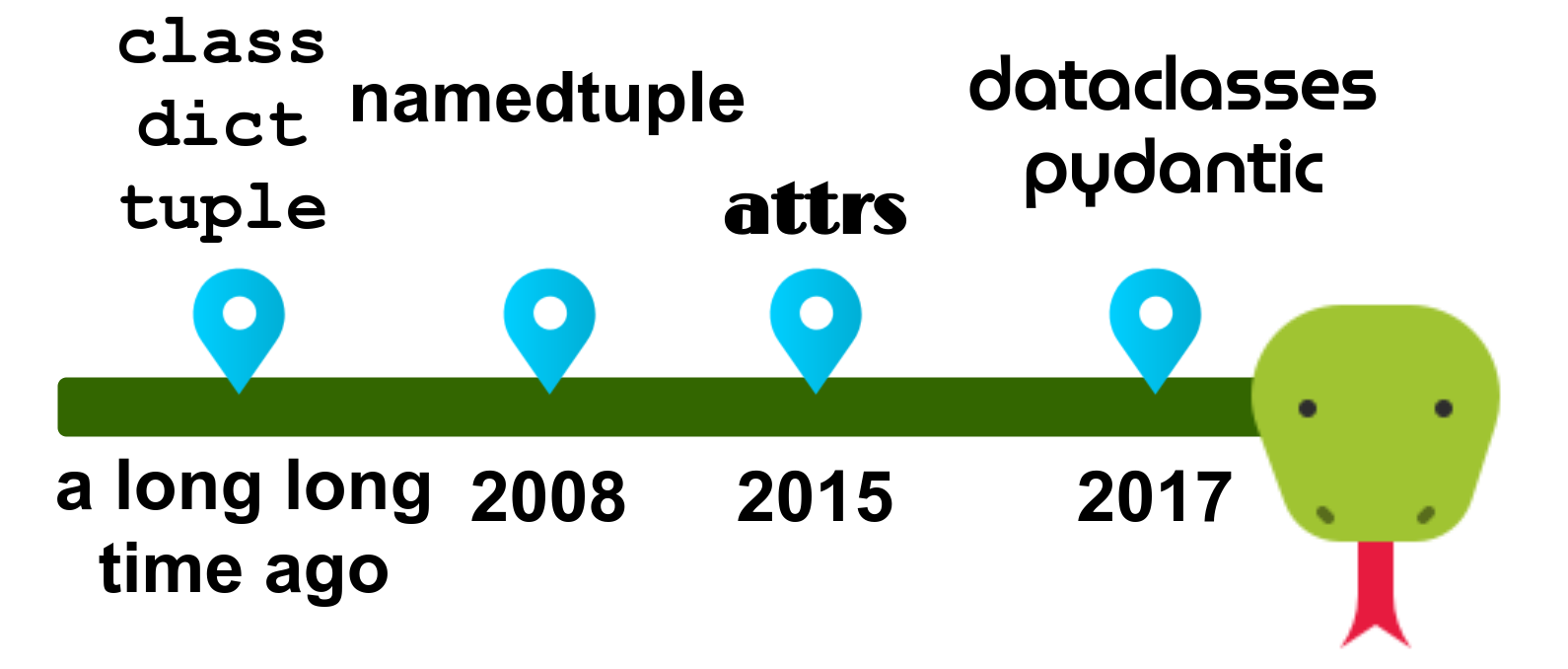
As developers, we throw a lot of data around. The representation of data matters a lot and we need to be able to keep track of which variables represent which attributes. Configuration is a prime example of complex data.
In the following article, I will use location as an example. It must have a longitude, latitude, and can have an address. In C, you would use a struct for this. In Java, you would simply create a class. In Python, there are six alternatives. Let’s explore each of their advantages and disadvantages!
Plain Classes
Plain classes are the default way provided by the standard library to organize data. You can (and should!) use type annotations as done in the following example:
from typing import Optional


class Position:
    MIN_LATITUDE = -90
    MAX_LATITUDE = 90
    MIN_LONGITUDE = -180
    MAX_LONGITUDE = 180

    def __init__(
        self, longitude: float, latitude: float, address: Optional[str] = None
    ):
        self.longitude = longitude
        self.latitude = latitude
        self.address = address

    @property
    def latitude(self) -> float:
        """Getter for latitude."""
        return self._latitude

    @latitude.setter
    def latitude(self, latitude: float) -> None:
        """Setter for latitude."""
        if not (Position.MIN_LATITUDE <= latitude <= Position.MAX_LATITUDE):
            raise ValueError(f"latitude was {latitude}, but has to be in [-90, 90]")
        self._latitude = latitude

    @property
    def longitude(self) -> float:
        """Getter for longitude."""
        return self._longitude

    @longitude.setter
    def longitude(self, longitude: float) -> None:
        """Setter for longitude."""
        if not (Position.MIN_LONGITUDE <= longitude <= Position.MAX_LONGITUDE):
            raise ValueError(f"longitude was {longitude}, but has to be in [-180, 180]")
        self._longitude = longitude


pos1 = Position(49.0127913, 8.4231381, "Parkstraße 17")
pos2 = Position(42.1238762, 9.1649964)


def get_distance(p1: Position, p2: Position) -> float:
    pass
You can see how we needed to write a boilerplate constructor __init__ . The code for the constructor does not necessarily always look that simple, but in a lot of cases, it is.
You can see that it’s possible to use positional arguments or keyword arguments. If you define a default value in the constructor, you can also leave the values out when you create an object from the class. This happened for pos2, where the address was not given to the constructor.
You can also see that the annotation for the get_distance function looks pretty clean. It is clear what is meant.
The tooling support is as good as it gets because every editor has to support the plain classes and all of the important information is there.
1. Tuples
Tuples are a native data type. They have a very low memory overhead, so we can address the elements by index very quickly. The problem with tuples is that you have no names for member attributes. You have to remember what each index represents. Tuples are always immutable.
from typing import Tuple, Optional
pos1 = (49.0127913, 8.4231381, "Parkstraße 17")
pos2 = (42.1238762, 9.1649964, None)
def get_distance(p1: Tuple[float, float, Optional[str]],
                 p2: Tuple[float, float, Optional[str]]) -> float:
    pass
The annotation for get_distance looks messy. A human should be given the information that p1 represents a location — not that the location contains two floats and an optional string. That is work the editor should do for you.
The editor's support depends on how thoroughly you annotate. In the example above, you could also just write Tuple without specifying what the tuple contains. As people are lazy, I’d say the editor support is not good. It’s no fault of the editor, but it’s often not possible to give good support.
2. Dictionaries
Dictionaries are a native data type and probably the most common way to throw data around in Python. Dicts have a bigger memory overhead compared to tuples, as you have to store the names somewhere, but they are still OK. Accessing elements by index is fast. Dicts are always mutable, but there is the third-party package frozendict to solve this.
from typing import Any, Dict
pos1 = {"longitude": 49.0127913,
        "latitude": 8.4231381,
        "address": "Parkstraße 17"}
pos2 = {"longitude": 42.1238762,
        "latitude": 9.1649964,
        "address": None}
def get_distance(p1: Dict[str, Any],
                 p2: Dict[str, Any]) -> float:
    pass
The annotation in practice is really bad. It’s almost always Dict[str, Any] in the best case. Often, there is no annotation.
TypedDict (PEP 589) has been around since Python 3.8, but I’ve never seen that in any bigger code base. TypedDict is a killer feature, but it’s irrelevant, as we want to support legacy Python versions.
For those reasons, the editor's support is even worse than for tuples.
3. Named Tuples
Named tuples were added to Python 2.6, so they have been around for quite a while. They are actually tuples, but they have a name and a constructor that accepts keyword arguments:
from collections import namedtuple

attribute_names = ["longitude", "latitude", "address"]
Position = namedtuple("Position", attribute_names, defaults=(None,))

pos1 = Position(49.0127913, 8.4231381, "Parkstraße 17")
pos2 = Position(42.1238762, 9.1649964)

def get_distance(p1: Position, p2: Position) -> float:
    pass
NamedTuples solve the issue of the annotations becoming hard to read. They thus also fix the issue of editor support that I mentioned earlier.
Interestingly, NamedTuples are not type-aware:
>>> from collections import namedtuple
>>> Coordinates = namedtuple("Coordinates", ["x", "y"])
>>> BMI = namedtuple("BMI", ["weight", "size"])
>>> a = Coordinates(60, 170)
>>> b = BMI(60, 170)
>>> a
Coordinates(x=60, y=170)
>>> b
BMI(weight=60, size=170)
>>> a == b
True
4. attrs
attrs is a third-party library that reduces boilerplate code. Developers can use it by adding the @attrs.s decorator above the class. Attributes are assigned the attr.ib() function:
from typing import Optional
import attr


@attr.s
class Position:
    longitude: float = attr.ib()
    latitude: float = attr.ib()
    address: Optional[str] = attr.ib(default=None)

    @longitude.validator
    def check_long(self, attribute, v):
        if not (-180 <= v <= 180):
            raise ValueError(f"Longitude was {v}, but must be in [-180, +180]")

    @latitude.validator
    def check_lat(self, attribute, v):
        if not (-90 <= v <= 90):
            raise ValueError(f"Latitude was {v}, but must be in [-90, +90]")


pos1 = Position(49.0127913, 8.4231381, "Parkstraße 17")
pos2 = Position(42.1238762, 9.1649964)


def get_distance(p1: Position, p2: Position) -> float:
    pass
You can make it immutable by changing the decorator to [@attr.s(frozen=True)](https://www.attrs.org/en/stable/api.html).
You also can automatically run code on the input to the constructor. This is called a “converter,” and the docs show a pretty nice example:
>>> @attr.s
... class C(object):
...     x = attr.ib(converter=int)
>>> o = C("1")
>>> o.x
Visual Studio Code does not like the type annotations.
5. Dataclass
Dataclasses were added in Python 3.7 with PEP 557. They are similar to attrs, but in the standard library. It’s especially important to note that dataclasses are “just” normal classes that happen to have lots of data in them.
In contrast to attrs, data classes use type annotations instead of the attr.ib() notation. I think this increases readability a lot. Also, the editor support is better because you now have to annotate the attributes.
You can easily make it immutable by changing the decorator to @dataclass(frozen=True) — just like with attrs.
from typing import Optional
from dataclasses import dataclass


@dataclass
class Position:
    longitude: float
    latitude: float
    address: Optional[str] = None


pos1 = Position(49.0127913, 8.4231381, "Parkstraße 17")
pos2 = Position(42.1238762, 9.1649964, None)


def get_distance(p1: Position, p2: Position) -> float:
    pass
One part that I’m lacking here is attribute validation. I can use __post_init__(self) to do it for the construction:
def __post_init__(self):
    if not (-180 <= self.longitude <= 180):
        v = self.longitude
        raise ValueError(f"Longitude was {v}, but must be in [-180, +180]")
    if not (-90 <= self.latitude <= 90):
        v = self.latitude
        raise ValueError(f"Latitude was {v}, but must be in [-90, +90]")
You can also combine dataclasses with properties:
@dataclass
class Position:
    longitude: float
    latitude: float
    address: Optional[str] = None

    @property
    def latitude(self) -> float:
        """Getter for latitude."""
        return self._latitude

    @latitude.setter
    def latitude(self, latitude: float) -> None:
        """Setter for latitude."""
        if not (-90 <= latitude <= 90):
            raise ValueError(f"latitude was {latitude}, but has to be in [-90, 90]")
        self._latitude = latitude

    @property
    def longitude(self) -> float:
        """Getter for longitude."""
        return self._longitude

    @longitude.setter
    def longitude(self, longitude: float) -> None:
        """Setter for longitude."""
        if not (-180 <= longitude <= 180):
            raise ValueError(f"longitude was {longitude}, but has to be in [-180, 180]")
        self._longitude = longitude
However, I don’t like that so much. It is again super verbose and removes a lot of the charm of dataclasses. If you need validation that is not covered by the types, then go for Pydantic.
6. Pydantic
Pydantic is a third-party library that focuses on data validation and settings management. You can either inherit from pydantic.BaseModel or create a dataclass with Pydantic:
from typing import Optional
from pydantic import validator
from pydantic.dataclasses import dataclass


@dataclass(frozen=True)
class Position:
    longitude: float
    latitude: float
    address: Optional[str] = None

    @validator("longitude")
    def longitude_value_range(cls, v):
        if not (-180 <= v <= 180):
            raise ValueError(f"Longitude was {v}, but must be in [-180, +180]")
        return v

    @validator("latitude")
    def latitude_value_range(cls, v):
        if not (-90 <= v <= 90):
            raise ValueError(f"Latitude was {v}, but must be in [-90, +90]")
        return v


pos1 = Position(49.0127913, 8.4231381, "Parkstraße 17")
pos2 = Position(longitude=42.1238762, latitude=9.1649964)


def get_distance(p1: Position, p2: Position) -> float:
    pass
At first glance, this is identical to the standard @dataclass — except that you get the dataclass decorator from Pydantic.
Mutability and Hashability
I don’t tend to consciously think about mutability a lot, but in many cases, I want my classes to be immutable. The big exceptions are database models, but they are a complete story on their own.
Having the option to mark classes as frozen to make their objects immutable is pretty nice.
Implementing __hash__ for a mutable object is problematic because the hash might change when the object is changed. This means if the object is in a dictionary, the dictionary would need to know that the hash of the object has changed and store it in a different location. For this reason, both dataclasses and Pydantic prevent the hashing of mutable classes by default. They have unsafe_hash, though.
Default String Representation
Having a reasonable string representation is super helpful (e.g. for logging). And let’s be honest: A lot of people do print debugging.
If we printed pos1 from the examples above, here is what we would get. The linebreaks and alignments were added to keep things nice to read. The original results are on one line:
>>> print(pos1)

Plain class   : <__main__.Position object at 0x7f1562750640>
# 1 Tuples    : (49.0127913, 8.4231381, 'Parkstraße 17')
# 2 Dicts     : {'longitude': 49.0127913,
                 'latitude': 8.4231381,
                 'address': 'Parkstraße 17'}
# 3 NamedTuple: Position(longitude=49.0127913,
                         latitude=8.4231381,
                         address='Parkstraße 17')
# 4 attrs     : Position(longitude=49.0127913,
                         latitude=8.4231381,
                         address='Parkstraße 17')
# 5 dataclass : Position(longitude=49.0127913,
                         latitude=8.4231381,
                         address='Parkstraße 17')
You can see that the string representation of an object created from a plain class is useless. Tuples are better, but they don’t indicate which index represents which attribute. All remaining representations are pretty awesome. They are easy to understand and can even be used to recreate the object!
Data Validation
You have seen how data validation can be implemented for plain classes, attrs, dataclasses, and Pydantic. What you haven’t seen is what the error messages look like.
For the following, I will attempt to create Position(1234, 567). So both the longitude and latitude are wrong. Here are the error messages this triggers:
# Plain Class
ValueError: Longitude was 11111, but has to be in [-180, 180]

# 4: attr
ValueError: Longitude was 1234, but must be in [-180, +180]

# 5: dataclasses
(same as plain classes is possible)

# 6: Pydantic
pydantic.error_wrappers.ValidationError: 2 validation errors for Position
longitude
  Longitude was 1234.0, but must be in [-180, +180] (type=value_error)
latitude
  Latitude was 567.0, but must be in [-90, +90] (type=value_error)
This is the point I want to make: Pydantic gives you all the errors in a very clear way. Plain classes and attrs just give you the first error.
Serialize to JSON
JSON is the way to exchange data on the web. The GitLab API is no exception. Let’s say we want to have Python objects that we can serialize to JSON to get a single MR. In Pydantic, it is as simple as that (removing a lot of attributes for readability):
from pydantic import BaseModel


class GitlabUser(BaseModel):
    id: int
    username: str


class GitlabMr(BaseModel):
    id: int
    squash: bool
    web_url: str
    title: str
    author: GitlabUser


mr = GitlabMr(
    id=1,
    squash=True,
    web_url="http://foo",
    title="title",
    author=GitlabUser(id=42, username="Joe"),
)
json_str = mr.json()
print(json_str)
This gives you:
{"id": 1, "squash": true, "web_url": "http://foo", "title": "title", "author": {"id": 42, "username": "Joe"}}
For dataclasses, [dataclasses.asdict](https://docs.python.org/3/library/dataclasses.html#dataclasses.asdict) goes a long way. Then you might be able to directly serialize the dictionary to JSON. It becomes interesting with DateTime or decimal objects. Something similar is possible with attrs.
Unserialize From JSON
Userializing nested classes from a JSON string is trivial with Pydantic. Using the example above, you would write:
mr = GitlabMr.parse_raw(json_str)
There are very dirty hacks to do something similar with dataclasses. The attrs way to deserialize looks better, but I guess it also struggles with nested structures. And when it comes to DateTime or decimals, I’m pretty certain that both show more problems than Pydantic. Serialization, deserialization, and validation are where Pydantic shines.
Memory
Using this [getsize](https://stackoverflow.com/a/30316760/562769) implementation on pos1 , I get:
Raw float    :   8 B ("double")
Raw string   :   1 B per char => 13B
Raw data     :  29 B = 8B + 8B + 13B

Float object :  24 B
Str object   :  86 B
3 objects    : 134 B = 24B + 24B + 86B

Native class : 286 B
#1 Tuple     : 198 B
#2 Dict      : 366 B
#3 NamedTuple: 198 B
#4 attrs     : 286 B
#5 dataclass : 286 B
#6 pydantic  : 442 B (the "dataclass" version)
#6 pydantic  : 801 B (the "BaseModel" version)
The Pydantic base model has quite an overhead, but you always have to keep things in perspective. How many of those objects will you create? Let’s assume you have maybe 100 of those. Each of them might consume 500B more than a more efficient alternative. That would be 50kB. To quote Donald Knuth:
“Premature optimization is the root of all evil.”
If memory becomes problematic, then you will not switch from Pydantic to dataclasses or attrs. You will switch to something more structured like NumPy arrays or pandas DataFrames.
Execution Time
There are multiple things you can mean by “execution time” in this context:
- Object creation time with or without validation or conversion
- Parsing time from JSON
- Parsing time from a dictionary
I’m convinced that the parsing time for JSON dominates the rest. There are multiple JSON parsers available in Python:
JSON encoding/decoding with Python - Comparing libraries by speed, maturity, and operational safety
So When Do I Use What?
Use what you need:
Dictwhen you don’t know ahead of time what will be added. Please note that you can mix all of the others withdictand vice versa. So if you know what a part of the data structure will look like, then use something different. I seedictas a last resort.NamedTuplewhen you need a quick way to group data and mutability is not needed. And when it’s OK for you to not be type-aware.- Dataclasses when you need mutability, want to be type-aware, or want to have the possibility of inheriting from the created dataclass.
- Pydantic
BaseModelwhen you need to deserialize data.
Please note that I didn’t mention tuple and attrs. I simply cannot find a valid use case where you would prefer them for new code over the other choices. Please let me know if I missed one.
I also didn’t mention plain classes. I think I would only use plain classes if I want to overwrite __init__, __eq__ , __str__, __repr__ , and__hash__ anyway. Or if I have to support old Python versions.
Resource
- Raymond Hettinger: “Dataclasses: The code generator to end all code generators” at PyCon 2018, on YouTube.