1.实现原理
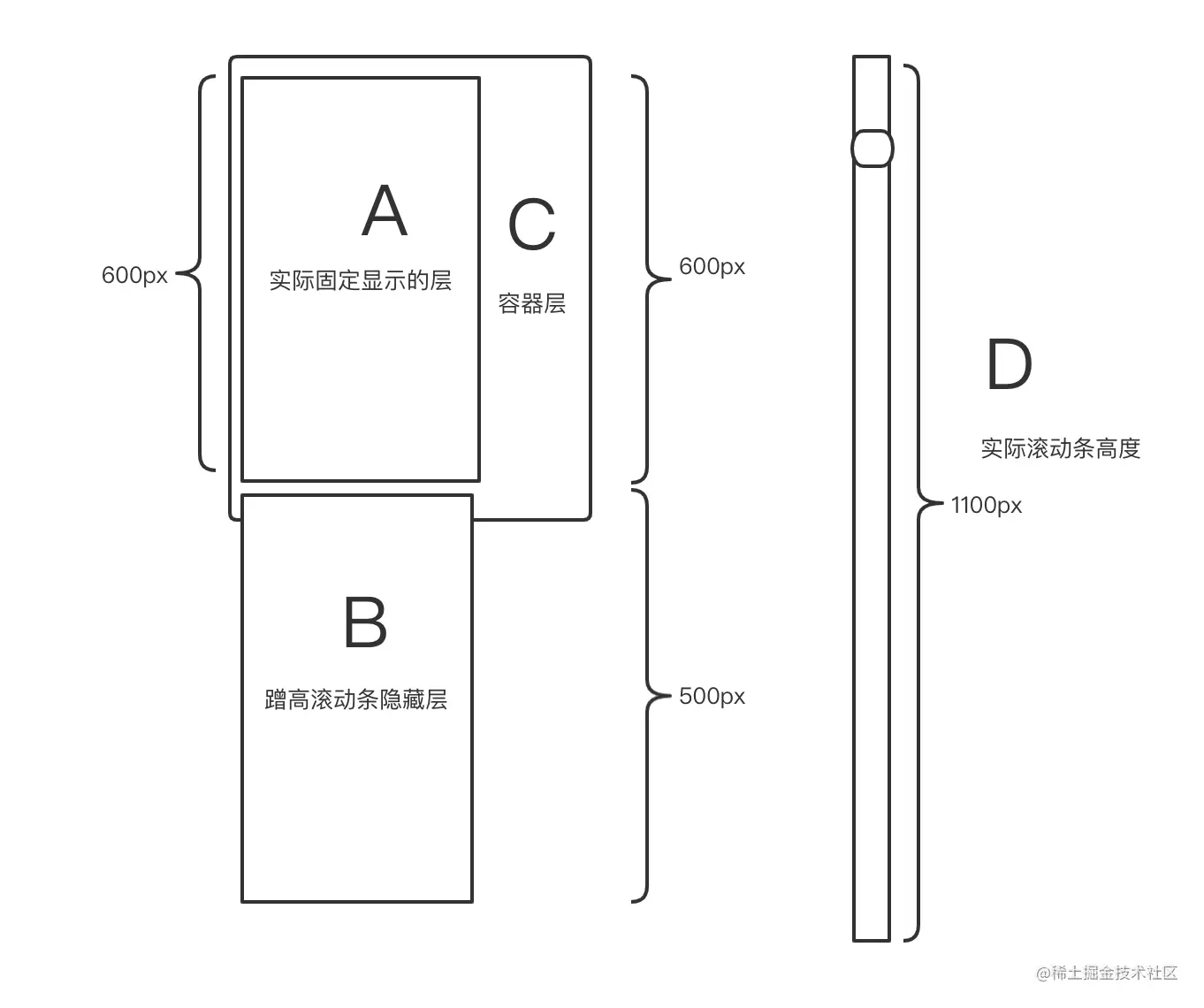
已知 一行高度为100px,C容器一次能显示6条(600px)。
如果当前分页显示11条,总高度D滚动条为1100px,则B的高度为500px。
- A固定层放在C容器,A高度 = C高度
- B蹭高层放在A层下面,B高度= D高度 - C高度 = 500px
- 由于A+B超过了C的高度,出现滚动条,
- 每当滚动的时候,动态设置A在C中的y偏移值位置,同时减少B的高度。
- 当到达底部,A的y偏移值到底部,同时B为0
2.简单组件版本 (组件实现)
<template>
<div ref="list" class="infinite-list-container" @scroll="scrollEvent($event)">
<div class="infinite-list-phantom" :style="{ height: listHeight + 'px' }"></div>
<div class="infinite-list" :style="{ transform: getTransform }">
<div ref="items"
class="infinite-list-item"
v-for="item in visibleData"
:style="{ height: itemSize + 'px'}"
>
显示内容xxxxx
</div>
<div>
</div>
</div>
</div>
</template>
<script>
export default {
name:'VirtualList',
props: {
listData:{
type:Array,
default:()=>[]
},
itemSize: {
type: Number,
default:200
}
},
computed:{
listHeight(){
return this.listData.length * this.itemSize;
},
visibleCount(){
return Math.ceil(this.screenHeight / this.itemSize)
},
getTransform(){
return `translate3d(0,${this.startOffset}px,0)`;
},
visibleData(){
console.log(this.listData,this.start,this.end)
return this.listData.slice(this.start, Math.min(this.end,this.listData.length));
}
},
mounted() {
this.start = 0;
this.end = this.start + this.visibleCount;
},
data() {
return {
screenHeight:800,
startOffset:0,
start:0,
end:4,
};
},
methods: {
scrollEvent() {
let scrollTop = this.$refs.list.scrollTop;
this.start = Math.floor(scrollTop / this.itemSize);
this.end = this.start + this.visibleCount;
this.startOffset = scrollTop - (scrollTop % this.itemSize);
}
}
};
</script>
<style scoped>
.infinite-list-container {
height: 100%;
overflow: auto;
position: relative;
-webkit-overflow-scrolling: touch;
}
.infinite-list-phantom {
position: absolute;
left: 0;
top: 0;
right: 0;
z-index: -1;
}
.infinite-list {
left: 0;
right: 0;
top: 0;
position: absolute;
}
.infinite-list-item {
padding: 10px;
color: #555;
border-bottom: 1px solid #999;
}
</style>
<template>
<div class="kkb-container">
<VirtualList :listData="articles" :estimatedItemSize="300" v-slot="slotProps">
<div>test</div>
</VirtualList>
</template>
2.element Table实现虚拟滚动 (指令实现)
import loadmore from '@/directive/loadmore'
Vue.directive(loadmore.name, loadmore.componentUpdated)
var spillDataNum = 20;
var timeout = false;
let setRowDisableNone = function (topNum, showRowNum, binding) {
if (timeout) {
clearTimeout(timeout);
}
timeout = setTimeout(() => {
binding.value.call(null, topNum, topNum + showRowNum + spillDataNum);
});
};
export default {
name: 'loadmore',
componentUpdated: function (el, binding, vnode, oldVnode) {
setTimeout(() => {
const dataSize = vnode.data.attrs['data-size'];
const oldDataSize = oldVnode.data.attrs['data-size'];
const dataPage = vnode.data.attrs['data-page'];
const oldDataPage = oldVnode.data.attrs['data-page'];
const dataHeight = vnode.data.attrs['data-height'];
const oldDataHeight = oldVnode.data.attrs['data-height'];
if(dataSize === oldDataSize && dataPage === oldDataPage && dataHeight === oldDataHeight){
return;
}
const selectWrap = el.querySelector('.el-table__body-wrapper');
const selectTbody = selectWrap.querySelector('table tbody');
const selectRow = selectWrap.querySelector('table tr');
const lastTR = selectTbody.querySelector('.lastTR');
if (!selectRow) {
return;
}
if(lastTR){
lastTR.remove()
}
const rowHeight = selectRow.clientHeight;
let showRowNum = Math.round(selectWrap.clientHeight / rowHeight);
const createElementTR = document.createElement('tr');
createElementTR.setAttribute('class', 'lastTR')
let createElementTRHeight = (dataSize - showRowNum - spillDataNum) * rowHeight;
createElementTR.setAttribute('style', `height: ${createElementTRHeight}px;`);
selectTbody.append(createElementTR);
selectWrap.scrollTop = 0;
selectWrap.addEventListener('scroll', function () {
let topPx = this.scrollTop - (spillDataNum + 1) * rowHeight;
let topNum = Math.round(topPx / rowHeight);
let minTopNum = dataSize - spillDataNum - showRowNum;
if (topNum > minTopNum) {
topNum = minTopNum;
}
if (topNum < 0) {
topNum = 0;
topPx = 0;
}
selectTbody.setAttribute('style', `transform: translateY(${topPx}px)`);
createElementTR.setAttribute('style', `height: ${createElementTRHeight-topPx > 0 ? createElementTRHeight-topPx : -rowHeight}px;`);
setRowDisableNone(topNum, showRowNum, binding);
})
});
}
};
<el-table
:data="filteredData"
v-loadmore="handelLoadmore"
:data-size="tableData.length"
:data-page="curPage"
>
</el-table>
export default {
name: 'sewingCraftQuery',
data() {
return {
curPage:1,
tableData:[],
currentStartIndex: 0,
currentEndIndex: 30
}
}
computed: {
filteredData () {
return this.tableData.filter((item, index) => {
if (index < this.currentStartIndex) {
return false;
} else if (index > this.currentEndIndex) {
return false;
} else {
return true;
}
});
}
},
methods: {
handelLoadmore(currentStartIndex, currentEndIndex){
this.currentStartIndex = currentStartIndex;
this.currentEndIndex = currentEndIndex;
},
}
}



