<!DOCTYPE html>
<html lang="en">
<head>
<meta charset="UTF-8">
<title>Title</title>
<style>
html, body {
height: 100%;
width: 100%;
margin: 0;
}
.box {
position: relative;
}
#canvas {
position: relative;
z-index: 100;
}
.slider {
position: relative;
box-sizing: border-box;
border: 1px #E4E7EB solid;
border-radius: 3px;
width: 400px;
height: 40px;
}
.progress{
position: absolute;
height: 100%;
background: #00b7ee;
}
.but {
position: relative;
background: #ffffff;
height: 100%;
width: 55px;
box-sizing: border-box;
border: 1px #E4E7EB solid;
border-radius: 3px;
display: flex;
justify-content: center;
align-items: center;
cursor: pointer;
z-index: 100;
}
.but:after {
content: '\2794';
font-size: 25px;
color: #676D73;
}
span {
position: absolute;
top: 10px;
left: 140px;
z-index: 1;
}
img {
z-index: 1;
position: absolute;
left: 0;
top: 0;
width: 400px;
height: 200px;
}
</style>
</head>
<body>
<div class="box">
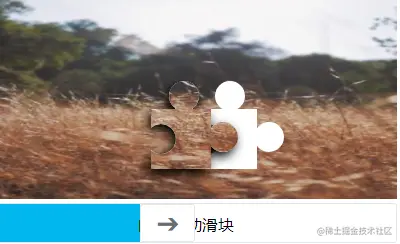
<canvas id="canvas" width="400" height="200"></canvas>
<div class="slider">
<div class="progress"></div>
<div class="but"></div>
<span>向右滑动滑块</span>
</div>
</div>
<script>
let doc = document;
let canvas = doc.getElementById('canvas');
let ctx = canvas.getContext('2d');
let img = new Image();
img.crossOrigin = '*';
img.src = 'https://picsum.photos/300';
img.onload = function () {
doc.querySelector('.box').append(img);
let x = canvas.width / 2;
let y = canvas.height / 2.5;
let rect = [x, y + 30, 60, 60];
let middleArc = [x + 9.9, y + 60, 15, Math.PI * 0.729, Math.PI * 1.27, true];
let topArc = [x + 33, y + 17, 15, 0, Math.PI * 2];
let rightArc = [x + 72, y + 58, 15, 0, Math.PI * 2];
ctx.save();
ctx.shadowBlur = 10;
ctx.shadowOffsetX = -3;
ctx.shadowOffsetY = 5;
ctx.shadowColor = "black";
ctx.arc(...middleArc);
ctx.rect(...rect);
ctx.arc(...topArc);
ctx.moveTo(x, y);
ctx.arc(...rightArc);
ctx.fillStyle = '#ffffff';
ctx.fill();
ctx.clip();
ctx.drawImage(img, 0, 0, canvas.width, canvas.height);
ctx.restore();
let imgData = ctx.getImageData(x - 12, y, 105, 105);
function f(mX = 0) {
ctx.clearRect(0, 0, canvas.width, canvas.height);
ctx.save();
ctx.beginPath();
ctx.putImageData(imgData, mX, y);
ctx.globalCompositeOperation = "destination-over";
ctx.arc(...middleArc);
ctx.rect(...rect);
ctx.arc(...topArc);
ctx.moveTo(x, y);
ctx.arc(...rightArc);
ctx.fillStyle = '#ffffff';
ctx.fill();
ctx.restore();
}
f();
let but = doc.querySelector('.but');
let slider = doc.querySelector('.slider');
let progress = doc.querySelector('.progress');
let moveX = 0;
let butLeft = but.getBoundingClientRect().left;
let butWidth = but.offsetWidth;
let sliderWidth = slider.offsetWidth;
let distance = 0;
function mouseFunc(e) {
distance = e.clientX - moveX - butLeft;
if (distance + butWidth >= 400) {
distance = sliderWidth - butWidth
} else if (distance <= 0) {
distance = 0
}
progress.style.width = `${distance}px`;
but.style.transform = `translateX(${distance}px)`;
f(distance);
}
but.onmousedown = function (e) {
but.style.transition = '';
progress.style.transition = '';
moveX = e.clientX - but.getBoundingClientRect().left;
doc.body.addEventListener('mousemove', mouseFunc);
};
doc.body.onmouseup = function () {
let num = (x - 12) - 10;
doc.body.removeEventListener('mousemove', mouseFunc);
if(distance >= (num - 10) && distance <= (num+15)){
alert('成功')
}else {
progress.style.cssText = 'width:0px;transition:width 0.5s';
but.style.cssText = 'transform:translateX(0px);transition:transform 0.5s';
f(0);
}
};
};
</script>
</body>
</html>