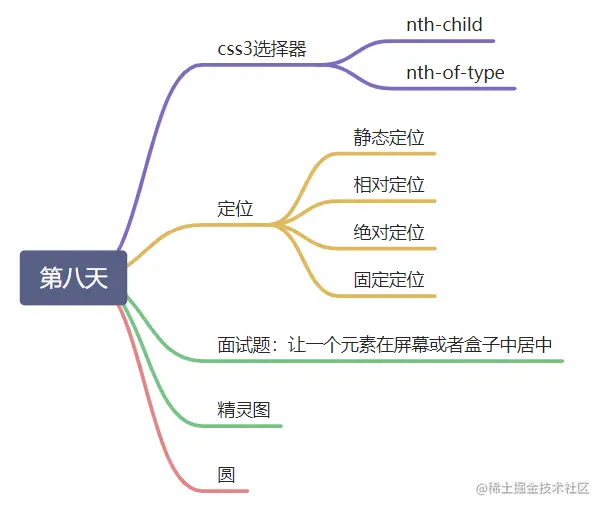
第八天C3选择器 定位
css3选择器
<!DOCTYPE html>
<html lang="en">
<head>
<meta charset="UTF-8">
<meta http-equiv="X-UA-Compatible" content="IE=edge">
<meta name="viewport" content="width=device-width, initial-scale=1.0">
<title>Document</title>
<style>
.main>li:nth-child(2){
background: darkcyan;
}
.main>li:nth-child(odd){
background: darkgreen;
}
.main>li:nth-child(even){
background: darkmagenta;
}
.main>li:nth-child(3n){
background: yellow;
}
.main>li:nth-child(3n+1){
background: red;
}
.main>li:first-child{
background: darkseagreen;
}
.main>li:last-child{
background: darkseagreen;
}
</style>
</head>
<body>
<ul class="main">
<li>1</li>
<li>2</li>
<li>3</li>
<li>4</li>
<li>5</li>
<li>6</li>
<li>7</li>
<li>8</li>
</ul>
</body>
</html>
nth-child:选中所有儿子元素中的第几个
- first-child:快速选中第一个
- last-child:快速选中最后一个
- 跟普通数字
- 跟奇偶数
- 跟自己设计的:3n 3n+1 3n+2
nth-of-type:选中儿子元素中特定类型中的第几个
<!DOCTYPE html>
<html lang="en">
<head>
<meta charset="UTF-8">
<meta http-equiv="X-UA-Compatible" content="IE=edge">
<meta name="viewport" content="width=device-width, initial-scale=1.0">
<title>Document</title>
<style>
.main>p:nth-of-type(1){
background: red;
}
.main>p:nth-of-type(odd){
background: red;
}
.main>p:nth-of-type(even){
background: yellow;
}
.main>p:first-of-type{
background:green;
}
.main>p:last-of-type{
background: gray;
}
</style>
</head>
<body>
<div class="main">
<p>p1</p>
<h3>h3</h3>
<p>p2</p>
<p>p3</p>
<p>p1</p>
<h3>h3</h3>
<p>p2</p>
<p>p3</p>
</div>
</body>
</html>
- 标签类型中的第一个:nth-of-type(1)
- 标签类型中的奇数项:nth-of-type(odd)
- 标签类型中的偶数项:nth-of-type(even)
- first-child:快速选中第一个
- last-child:快速选中最后一个
定位:position
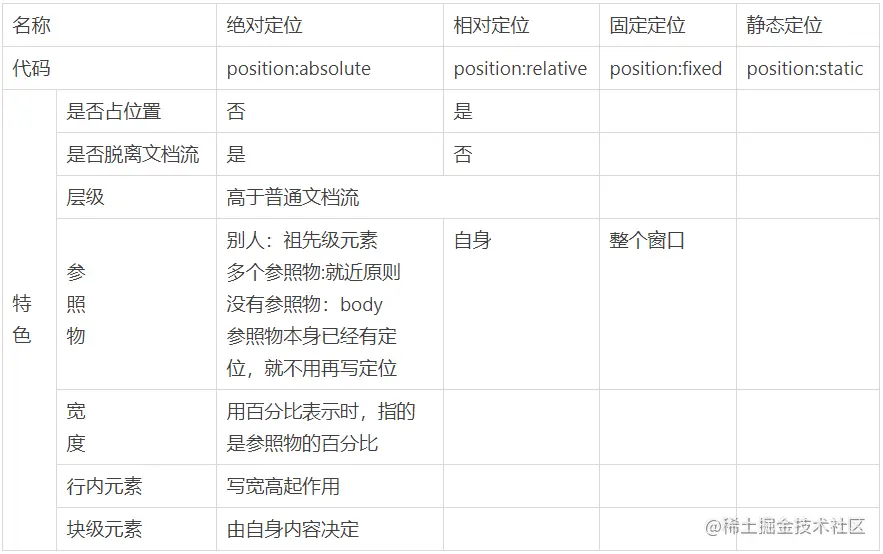
静态定位:position:static
相对定位:position:relative
- 不脱离普通文档流
- 相对定位的元素层级高于普通文档流
- 给绝对定位的元素做参照物
- 相对自身原来的位置
绝对定位: position: absolute
- 参照物是别人,必须是祖先级元素
- 如果有多个参照物,浏览器按照就近原则“就近原则”.如果都没有设置参照物,参照物就是body
- 在设置参照物的时候,如果参照物本身已经是绝对定位或固定定位,就不用再写position:relative;
- 绝对定位的元素不占位置,脱离普通文档流;
- 层级高于普通文档流
- 给绝对定位的元素,宽度用百分比表示的时候,指的是参照物的百分比
- 行内元素,写宽高本来不起作用,一旦设置了定位,写宽高也可以起作用
- 块级元素,不写宽度,会自动撑满父级,但是一旦给它设置了定位,它的宽度就是由自身内容决定的
固定定位:position: fixed
- 固定定位的参照物是相对于整个窗口的
- 对于定位的元素,可以通过z-index 来控制它的层级关系,z-index这个值越大,就越靠上
面试题:如何让一个元素在整个屏幕或者是一个盒子中水平垂直居中
- 固定定位或者绝对定位;
- left:50%;top:50%;
- margin-left:负的盒子宽的一半;margin-top:负的盒子高度的一半;
<style>
    .box{
        width:200px;
        height:200px;
        background:green;
        position: absolute;
        left:50%;
        top:50%;
        margin-left:-100px;
        margin-top:-100px;
    }
</style>
精灵图
- 原理:通过改变background-position
- 在写精灵图的时候,background-position的x轴,y轴的值一定的负的
变成圆
.box{
        width:300px;
        height:300px;
        background:gold;
        border-radius: 50%;
    }