于公司业务所需要,于是我的路书开发历程开始。
所谓的路书就是为一次旅行制作的详细计划,其中包括行程安排、交通信息、住宿信息、景点和餐厅推荐、娱乐项目预订、费用支出信息等,是出行前的重要准备工作。
路书项目架构
我所理解的项目架构是:工程架构、 目录结构、数据处理、功能抽象、方法提取
工程架构:
由于业务需求这个项目需要多页面开发,所有我放弃了vue和react,所以自己搭建了一个webpack,这里就不详细做介绍了github地址:github.com/guojinfa108…
目录结构
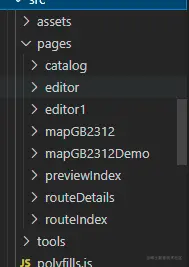
page 为所有页面的集合
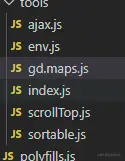
tools 为公共方法的提取集合
assets 为静态资源 (img/css)
数据处理
由于项目任务比较紧张,也没有做特别的数据处理,故我在window 上挂载了sourceData 对象,路书的整体数据通过一个二维数组的形式表示
[
    [{
       poiPos: "116.392427,39.992919",
       poiTitle: "北京奥林匹克公园",
       type: "景点",
       cityTitle: "北京",
       poiAddr: "北京市朝阳区北辰东路15号"
   }]
]
功能抽象
路书中最重要的就是地图的处理,所以我二次封装了高德地图的一些api
export class Maps{
constructor(option){
this.option = {...{
mapWrap:'mapContainer',
appendPoi(){},
maskerResult(){},
zoomchange(zoom,result){}
},...option}
this.myMays = null;
this.state = {
cacheMaskerQue:[]
};
this.init()
}
init(){
const _this = this;
this.myMays = new AMap.Map(this.option.mapWrap,{
viewMode:'3D',
center: [116.474401,39.924326],
});
AMap.plugin(['AMap.ToolBar','AMap.Scale','AMap.OverView','AMap.Geolocation'],function(){
_this.myMays.addControl(new AMap.ToolBar({
position: 'RB',
liteStyle:true
}));
_this.myMays.addControl(new AMap.Scale());
const geolocation = new AMap.Geolocation({
enableHighAccuracy: true,
timeout: 10000,
buttonPosition:'RB',
buttonOffset: new AMap.Pixel(15, 130),
zoomToAccuracy: true,
});
_this.myMays.addControl(geolocation);
})
this.mapEvent()
}
mapEvent(){
const _this = this;
let marker = null;
this.myMays.off('click')
this.myMays.on('click', function(e){
$(document).find('.map .searchMapContent .appPoiCont').hide();
$(document).find('.map .mapRouteMarkerIetm .title').hide();
$(document).find('.map .mapRouteMarkerIetm').removeClass("show")
});
this.myMays.on('zoomchange', function(e){
setTimeout(()=>{
const zoom = _this.myMays.getZoom();
_this.myMays.getCity((result)=>{
_this.option.zoomchange && _this.option.zoomchange(zoom,result);
})
},300)
});
this.myMays.on('dragend',function(e){
const zoom = _this.myMays.getZoom();
_this.myMays.getCity((result)=>{
_this.option.zoomchange && _this.option.zoomchange(zoom,result);
})
})
}
clearMap(){
this.myMays.clearMap();
}
getTwoPoiRtime(list=[],callback){
if(!list || list[0] && (list.length<=1) ||list[0] && !list[0].poiGPos){
callback && callback([{
time:'',
distance:''
}]);
return
};
const poiQue = getLngLat(list);
getTwoPoiRtime(poiQue,(routerQue)=>{
callback && callback(routerQue);
});
}
setSomeDaysRoute(list=[]){
this.clearMap()
if(!list || list[0] && !list[0].poiGPos){ return}
const poiQue = getLngLat(list);
const poiObjQue = getLngLatToObject(list);
this.clearMap()
searchRoute(poiQue,poiObjQue,this.myMays);
}
searchPoiMaskerEvent(searchQue){
let opts = this.option
$(document).off("click",'.map .searchMapContent >.inx');
$(document).on("click",'.map .searchMapContent >.inx',function(){
$(document).find('.map .searchMapContent .appPoiCont').hide();
const parent = $(this).parents('.searchMapContent');
const poiGPos = parent.attr('poiGPos');
const poiobj = getPoiObj(poiGPos,searchQue);
parent.find(".appPoiCont").show();
opts.maskerResult && opts.maskerResult(poiobj)
})
$(document).off("click",'.map .searchMapContent div[data-query="appendPoi"]');
$(document).on("click",'.map .searchMapContent div[data-query="appendPoi"]',function(){
$(document).find('.map .searchMapContent .appPoiCont').hide();
const parent = $(this).parents('.searchMapContent');
const poiGPos = parent.attr('poiGPos');
const poiobj = getPoiObj(poiGPos,searchQue);
opts.appendPoi && opts.appendPoi(poiobj)
})
}
setSearchPoiMasker(searchQue){
const lnglat = getLngLatToObject(searchQue);
this.state.cacheMaskerQue = setRouteMarker(this.myMays,lnglat,true)
this.searchPoiMaskerEvent(searchQue);
setFitView(this.state.cacheMaskerQue, this.myMays);
}
clearSearchPoiMaseter(){
this.myMays.remove(this.state.cacheMaskerQue || []);
}
setOverViewPoiMasker(tripObj,someDay){
this.clearMap()
setOverViewFn(tripObj,someDay,this.myMays);
}
setCenter(lat,lon){
const position = new AMap.LngLat(lat,lon);
this.myMays.setCenter(position);
}
}
方法提取
路书中高德地图使用后的一些问题
在高德地图中其他倒是没遇到啥大问题,就说说 在ie打点奔溃的问题吧
问题:在地图上打一个点的时候ie浏览器奔溃
问题分析:如果这个点的zooms 层级到最后一层 使用map.setFitView() 方法适配展示区域的时候地图放大导致
解决方案:判断为ie 并一个maker 的时候固定zomm 层级
const setFitView = (makarr,map)=>{
if(isIe && makarr.length <=1){
map.setFitView([...makarr],true,null,14);
}else{
map.setFitView([...makarr]);
}
}
总结
做了这么多项目我觉得就是工程、目录、数据、dom、以及方法、代码质量(精简再精简,提取再提取),还有就是功能逻辑抽象。



