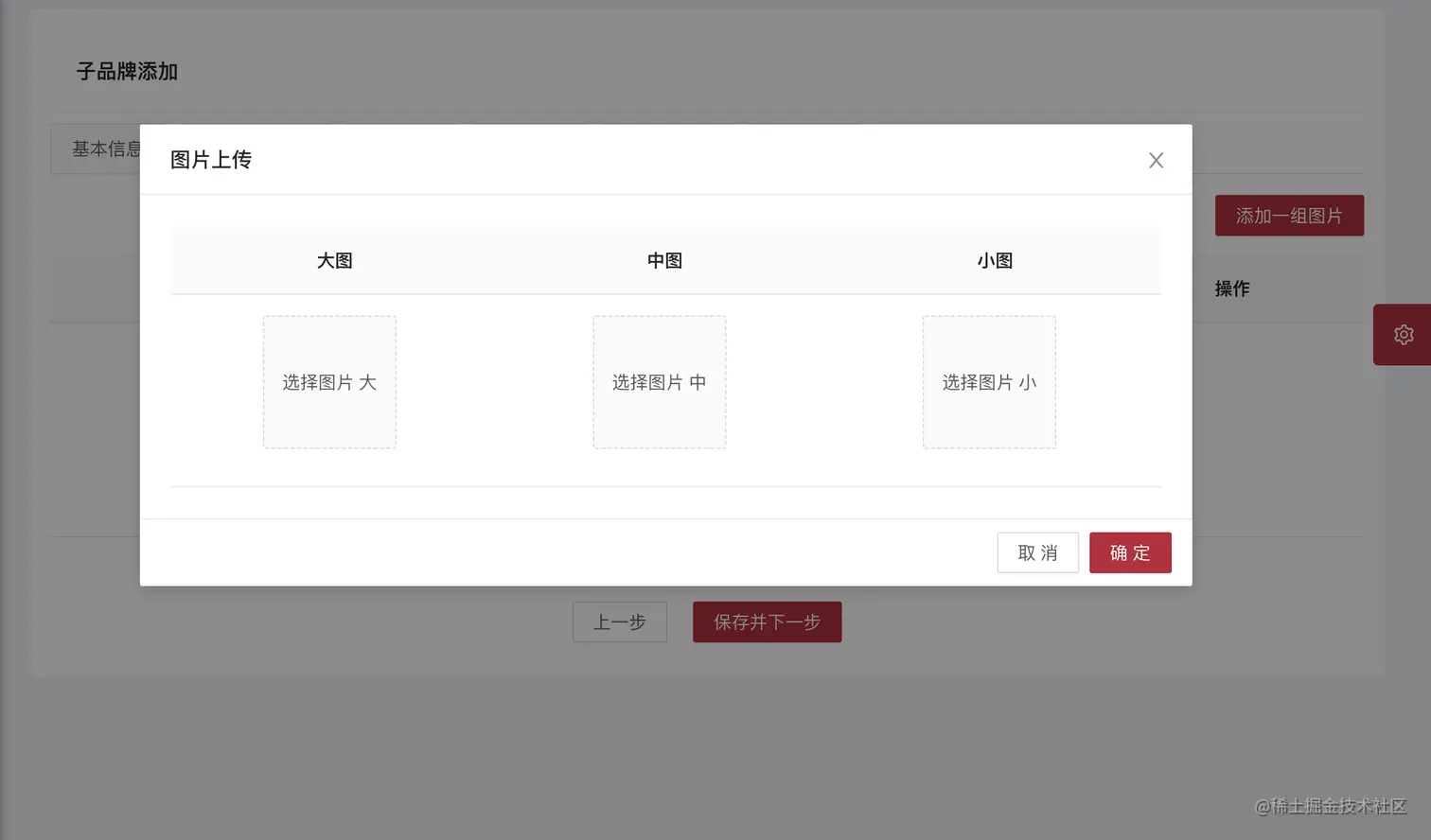
<template>
<div>
<a-card :bordered="false">
<h1 class="search_title">子品牌添加</h1>
<a-tabs type="card" :tab-bar-gutter="tabBarGutter" v-model="activeKey" @change="callBack">
<a-tab-pane key="5" tab="轮播图配置">
<p class="right">
<a-button type="primary" @click="addPicBook('addPic')">添加一组图片</a-button>
</p>
<a-table
:columns="picColumns"
:data-source="picLoadData"
:loading="loading"
:pagination="false"
:rowKey="(record)=>record.infoId"
>
<template v-slot:serialSlot="text,record,index">
{{ serialNumber(text,record,index)}}
</template>
<template v-slot:lImgSlot="text,record,index">
<img :src='text' style="width: 200px;height: 150px"/>
</template>
<template v-slot:mImgSlot="text,record,index">
<img :src='text' style="width: 200px;height: 150px"/>
</template>
<template v-slot:sImgSlot="text,record,index">
<img :src='text' style="width: 200px;height: 150px"/>
</template>
<template v-slot:action="text,record,index">
<a-popconfirm
title="是否确认删除此条数据?"
ok-text="确认"
cancel-text="取消"
@confirm="delFormTsPicInfo(record)"
@cancel="cancel"
>
<a-button type="link" class="ownerLink">删除</a-button>
</a-popconfirm>
</template>
</a-table>
</a-tab-pane>
</a-tabs>
</a-card>
<!--查看 轮播图 和展示页签-->
<a-modal
:title="picTitle"
:visible="picVisible"
:confirm-loading="confirmLoading"
:width="820"
@cancel="pichandleCancel"
>
<!---添加一组图片-->
<a-table
:columns="picModelColumns"
:data-source="picModelLoadData"
:pagination="false"
:loading="loading"
:rowKey="(record)=>record.infoId"
>
<template v-slot:lImgSlot="text,record,index">
<!--<img :src="fileList" style="width:150px;" />-->
<a-upload
:data="{upload_sysName:'tsk',upload_folder:'tsPicInfo'}"
list-type="picture-card"
:action="apiUrl.uploadServlet"
@preview="handlePreview"
@change="uploadChange"
:fileList="fileList">
<div v-if="fileList.length < 1">
<div class="ant-upload-text">
选择图片 大
</div>
</div>
</a-upload>
<a-modal :visible="previewVisible" :footer="null" @cancel="andleCancel">
<img alt="example" style="width: 100%" :src="previewImage"/>
</a-modal>
</template>
<template v-slot:mImgSlot="text,record,index">
<!--<img :src='text' style="width:150px;" />-->
<a-upload
:data="{upload_sysName:'tsk',upload_folder:'tsPicInfo'}"
list-type="picture-card"
:action="apiUrl.uploadServlet"
@preview="handlePreview"
@change="uploadChange1"
:fileList="fileList1">
<div v-if="fileList1.length < 1">
<div class="ant-upload-text">
选择图片 中
</div>
</div>
</a-upload>
<a-modal :visible="previewVisible" :footer="null" @cancel="andleCancel">
<img alt="example" style="width: 100%" :src="previewImage"/>
</a-modal>
</template>
<template v-slot:sImgSlot="text,record,index">
<!--<img :src='text' style="width:150px;" />-->
<a-upload
:data="{upload_sysName:'tsk',upload_folder:'tsPicInfo'}"
list-type="picture-card"
:action="apiUrl.uploadServlet"
@preview="handlePreview"
@change="uploadChange2"
:fileList="fileList2">
<div v-if="fileList2.length < 1">
<div class="ant-upload-text">
选择图片 小
</div>
</div>
</a-upload>
<a-modal :visible="previewVisible" :footer="null" @cancel="andleCancel">
<img alt="example" style="width: 100%" :src="previewImage"/>
</a-modal>
</template>
</a-table>
<template v-slot:footer>
<a-button @click="pichandleCancel">取消</a-button>
<a-button type="primary" @click="pichandleOk">确定</a-button>
</template>
</a-modal>
</div>
</template>
<script>
const picColumns = [
{
title: '序号',
align: 'center',
scopedSlots: {customRender: 'serialSlot'}
},
{
title: '大图',
align: 'center',
dataIndex: 'urlMax',
scopedSlots: {customRender: 'lImgSlot'}
},
{
title: '中图',
align: 'center',
dataIndex: 'urlMiddle',
scopedSlots: {customRender: 'mImgSlot'}
},
{
title: '小图',
align: 'center',
dataIndex: 'urlMin',
scopedSlots: {customRender: 'sImgSlot'}
},
{
title: '操作',
align: 'center',
scopedSlots: {customRender: 'action'}
},
]
const picModelColumns = [
{
title: '大图',
align: 'center',
// dataIndex: 'urlMax',
scopedSlots: {customRender: 'lImgSlot'}
},
{
title: '中图',
align: 'center',
// dataIndex: 'urlMiddle',
scopedSlots: {customRender: 'mImgSlot'}
},
{
title: '小图',
align: 'center',
// dataIndex: 'urlMin',
scopedSlots: {customRender: 'sImgSlot'}
},
]
export default {
data() {
return {
previewVisible: false,
previewImage: '',
tsPicInfo: {
urlMin: '',//小图
urlMax: '',//大图
urlMiddle: '',//中图
objId: '',//对象id 产品id
objType: '',//对象表名
},
picColumns,
picLoadData: [],
picModelColumns,
picModelLoadData: [],
bookLoadData: [],
picTitle: '图片上传',
picVisible: false,
labelVisible: false,
rowClassId: '',
dictDataMap,
tabBarGutter: 10,
fileList: [],//所有附件的集合
fileList1: [],
fileList2: [],
newFileList: [],
newFileList1: [],
newFileList2: [],
picList: [],
newPicList: [],
attachFileLoadData:[],
}
},
computed: {
apiUrl() {
return urlApi
},
},
methods: {
addFormTsPicInfo() { //66
const {urlMax,urlMiddle,urlMin}=this.tsPicInfo
if(!urlMax){
this.$message.error('大图上传失败,请重新上传')
return
}
if(!urlMiddle){
this.$message.error('中图上传失败,请重新上传')
return
}
if(!urlMin){
this.$message.error('小图上传失败,请重新上传')
return
}
const requestParameters = eachObj(this.tsPicInfo, 'tsPicInfo')
requestParameters.pageName = 'ts-pic-info'
requestParameters.formName = 'addForm'
requestParameters['tsPicInfo.objId'] = this.tsSkuInfoId
requestParameters['tsPicInfo.objType'] = 'sku'
getCommonSubmit(requestParameters).then(res => {
console.log('添加图片', res)
if (res.flag == 'T') {
this.picVisible = false
this.tsPicInfo.infoId = res.ids.tsPicInfo_infoId
this.picLoadData.push(this.tsPicInfo)
this.tsPicInfo = {}
console.log(this.picLoadData, '轮播图数据')
this.$message.success(res.msg)
this.fileList = []
this.fileList1 = []
this.fileList2 = []
} else {
this.$message.error(res.msg)
}
})
},
async handlePreview(file) {
if (!file.url && !file.preview) {
file.preview = await this.getBase64(file.originFileObj)
}
this.previewImage = file.url || file.preview
this.previewVisible = true
},
getBase64(file) {
return new Promise((resolve, reject) => {
const reader = new FileReader()
reader.readAsDataURL(file)
reader.onload = () => resolve(reader.result)
reader.onerror = error => reject(error)
})
},
uploadChange({fileList}) {//大图
this.show = false
this.fileList = fileList
if(fileList.length > 0){
const {status, response = {}} = this.fileList[0]
if (status == 'done') {
const { murl} = response
this.tsPicInfo.urlMax = murl
}
}else{
this.tsPicInfo.urlMax =''
}
},
uploadChange1({fileList}) {//中图
console.log(fileList, '中图数组1')
this.show = false
this.newFileList1 = []
this.fileList1 = fileList
if(fileList.length > 0){
const {status, response = {}} = this.fileList1[0]
if (status == 'done') {
const { murl} = response
this.tsPicInfo.urlMiddle = murl
}
}else{
this.tsPicInfo.urlMiddle =''
}
},
uploadChange2({fileList}) {//小图
this.show = false
this.newFileList2 = []
this.fileList2 = fileList
if (fileList.length > 0) {
const {status, response = {}} = this.fileList2[0]
if (status == 'done') {
const { murl} = response
this.tsPicInfo.urlMin = murl
}
}else{
this.tsPicInfo.urlMin =''
}
},
//删除一组图片
delFormTsPicInfo(obj) {
console.log(obj, '删除一组图片')
let id = obj.infoId
let requestParameters = {
pageName: 'ts-pic-info',
formName: 'delForm',
'tsPicInfo.w_infoId': id
}
getCommonSubmit(requestParameters).then(res => {
if (res.flag == 'T') {
this.picLoadData.forEach((item, index) => {
if (item.infoId == id) {
this.picLoadData.splice(index, 1)
}
})
this.$message.success(res.msg)
} else {
this.$message.error(res.msg)
}
})
},
}
}
</script>



